
Introduction
Most teams set up a sandbox environment and still ship bugs to production. The environment exists — it's just not doing the job.
Developers rely on sandboxes to test API changes, new features, and third-party integrations without touching production. Sales and presales teams use them to run demos that don't depend on live infrastructure staying stable.
Both use cases break down for the same reasons: poor scoping, placeholder data that looks fake, and environments that drift out of sync with the actual product.
According to Gartner, 61% of B2B buyers now prefer a rep-free buying experience. That makes self-serve sandbox access — not just live demos — a genuine pipeline tool.
This guide walks through how to scope, build, and maintain a sandbox that actually holds up — covering environment setup, data management, sync strategies, and how sales teams use sandboxes to run self-serve demos that move deals forward.
Key Takeaways
- A sandbox is an isolated replica of a production system for safe testing, development, or demonstration.
- You need a defined use case, realistic sample data, and a capture method before building one.
- Start by scoping your happy path, configure with realistic data, test thoroughly, then share or present.
- Demo sandboxes outperform live demos by removing production dependencies, stale data, and rep scheduling conflicts.
- Avoid sandboxes when buyers need to test their own live integrations, or when maintenance costs outweigh the ROI.
What Is a Sandbox Environment?
A sandbox environment is an isolated replica that mirrors production behavior but operates independently. Changes, errors, and experiments inside it have zero impact on live systems, real users, or actual customer data.
Stripe defines a sandbox as "an isolated test environment" where teams test functionality and experiment with new features without affecting live integrations. Salesforce describes theirs as a copy of a production org used for development, testing, training, and staging.
Two distinct contexts matter here:
- Development/testing sandboxes — engineers test new code, API configurations, or third-party integrations before deployment
- Demo sandboxes — GTM teams replicate the product so prospects can experience it during sales calls or async evaluations
Sandbox vs. Staging Environment
These two terms get used interchangeably, but they serve different purposes.
A staging environment is a pre-deployment step in your release pipeline: it validates code before it ships to production. A sandbox exists for safe exploration or demonstration, independent of any deployment cycle. Staging is owned by engineering; demo sandboxes are increasingly owned by sales, presales, or product marketing.
Thoughtworks' 2024 Technology Radar identifies shared enterprise-wide staging environments as a bottleneck for continuous delivery — another reason to keep sandboxes isolated and purpose-built rather than routing everything through one fragile shared instance.
Sandbox vs. Demo Environment
"Demo environment" is often shorthand for a shared production account repurposed for sales calls. That's a liability.
If your demo environment runs on production infrastructure, one bug, one downtime event, or one rep who left messy data from the previous call can derail a live demo. A proper sandbox eliminates that dependency. It's isolated, resets cleanly between uses, and stays completely unaffected by whatever is happening in production at 2pm on a Tuesday.
When Should You Use a Sandbox Environment?
The Right Conditions
Use a sandbox when:
- Test API changes or integrations without risking production stability
- Run sales demos with multiple reps simultaneously or across different buyer personas
- Onboard new customers with hands-on time before their real account is provisioned
- Send async leave-behinds so prospects can explore on their own schedule
When Sandboxes Don't Make Sense
Not every situation calls for a full sandbox setup. They're the wrong choice when:
- Your product is simple enough to demo live with zero risk
- The buyer specifically needs to test with their own live data and real integrations (a sandbox can't replicate that)
- Your sales volume is too low to justify the setup overhead
- The workflow is inherently linear and a walkthrough video would serve the same purpose
Signals That You're Ready
If you're seeing any of these patterns, sandbox infrastructure is likely overdue:
- More than one sales rep running demos concurrently
- A product with multiple configuration states, personas, or modules
- Engineering time consumed by demo maintenance requests, which means GTM needs its own dedicated tooling
What You Need Before Setting Up a Sandbox
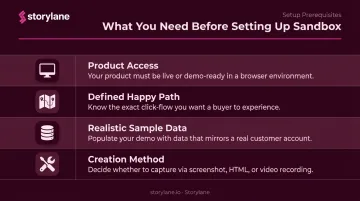
Don't start capturing screens until these four things are in place:
| Prerequisite | Why It Matters |
|---|---|
| Access to the product | You need the current UI state, workflows, and data structures the sandbox will replicate |
| A defined happy path | Without scope, you'll overbuild (30+ screens) or miss the features that actually close deals |
| Realistic, anonymized sample data | "Test Company" and "User 1" destroy credibility; compelling demo data is what makes sandboxes persuasive |
| A creation method | Self-hosted instance (engineering-heavy), HTML capture tool (no-code), or a platform like Storylane |
Two of those prerequisites deserve more detail. For sample data, Google Cloud's Sensitive Data Protection documentation covers de-identification techniques including masking, tokenization, and date shifting, useful when pulling real records to seed a sandbox. Synthetic data is the cleaner option when privacy compliance is a concern.
For your creation method, no-code HTML capture platforms remove the need for engineering involvement entirely. Storylane, for example, captures your product's live HTML via a browser extension — no backend access required, no developer hand-off. GTM teams get full autonomy to build, edit, and ship sandbox environments without filing tickets.
How to Set Up and Use a Sandbox Environment
Correct sandbox usage follows a defined sequence. Skipping steps, especially data setup and pre-launch testing, is how you end up with broken navigation or a demo that collapses mid-call.
Step 1: Plan Your Scope and Happy Path
Before capturing anything, write down:
- The starting screen (dashboard, login state, home view)
- Each screen visited during a typical demo or test run
- Secondary paths for common prospect questions
Keep it tight. Navattic's 2025 State of the Interactive Product Demo report (vendor benchmark) found top-performing interactive demos contain 5 to 12 steps. A sandbox covering 30+ screens is harder to maintain and harder to navigate than one that nails 10 to 12 critical screens.
Step 2: Configure and Populate Your Environment
For HTML capture tools: navigate through the product while the browser extension records each screen and auto-links clickable elements. Storylane's extension does this automatically. As you click through your product, it captures screens and links buttons, forms, and navigation in real time, building the foundational structure without manual path mapping.
For self-hosted instances: use data seed scripts to populate the environment with relevant sample records before any testing or demo run begins.
Avoid placeholder or real customer data — it's the most common setup mistake. Replace company names, user names, metrics, and dates with realistic but fictional examples matched to your target buyer's context. For sales teams running multiple personas, Storylane's Personalization Tokens (available on Growth plan and above) let you swap company names, logos, and currencies dynamically across one shared template.
Step 3: Test Before Going Live
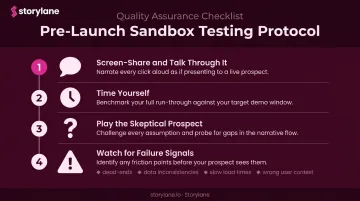
Run the pre-launch protocol before any external use:
- Screen-share and talk through it — out loud, at demo pace
- Time yourself — does it fit your typical call structure?
- Play the skeptical prospect — have a colleague ask off-script questions and navigate freely
- Watch for failure signals:
- Navigation dead-ends (clicking a button that leads nowhere)
- Data inconsistencies across screens (a metric that contradicts itself between two views)
- Slow load times on individual pages
- Any screen that shows the wrong user context
Step 4: Run and Present the Sandbox
Open the sandbox fresh for each session. Don't carry over residual changes from a previous run; confirm your starting state is clean before every call.
During the session, the sandbox should behave like the live product. Two principles keep it on track:
- Stay non-linear: Reps can jump directly to any feature on demand rather than following a fixed sequence.
- Follow the prospect's lead: When a buyer asks to see a specific workflow mid-call, you can go there immediately without awkward pivots.
Step 5: Maintain and Update
Sandboxes that lag behind the product by even a few sprints undermine trust the moment a prospect asks about a feature they saw on your website that doesn't appear in the environment.
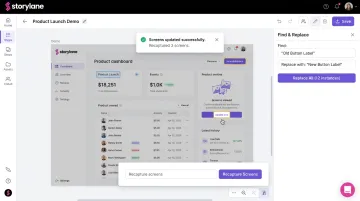
With HTML capture tools, you don't rebuild from scratch when the UI changes. Recapture only the screens that changed. Storylane also supports search-and-replace functionality for sweeping content changes across an entire demo, which handles text and data updates without full recapture.
Best Practices for Sandbox Environments
Build Variants, Not One Monolithic Sandbox
Create separate versions for:
- Buyer personas — an executive overview runs differently than a technical evaluation
- Deal stages — first call overview vs. deep product evaluation
- Verticals — a healthcare buyer cares about different metrics than a fintech buyer
Storylane supports this through separate demo flows organized by use case, with templates that let reps duplicate and customize for specific accounts quickly. Whispli, for example, built separate demos for different personas — user-based, feature-based, and in-depth platform overviews — giving each sales conversation the right starting point.
Treat the Sandbox as a Leave-Behind
After discovery calls, share the sandbox as a link. Prospects revisit workflows on their own schedule, share internally with stakeholders who missed the call, and self-qualify before the next meeting.
Storylane's Demo Hubs organize multiple sandbox flows into a single shareable link — prospects choose their own exploration path across use cases and personas. SentinelOne uses this to validate multiple complex product features across bite-sized demos in one hub rather than scheduling separate calls for each.
Assign Ownership and a Refresh Cadence
That self-serve experience only holds up if someone owns it. Assign a specific person — typically in product marketing or presales — to audit sandbox data and navigation every product release cycle. One missed sprint can mean a broken flow appearing in front of a high-value prospect.
Track Engagement After Sharing
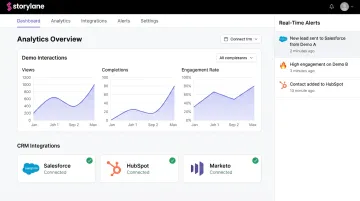
A sandbox shared as a leave-behind is only useful if you know who's engaging with it. Storylane pushes demo interaction data directly to Salesforce, HubSpot, and Marketo. It also sends real-time Slack alerts the moment a prospect engages — so reps enter follow-up calls knowing exactly which features the buyer explored and how long they spent there.
Frequently Asked Questions
What is a sandbox environment for developers?
For developers, a sandbox is an isolated execution environment where code, integrations, or configuration changes can be tested safely without affecting live systems or real users. Common use cases include API testing, feature validation before deployment, and testing third-party integration behavior.
What is the difference between a sandbox and a demo environment?
A "demo environment" often refers to a shared production account used informally for sales — which means production bugs, downtime, or stale data can break it mid-call. Sandboxes are fully isolated, repeatable, and independent of production, making them far more reliable for live sales calls and async evaluations.
What is the best sandbox software?
The right tool depends on your use case. Sales demo sandboxes are well-served by no-code HTML capture platforms like Storylane, which let GTM teams build and manage sandboxes without engineering involvement. For code execution in AI or agent contexts, tools like E2B (Firecracker microVM-based) or Modal (gVisor container virtualization) provide the isolation required for untrusted workloads.
What is the difference between a sandbox and a staging environment?
A staging environment is a pre-production deployment step in the engineering release pipeline — it validates code before it ships. A sandbox is an independently operated environment built for safe exploration, testing, or demonstration. They serve different teams and different purposes.
How long does it take to set up a sandbox environment?
With HTML capture tools, a demo sandbox can be operational in under an hour: the browser extension records each screen as you navigate and auto-links elements. Self-hosted dedicated instances typically require 40+ hours of initial engineering setup plus ongoing infrastructure maintenance.
When should I use a sandbox demo instead of a live product demo?
Use a sandbox whenever production data, uptime, or a prior rep's leftover session state could undermine the buyer's experience. That includes live calls with multiple reps running simultaneously, overlapping prospect demos, or post-call leave-behinds sent for async evaluation.