Introduction
B2B buyers have shifted. Gartner's 2025 survey of 632 B2B buyers found 61% prefer a rep-free buying experience — they want to evaluate software on their own terms before talking to anyone. Yet most sales teams still hide their product behind a 30-minute discovery call and a generic slide deck.
The result: prospects disengage before they understand the value, deals stall, and sales cycles stretch longer than they need to.
A well-designed demo environment fixes this. It lets buyers experience your product at the right moment — before a call, during a POC, or embedded on your website — without exposing production data or tying up your solutions engineers.
This guide gives you a practical framework for building demo environments that convert — from initial setup through the habits that keep them performing.
Key Takeaways
- A demo environment is an isolated, pre-configured version of your product built for sales presentations — not production use
- Demo environment formats include sandbox demos, interactive click-through tours, and centralized demo hubs
- Early product exposure shortens sales cycles and builds buyer confidence before reps even enter the picture
- Platforms like Storylane let AEs build, personalize, and share demos without engineering support
- Demo engagement analytics surface intent signals that help reps prioritize high-value accounts
What Is a Demo Environment?
A demo environment is a pre-configured, controlled version of a software product used to showcase features and workflows to prospects, partners, or internal teams. It runs separately from your production environment — isolated, curated, and optimized for storytelling rather than live business operations.
Understanding where demo environments fit alongside other environment types helps teams avoid costly confusion.
Demo Environment vs. Production Environment
Production is your live system of record: real customer data, real consequences for bugs or misconfigurations. A demo environment, by contrast, runs on dummy or curated data. Sales teams can customize freely without IT involvement, and nothing they do affects live customers.
Demo Environment vs. Sandbox Environment
These two terms get conflated, but they serve different audiences:
- Sandbox environments are non-production spaces for developers doing testing and QA
- Demo environments are curated for external audiences, optimized for buyer storytelling rather than technical validation
Common Use Cases
Demo environments appear across the entire revenue motion:
- Live sales calls: guided walkthroughs during synchronous discovery or evaluation sessions
- Async self-serve pre-sales: prospects explore on their own schedule, before or after a call
- POC evaluations: structured, time-limited trials built around realistic data scenarios
- Partner enablement: channel partners demo the product without needing live system access
- Trade shows and events: offline-capable demos that run regardless of venue WiFi
Types of Demo Environments
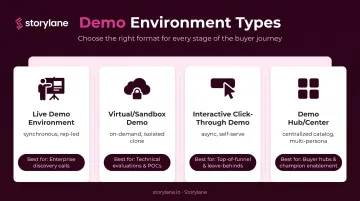
Not every demo format fits every stage of the sales cycle. Here's how the main types compare:
Live Demo Environments
A sales rep demos the actual product — or a close replica — in real time during a synchronous call. The setup requires a pre-loaded instance with clean, relevant data.
Live bugs can surface, sensitive data may be exposed, and personalizing the environment per prospect typically requires engineering support. This approach works well for complex enterprise evaluations but doesn't scale without dedicated SE resources.
Virtual/Sandbox Demo Environments
Cloud-hosted clones of the product that reps can spin up on demand, isolated per prospect, and reset after use. Prospects get a realistic product experience without touching the live system.
These environments require real engineering effort to build and maintain. Before automation tools existed, solution engineers at companies like SailPoint spent over an hour preparing and cleaning demo environments for a single call — a clear indicator of where the overhead accumulates.
Interactive (Click-Through) Demos
Screenshot- or HTML-based guided walkthroughs that prospects can explore asynchronously — before a call, after a call, or embedded on a website. These aren't the live product; they're curated, annotated experiences that prospects navigate at their own pace.
Unlike sandboxes, interactive demos are builder-controlled narratives, not open environments. Key advantages:
- Faster to produce and easier to personalize
- No live product access required
- Works asynchronously across the buyer journey
Storylane supports both screenshot demos (static captures with guided overlays) and HTML demos (higher-fidelity captures that preserve interactive product behavior). Tom Josephson, Sr. Solutions Consulting Director at Wiley, cited this as a core differentiator: "You have HTML, screenshots, video embeds, and the ability to mix media."
Demo Hubs / Demo Centers
A centralized library where prospects self-navigate multiple demos organized by use case, persona, or product area. Particularly useful for enterprise products with complex feature sets or multiple buyer personas.
Storylane's Buyer Hub lets companies like Channable organize their full demo catalog in one accessible location, so prospects arrive at live calls already familiar with the product. Navattic's 2025 vendor report found demo center usage increased 3.75x year over year — a signal that self-serve discovery is becoming standard, not optional.
Offline Demos
Pre-packaged demos that run without internet connectivity — designed for field sales, conferences, and events where WiFi is unreliable. Storylane's offline demo feature lets teams download demos and present confidently anywhere. SpyCloud's team uses it specifically so they "never worry about conference WiFi or connectivity issues" at high-stakes events.
Key Benefits of a Demo Environment for Sales Teams
Earlier Exposure, Faster Deals
Prospects who interact with a demo environment before their first discovery call arrive already familiar with core capabilities. Reps spend less time explaining basics and more time addressing specific buying criteria.
According to TrustRadius's 2024 B2B Buying Disconnect report, 71% of buyers who used demos said demos were the most influential resource in their purchase decision. When that exposure happens early — via a website embed or an async link shared before a discovery call — it compounds throughout the sales cycle.
Buyer Confidence Over Slide Decks
Seeing a product work beats hearing a rep describe it. The same TrustRadius report found 74% of buyers who used free trials or free versions cited them as their most influential resource. Interactive demos sit in the same category — they give buyers a hands-on reference point that a slide deck simply cannot replicate.
G2's 2023 Software Buyer Behavior report adds another dimension: **61% of B2B software buyers were less likely to purchase when vendors required personal information before showing product demos**. Ungated, accessible demo environments directly address this friction.
Personalization at Scale
Generic demos lose deals. Salesforce's research found 86% of B2B buyers are more likely to purchase when a company demonstrates understanding of their goals, and 73% say most sales interactions feel transactional.
A well-structured demo environment lets reps swap in prospect-specific data, logos, company names, and industry-relevant workflows without rebuilding anything from scratch. Storylane's dynamic token system handles this automatically — when a prospect fills out a form, the demo updates to reflect their company name, role, and relevant use cases.
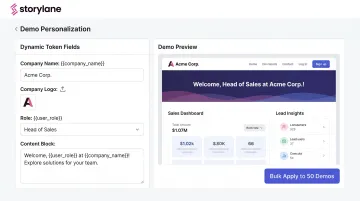
Planday uses this to create "custom experiences for each prospect without extra work."
Reduced SE and Engineering Dependency
When demo environments are pre-built and self-service, account executives run quality demos independently. Solution engineers stay focused on complex technical evaluations rather than routine demos.
No developer involvement is required. Demos can be built in minutes using an inline editor, AI-generated annotations, and drag-and-drop interactive elements — Storylane's no-code workflow makes this accessible to any rep, not just technical staff. Whispli's COO specifically chose Storylane because it let their team "create demo environments quickly to show prospects and customers how the product works without consulting the dev team."
Engagement Analytics as Intent Signals
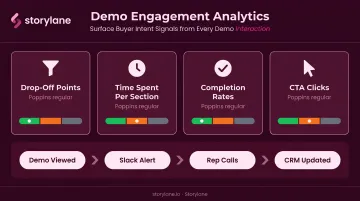
Modern demo platforms surface first-party behavioral data that passive marketing channels can't provide:
- Drop-off points — where prospects lose interest
- Time spent per section — what features generated the most attention
- Completion rates — how thoroughly a prospect engaged
- CTA clicks — high-intent actions within the demo
Storylane's Demo Signals layer goes further: it scores prospects as low, medium, or high intent, pushes real-time Slack alerts when a target account engages, and routes data directly into Salesforce or HubSpot. Reps calling within two hours of a demo view already know exactly what the prospect explored — so they open with the prospect's top feature, not a cold introduction.
Account Reveal adds another layer: it de-anonymizes demo visitors who never filled out a form, surfacing enriched firmographic data for accounts that engaged but didn't self-identify. PDQ uses this to ensure their team never loses track of anonymous high-intent visitors.
How to Set Up a Demo Environment
Defining Scope and Use Case
Before building anything, answer one question: what is this demo environment for?
That answer drives format, tooling, customization level, and how much personalization each use requires.
- Live sales calls → sandbox or guided HTML demo, rep-controlled
- Async self-serve → interactive click-through, shareable link
- Website embed → screenshot or HTML demo, ungated
- Events and conferences → offline-capable demo package
- Complex enterprise evaluations → demo hub with multiple persona paths
Next, identify the specific workflows to showcase. Resist the urge to show everything. A focused demo mapped to the prospect's core pain points outperforms an exhaustive product tour.
Choosing Your Tooling and Infrastructure
Two broad categories apply here:
| Approach | Best for | Trade-off |
|---|---|---|
| Full sandbox/virtual environment | Complex products, late-stage POCs, high technical scrutiny | Higher engineering lift to build and maintain |
| Interactive demo platform | Earlier funnel stages, async sharing, AE-led demos | Not a live product replica — but faster to build and personalize |
For most GTM teams, an interactive demo platform covers the majority of use cases without requiring engineering resources. Storylane, for example, supports screenshot, HTML, video, sandbox-style, and hub formats from a single tool, with no-code building for non-technical users.
Key infrastructure considerations regardless of format:
- Use realistic dummy data — not sensitive or production data
- Isolate environments per prospect rather than sharing a single instance
- Plan for easy reset or de-provisioning after each sales cycle
Personalizing and Launching
With infrastructure in place, the final step before each use is tailoring the demo to the specific prospect:
- Duplicate your master template — don't build from scratch per prospect
- Apply dynamic tokens — swap in company name, logo, and relevant industry data
- Select the right demo chapter or path — route the prospect to content matching their role and pain points
- Set access controls — use private links with expiry dates to create urgency and prevent unauthorized sharing
- Test before sending — click through the full flow to catch any broken steps or outdated content
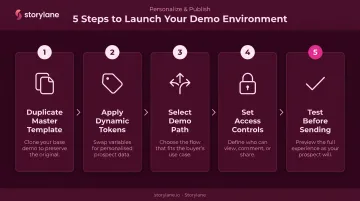
Even light personalization improves engagement compared to a generic send. The prospect should feel the demo was built for their situation.
Best Practices for Demo Environments
Isolate Environments Per Prospect
Never reuse a demo instance across different accounts. Shared environments risk exposing one prospect's behavior to another, and meaningful personalization becomes impossible when a single instance serves multiple sales cycles. Storylane's template-and-duplicate workflow makes per-prospect isolation fast. Whispli's team duplicates, customizes, and sends in minutes.
Structure the Experience, Then Leave Room to Explore
Design a guided narrative that moves the prospect through the most relevant product story. Don't let them wander into unfinished or confusing areas.
At the same time, build in flexibility. For buyers who prefer autonomy, Storylane's sandbox mode lets prospects navigate freely within a curated environment. Always follow up self-serve demos with personalized outreach tied to what the prospect actually engaged with.
Track, Test, and Iterate
Once your demo is live, review analytics regularly to identify where prospects drop off, run QA checks to catch broken flows, and update content when the product ships new features. Stale demos that contradict the live product directly cost deals.
Reprise's 2025 vendor survey found 81% of sales reps have lost a deal because of a bad demo. Keeping demo content current isn't a maintenance task — it's a revenue decision.
Frequently Asked Questions
What is a demo environment?
A demo environment is a pre-configured, isolated version of a software product used to showcase features to prospects or stakeholders in a controlled setting. It runs separately from the live production environment, using dummy or curated data with no risk to real business operations.
What is the difference between a demo environment and a production environment?
A production environment is the live system of record used by actual customers — any bugs or data exposure have real consequences. A demo environment is purpose-built for presentations, containing curated or dummy data with no impact on live customer operations.
What is the difference between a sandbox demo and an interactive demo?
A sandbox demo is a live, cloned product environment used for synchronous sales calls where prospects can freely explore the product. An interactive demo is a click-through, pre-recorded experience that prospects navigate asynchronously — before, after, or instead of a live call.
How do I set up a demo environment for sales?
Define the use case and target persona, select the right format (sandbox versus interactive demo platform), populate with realistic dummy data, personalize to the prospect's industry and role, and isolate each environment per account. Platforms like Storylane handle much of this without engineering involvement.
How do I know if my demo environment is effective?
Track completion rate, time spent per section, drop-off points, and CTA clicks alongside downstream outcomes like conversion rate and deal velocity. Prospect feedback after demos reveals what resonated and what fell flat.
What tools can I use to create a demo environment?
Options include full virtual lab platforms for complex sandbox provisioning and no-code interactive demo platforms like Storylane, which let GTM teams build, personalize, and share demos without engineering support. The right choice depends on your product's complexity and where in the sales cycle the demo needs to run.