Yet most sales teams respond to this reality by firing off five separate emails with PDF attachments, scattered demo recordings, and vague "let me know if you have questions" follow-ups. Momentum dies. Deals go dark.
Deal room software fixes this. It replaces the email chaos with a single, persistent digital workspace where buyers and sellers access everything in one place—proposals, demos, contracts, pricing, and communication—and where sellers can actually see what buyers are doing.
This guide covers exactly what deal room software is, which features matter, how it accelerates the sales cycle, and how to evaluate options for your team.
Key Takeaways
- Deal rooms centralize all deal content—proposals, demos, contracts, FAQs—into one shareable link
- Real-time buyer engagement tracking reveals who's reviewing content and when, enabling better-timed follow-ups
- Multi-stakeholder visibility exposes hidden decision-makers the moment buyers forward the room internally
- Embedded interactive demos let prospects self-educate before follow-up calls, reducing discovery cycles
- Mutual action plans align both sides on next steps, deadlines, and who owns what
What Is Deal Room Software?
Deal room software is a secure, browser-based workspace that brings buyers and sellers together in one shared digital environment. Rather than scattering deal assets across a dozen email threads, it consolidates proposals, contracts, product demos, case studies, pricing, and communication into a single shareable link that both parties can access throughout the sales process.
The terminology can be confusing — "deal room," "digital sales room," "virtual sales room," and "sales microsite" are interchangeable in B2B sales contexts.
Gartner defines digital sales rooms as "private, persistent microsites" connecting buying and selling teams; Forrester describes them as centralized microsites where sales reps and buyers work together throughout the deal.
One distinction worth clarifying: a deal room is not the same as a virtual data room (VDR). A VDR is a secure document repository used primarily for M&A due diligence and sensitive financial transactions. A deal room is a collaborative sales workspace designed specifically to help B2B sellers engage buyers and close deals—a fundamentally different use case.
Why Traditional Sales Methods Fall Short
The old model—email threads, PDF proposals, manual follow-ups—was already imperfect. The way B2B buying actually works now has made it structurally broken.
Forrester's 2026 State of Business Buying research found that a typical B2B decision now involves 13 internal stakeholders and 9 external influencers. When a single deal touches that many people, a PDF attachment forwarded through email chains is not a collaboration strategy—it's a liability.
That stakeholder complexity pairs with a shift in how buyers want to engage. More than 70% of customers prefer doing business remotely, and 97% are willing to make self-serve digital purchases exceeding $50,000, according to McKinsey research. Deals are won and lost in the spaces between sales calls, not during them.
Types of Deal Room Software
Not all deal room tools are built the same. The main categories:
- CPQ extensions — Add a deal room layer on top of quoting and configure-price-quote tools; strongest on pricing and proposal workflows
- DSR point solutions — Built specifically for digital sales rooms; typically strongest on buyer engagement tracking and personalization
- Content repository tools with DSR features — Sales enablement platforms that have added deal room capabilities; best if content management is the primary friction point
- End-to-end revenue enablement platforms — Cover the full customer lifecycle from deal through onboarding; appropriate for teams that need one platform across the entire revenue motion
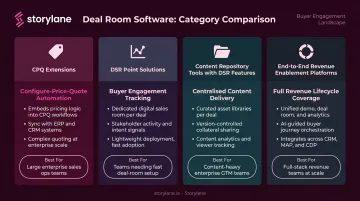
The right choice depends on where your team's biggest friction actually lives.
Key Features of Deal Room Software
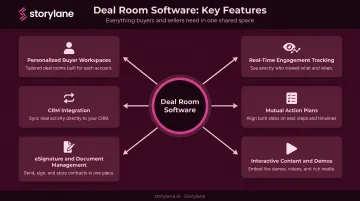
Personalized Buyer Workspaces
Top platforms pull CRM data—company name, logo, industry, deal stage—to auto-personalize the workspace for each buyer. Every prospect arrives in an environment that feels built specifically for them rather than a generic sales portal.
This matters more than it might seem. Salesforce research found that 73% of customers expect companies to understand their unique needs, and 88% say experience matters as much as the product itself. A personalized workspace communicates relevance before a single word is read.
Storylane applies the same principle to interactive demos. Its dynamic variable token system injects prospect-specific data—company name, logo, industry—into every demo automatically, so reps don't need to build separate versions for each account.
Real-Time Buyer Engagement Tracking
Deal rooms give sellers genuine visibility into buyer behavior between calls:
- Who opened the room and when
- Which content sections they spent the most time on
- Whether they forwarded the link to additional stakeholders
- How many times they returned
These signals eliminate the guesswork that drives arbitrary "just checking in" emails. Instead of reaching out on a random Tuesday, a rep can follow up precisely when a buyer just spent 12 minutes reviewing the pricing section—when intent is highest and the conversation is most likely to be productive.
Mutual Action Plans and Collaboration Tools
A mutual action plan (MAP) is a shared roadmap, editable by both buyer and seller, that documents agreed milestones, task ownership, and the timeline to close. MAPs bring structure to deals that would otherwise drift.
Typical B2B sales cycles run 3 to 24 months (per Salesforce). A shared document both sides actively reference keeps deals from losing momentum during the long quiet periods between calls.
Embedded live chat and comment threads consolidate communication inside the room itself—particularly valuable when 13+ internal stakeholders are involved in a single purchase decision.
Interactive Content and Embedded Demos
Modern deal rooms support embedding rich media directly inside the workspace:
- Product demo recordings and walkthroughs
- Slide decks and case studies
- Interactive product demos buyers can explore on their own schedule
The last item deserves specific attention. Embedding an interactive demo—such as those built with Storylane—into a deal room lets prospects experience the product hands-on between calls. They arrive to follow-up conversations already product-aware, with more focused questions and fewer early-stage objections. This meaningfully reduces the number of discovery cycles needed to reach a close.
Storylane's Buyer Hub functions as its own deal room environment: a single secured link that organizes multiple demos by use case or buyer role, with password protection and email domain restrictions for controlled access.
eSignature and Document Management
Native or integrated eSignature allows deals to close entirely within the deal room—no jumping back to email to send a separate signing link. According to Docusign, 80% of eSignature transactions complete in under 24 hours, and 44% within 15 minutes. Version control for contracts and proposals prevents the common problem of buyers referencing outdated documents, which can derail deals at late stages.
CRM Integration
Two-way CRM sync (with platforms like Salesforce and HubSpot) is what separates a useful deal room from another disconnected tool in the stack. The integration should:
- Pull account data to auto-populate the room with accurate information
- Push buyer engagement activity (opens, content views, time spent, stakeholder additions) back to the CRM for pipeline visibility
Gartner found that 50% of sellers already feel overwhelmed by technology, and overwhelmed sellers are 45% less likely to hit quota (per Gartner). Without CRM integration, a deal room creates more work, not less. With it, buyer engagement data flows directly into forecasting and follow-up workflows.
Storylane's native CRM apps for Salesforce and HubSpot sync demo engagement data—including intent scoring, features explored, and return visit frequency—directly back to contact and account records. Taken together, these six features define what a deal room needs to do: reduce friction, surface buyer intent, and keep every stakeholder aligned from first touch to signature.
How Deal Room Software Accelerates the B2B Sales Cycle
Replacing the Multi-Email Follow-Up with One Link
After a discovery call, the typical rep sends multiple separate emails: one with the deck, another with case studies, a third with pricing, a fourth with the contract. Buyers lose track, and the deal loses momentum.
A deal room consolidates everything into one persistent link. The buyer can return to it on their schedule—sharing it internally, revisiting pricing, or reviewing the proposal the night before an internal approval meeting—without searching through a cluttered inbox.
Enabling the Invisible Buying Committee
When a buyer forwards the deal room link to their CFO, legal counsel, or IT director, the seller gets notified—turning previously invisible stakeholders into known participants.
With Forrester reporting that procurement professionals are decision-makers in 53% of buying cycles, this visibility isn't a nice-to-have. Reps who discover new stakeholders early can proactively prepare relevant content for each persona—rather than being blindsided by new objections at final review.
Timing Follow-Ups with Intent Signals
Traditional email tracking shows whether someone opened a message. Deal room engagement tracking shows:
- Which sections they reviewed
- How long they spent on pricing versus legal terms
- Whether they came back a second or third time
- Who else they brought into the room
A rep who sees a prospect return to the contract section three times in one week has a very different follow-up conversation than one sending a generic check-in on a pre-scheduled cadence.
Streamlining the Close
Late-stage deals often stall on logistics. The typical friction looks like this:
- Sending the initial contract and waiting on legal redlines
- Re-sending the revised version after markup
- Chasing the final signature across email threads
When contract, eSignature, and final pricing all live inside the same room, this back-and-forth compresses significantly.
Vendor-reported outcomes illustrate the potential. Dock customer stories show Spotnana achieved a 20% win-rate increase and Lattice a 25% increase in late-stage win rates using workspace-based selling—though these are vendor-sourced figures and should be evaluated accordingly.
Top Use Cases for Deal Room Software
Post-Demo Follow-Up and Opportunity Nurturing
Instead of sending a generic recap email after a discovery call, AEs send a single personalized workspace containing the demo recording, relevant case studies, a custom proposal, and a mutual action plan. The buyer has everything they need; the rep gets notified when they engage with it.
Platforms like Storylane complement this workflow directly: AEs can share a Buyer Hub link as the follow-up, giving prospects access to self-guided interactive demos organized by their specific use case or role.
Complex Enterprise Deals With Multiple Stakeholders
With 13+ internal stakeholders now typical in a B2B purchase, a single shared room keeps everyone aligned. Key advantages include:
- Ensures latecomers—people who weren't on the original call—have access to the same current materials
- Eliminates version confusion from outdated PDFs circulating across inboxes
- Gives champions a single link to share internally without rep involvement
Renewals and Expansion Deals
Customer success teams use deal rooms for renewal conversations and upsell discussions—presenting updated pricing, new feature walkthroughs, and ROI summaries in a branded format.
Given that acquiring new customers costs 5x to 25x more than retaining existing ones, the renewal motion deserves the same quality of buyer experience as the initial sale.
How to Choose the Right Deal Room Software
Define Your Primary Use Case First
Before evaluating vendors, identify your team's biggest bottleneck:
- Reps spending too long building proposals from scratch? → Look for template-heavy, CPQ-adjacent tools
- Buyers going dark after demos? → Prioritize engagement tracking and content organization
- Multi-stakeholder deals losing momentum? → Focus on mutual action plans and stakeholder visibility
- Closing velocity problems? → Emphasize eSignature integration and contract workflow
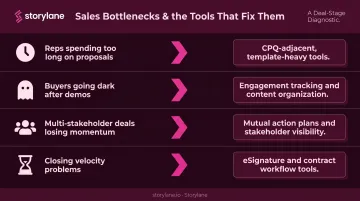
The answer determines which type of deal room fits best. Once you've nailed down the use case, you can score vendors against the criteria that actually matter for your workflow.
Key Evaluation Criteria
When comparing platforms, weight these criteria:
- CRM and sales stack integrations — Salesforce, HubSpot, eSign tools, video platforms, and interactive demo tools like Storylane (which surfaces buyer engagement signals from demos directly into your CRM)
- Depth of buyer analytics — Not just "was it opened," but who opened it, what they reviewed, and for how long
- Ease of use for reps vs. admin flexibility — Reps should be able to create a room in minutes; admins should have template and branding controls
- Security controls — SSO, access permissions, link expiration, and domain-restricted access for enterprise deployments
- Scalability — Does pricing and feature access hold up as you go from 5 AEs to 50?
Questions to Ask During a Demo or Trial
Push vendors on specifics rather than feature lists:
- Can a rep create a fully personalized room from a CRM record in under 5 minutes?
- What buyer engagement data flows back into the CRM automatically—and in what format?
- Can we set branding and content defaults at the template level so reps don't start from scratch every time?
- Is there a mutual action plan feature, and can buyers edit it directly?
- How does pricing scale as we add users, rooms, or additional integrations?
Frequently Asked Questions
What is deal room software?
Deal room software is a digital workspace that centralizes all deal-related content—proposals, demos, contracts, and communication—into one shared, trackable link. Both buyers and sellers access it throughout the sales process, replacing scattered email threads and disconnected PDF attachments.
What is the difference between a deal room and a virtual data room?
A virtual data room (VDR) is a secure document storage solution used primarily for M&A due diligence and sensitive financial transactions. A deal room (or digital sales room) is a collaborative workspace built for B2B sales—focused on buyer engagement, content sharing, and closing deals rather than document confidentiality.
What are the must-have features in deal room software?
Prioritize: personalized buyer workspaces, real-time engagement tracking (who viewed what and for how long), mutual action plans, native or integrated eSignature, and two-way CRM sync. Without CRM integration, the deal room becomes a siloed tool that adds work rather than reducing it.
How does deal room software integrate with a CRM?
Most platforms offer two-way integration with Salesforce and HubSpot—pulling account data to auto-populate the room and pushing buyer engagement activity (views, time on content, stakeholder additions) back to the CRM for pipeline tracking and forecasting.
How do you measure the success of a deal room?
The key metrics to monitor:
- Deal room open rates and time-to-signature
- Number of unique stakeholders who accessed the room
- Content engagement depth by section
- Win rate and average sales cycle length vs. deals closed without a room
How is deal room software different from sending a PDF proposal?
A PDF is static and untrackable. You don't know if it was opened, who read it, or which version the buyer is referencing. A deal room is live: sellers see who opened it and when, content updates without resending, and the deal closes with eSignature in the same environment.