The root cause is almost never the production quality. It's the absence of a proper brief.
A product demo video brief is meaningfully different from a generic creative brief. It requires decisions specific to buyer stage, feature scope, demo format, and measurable outcomes — none of which a general template will surface. This guide walks through every section to include, the variables that separate strong briefs from weak ones, and the most common mistakes to cut before they cost you.
Key Takeaways
- A video brief aligns your team, agency, or freelancer on purpose, audience, format, and success criteria before recording starts
- Strong briefs specify funnel stage, demo format (overview, walkthrough, or custom), and which features to show versus exclude
- Every creative decision should tie to a measurable outcome — completion rate, CTA click-through, or trial conversion
- Skipping the brief is the leading cause of expensive revision cycles and demo videos that don't convert
- Use the brief to decide whether an interactive demo would convert better than passive video
What Is a Product Demo Video Brief — and Why Does It Matter?
A product demo video brief is a structured document that captures every requirement for a product demonstration video before production begins: audience persona, funnel stage, feature scope, format, deliverables, budget, and success metrics.
That distinction matters: it forces decisions unique to SaaS go-to-market work that a general creative brief never asks.
Which stage of the buyer journey does this video target? Is it serving a self-serve website visitor or a mid-deal sales follow-up? Which product flows create the "aha moment" for this specific viewer? A generic template skips these questions entirely.
Those questions carry real consequences. TrustRadius's 2024 B2B Buying Disconnect Report found that 71% of technology buyers called a demo the most influential resource in their buying decision — and 67% of enterprise buyers used at least one demo during evaluation.
A brief ensures that influence lands where you intend it to.
The cost of skipping one is predictable: vague scope and undefined deliverables are the primary drivers of revision cycles and over-servicing. Most failed demo videos trace back to a brief that didn't exist — or was too vague to catch misalignment before the first cut.
How to Write a Product Demo Video Brief — Step by Step
Step 1: Define the Goal and Funnel Stage
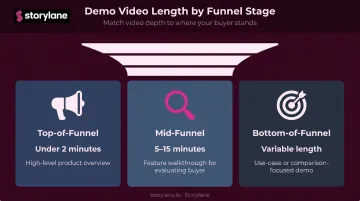
Your funnel stage governs everything: length, depth, and tone.
| Funnel Stage | Video Purpose | Typical Length |
|---|---|---|
| Top-of-funnel | High-level product overview | Under 2 minutes |
| Mid-funnel | Feature walkthrough for evaluating buyer | 5–15 minutes |
| Bottom-of-funnel | Use-case or comparison-focused demo | Variable, high specificity |
Vidyard's 2024 benchmark of 943,305 B2B videos found 65% completion for videos under one minute, dropping to 20% for videos over 20 minutes. Longer, later-stage demos still have a role — but only when the viewer already has context and intent.
Beyond length, state the intended viewer action explicitly: start a free trial, request a live demo, share with a buying committee. A video without a declared conversion goal cannot be measured or improved.
Step 2: Define Your Target Viewer
That conversion goal only makes sense once you know who's watching. "Decision makers" is not an audience definition. "A VP of Sales at a mid-market SaaS company evaluating their first demo automation tool" is.
Document the primary viewer's:
- Role and seniority level
- Industry and company size
- Technical sophistication
- Current familiarity with your product category
- Whether they're the economic buyer, the end user, or both
That last point reshapes the entire script. The economic buyer needs ROI framing and risk reduction. The end user needs to see their daily workflow made easier. The same demo rarely serves both well.
Step 3: Choose the Demo Video Type and Format
Specify the format clearly:
- Short overview (under 2 minutes) — website homepage, paid ads, cold outreach
- Feature walkthrough (5–15 minutes) — mid-funnel nurture, post-webinar follow-up
- Use-case demo — tailored to a specific industry or role, often in a sales deck
- Custom/personalized demo — created by a sales rep for a named account
Distribution channel matters as much as format. A homepage hero video needs a hook within the first three seconds. A LinkedIn video ad should run 15–30 seconds to be eligible for all placements, per LinkedIn's official video ad specs. A post-demo follow-up email can support a longer, more detailed walkthrough.
Aspect ratio, pacing, and CTA placement all change depending on where the video lives. Declare the distribution channel in the brief, not during editing.
Step 4: Scope the Content — What to Show and What to Exclude
This is where most briefs fail. Teams include features because the product team is proud of them, not because the target viewer needs to see them to trust the product.
What to include:
- The top three to five features or workflows most relevant to the viewer's primary pain points
- Ranked by buyer relevance, not engineering effort or internal preference
- The "aha moment" — the single workflow that makes the product's value undeniable
What to explicitly exclude:
- In-development or unreleased features
- Pricing or competitor-sensitive screens
- Onboarding flows with no connection to the core value story
- Workflows that require lengthy setup to make sense
Skipping this section is the most common source of expensive reshoots. Productions that start without an exclusion list almost always circle back to redo scenes the product team wanted but the buyer didn't need.
Step 5: Define Deliverables, CTA, and Success Metrics
List every expected output before production starts. Unspecified deliverables become scope creep.
Common deliverables checklist:
- Main video file (spec format and resolution)
- Short social cut (30–60 seconds)
- Captioned version
- Thumbnail image
- In-video chapter markers or annotations (if applicable)
For success metrics, tie benchmarks to the funnel stage goal from Step 1. Vidyard's 2024 data gives a working baseline: 65% completion for videos under one minute, 9% average CTA click-through rate for videos between 5–30 minutes (per Wistia's annual State of Video benchmarks). Use these as starting targets, then refine based on your own historical performance.
Step 6: Document Budget, Timeline, and Brand Guidelines
Nail down the production logistics before anyone starts recording:
Timeline milestones to specify:
- Brief approval
- Script draft and stakeholder review
- Screen recording or live capture
- First edit and internal review
- Final delivery
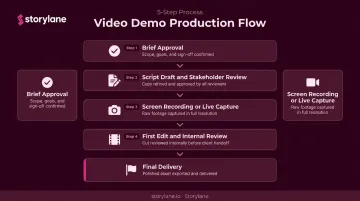
Identify who holds approval authority at each gate. Without named approvers, reviews stall indefinitely.
Brand constraints to document:
- Colors, fonts, and logo usage rules
- Tone of voice (formal, conversational, technical)
- Presenter format: live human, AI avatar, or on-screen text narration
- Any legal or compliance review requirements
Visual inconsistency is one of the most common reasons demo videos fail brand review at the final stage. Document the rules before production starts, not after the first cut comes back wrong.
Key Elements That Define a Strong Product Demo Video Brief
Audience Specificity
Vague audience descriptions produce generic scripts. The more precisely the brief defines the viewer — viewer role, pain points, and decision-making context — the more precisely the script can demonstrate value to that exact person.
Feature Prioritization by Buyer Relevance
Front-load the core value. Vidyard's benchmark data explicitly recommends placing the most important content in the first quarter of runtime, because engagement is highest early and drops as length increases. Briefs that let the product team rank features by pride rather than buyer relevance produce demos that lose viewers before the CTA.
Success Metric Alignment
Every creative choice in the brief — opening hook, features shown, CTA placement — should connect to a defined KPI. Without declared metrics, the video gets evaluated subjectively and can't be attributed to pipeline impact.
The Medium-Fit Decision
Before production starts, the brief should answer one format question: is a passive video actually the right medium for this goal?
For website self-serve conversion and async sales outreach, interactive demos increasingly outperform passive video. Two real-world tests make the case:
- PDQ ran an A/B test (same landing page, same placement) comparing a Storylane interactive demo against a video. The interactive demo delivered a 92% conversion lift, with visitors converting at nearly twice the rate (6.14% versus 3.19%).
- ContactMonkey replaced a 30-minute on-demand video walkthrough with an interactive demo and hit a 15% form conversion rate and 50–60% demo completion rate — well above their 40% benchmark target.
Video still earns its place in the mix. But when buyers need to explore the product on their own terms rather than watch someone else navigate it, an interactive format often performs better. Settle that question at the briefing stage, not after post-production.
Common Mistakes When Writing a Product Demo Video Brief
Most video briefs fail for the same three reasons. Catching them early keeps your production on track.
Writing for Every Audience at Once
A brief trying to serve the CMO, the end user, and the IT security reviewer simultaneously produces a video that serves none of them. Designate one primary viewer and cut everything that isn't relevant to that person's decision.
Scoping Too Many Features
Including every capability creates an overwhelming video that loses viewers before the CTA. The brief must impose a hard content ceiling — anchor feature selection to the single outcome the viewer needs to believe.
Omitting the "What Not to Show" Section
Teams routinely skip explicitly prohibiting in-progress features, live pricing data, or screens requiring extensive context. That omission leads directly to legal review delays, reshoots, and inflated timelines. Treat this section as risk control, not a nice-to-have.
Frequently Asked Questions
What should be included in a video brief?
A complete product demo video brief covers: goal and funnel stage, target audience persona, demo format and video type, feature scope (what to include and exclude), expected deliverables, success metrics, and production logistics including budget, timeline, and brand guidelines. All seven sections should be confirmed before production begins.
How long should a product demo video be?
Match length to format and channel. Introductory overview videos perform best under two minutes; mid-funnel feature walkthroughs can run 5–15 minutes. Specify the target length in the brief to give production a clear constraint.
What is the difference between a video brief and a storyboard?
The video brief is the strategic planning document created before production — covering goals, audience, scope, and logistics. The storyboard is a visual shot-by-shot plan created after the brief is approved. The brief informs the storyboard, not the other way around.
Who should write the product demo video brief?
In most B2B SaaS organizations, the product marketer or demand gen manager owns the brief. It should incorporate input from sales (common objections), product (feature accuracy), and the video producer or agency before it's finalized — cross-functional review is what makes it actionable.
How detailed does a video brief need to be?
Detailed enough for a production team to begin scripting without a clarification call — typically one to three pages covering all sections in this guide. Focus on clarity and specificity rather than length.
Should the script be part of the video brief?
A full script is a production artifact, not a brief component. The brief should include a rough narrative outline or bullet-point flow covering the intended story arc, key messages, and tone. That gives the scriptwriter a solid foundation without locking in wording too early.