Introduction
Conference booths are expensive, chaotic, and unforgiving. Your WiFi drops mid-demo, three prospects approach your booth simultaneously, and the sales engineer you flew in is stuck answering a question that has nothing to do with your ICP.
Unlike a one-on-one sales call where you control the environment, a conference demo happens in noise, distraction, and time pressure. Most SaaS teams show up with the same demo they run on discovery calls — same format, same flow, zero adaptation for the environment. They collect badge scans and wonder why the event generated no pipeline.
The US B2B trade show market hit $15.8 billion in 2024, surpassing pre-pandemic highs. That's a lot of budget riding on booths that often underperform because teams prepare for a sales call, not a conference floor.
These 6 tips cover the preparation steps that separate teams generating pipeline from those going home with a bag of business cards — from demo format selection and persona targeting to account personalization and post-event follow-up.
Key Takeaways
- Conference WiFi fails. Offline-ready interactive demos eliminate the most common conference failure mode.
- Booth visitors span five different personas. One generic demo won't hold any of them.
- Pre-personalizing demos for target accounts before the event sharpens your highest-priority conversations.
- 94% of B2B buyers say use-case-tailored demos matter when evaluating software.
- Post-event follow-up planning must happen before the conference, not after.
The High Stakes of Conference Product Demos
Conference demos are a different category of risk. You have no control over WiFi reliability, no ability to pre-qualify who walks up, and a limited window — often less than 10 minutes — to make an impression before someone moves to the next booth.
According to Reprise, 81% of sales reps report losing a deal because of a bad demo. At a conference, the margin for error is even thinner. A live product crash in front of three potential enterprise buyers can undo months of outbound effort in under a minute.
The financial stakes compound the pressure:
- $15.8B spent on US B2B trade shows in 2024
- Only 35% of marketers track whether trade show leads convert to sales
- At least 40% of leads generated on the trade show floor go unfulfilled by sales teams
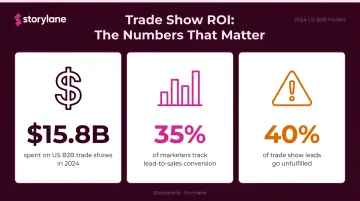
Those numbers point to a consistent pattern: most teams invest heavily in booth design, travel, and sponsorships, then underinvest in the one thing that determines ROI — the demo itself. The six tips below are designed to fix that.
6 Tips to Prepare Perfect Conference Product Demos
Tip 1: Use Interactive Demos Instead of Demoing Live Software
Demoing live software at a conference is the highest-risk approach with the lowest upside. You're dependent on venue WiFi, your staging environment, and a technical resource who may be pulled in three directions at once.
Interactive demos eliminate that dependency entirely.
Why interactive demos work better at booths:
- No crashes, no login issues, no "let me just refresh this"
- Work offline — no WiFi required
- Allow attendees to self-explore before talking to your sales team
- Loop on screen to draw foot traffic when no one is actively engaged
Storylane's offline demo feature, available on the Premium tier, lets teams download demos that run directly in a browser without any internet connection. The format is device-agnostic — tablets, laptops, and booth displays all work.
Phenom used this approach for their flagship trade show, building 35 interactive demos in three weeks and setting up a 12-booth "AI and Automation Learning Lab" where attendees could explore their full product suite independently. The result: new partnership conversations, positive attendee feedback, and demos the sales team kept using for follow-ups long after the event.
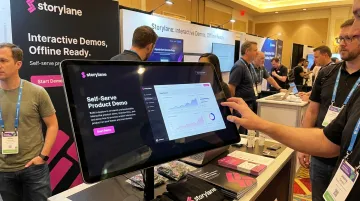
The self-qualification benefit is significant. Attendees who complete an interactive demo and click a CTA have already signaled intent — your sales engineer can prioritize those conversations instead of running the same 10-minute walkthrough for every visitor.
Tip 2: Build a Demo Hub for Different Personas and Use Cases
A single demo assumes every booth visitor has the same problem. They don't. An IT security buyer and a procurement lead walking into the same booth need entirely different conversations. A generic product walkthrough addresses neither of them well.
A demo hub solves this by organizing multiple short, focused demos under one navigable interface.
Storylane's Hub feature supports two layouts:
- Gallery layout — a grid-style browsable experience, ideal for self-serve booth kiosks where attendees pick their own path
- Playlist layout — a sequential curated flow, better for guided conversations with sales reps
For conference use, the Gallery layout works best. Attendees can arrive at a tablet kiosk, select their role or use case, and explore a demo relevant to them — without waiting for a sales rep to become available.
SentinelOne demonstrated this at RSA, setting up a "GeniusBar"-style kiosk with iPads running Storylane demos that attendees could explore on their own. The device-agnostic format meant consistent experiences regardless of device type.
Hub best practices for conferences:
- Cap each hub at 9 demos maximum to avoid overwhelming visitors
- Organize by persona (end-user, IT buyer, executive) or use case
- End each individual demo with a persona-specific CTA, not a generic "Request a Demo" button
- Use the Gallery layout for booth kiosks; switch to Playlist for deeper rep-led conversations
Demand Gen Report found that 51% of B2B buyers said sales and marketing content was too generic in 2024 — up from 38% the year before. A persona-organized hub directly addresses that complaint.
Tip 3: Qualify Prospects at the Booth Using Demo Engagement
Your sales engineer can't run a deep demo for every visitor. At a busy booth, they need a way to prioritize who gets their time — without guessing.
The demo itself becomes your qualification layer.
When visitors self-explore an interactive demo, their behavior tells you something. Someone who clicks through all 12 steps, explores a specific feature module, and hits the CTA is a different prospect than someone who bounced after step two. That behavior is trackable data, not inference.
What Storylane's analytics tracks during demo interactions:
- Engagement rate (clicks on interactive elements and CTAs)
- Time spent per user and per step
- Completion rate and drop-off points
- CTA clicks (e.g., "Book a Demo," "Start Free Trial")
When a visitor engages deeply, Storylane can send real-time Slack alerts to your team with company-level insights, giving the sales rep at the booth a natural conversation starter before they even approach. EXHIBITOR research found that at least 40% of trade show leads go unfulfilled — partly because booth staff have no reliable way to prioritize. Engagement-driven qualification changes that.
Put the demo on a tablet at the front of the booth. Let visitors explore. When engagement depth signals intent, the sales engineer steps in with context already in hand.
Tip 4: Pre-Build Personalized Demos for Target Accounts
Before the conference, cross-reference the attendee list against your target accounts. For each priority account, build a personalized demo environment — their logo, their industry use case, a CTA matched to where they are in the buying cycle.
Most teams skip this ABM play because it sounds like a week of work. It isn't.
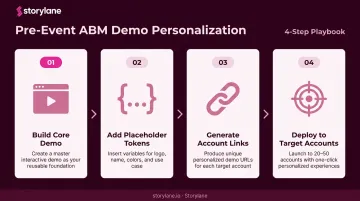
Storylane's token-based workflow for pre-event ABM:
- Build one core guided demo showcasing your primary value proposition
- Add placeholder tokens for company name, logo, brand colors, and relevant use case text
- Generate individual personalized links for each target account — typically 20 to 50 accounts
- Each link takes seconds to produce once the base demo is built
The personalization elements that move the needle aren't cosmetic. Swapping a logo signals you know who they are. Adjusting the scenario to reflect their actual pain point — and using a CTA like "See how this works for your security operations team" instead of a generic "Request a Demo" — is what drives conversion.
Storylane's dynamic variable tokens support text, image, and date tokens — meaning you can replace logos, swap company names, and surface real-time context within the same demo template. For a team preparing for a major industry conference, this means 50 personalized demo links built in an afternoon, not a week.
The numbers support the investment. ABM programs improved active engagement for 90% of respondents and pipeline growth for 84% in Demandbase's benchmarking research.
Tip 5: Prepare a Demo Leave-Behind for High-Intent Attendees
Conferences are information-dense. A prospect who had a great 10-minute conversation at your booth on Tuesday afternoon has processed three more days of sessions, networking, and competing booths before they get back to their desk. Your demo is not top of mind.
A leave-behind changes that equation.
The leave-behind is simple: a shareable link to the personalized demo you showed at the booth, sent within 24-48 hours of the interaction. The prospect can revisit it on their own time, and they can forward it to their buying committee. Demand Gen Report found that 72% of B2B buyers share content with relevant team members — which means your demo has the potential to reach stakeholders you never met at the event.
What a strong post-conference follow-up email includes:
- One sentence recapping the specific use case you discussed (not a generic feature list)
- A direct link to the personalized interactive demo from the booth
- A single, frictionless next step — a calendar link, sandbox access, or technical deep-dive invite
Storylane supports per-company trackable demo links, so you'll know when the prospect reopens the demo and receive a Slack notification when they re-engage. That signal triggers the right follow-up at the right moment, rather than a generic check-in three weeks later.
This follow-up plan must be ready before the conference starts. Teams that try to build it after the event spend the first week back setting up sequences instead of working the leads that are already going cold.
Tip 6: Run Retargeted Outreach for Conference Attendees Who Missed Your Booth
Not everyone who should have visited your booth did. Large conferences are chaotic, sessions run long, and a portion of your ICP simply never made it to your side of the floor. That doesn't mean those opportunities are gone.
A retargeting campaign directed at conference attendees extends your reach beyond the physical booth footprint.
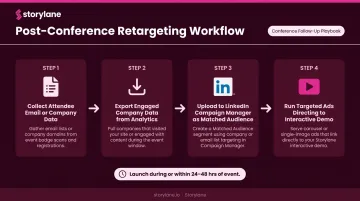
The workflow:
- Collect email addresses or company data from conference attendee lists (where compliantly available)
- Export engaged company data from Storylane analytics
- Upload company lists to LinkedIn Campaign Manager to create matched audiences
- Run targeted ads directing prospects to your interactive demo — not a landing page, not a whitepaper
Storylane integrates with HubSpot, Marketo, and Salesforce, and supports automated list syncing via Zapier, so engaged company lists can flow directly into LinkedIn ad audiences without manual exports.
Retargeting should go live during the conference or within 24-48 hours of it ending — when your brand still has ambient recognition from the event. Waiting a week for a standard post-event cadence loses the window where attendees are still processing what they saw and are most receptive to follow-through.
Common Conference Demo Mistakes to Avoid
Most conference demo failures are predictable — and preventable.
- Run live software without a fallback and a WiFi outage or environment crash ends your demo on the spot. Pre-load interactive demos so they're available offline.
- Use the same generic walkthrough for every visitor and most will leave without remembering why your product was relevant to their role or problem.
- Skip pre-event account research and you lose the window to pre-personalize demos and prepare for high-value conversations before the conference starts.
- Build your follow-up sequence after the conference and your hottest leads go cold while you're still setting up automations. That work needs to happen before you travel.
The numbers reinforce this: EXHIBITOR found that 40% of trade show leads go unfulfilled, and booth staff fail to record 80% of the specific promises made to attendees. Each of these mistakes is avoidable with the right prep work done before you board the plane.
Conclusion
The difference between a forgettable conference presence and a genuine pipeline generator comes down to preparation. Teams that consistently generate ROI from events treat each conference as a campaign with three distinct stages:
- Pre-event: personalized demos, account research, follow-up sequences
- During-event: interactive demos, persona-specific hubs, qualification analytics
- Post-event: leave-behinds, retargeting, Slack-triggered follow-up
None of that requires a bigger team or a bigger budget. It requires the right tools and a repeatable process. Storylane gives you both — from offline-ready demos and persona-specific hubs to real-time engagement alerts that tell your reps exactly who to follow up with first. Start building your conference demo for free.
Frequently Asked Questions
What is a product demo at a conference?
A conference product demo is a focused demonstration of a software product delivered at a trade show or industry event, typically at a booth or scheduled session. The goal is to engage qualified prospects, communicate product value quickly, and generate pipeline from event attendees.
What is an example of a product demonstration at a conference?
A SaaS company sets up a tablet kiosk at their booth — running an interactive click-through demo organized by persona. Attendees self-navigate to the use case most relevant to their role, explore the product independently, and a sales engineer steps in when engagement signals high intent.
What does a product demonstrator do at a conference?
A product demonstrator (typically a sales engineer, AE, or product marketer) guides booth visitors through the product and connects features to specific pain points. They qualify intent based on engagement signals and establish a clear next step, such as a follow-up call or sandbox access.
Should you demo live software or use an interactive demo at a conference?
Interactive demos are safer and more effective for most conference scenarios — they work offline, eliminate crash risk, and let attendees self-explore. Live software demos still have a place for deeper, pre-scheduled technical conversations with pre-qualified prospects.
How do you follow up with prospects after a conference demo?
Send a personalized follow-up email within 24-48 hours. Include a direct link to the demo shown at the booth, a one-line recap of the use case discussed, and a single clear next step (a calendar link or sandbox access). Track re-engagement to time your follow-through.
How do you handle technical issues during a conference demo?
Pre-load an offline-compatible interactive demo on the booth device and test it on the actual hardware — not just your office setup. Designate one team member as the "demo reset" contact so any rep can recover quickly without disrupting the visitor experience.