The fix is a demo library — a centralized, organized collection of interactive demos that gives every rep the right asset for the right buyer at the right moment.
This guide walks through exactly how to build one: what to include, how to structure it, how to measure its impact, and what to avoid.
Key Takeaways
- A demo library is a centralized hub of interactive demos organized by persona, use case, and funnel stage — purpose-built for sales moments, not passive storage
- Effective libraries include multiple demo types mapped to specific sales moments; one generic walkthrough won't cut it
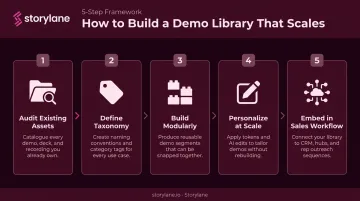
- Building one follows a clear sequence: audit → define taxonomy → build modularly → personalize → embed in workflow
- TrustRadius research found virtually 100% of B2B buyers want to self-serve some or all of their journey — making demo libraries a baseline buyer expectation
- Demo analytics turn your library into a live intelligence layer, surfacing which demos drive pipeline and who's ready to buy
What Is a Demo Library (and Why Your Sales Team Needs One)?
A demo library — sometimes called a demo hub or demo center — is a structured, centralized repository of interactive product demos organized by use case, persona, feature, or funnel stage.
That's a meaningful distinction. A shared folder of screen recordings is not a demo library. PDFs, one-pagers, and slide decks aren't either — those formats are passive, and passive content loses attention fast.
A prospect can't explore on their own terms or experience the product firsthand. By the time they've finished watching a pre-recorded walkthrough that covers every feature in sequence, most buying committee members have already checked out.
The Buyer Shift That Makes This Non-Negotiable
B2B buyers no longer wait for a sales rep to show them a product. Gartner data shows 75% of B2B buyers now prefer a rep-free sales experience, and that preference intensifies when buyers are already familiar with the product category. Interactive demos fill that gap — they let prospects explore on their own terms before (or instead of) a live call.
Buyers also rarely make decisions alone. Demand Gen Report's 2024 Content Preferences Benchmark Survey found that 72% of respondents shared content with relevant stakeholders. A well-built demo library gives your champion an asset they can actually pass to the rest of the buying committee.
Who Owns a Demo Library
A demo library works best as a shared initiative:
- Product marketing builds, maintains, and governs content
- Sales and presales consume, personalize, and share demos with prospects
- Enablement ensures reps know which demo to use and when
Cross-functional alignment from day one prevents the most common pitfall: a library that product marketing builds but sales never adopts.
What to Include in Your Sales Demo Library
Not every demo serves the same purpose. The strongest libraries contain multiple demo types, each mapped to a specific moment in the sales cycle.
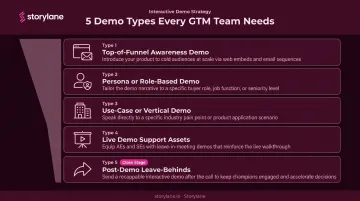
The Five Core Demo Types
1. Top-of-funnel awareness demos Short, self-guided product tours embedded on your website or in outbound sequences. Designed for prospects who aren't ready to talk to sales yet — they want to explore independently first.
2. Persona- or role-based demos Tailored to specific buyer roles: a VP of Sales, a CTO, an end user. These focus on the outcomes each persona cares about, not the full product. A CTO doesn't need to see the reporting dashboard the same way a data analyst does.
3. Use-case or vertical demos Built around specific industries or problems — "how a cybersecurity team uses this" or "how financial services firms handle compliance workflows." These sharpen relevance for prospects in targeted segments.
4. Live demo support assets Modular demo flows a rep can navigate during a live call based on what discovery surfaced. Not a single linear walkthrough — a set of building blocks the rep can sequence on the fly.
5. Post-demo leave-behinds Interactive demos sent after a live call so the champion can share the product experience asynchronously with the rest of the buying committee. This is where deals often stall without them.
What Doesn't Belong in Your Library
- Demos that cover every feature in a single linear flow
- Assets built around internal product jargon prospects don't recognize
- Any demo that hasn't been updated after a major product release
Storylane's Buyer Hub brings all these demo types — Guided Demos, HTML captures, Screenshot demos, and video formats — into one place. Prospects self-navigate by persona or use case; sales teams see exactly what each visitor explored and for how long. One destination, zero format juggling.
How to Build Your Demo Library: A Step-by-Step Guide
Step 1 — Audit What You Already Have
Before creating anything new, catalog every existing demo, screen recording, and product walkthrough. Tag each one by use case, audience, funnel stage, and how recently it was updated.
Involve frontline reps in this audit — they know which assets actually get used versus which ones just sit in a folder. You'll likely find gaps (missing personas, no leave-behind assets) and redundancies to eliminate.
Step 2 — Define Your Demo Taxonomy
Establish the organizational logic before you build anything. Decide the primary sorting categories:
- By funnel stage (awareness, consideration, decision)
- By persona (executive, technical, end user)
- By use case or vertical
- Or a combination
Pick a consistent naming and tagging convention and document it. This taxonomy is what makes a demo library actually searchable — without it, you have an expensive folder.
Step 3 — Build Demos in a Modular Way
Create demos as building blocks, not monolithic walkthroughs. A five-minute demo on your analytics feature can appear in three places at once: a data team persona demo, a financial services vertical demo, and a post-demo leave-behind.
Modular construction reduces build time significantly as your library grows — and tools like Storylane's Multi-Chapter Demos let reps jump to the relevant chapter during a live call, skipping content that doesn't apply to the buyer in front of them.
Step 4 — Personalize at Scale Before Publishing
A demo that still reads as generic will be ignored. Storylane's dynamic variable tokens let reps swap in company names, logos, and currencies without rebuilding anything — one base demo adapts to dozens of scenarios. That personalized demo can go out in minutes, sent directly from HubSpot or Salesforce without touching the underlying structure.
Step 5 — Embed in the Sales Workflow
A demo library that lives outside your reps' daily workflow won't get used. Map each demo to the specific sales moment it serves:
- Send the top-of-funnel awareness demo in the first outbound email
- Pull the relevant persona demo before the discovery call
- Share the leave-behind within two hours of the live call
Connect the library to your CRM and sales engagement tools so demos are accessible where reps already work. Salesforce's 2024 research found reps spend 70% of their time on non-selling tasks — a library that adds steps to that burden defeats its own purpose.
How to Organize Your Demo Library for Maximum Impact
Discoverability is the most common failure point. If a rep can't locate the right demo in 30 seconds, they'll skip it — or worse, use the wrong one.
Folder and Tag Structure
Organize with two levels:
- Primary sort: funnel stage or audience (ToFu, MoFu, BoFu — or Awareness, Consideration, Decision)
- Secondary tags: industry, feature area, content type
Every demo should be findable through at least two different paths. Someone looking for a cybersecurity-focused demo should find it whether they search by vertical or by persona.
Access Controls
Not everyone on the team should have equal edit access:
- Product marketing/enablement: can add, edit, archive, and approve demos
- Sales reps: curated view-and-share access only
Access governance exists to prevent a real risk: reps accidentally sharing outdated demos with discontinued features or stale pricing. Storylane supports password-protected demos and email-restricted sharing links, giving teams granular control over who accesses what and for how long.
Maintenance Cadence
Assign a content owner to each demo category and set a recurring review schedule — quarterly at minimum, and immediately after any major product release. The Storylane platform's search-and-replace functionality lets teams sweep through an entire demo and update repeated text or terminology in seconds, a far faster process than manually re-recording traditional video-based demos.
An outdated demo showing deprecated features doesn't just waste a rep's time — it actively erodes buyer trust at exactly the moment you need it most.
How to Measure Your Demo Library's Impact
Internal Library Metrics
Track these to understand what to build more of — and what to retire:
- Most-viewed demos by funnel stage and persona
- Most-shared demos by rep and deal stage
- Time-to-first-share: how quickly reps adopt new assets after publish
- Demo-to-deal association: which demos appear most frequently in won opportunities
This data tells you where the library is working and where it has gaps.
Prospect-Level Engagement Analytics
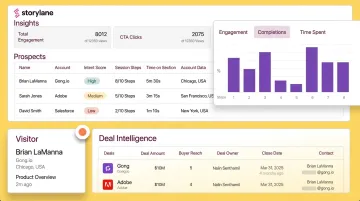
Storylane's analytics operate at the individual prospect and account level. For every session, the platform captures:
- Who viewed the demo and which steps they explored
- Time spent on each section and where they dropped off
- Intent score — High, Medium, or Low — so reps know who to prioritize
The Account Reveal feature goes a step further, de-anonymizing anonymous viewers with enriched firmographic data — company name, location, and other account details — even before a prospect fills out a form. Slack and email alerts fire in real-time when a high-intent prospect engages, giving reps the context they need to follow up with relevance, not just speed.
Connecting to Pipeline
Two metrics justify continued investment in your library:
- Demo-influenced pipeline: deals where a demo from the library was shared at any point
- Demo-converted pipeline: demos that directly preceded a meeting booking or opportunity creation
Start tracking these from day one. They're the numbers that turn a demo library from a project into a strategic asset.
Common Demo Library Mistakes to Avoid
Building too many demos at launch. A library of 40 demos that's 60% outdated within six months is worse than 10 that are always current. Start with five to seven high-priority demos mapped to your most common buyer personas and scenarios, then expand based on what analytics and rep feedback demand.
Treating it as a one-time project. Demo libraries decay fast. Product changes, messaging pivots, and competitive shifts make demos stale faster than most teams expect. Assign ownership, set a review cadence, and build updating into the workflow — not just the launch plan.
Skipping rep enablement. A great demo library that reps don't use is a failed initiative. Train reps not just on where to find demos, but on which demo to use when and why. Tie demo usage to coaching conversations and deal reviews. When reps notice that top quota-attainers are also the heaviest library users, adoption tends to take care of itself.
Frequently Asked Questions
What makes a good sales demo?
A good demo is tailored to the buyer's specific role and pain points — not a feature tour of the entire product. It focuses on outcomes, stays short enough to hold attention, and ends with a concrete next step that advances the deal.
What is the sales demo process?
The standard sequence moves through four stages: discovery (understand buyer needs), preparation (select or personalize the right demo), delivery (run a tailored live or interactive demo), and follow-up (share a leave-behind and confirm next steps within hours of the call).
What to say at the end of a demo?
Close by summarizing the specific problems you showed you can solve, confirming those points resonated, and securing a concrete next step (a follow-up call, trial, or proposal) before the conversation ends.
What is a demo library?
A demo library is a centralized collection of interactive product demos that sales teams can access, personalize, and share with prospects. It covers multiple use cases, buyer personas, and funnel stages from one hub — replacing scattered folders of screen recordings or slide decks.
How many demos should be in a sales demo library?
Start with five to ten high-priority demos mapped to your most common buyer personas and sales scenarios. Expand based on rep usage data and gaps surfaced by analytics. Quality and currency always matter more than volume — a smaller, accurate library will outperform a large, stale one.