Introduction
A product that takes 10 minutes to explain in a sales call shouldn't take weeks to capture on video. Traditional production costs thousands, ships late, and goes stale the moment a feature updates — leaving SaaS and B2B teams scrambling to keep demos current.
AI explainer video tools have changed that. Teams can now go from a script, screenshot, or screen recording to a polished video in hours instead of weeks.
According to Wyzowl's 2026 video marketing research, 91% of businesses already use video as a marketing tool. Teams still relying on static assets or expensive productions are giving up ground.
Choosing the right tool is where it gets complicated. Interactive product demos, avatar-led training, animated explainers, and fast social content each call for a different platform — and the wrong pick wastes both budget and time.
Key Takeaways
- AI explainer tools cut production time from weeks to hours and cost from thousands to tens of dollars per video
- Start with your use case, not features — picking the wrong tool for your workflow wastes time no matter how capable it is
- Avatar-led tools (Synthesia, HeyGen) suit presenter-style content, animation tools (Vyond) fit scenario-based training, and text-to-video tools (InVideo AI) are built for volume
- For SaaS teams, interactive demo platforms like Storylane go beyond passive video — prospects click through the actual product
- The AI video generator market was $788.5M in 2025 and is projected to reach $3.4B by 2033 at 20.3% CAGR
Why AI Explainer Video Tools Matter in 2026
An AI explainer video tool combines script generation, voiceover, visuals, and editing into a single workflow. What used to require a scriptwriter, voice actor, motion designer, and editor can now happen inside one platform — often in under an hour.
The market reflects this shift. Grand View Research reports the AI video generator market was $788.5 million in 2025 and is projected to reach $3,441.6 million by 2033 at a 20.3% CAGR. That kind of growth signals a technology that's moved past early adoption into mainstream business use.
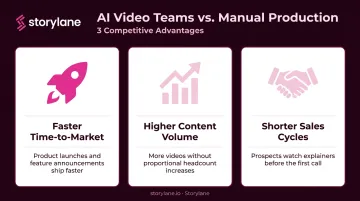
That growth has a direct competitive implication. Teams still relying on agencies or manual production pipelines are already losing ground to those publishing three or more explainer videos a week. The gap shows up in:
- Faster time-to-market for product launches and feature announcements
- Higher content volume without proportional headcount increases
- Shorter sales cycles when prospects can watch a clear explainer before the first call
Best AI Tools for Creating Explainer Videos in 2026
Tools below were evaluated on input flexibility, script intelligence, visual output quality, customization depth, export options, and pricing accessibility.
Storylane
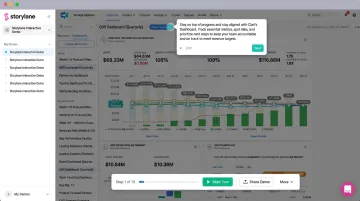
Storylane is an AI-powered interactive demo platform built for SaaS teams. Rather than creating a passive video that prospects watch, Storylane turns your actual product UI into a guided, clickable demo experience — with AI Video Avatars, voiceovers, and one-click annotations added automatically.
The core difference from every other tool on this list: demos are interactive. Prospects don't just watch — they click through features, choose their own path, and experience the product firsthand before a sales call. For SaaS teams, this produces meaningfully different outcomes than a video that plays and ends.
Other standout capabilities:
- Dynamic tokens automatically insert prospect names, company names, logos, and metrics into each demo (personalization at scale)
- Sales teams receive Slack notifications the moment a prospect engages, with full behavioral context — chapters viewed, time spent, CTAs clicked
- AI voiceovers in 25+ languages enable global demo distribution without re-recording
- Engagement data flows directly into Salesforce, HubSpot, and other CRM platforms
- Demo Hub lets you organize multiple demos in one shareable gallery for self-serve discovery or guided sales journeys
For SaaS marketing and sales teams, ContactMonkey's results illustrate what's possible: $1.3M in pipeline attributed directly to Storylane demos, with new feature demos produced in 2 hours versus weeks for video production.
| Attribute | Details |
|---|---|
| Best For | SaaS teams creating interactive product demo explainers and guided walkthroughs for sales, marketing, and onboarding |
| Key Features | AI Video Avatars, AI voiceovers (25+ languages), one-click annotations, interactive click-through demos, demo hubs, personalization tokens, CRM integrations, offline demo support |
| Pricing | Free plan available; paid tiers from Starter onwards — visit Storylane's pricing page for current rates |
Synthesia
Synthesia is the category leader in avatar-based AI video, widely used for corporate training, onboarding, and structured product explainers. The workflow is simple: type a script, choose from 240+ digital avatars, and generate a polished presenter-led video with lip-synced narration in 160+ languages.
Its strengths are consistency and scale. For global teams that need to produce the same explainer in a dozen languages without on-site talent, Synthesia removes nearly all production friction.
Where it's less suited: complex motion graphics, animated storytelling, or anything requiring non-avatar visual elements as the primary format.
| Attribute | Details |
|---|---|
| Best For | Corporate training, compliance explainers, multilingual onboarding, and product education at scale |
| Key Features | 240+ avatars, 160+ language support, scene-based editor, brand kit, screen capture integration |
| Pricing | Free ($0/mo, up to 10 min/month); Starter ($29/mo or $18/mo annually); Creator ($89/mo or $64/mo annually); Enterprise (custom) |
HeyGen
HeyGen specializes in realistic, avatar-led videos optimized for sales and customer-facing use cases. Outbound sales and ABM teams use it to create personalized prospect explainers that feel like direct messages rather than generic corporate videos — a meaningful distinction when cold outreach response rates are already low.
Key differentiators include high-quality avatar realism, dynamic personalization fields (names, companies, industries), and localization support across 175+ languages and dialects with lip-sync. The workflow is fast enough for non-video professionals to produce polished output without training. Like Synthesia, it's presenter-forward — complex animation-driven storytelling or scenario-based content falls outside its range.
| Attribute | Details |
|---|---|
| Best For | Sales outreach videos, personalized ABM explainers, product intros, and customer onboarding content |
| Key Features | Realistic AI avatars, 175+ language/dialect support, personalization at scale, CRM/LinkedIn/email sharing, presenter-led workflows |
| Pricing | Free ($0/mo, 3 videos/month); Creator ($29/mo or $24/mo annually); Pro (from $49/mo); Business ($149/mo); Enterprise (custom) |
InVideo AI
InVideo AI is a text-to-video platform serving over 50 million users worldwide, with more than 8 million videos created every month. Teams go from a prompt or script to a complete video — stock footage, voiceover, subtitles, transitions — in minutes, making it the fastest option for social media explainers and high-volume marketing content.
Its v4.0 release introduced AI Twins, enabling teams to clone themselves or their products for studio-quality video at scale. The platform can generate up to 30 minutes of video from a single prompt, which matters for teams producing content at volume.
Speed is the priority here, not precision. Teams with strict brand guidelines or complex visual requirements will spend time refining the output — intricate customization is secondary to the platform's core promise.
| Attribute | Details |
|---|---|
| Best For | Fast marketing explainers, social media clips, product launch teasers, and content repurposing at volume |
| Key Features | Prompt-to-video generation, large stock footage library, multi-format export (16:9, 9:16, 1:1), AI voiceover, AI Twins, template library |
| Pricing | Free ($0/mo, 10 min AI generation/week); Plus ($25/mo or $20/mo annually); Max ($48/mo or $40/mo annually) |
Vyond
Vyond is a dedicated animated video creation platform built for business storytelling. Unlike one-click AI generators, it combines AI-assisted features with a hands-on editing environment — giving teams precise control over characters, scene composition, and motion.
This depth makes it the strongest choice for scenario-based and process-driven explainers. L&D and HR teams use it to simulate real workplace situations: manager/employee conversations, compliance walkthroughs, safety procedures. Vyond is used by used by 65% of the Fortune 500 for training and e-learning content.
The trade-off is a steeper learning curve and slower output than fully automated tools — worth it for teams that need narrative precision, less so for high-volume content production.
SCORM export (1.2 and 2004 4th edition) is available on Enterprise and Agency plans for LMS integration.
| Attribute | Details |
|---|---|
| Best For | Animated training explainers, compliance and safety videos, process walkthroughs, and scenario-based L&D content |
| Key Features | Custom character builder, multi-layer timeline editor, auto lip-sync, camera movements, brand controls, LMS/SCORM export, 80+ language translation (Professional+) |
| Pricing | Starter ($58/mo annually or $99/mo monthly); Professional ($100/mo annually or $199/mo monthly); Enterprise ($137/mo annually); Agency ($167/mo annually) |
Colossyan
Colossyan is purpose-built for workplace learning. Where other tools are general-purpose, Colossyan is designed specifically for L&D, HR, and enablement teams who need to turn documents, slide decks, and SOPs into measurable training experiences.
Its standout capabilities:
- Upload existing training materials (docs or PPT) and generate video directly
- Supports SCORM-compliant branching interactions and quiz assessments
- 300+ NEO 2 AI avatars and 600+ AI voices for variety in presenter-led content
- Instant translation across 80+ languages — script, captions, and interactions in one pass
- Analytics dashboard tracking play rate, quiz scores, and scene-level drop-off
SCORM 1.2 and SCORM 2004 4th edition exports are available on paid plans, making it directly compatible with major LMS platforms.
| Attribute | Details |
|---|---|
| Best For | SCORM-compliant training explainers, onboarding modules, compliance videos, and scenario-based L&D content |
| Key Features | Doc/PPT-to-video import, 300+ AI avatars, branching interactions, SCORM 1.2/2004 export, 80+ language translation, analytics dashboard, brand kit |
| Pricing | 14-day free trial; Starter (from $19/mo annually, 120 annual minutes); Business (from $70/mo annually); Enterprise (custom) |
How to Choose the Right AI Explainer Video Tool
Start with use case, not features. The most common mistake teams make is evaluating tools based on feature lists rather than testing whether the actual output quality matches their specific content needs.
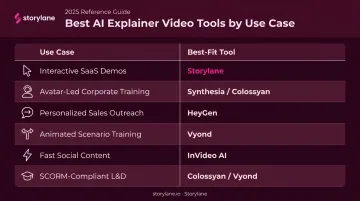
Decision Guide by Use Case
| Use Case | Best Fit |
|---|---|
| Interactive SaaS product demos | Storylane |
| Avatar-led corporate training at scale | Synthesia or Colossyan |
| Personalized sales outreach videos | HeyGen |
| Animated scenario-based training | Vyond |
| Fast social/marketing content at volume | InVideo AI |
| SCORM-compliant L&D modules | Colossyan or Vyond |
Five-Factor Evaluation Checklist
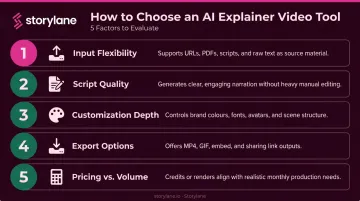
Before committing to any platform, test each against your actual workflow:
- Input flexibility — Can it start from your existing assets (screenshots, screen recordings, documents, or prompts)?
- Script quality — Does the AI understand narrative structure, or does it produce generic filler?
- Customization depth — Are brand colors, fonts, and logos controllable, or is the output template-locked?
- Export options — Does it support the formats and aspect ratios you need (MP4, SCORM, 9:16 for social)?
- Pricing relative to volume — Free tiers are useful for testing. Calculate the per-video cost at your actual production volume before committing.
That last point connects directly to output quality. Vidyard's research shows that 65% of viewers watch videos under 1 minute all the way through — which means the tool you choose directly affects whether your content actually gets watched.
Conclusion
The AI explainer video space in 2026 covers nearly every use case a go-to-market or training team will encounter. A training team needs SCORM compliance and analytics — Colossyan or Vyond. A sales team needs personalization and speed — HeyGen. For raw content volume, InVideo AI is the natural fit. Match the tool to how your team actually works, not the other way around.
That said, for SaaS teams, video has a hard ceiling regardless of which tool you use. Prospects watch, then leave — with no record of what interested them and no next step. Storylane's interactive demos let prospects click through the actual product, self-qualify, and arrive at sales calls already primed — so your AE is continuing a conversation, not starting one cold.
If your team creates product demos for sales, marketing, or onboarding, explore Storylane's AI-powered interactive demo platform to see how interactive demos complement or replace traditional explainer video in your workflow.
Frequently Asked Questions
What is the AI tool for creating explainer videos?
Several leading options exist depending on your use case. Synthesia and HeyGen are the go-to choices for avatar-based presenter videos; Vyond leads for animated scenario-driven content; InVideo AI handles fast text-to-video for social and marketing; and Storylane is purpose-built for interactive SaaS product demo explainers where prospects click through the product themselves.
How much does it cost to create an explainer video with AI?
AI tools range from free entry tiers to roughly $19–$89/month for most creator plans, compared to a traditional production average of $10,983 according to HubSpot's explainer video cost research. For teams producing multiple videos per month, the cost difference is significant.
What is the ideal length for an AI-generated explainer video?
The research-backed sweet spot is 60–90 seconds for most explainer formats. Plan for approximately 120–200 spoken words per minute of script. If the message requires more time, break it into a series of focused short videos rather than one long one, since viewer retention drops sharply past the 2-minute mark.
Can AI explainer video tools replace professional video production?
For product demos, onboarding walkthroughs, feature announcements, and social explainers, AI tools are fully capable replacements at a fraction of the cost. High-end brand campaigns and live-action shoots with on-set talent still benefit from traditional production, but those use cases represent a small share of what most B2B teams actually produce.
What types of explainer videos can AI tools create?
The main formats include animated explainers, avatar-based presenter videos, screen capture walkthroughs, text-to-video conversions, and interactive click-through demos. Some tools specialize in one format (Vyond for animation, HeyGen for avatars), while Storylane handles screenshots, screen recordings, and HTML captures within a single workspace.
Which AI explainer video tool is best for SaaS product demos?
For passive video-style demos, Synthesia and HeyGen work well. For SaaS teams that want prospects to actually interact with the product by clicking through features and choosing their own path before a sales call, Storylane's interactive demo platform drives more pipeline-ready conversations than passive video formats can.