The gap isn't production quality. It's the difference between showcasing features and solving problems on screen.
This guide covers what separates high-converting demo videos from forgettable ones, the exact steps to build one, key variables that affect conversion, and the mistakes that quietly kill results — including when a video alone isn't enough.
Key Takeaways
- Lead with the customer's pain point, not a feature list — the problem must come before the product
- The hook (first 5–7 seconds), a tight problem-solution narrative, and a single CTA are the three most critical conversion elements
- Optimal length varies: 60–90 seconds for ads/social, 2–3 minutes for product pages, up to 5 minutes for sales enablement
- Interactive demos outperform passive video for mid-to-bottom-funnel B2B buyers who want to self-explore
- Common conversion killers: feature overload, weak CTAs, slow openings, and repurposing one video across every channel
What Is a Product Demo Video?
A product demo video is a short-form video showing how a product works in context — not just what it does, but why it matters to a specific viewer's situation. An explainer video describes a concept abstractly. A tutorial teaches existing users how to complete a task. A demo video bridges the two — pre-sale, specific, built to move someone toward a decision.
A $500 screen recording with clean audio and real data will outperform a $10,000 animated video that explains nothing concretely. Format choice should follow product type, audience, and distribution channel — not production budget.
The Three Main Formats
| Format | Best For | Typical Use Case |
|---|---|---|
| Screen recording | SaaS/software | Product walkthroughs, feature highlights |
| Live-action | Physical products, service-led businesses | Authentic environment demonstrations |
| Animated | Abstract or complex concepts | Processes that can't be shown in-product |
Format and funnel stage work together — knowing where a viewer sits shapes which format and length will actually land.
Where Demo Videos Fit in the Funnel
- Top-of-funnel: Build awareness and curiosity — keep it broad, punchy, under 60 seconds
- Mid-funnel: Handle objections, show specific use cases — 2–3 minutes, problem-focused
- Bottom-of-funnel: Personalized, feature-specific, used in sales sequences — up to 5 minutes
What Makes a Product Demo Video Convert
Lead With the Pain — Then Show the Hook
High-converting demos open by naming a problem the viewer is actively experiencing. Not a generic frustration — a specific, recognizable one. When the viewer thinks "that's exactly my situation," they're primed to pay attention before the product appears on screen.
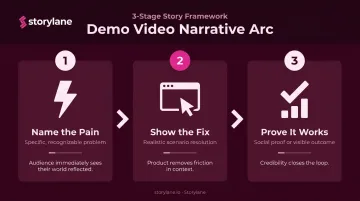
This is why the problem-solution-proof arc works better than a feature-by-feature walkthrough:
- Here's the pain — name the specific problem with enough precision that it stings
- Here's how it's resolved — show the product fixing it in a realistic scenario
- Here's evidence it works — social proof, real data, or a visible outcome
Keep the demonstration focused on 3–5 capabilities. Showing everything dilutes the message — viewers remember nothing specific.
That focused opening needs to land fast. Wistia's engagement research documented one case where moving the strongest material into the first 10 seconds reduced early drop-off by 50% and lifted overall engagement by 5 percentage points.
The hook must do one thing: make the viewer feel the problem before they've seen a single product screen.
Trust Signals That Reduce Skepticism
Embedded trust signals directly shape whether a skeptical buyer keeps watching. Effective options include:
- Real interface footage with actual data (not placeholder content)
- Customer logos from recognizable brands
- Testimonials with photos — CXL research found photo-backed testimonials significantly outperformed text-only formats in recall and perception
- Use case scenarios that reflect the viewer's actual industry
The CTA: One Action, Right Timing
Wistia's analysis of more than 36,000 CTAs found video CTAs average approximately 16% conversion rate — but timing matters. For 1–3 minute videos, CTAs perform best in the last quarter. Action-oriented copy ("Try," "Start," "Book") outperforms passive options like "Learn More."
The CTA should be singular — one destination, one action. Multiple options dilute intent. Place it at the moment of highest emotional engagement, typically right after the key benefit lands.
How to Make a Product Demo Video That Converts
Step 1: Define the Audience, Pain Point, and Single Goal
Before recording anything, answer three questions:
- Who exactly is this for? (Role, company size, industry — not "anyone who might buy")
- What specific problem are they experiencing right now?
- What one action do you want them to take after watching?
Demo videos fail most often because they were built for everyone, which means they resonate with no one. A video meant to drive trial sign-ups should not simultaneously explain onboarding or pitch advanced features.
Map the goal to the funnel stage:
- Awareness: CTA = watch another video or visit a product page
- Consideration: CTA = start a free trial or book a demo
- Decision: CTA = talk to sales or activate an account
Before writing a single line of script, research the actual language your buyers use. Sales call transcripts, support tickets, and G2/Capterra reviews surface the exact phrases that make hooks feel authentic — not generic.
Step 2: Write a Conversion-Focused Script
That buyer language feeds directly into your script structure. Three parts cover everything:
- Hook — open with the pain or a consequence of it. Not "Hi, we're [Company]..." — that's a fast path to the skip button
- Demonstration — show the product solving the problem in a realistic scenario, jargon-free, outcome-focused
- CTA — close with one specific, low-friction next step
On length: aim for roughly 130–150 words per minute of finished video. A 90-second demo needs approximately a 200-word script. Read it aloud before recording — unnatural phrasing and accidental feature lists show up immediately when spoken.
Read every line against a single test: does it move the viewer closer to clicking? If not, cut it.
Step 3: Record Footage That Builds Trust
For software products:
- Show real data in the interface — placeholder content signals a product that isn't ready for real use
- Keep cursor movements deliberate and unhurried — frantic mouse movement distracts from what's being demonstrated
- Capture the specific workflow the target persona actually uses
For quality standards that directly affect conversion:
- Audio quality will make or break your video. Distorted or muffled sound causes immediate drop-off — viewers tolerate imperfect visuals far longer than bad audio
- Add captions by default. Meta's official guidance confirms captions make video ads easier to watch with sound off — and a significant portion of mobile and social video is consumed silently
Step 4: Edit for Pacing, Clarity, and Conversion
Editing principles that directly affect conversion:
- Cut ruthlessly — remove any moment where nothing is being demonstrated or explained
- Add on-screen text callouts to reinforce key benefits visually (viewers who skim still absorb these)
- Make the CTA visually prominent — not buried, not a brief flash at the end
- Keep transitions minimal — heavy effects draw attention away from the product
Platform-specific considerations:
| Placement | Edit Priority |
|---|---|
| Social/paid ads | Hook in first 3 seconds, benefit-first pacing |
| Website product pages | Slightly longer, more context acceptable |
| Sales sequences | Personalized intro frame, buyer-specific scenario |
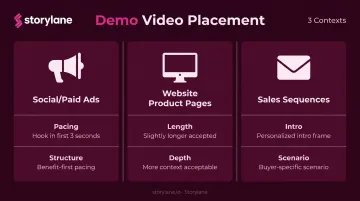
Editing for multiple formats is easier than starting from scratch. A 3-minute website video can yield a 60-second social cut and a 90-second sales email version from the same raw footage.
Common Mistakes That Kill Demo Video Conversions
Feature Overload and Slow Intros
Opening with company history, an "about us" segment, or a catalog of everything the product can do before establishing why any of it matters is the fastest way to lose a viewer. Vidyard's 2025 benchmark data across 943,305 videos shows 65% of viewers watch to the end for videos under 1 minute, dropping to 20% for videos over 20 minutes.
Common slow-intro patterns that kill watch time:
- Opening with a brand overview or company timeline
- Listing every feature before establishing the problem it solves
- Delaying the core value proposition past the 30-second mark
The opening has to hit a recognizable problem. Start there.
Mismatched Placement and Format
A 3-minute detailed walkthrough embedded in a homepage hero will underperform a 60-second focused version. The reverse is true for a sales enablement context where buyers expect depth. Using the same unedited video across every channel consistently underperforms. Each placement has a different audience, attention span, and conversion goal — the video needs to match.
No or Weak CTA
Ending with "learn more" or nothing at all leaves the viewer without a clear next step. Strong vs. weak CTAs in a SaaS context:
| Weak | Strong |
|---|---|
| "Learn more" | "Start your free trial" |
| "Visit our website" | "See it in your workflow — book a 15-min call" |
| No CTA | "Try it free — no credit card required" |
The CTA should reflect the buyer's stage, be visually distinct, and point to one destination only — not a menu of options.
Product Demo Video vs. Interactive Demo: When to Go Further
Video is powerful for top and mid-funnel, but it has a ceiling. Many B2B buyers, especially those evaluating SaaS, prefer to self-explore rather than passively watch. Gartner research ranks interactive demonstrations as the most useful website resource when evaluating SaaS from startup, small, and midsize providers.
That preference shows up in purchase behavior too. A survey of 2,185 technology buyers by TrustRadius found 43% wanted access to self-guided product demos, and 40% said having to contact sales for a demo made them less likely to purchase.
When an Interactive Demo Outperforms Video
- Buyers want to click through the product at their own pace, not follow a predetermined narrative
- Personalization at scale is needed — different industries, roles, or use cases
- The sales team needs a leave-behind that prospects can revisit asynchronously
- The product is complex enough that a 3-minute video can't do it justice
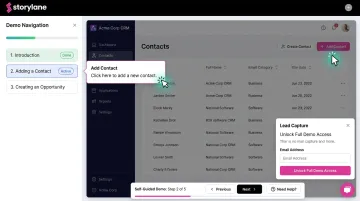
Platforms like Storylane let teams build interactive product demos that combine video walkthroughs, guided tours, and in-demo lead capture — all without a live rep in the room. Storylane's internal data shows website visitors who engaged with an interactive demo converted at 24.35%, compared to the average website conversion rate of 3.05% — nearly 8x higher.
The Hybrid Approach
For many teams, video and interactive demos aren't an either/or choice. A short demo video (60–90 seconds) drives initial interest and qualifies intent, while an interactive demo closes the loop — letting the prospect experience the product themselves before a sales call.
Jon Dolan, Sales Director at Cognism (a Storylane customer), put it directly: "Nobody wants to watch a 5-minute video anymore. So my team sends a Storylane demo and the prospect sees the demo in 5 clicks."
Frequently Asked Questions
What is a product demo video?
A product demo video is a short video showing how a product works in a real-world context, designed to help potential buyers understand its value and take a next step. It differs from explainer videos (which are more conceptual) and tutorials (which serve existing users post-sale).
How do you create a product demo video?
Four steps cover the essentials:
- Define your specific audience and a single conversion goal
- Write a problem-solution script (pain point → feature → outcome)
- Record clean footage of the product in a realistic scenario
- Edit with a visually prominent CTA that drives the next action
How long should a product demo video be?
Length depends on placement: 60–90 seconds for social and ads, 2–3 minutes for product pages, and up to 5 minutes for sales enablement. Every second should deliver value — Wistia's research shows videos under 1 minute average 52% engagement.
What is the ideal structure for a product demo video script?
Three parts: hook with the pain point, demonstration of the solution in a realistic scenario, and a single clear CTA. Target approximately 130–150 words per minute of intended video length to maintain tight pacing.
Where should you place your product demo video for the most conversions?
High-converting placements include:
- Above the fold on your homepage or product page
- Outbound sales email sequences
- Landing pages tied to paid campaigns
- Demo request confirmation flows
Each placement needs a version tailored to its context — same footage, different length, pacing, and CTA.
How do you measure whether a product demo video is converting?
Track view-through rate and average watch time (engagement), CTA click-through rate (intent), and downstream metrics like trial starts, demo requests, or pipeline influenced. A/B test different hooks and CTAs to find what actually moves your specific audience — assumptions rarely survive contact with data.