Introduction
Your marketing team is generating leads. Your sales team is running demos. Your product team is shipping features. Yet customers still churn, deals still stall, and no one can agree on where exactly things are going wrong.
That gap between the effort you're investing and the results you're getting is almost always a journey problem — one you can't fix until you can see it clearly.
According to McKinsey, B2B customers now use an average of 10 interaction channels, up from 5 in 2016, and more than 50% are likely to switch suppliers if the experience isn't seamless across those channels. The journey is already happening — mapped or not.
Customer journey mapping is the process of visualizing every interaction a customer has with your brand — from first awareness through purchase and beyond. Done well, it turns internal disagreements about "where things go wrong" into a shared, actionable picture your whole team can work from.
Key Takeaways
- A customer journey map captures every touchpoint a customer has with your brand: their actions, emotions, and pain points at each stage
- Effective maps are built from real data (interviews, analytics, support logs), not internal assumptions
- Every map needs five core elements: persona, journey stages, touchpoints, emotions/pain points, and opportunities
- Current state, future state, day-in-the-life, and service blueprint are the four main map types — each suited to different goals
- Maps only create value when acted upon — treat the output as a decision-making tool, not a slide deck artifact
What Is Customer Journey Mapping?
Nielsen Norman Group defines a journey map as "a visualization of the process that a person goes through in order to accomplish a goal." For B2B SaaS teams, that goal spans a long arc: from the moment a buyer first recognizes a problem, through evaluation, purchase, onboarding, and ideally into long-term advocacy.
How It Differs from Other Analysis Tools
Journey mapping is often conflated with funnel analysis or user research. They're not the same:
- Funnel analysis tracks conversion rates between pipeline stages — it tells you where drop-off happens, not why
- User research captures individual sessions or interviews — it reveals behavior at a specific moment, not across a full lifecycle
- Journey maps synthesize both quantitative and qualitative data into a single narrative showing what customers do and what they think and feel at every step
That synthesis is what makes a journey map genuinely useful. It connects emotional context to behavioral data in a way that neither analytics nor research achieves alone.
Why It's Commonly Misused
Many teams treat journey mapping as a one-time workshop output. They run a half-day session, produce a nicely formatted diagram, and file it away. That approach produces a snapshot, not a strategy — and it's usually outdated within months.
A real journey map is an evolving asset that drives ongoing decisions across marketing, product, sales, and customer success. B2B buyers now interact across channels simultaneously, including:
- Company websites and landing pages
- Emails, ads, and retargeting
- Sales calls and product trials
- Review sites and peer communities
A map that doesn't update when any of these touchpoints shift loses its value within a single product release cycle.
Core Elements of a Customer Journey Map
Every effective journey map contains five components. Miss any one of them, and the map loses its usefulness.
Persona (The "Who")
Every map begins with a clearly defined customer persona — a data-driven profile representing a specific segment of your audience. This isn't a generic "VP of Marketing." It's a specific role with documented goals, frustrations, preferred channels, and decision-making behaviors.
Critical rule: one persona per map. Mapping multiple personas simultaneously produces generic outputs that reveal nothing actionable. B2B organizations with distinct customer segments — say, an SMB buyer and an enterprise buyer — should build separate maps.
Journey Stages (The "When")
Stages represent the distinct phases of a customer's relationship with your brand. For most B2B SaaS companies, these are:
- Awareness — recognizing a problem or discovering a solution category
- Consideration — evaluating options and building requirements
- Decision — selecting a vendor and completing purchase
- Onboarding — activating and achieving initial value
- Loyalty/Advocacy — expanding usage and referring others
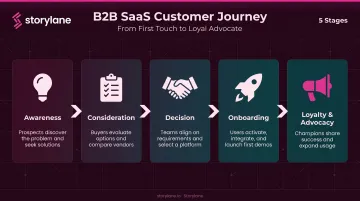
One important distinction: stages should reflect the customer's experience, not your internal sales pipeline stages. "Proposal Sent" is a pipeline stage. "Evaluating final vendors" is a journey stage.
Touchpoints and Channels (The "Where" and "How")
Touchpoints are the specific moments when a customer interacts with your brand. Channels are the mediums through which those interactions occur. A Google ad is a touchpoint on the paid search channel. A product demo is a touchpoint on the direct sales channel.
For B2B SaaS, the product evaluation stage is often the most consequential and the most under-mapped. Forrester reports that more than 60% of business buyers use trials, sandboxes, or usage-based periods as a risk-reduction strategy before committing to a vendor.
The challenge: most teams map this stage based on assumptions, not evidence. Platforms like Storylane close that gap by capturing behavioral data — click paths, feature dwell times, drop-off points, and CTA engagement — during demo sessions, then syncing it directly to Salesforce, HubSpot, and Marketo. That turns evaluation-stage guesswork into documented buyer behavior.
Emotions and Pain Points (The "How It Feels")
Recording customer sentiment at each touchpoint transforms a process diagram into an empathy tool. Two types of pain points matter here:
- Explicit pain points: customers name these directly in surveys, support tickets, or sales calls
- Latent pain points: these surface through behavior — repeated support requests for the same feature, or drop-off patterns in a product demo that no one mentioned in a follow-up call
Both are necessary. Customers can't always articulate what's frustrating them; behavioral data surfaces what they can't say.
Insights and Opportunities (The "So What")
The most frequently skipped element. Every map should end with a documented list of gaps, friction points, and opportunities — with ownership assigned to specific teams. A friction point with no owner attached is just an observation. Assign it to a team, and it becomes a roadmap item.
How to Create a Customer Journey Map: Step-by-Step
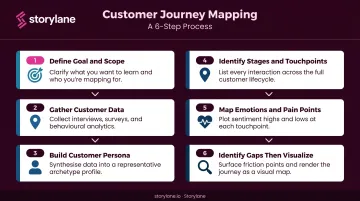
Building a useful journey map is a structured process, not a design exercise — visualization comes last. Here's the sequence that produces maps teams actually use.
Step 1: Define Your Goal and Scope
A map without a defined business objective produces insight without direction. Align your team on three things before you start:
- What problem are you solving? Examples: reducing onboarding drop-off, improving trial-to-paid conversion, understanding why enterprise deals stall
- Which persona are you mapping? One persona, one scenario
- What's in scope? Define the start and end points of the journey you're documenting
Teams that skip this step end up with a map that covers everything and prioritizes nothing.
Step 2: Gather Customer Data
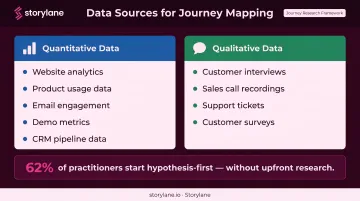
You need two data streams:
Quantitative data:
- Website analytics and traffic sources
- Product usage data and feature adoption rates
- Email engagement and conversion rates
- Demo engagement metrics (completion rates, drop-off points, CTA clicks)
- CRM pipeline data
Qualitative data:
- Customer interviews (the highest-signal input)
- Sales call recordings
- Support tickets and NPS comments
- Customer surveys
NN/g's research on 343 practitioners found that 62% start hypothesis-first rather than with upfront user research — meaning most maps are built on assumptions. Maps built from assumptions lead to solutions for problems customers don't actually have. Treat any hypothesis-first map as a draft that requires customer validation.
Step 3: Build the Customer Persona
Synthesize your research into a working persona that captures:
- Role and seniority
- Primary goals and success metrics
- Key frustrations and blockers
- Preferred channels and communication styles
- Where they typically enter and exit the buying process
In B2B, this persona often represents a buying committee role (a Head of IT Security, a VP of Revenue Operations) not a generic "user." Gartner research shows B2B buying groups range from 5 to 16 people across up to four functions, so persona selection matters enormously.
Step 4: Identify Journey Stages and Touchpoints
With your persona defined, walk through each stage and list every touchpoint within it, from first-touch content to post-sale check-ins. For each touchpoint, document:
- What the customer is doing
- Which team owns this interaction
- Which channel it occurs on
Flag touchpoints that are currently unowned — these are common sources of experience gaps, where customers fall through the cracks between marketing, sales, and customer success handoffs.
Step 5: Map Emotions, Pain Points, and Expectations
Layer customer sentiment onto the map at each touchpoint. Use your research data to show where customers feel confident versus confused, engaged versus frustrated.
One useful technique is the sentiment line: a visual arc plotted beneath the journey that charts emotional highs and lows across stages. This makes the emotional pattern immediately visible to stakeholders who scan rather than read. A sentiment line showing a steep drop during onboarding communicates urgency far faster than a paragraph describing it.
Step 6: Identify Gaps, Then Visualize
Step back from the completed map and look for patterns:
- Where are the biggest drops in sentiment?
- Where are touchpoints missing between stages?
- Where does ownership fall through the cracks?
- Which channels are inconsistent with each other?
Visualization comes after this synthesis. Tools commonly used include Miro, Lucidchart, Confluence, and dedicated CJM platforms. The format matters less than the rigor behind it. Make the final map a shared, accessible document. A PDF attached to an email that nobody opens isn't a journey map — it's a filing cabinet.
Types of Customer Journey Maps (with Examples)
Current State Map
The most common type. Documents the customer journey exactly as it exists today, used primarily for diagnosing friction points and prioritizing improvements.
Example: A cybersecurity software company builds a current-state map for enterprise prospects and discovers that buyers consistently disengage after an initial demo. The demo is generic: it doesn't speak to the compliance requirements of a CISO versus the deployment concerns of an IT administrator. The current-state map makes this visible through a sharp sentiment drop at the demo touchpoint.
The fix: persona-specific demo paths. A single demo asset that branches by buyer role means a CISO sees compliance and risk reduction content while an IT administrator sees deployment and integration details. Storylane's branching demo format handles this directly, with engagement tracked separately by path.
Future State Map
Projects the ideal customer journey the organization wants to design, useful for product roadmapping, go-to-market strategy, and experience redesigns.
NN/g's practitioner research found that 73% of practitioners use journey maps to envision future-state experiences for existing products. The key constraint: future state maps should be grounded in real customer aspirations, not internal wishful thinking. The best future state maps are built by asking customers where they want the experience to go, not by projecting what the product team hopes to build.
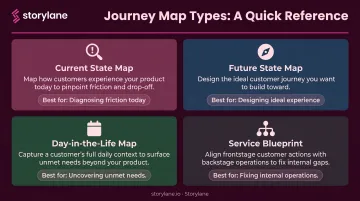
Day-in-the-Life Map
Maps the customer's full daily context, including everything beyond their interaction with your brand: the tools they switch between, the workflows they follow, the friction points that exist before they ever reach you.
This type is particularly useful for identifying unmet needs. A day-in-the-life map for a sales rep evaluating a new tool might reveal that they spend 45 minutes before each call preparing context from three different systems. That's not a problem your product's feature list addresses, but it's a need your product could solve if you design for it.
Service Blueprint
An advanced extension of the journey map that includes the "backstage": internal processes, systems, and staff workflows that support the customer-facing experience.
Use a service blueprint when the root cause of a poor customer experience lies in internal operations rather than surface-level touchpoints. If customers consistently report frustration during onboarding but the customer-facing map looks fine, a service blueprint often reveals the real problem:
- A handoff failure between sales and customer success
- An internal system that doesn't pass the right data to the onboarding team
- Misaligned SLAs between teams that create response delays customers feel directly
Common Customer Journey Mapping Mistakes to Avoid
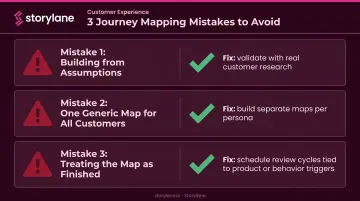
Building from Assumptions, Not Research
The most common and costly mistake. Internal teams tend to map the experience they believe customers have — which reflects internal processes and biases rather than actual behavior. Customers experience your brand differently than you design it, particularly at self-service and digital touchpoints.
Treat any map built without customer research as a hypothesis — and validate it before acting on it.
Creating One Generic Map for All Customers
A single universal journey map almost never reflects the actual diversity of your customer base. In B2B, an SMB buyer and an enterprise buyer follow entirely different journeys — different timelines, different channels, different stakeholders, and different decision criteria.
Build separate maps per persona or use case when journeys diverge significantly — combining them into one map produces outputs that are too vague to act on.
Treating the Map as a Finished Product
Customer journeys evolve. New channels emerge, products change, buyer behavior shifts. A journey map that isn't revisited becomes inaccurate — and worse, it creates false confidence about an experience that no longer resembles what customers actually encounter.
Schedule regular review cycles tied to meaningful triggers: major product launches, significant market shifts, or observable changes in conversion rates or churn patterns. Where possible, connect the map to live data sources so changes in behavior surface automatically rather than waiting for a scheduled review.
Frequently Asked Questions
What are the main stages of a customer journey map?
The typical stages are Awareness, Consideration, Decision, Onboarding, and Loyalty/Advocacy — though the exact stages vary by business model. What matters most is that stages reflect the customer's perspective, not the company's internal sales pipeline.
What is the difference between a customer journey map and a buyer journey map?
A buyer journey map covers only the pre-purchase decision process. A customer journey map spans the full lifecycle — including post-purchase onboarding, support, and advocacy — which is where retention and expansion revenue are won or lost.
How often should a customer journey map be updated?
Revisit the map whenever something meaningful shifts: a product launch, a go-to-market change, a behavior pattern, or a notable move in conversion or churn metrics. Think of it as a living document, not a one-time workshop deliverable.
How many personas should a customer journey map include?
One persona per map. Organizations with multiple distinct customer segments should build separate maps rather than combining personas into a single generic output. Specificity is what makes a journey map actionable.
What is the difference between a current state and future state journey map?
A current state map documents how the journey actually works today — used for identifying friction points and diagnosing problems. A future state map defines the ideal journey the organization wants to design — used for strategic planning and experience development. Most teams should start with a current state map before attempting a future state.