The problem isn't customer intent. It's the training model. Static PDFs go unread. Slide decks explain without showing. One-on-one onboarding calls don't scale past a certain account volume. And as Gartner research shows, only 14% of customer service issues are fully resolved through self-service — which tells you exactly how far most static help content falls short.
Interactive demos change the mechanic. Instead of reading about a workflow, customers complete it. Instead of scheduling a call to ask how something works, they find a guided walkthrough in your help center and do it themselves.
This article covers why interactive demos outperform static training materials, the strongest use cases across the post-sale journey, how to build and measure demos that actually drive adoption, and what good scaling looks like in practice.
Key Takeaways
- Interactive demos drive active, practice-based learning — proven more effective than passive reading or video watching
- The most valuable use cases span onboarding, ongoing feature education, and internal team training
- Effective training demos are task-based, role-segmented, and short enough to revisit on demand
- Measure impact through support ticket volume, time-to-first-value, and feature adoption rates
- No-code platforms like Storylane let teams build, personalize, and maintain demo libraries without engineering support
Why Interactive Demos Outperform Static Training Materials
The case against passive training is measurable. A 2014 meta-analysis published in PNAS found failure rates of 33.8% under traditional lecturing versus 21.8% under active learning across STEM courses. The mechanism matters: when learners practice and apply rather than read and watch, they retain more and perform better.
That same principle maps directly to software training. Reading a help doc describes a workflow. Watching a video shows it. But clicking through an interactive demo forces the learner to actually do it — building the muscle memory that makes the behavior stick.
The Self-Service Demand Gap
There's also a pull-side problem. Zendesk reports that 91% of customers would use a knowledge base if it met their needs, and Salesforce data puts the preference for self-service at 61% for straightforward issues. The gap is quality. Static help docs and FAQs describe steps — they don't simulate them. A customer trying to complete a first workflow needs to do it, not read about it.
Where Common Alternatives Fall Short
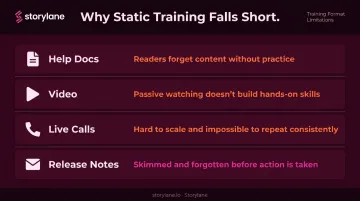
| Format | Core Limitation |
|---|---|
| Written help docs | Describe steps but can't simulate the action; often skipped |
| Video walkthroughs | Can't pause to attempt steps; become outdated quickly |
| Live onboarding calls | Don't scale; quality depends on the individual rep |
| Release note emails | Passive delivery; no practice mechanism |
Consistency is another problem worth naming directly. When training depends on individual CS reps, what customers learn varies by who picked up the call. Interactive demos standardize the path: every user gets the same guided experience, reinforcing the same product messaging, every time.
The Top Use Cases for Interactive Demos in Training & Onboarding
Onboarding New Customers
The traditional welcome call has a structural problem: it happens once, covers too much ground, and relies on the customer to remember everything later. Interactive demos flip that model.
Before a new user ever touches the live system, they can walk through their most critical first tasks in a guided, low-stakes environment. That builds confidence early — and Wyzowl's customer onboarding research found that 86% of customers say they're more likely to stay loyal to a business that invests in onboarding content after purchase.
The more underused advantage is role-based segmentation. A new admin needs to understand configuration and permissions. A manager needs reporting. An end user needs the core daily workflow. Sending all three through the same onboarding call wastes everyone's time.
With Storylane's multi-chapter demo format, you can build branching flows where each persona follows a distinct path — without multiplying the number of live sessions you have to run. Storylane also supports private demo links, which means you can control which users access which onboarding track based on their role.
Ongoing Feature Education
Pendo's Feature Adoption Report found that 80% of features in the average software product are rarely or never used. Shipping a feature and telling customers about it in release notes are two entirely different things from customers actually learning and using it.
Interactive demos give feature announcements teeth. Instead of a changelog entry, customers get a guided walkthrough they can complete in two minutes — in their own time, without scheduling anything.
The self-serve training library model takes this further. Embedding demos into a help center or resource hub creates a permanent, on-demand learning environment. Whispli, one of Storylane's customers, built a full library of feature-based demos covering functionality like analytics and team management. Their CS team shares these directly when customers have questions, letting customers find the answer themselves rather than waiting on a reply.
Storylane's Buyer Hub feature enables this across large libraries: multiple demos organized by topic, role, or product area in a single navigable interface that customers can explore independently or follow as a structured path.
Internal Team Training
That same self-serve model works just as well inside your organization. Before a new feature goes live, CS reps, support agents, and sales teams need to understand it well enough to answer customer questions accurately.
Interactive demos give internal teams a consistent, repeatable way to get up to speed without pulling a product manager into a training call. Everyone works through the same guided experience and arrives at the same baseline understanding.
This matters more than it might seem. Inconsistent internal product knowledge creates inconsistent customer experiences. A few specific consequences:
- Support agents give conflicting answers about the same feature
- Sales reps misrepresent capabilities during renewal conversations
- CS teams escalate questions that a product walkthrough would have resolved
Interactive demos remove that inconsistency at the source — before it ever reaches the customer.
How to Build Interactive Training Demos That Drive Adoption
Start with Tasks, Not Features
The most common mistake in building training demos is organizing them around feature lists rather than user goals. A customer doesn't need to "learn the dashboard" — they need to complete their first report, set up their team, or configure their notifications.
Map each demo to a specific job the user is trying to get done. That framing produces demos that are:
- Focused on outcomes, not feature inventories
- Short enough to finish (low step counts keep completion rates high)
- Relevant to what the user is trying to accomplish right now
Match the Format to the Training Depth
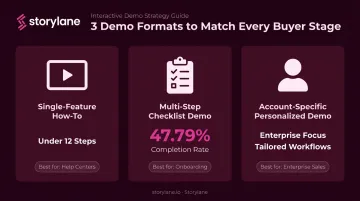
Three structural formats cover most training scenarios:
Single-feature how-to demos — Short, screenshot-based walkthroughs (ideally under 12 steps) covering one task. Best for help centers and support deflection. Fast to build, easy to update.
Multi-step checklist demos — Multi-chapter flows that guide users through an end-to-end process. Best for new user onboarding. Storylane's own data shows the first flow of a multi-chapter demo achieves a 47.79% completion rate — more than double the 22.63% rate for single-flow demos.
Account-specific personalized demos — High-touch demos tailored to a customer's own workflows, use case, and terminology. Best for enterprise accounts where generic training won't land.
Use a Demo Hub to Organize Training Content
Rather than sending customers a series of individual links, a centralized demo hub lets them self-navigate to the right content. Storylane's Demo Hub organizes guided demos by topic, role, or product area — all in one place. Different users can find what they need without asking anyone:
- A new admin follows their onboarding track
- An experienced user locates a specific feature walkthrough
- A manager jumps straight to a reporting-focused path
The hub supports both free-flow self-navigation and structured guided paths. You can configure the experience based on whether the goal is open exploration or step-by-step progression.
Personalize at Scale with Variable Tokens
Personalization is the fastest lever for improving training completion. Storylane's dynamic variable tokens swap in customer-specific content — name, company logo, use-case language, and even custom metrics — without requiring a separate demo build for each account.
A welcome screen that reads "Welcome back, Acme Corp" and a dashboard showing the customer's own data creates a meaningfully different experience from a placeholder-filled generic walkthrough. That relevance improves completion rates.
How to Measure the Impact of Interactive Demo Training
Primary Metrics to Track
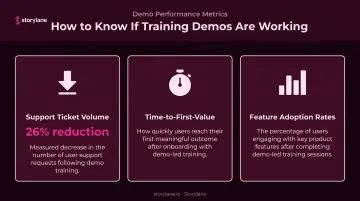
Three metrics signal whether training demos are actually working:
- Support ticket volume — Measure before and after demo deployment. A meaningful drop in how-to and setup-related tickets indicates users are finding answers through demos rather than contacting support. Buffer saw a 26% reduction in ticket submissions after redesigning their help center self-service content — a useful adjacent benchmark for what effective self-serve training can deliver.
- Time-to-first-value (TTV) — How quickly do new users complete their first key workflow? This is the clearest signal that onboarding demos are accelerating the path to value.
- Feature adoption rates — Track whether users who complete a feature demo actually use that feature at higher rates. If they do, the demo is working.
Demo-Level Engagement Analytics
Storylane tracks completion rates and session-level engagement percentages — data that tells you two things. High completion rates indicate the demo is appropriately scoped and useful. Drop-offs at specific steps reveal where users lose momentum, which tells you exactly where to improve the content.
ContactMonkey reported demo completion rates of 50–60% using Storylane, against a 40% industry benchmark — showing that well-built demos meaningfully outperform the average.
Connecting to Business Outcomes
Demo engagement data becomes useful when it connects downstream. Storylane integrates with Salesforce and HubSpot, making it possible to track contacts who completed training demos and correlate their engagement with renewal rates, expansion signals, and health scores.
One Storylane customer built a monthly reporting framework that cross-references demo engagement data with Salesforce purchase tracking to measure ARR influenced by demo views.
The same approach works for post-sale training: demo completed → activation event reached → feature adopted → support tickets avoided → renewal risk reduced.
Best Practices for Scaling Interactive Demo-Based Training
Keep demos short and modular. A library of focused, task-specific demos is more useful than one comprehensive walkthrough. Users can find exactly what they need without replaying irrelevant content — and Navattic's 2026 State of the Interactive Product Demo report found 48% higher completion rates for multi-flow demos versus single-flow demos, supporting the modular approach.
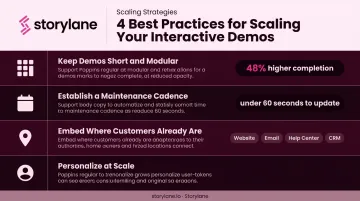
Establish a maintenance cadence. Training demos that show an outdated UI or a deprecated feature actively erode trust. Tie your demo review cycle to product release schedules. With Storylane's no-code editor, a UI change can be reflected in a live demo in under 60 seconds — compared to re-recording a video, which typically requires coordination across multiple teams and hours of work.
Embed demos where customers already are. The highest completion rates come from training that meets users in context. Requiring a detour to a separate learning environment adds friction — and friction reduces usage. Place demos where your customers are already working:
- Embedded in your help center or knowledge base
- Included in onboarding email sequences
- Surfaced via in-app prompts at relevant moments
- Organized in a customer-facing portal for self-discovery
Frequently Asked Questions
What are the best platforms for interactive customer education demos?
The main categories are interactive demo platforms (guided, clickable walkthroughs), digital adoption platforms (in-app overlays), and LMS tools (structured course-based training). The right choice depends on whether your priority is self-serve onboarding, in-app guidance, or formal course completion. Storylane covers the first category with guided demos, a self-serve demo hub, and built-in analytics — no engineering resources required.
How do interactive demos reduce customer support tickets?
Self-serve demos answer common how-to questions at the moment of friction, before users ever file a ticket. Adjacent benchmarks illustrate the potential: Buffer saw a 26% ticket reduction after improving self-service content, driven by the same principle — accessible answers reduce inbound contact volume.
Can interactive demos replace live onboarding calls entirely?
For standard use cases, yes — interactive demos handle the routine tasks that fill most welcome calls. A blended model works well in practice: demos for standard self-serve onboarding, live calls reserved for complex or strategic accounts where relationship and context outweigh efficiency.
How do I measure whether my interactive training demos are effective?
Track completion rates and step-level drop-offs to assess demo quality, then connect that to downstream metrics: support ticket volume, feature adoption rates, and time-to-first-value. Most interactive demo platforms, including Storylane, provide built-in analytics for completion and engagement tracking.
What types of interactive demos work best for customer onboarding?
The right format depends on the use case:
- Single-feature how-to demos for help centers and support deflection
- Multi-step checklist demos for guiding new users through full onboarding flows
- Personalized account-specific demos for enterprise customers who need training mapped to their own workflows
How is an interactive demo different from a product tour?
Product tours are typically passive, guided overviews shown automatically to new users that explain the product. Interactive demos are on-demand, clickable experiences where users actively complete tasks when needed. That distinction makes interactive demos better suited to training and ongoing education, where the goal is practice rather than introduction.