Introduction
B2B buyers don't wait for sales calls anymore. According to G2's 2024 Buyer Behavior Report, 69% of software buyers engage a salesperson only after making a purchase decision — meaning your product content does most of the persuading before anyone picks up the phone.
Demo videos built from product URLs fit directly into this shift. They let prospects see your product in action without requiring a live meeting, making them a high-ROI pre-sales asset for any go-to-market team.
But there's a real gap between building a demo video and building one that actually converts. How you structure it, who you target, and what conversion elements you layer in: those decisions determine whether viewers book a meeting or bounce.
This guide covers exactly that: a repeatable process for turning a product URL into a high-converting demo video, the variables that separate good demos from great ones, and the mistakes that tank your conversion rates.
Key Takeaways
- Define your persona and use case first — demos built around a specific buyer convert better than generic walkthroughs
- Use a consistent structure: open with the problem, show the product solving it, highlight 2–3 relevant features, close with a CTA
- Keep top-of-funnel videos under 1 minute; 65% of viewers finish videos that length
- Mid-roll CTAs convert at 4x the rate of post-roll CTAs on average — placement matters
- For mid-funnel and complex products, interactive demos extend what a video can do
What Is a URL-Based Demo Video (and Why It Differs from a Video Ad)?
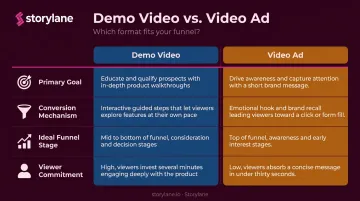
A URL-based demo video uses a product page or app URL as its source material. The tool — whether AI-powered or manual — extracts the UI, feature descriptions, and benefit language from that URL to build a structured walkthrough. That goal is distinct from what a video ad is designed to do.
| Demo Video | Video Ad | |
|---|---|---|
| Primary goal | Build product understanding and trust | Drive awareness or clicks |
| Conversion mechanism | Demonstrates workflows and outcomes | Creates interest or purchase impulse |
| Ideal funnel stage | Mid-funnel evaluation | Top-of-funnel awareness |
| Viewer commitment | Higher — they want to understand | Lower — they're being interrupted |
For B2B SaaS specifically, this distinction is critical. TrustRadius found that 54% of technology buyers used at least one type of demo during their evaluation — rising to 67% for enterprise buyers. These buyers aren't looking to be sold to. They're trying to understand whether your product fits their workflow before they commit to a conversation.
A demo video built from your product URL speaks directly to that intent — which is exactly why the format works at the evaluation stage where buying decisions actually form.
How to Create High-Converting Demo Videos from a Product URL
This process works whether you're using an AI-powered tool that auto-scrapes the URL or manually capturing your product UI. The sequence matters more than the method.
Step 1: Define the Audience and Use Case Before Touching the URL
Starting with the URL is the most common mistake teams make. Without first defining who the demo is for and what problem it solves, the output will mirror your marketing page — written for browsers, not buyers.
Decide upfront:
- Target persona — job title, company size, decision-making authority
- Key pain point — the specific friction they feel today
- Primary use case — one workflow, not a product overview
- Desired takeaway — the single thing you want them to believe after watching
Once you have that, use the URL itself to validate. Review the page's headline, feature descriptions, and CTAs — they tell you which use case and persona the page already targets. That becomes your demo's narrative spine. If the page is optimized for IT security buyers, your demo should speak that language from the first frame.
Step 2: Extract and Structure the Product Content from the URL
This step looks different depending on your toolset. Storylane captures your product screens via its Chrome extension — screen-by-screen or via continuous capture as you click through the product. From there, Storylane's AI Suite automatically generates contextual annotations, voiceover copy, and guided steps from what it sees on screen.
Manual capture works too. Screen-record your product flow, then script the narration separately.
Either way, the structure that converts follows the same sequence:
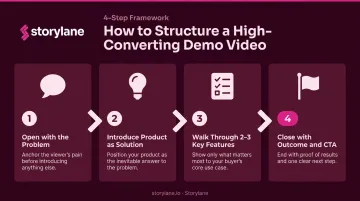
- Open with the problem — name the viewer's pain in the first 10 seconds
- Introduce the product as the solution — not as a feature list, as an answer
- Walk through 2–3 relevant features — chosen for the persona defined in Step 1
- Close with the outcome and CTA — what changes for the buyer, and what to do next
Feature-dumping kills demos. Showing everything instead of the right things trains viewers to disengage. Pick the features that most directly address the pain point you named in Step 1 and cut the rest.
Step 3: Add Conversion Elements — Voiceover, Annotations, and CTA
Raw screenshots or a screen recording aren't a demo yet. Three layers turn captured content into something that converts:
- Voiceover or narration — ties features to outcomes in the viewer's language. "This dashboard shows your pipeline health" is informative. "So instead of pulling three reports manually, your team sees deal risk in one view" connects to a real pain.
- Annotations and tooltips — direct attention to what matters and explain why it matters. Storylane's AI Suite generates contextual annotations with one click after capture, so teams aren't writing tooltip copy from scratch.
- A contextual CTA — matched to where the buyer is in their journey. "See how this works in your stack" lands better than "Learn more" for mid-funnel buyers. "Explore the product yourself" works better at the top of the funnel than "Book a demo."
Storylane's AI Content Assistant can also refine auto-generated copy before you publish. That step matters: content extracted from a marketing page often needs editing before it reads as buyer-facing, not brand-facing.
Step 4: Publish, Distribute, and Track Performance
Where you put the demo shapes how it converts. A few contexts and their appropriate formats:
- Landing pages — embed above the fold for highest visibility; use inline autoplay to reduce friction
- Sales follow-up emails — lead with a demo GIF in the preview, link to the full video; personalize the intro to the prospect's use case
- Outbound sequences — shorter clips (under 60 seconds) work better here; the goal is to earn a meeting, not replace one
- Post-demo leave-behinds — a more detailed walkthrough is appropriate; the buyer has already expressed intent
Tracking isn't optional. Without data on viewer completion rates, drop-off points, and CTA clicks, you have no basis for improving the demo. Storylane's analytics surface engagement depth, drop-off by screen, and CTA click rates — and the Account Reveal feature can identify which companies are watching, giving sales teams intent signals before any hand-raise occurs.
What Makes a Demo Video High-Converting? Key Variables to Control
Two demos built from the same product URL can produce dramatically different results. The difference comes down to four controllable variables.
Variable 1: Specificity of Audience
Persona-specific demos consistently outperform generic ones. A demo built for a Head of Security at a mid-market company needs different language, feature emphasis, and outcome framing than one built for a Sales Ops manager — even if the underlying product is identical.
Salesforce's 2024 sales data reports that 73% of B2B buyers actively avoid sellers who send irrelevant outreach. The same principle applies to demos. If the content doesn't speak to the specific buyer's context, they tune out — and your conversion rate reflects that.
That points to a clear fix: one core URL capture, multiple persona-specific cuts. Storylane supports this through branching flows and persona-targeted demo hubs, so you're not rebuilding from scratch for each segment.
Variable 2: Demo Length and Pacing
Short and specific beats long and comprehensive almost every time. Vidyard's benchmark data shows 65% of viewers finish videos under 1 minute, dropping to 20% for videos over 20 minutes.
That doesn't mean all demos should be under a minute. Wistia's 2024 analysis found that instructional videos of 3–5 minutes averaged 74% engagement, compared to 43% for generic content of the same length — a demo that teaches a specific workflow can earn that extra time.
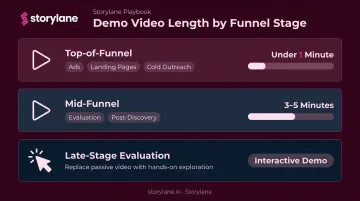
Quick reference by funnel stage:
- Top-of-funnel (ads, landing pages, cold outreach): under 1 minute
- Mid-funnel (evaluation, post-discovery): 3–5 minutes, instructional format
- Late-stage evaluation: interactive demo or live walkthrough beats passive video
Variable 3: Hook Strength in the First 30 Seconds
Wistia's data shows engagement drops sharply after the first 30 seconds. That's your highest-leverage window.
An effective hook doesn't open with your logo, a product overview, or a company intro. It opens with the viewer's problem — stated specifically enough that they think "that's me."
Weak hook: "Today we'll show you how [Product] works." Strong hook: "If your team is still manually updating CRM after every call, this 90-second demo shows what that looks like when it's automated."
The specificity is the conversion mechanism. Generic openings don't create the recognition that keeps viewers watching.
Variable 4: CTA Placement and Relevance
A CTA at the end only converts viewers who made it that far. For longer demos or multi-use-case content, mid-demo CTAs outperform end-only placement.
Wistia's platform data puts mid-roll CTAs at 12.7% conversion versus 3.1% for post-roll. These are platform-level averages, not B2B SaaS-specific, but the directional gap holds across most content types.
Match the CTA to where the buyer is:
- Early-stage visitors respond to low-commitment prompts: "Explore the product yourself" or "See a quick overview"
- Buyers in evaluation want relevance: "See it in your workflow" or "Start a free trial"
- Late-stage contacts are ready for a human: "Book a 30-minute walkthrough with our team"
Storylane supports dual CTAs — a primary and secondary ask — which internal research shows is used by 15% of demos achieving 50%+ conversion rates. The key is maintaining hierarchy: one big ask, one smaller one, not two competing calls to action.
When Should You Create Demo Videos from a Product URL?
This method isn't universal. It works well in specific contexts and falls short in others.
Where it makes sense:
- Scaling demo content across multiple personas without rebuilding each time
- Top-of-funnel landing pages, paid ads, or cold outbound where speed and visual quality matter
- Lean teams without dedicated video production resources
Where it becomes insufficient:
- Complex enterprise products with multi-stakeholder evaluation — a 2-minute video can't cover the required depth
- Late-stage sales conversations — buyers at this point need hands-on exploration, not passive watching
- Onboarding and training — interactivity drives retention; a video tells, an interactive demo teaches
In mid-funnel and late-stage scenarios, interactive demos are the stronger choice. Navattic's 2026 platform data — vendor-sourced, not a neutral benchmark — puts interactive demos at a 12% higher conversion rate than standard product videos.
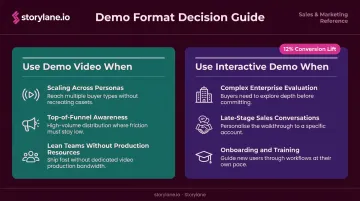
The clearest way to choose: if you're building awareness and pushing toward a next step, a demo video works. If a buyer needs to explore, self-qualify, or make a real evaluation decision, interactive is the right call.
Common Mistakes When Creating Demo Videos from Product URLs
Mistake 1: Using the URL as a Script, Not a Starting Point
Auto-generated content from a product page reflects marketing copy written for browsers — not buyers in evaluation mode. If the page is benefit-thin, jargon-heavy, or generic, the demo inherits all of that.
Always run extracted content through an editing pass before publishing. Storylane's AI Content Assistant can help refine copy at this stage, but the judgment call about what a buyer actually needs to hear still requires a human.
Mistake 2: Building One Demo for All Audiences
The "master demo" approach is where most conversion dies. When every viewer sees features irrelevant to their role, the message loses focus and stops resonating.
The solution is modular thinking, not more production effort:
- One core capture, multiple persona-specific cuts
- Identify the two or three buyer segments that matter most
- Build targeted versions for each, reusing the same base capture
Mistake 3: Launching Without a Tracking or Feedback Loop
Publishing a demo video with no analytics in place means flying blind. You won't know whether the hook is working, where viewers drop off, or which version of a CTA performs better.
Set up tracking before launch, not after you notice the demo isn't converting. The data from early views is some of the most valuable you'll collect — if you have a way to capture it.
Frequently Asked Questions
How can I turn product URLs into demo videos automatically?
AI-powered demo creation tools can scrape a product URL to extract UI screenshots, feature descriptions, and page copy, then auto-generate a structured video with voiceovers and annotations. The key is reviewing and refining the output for persona relevance before publishing — auto-generated content reflects your marketing page, which needs editing before it reads as evaluation-ready.
How do I create high-converting demo videos?
Start with a specific target persona and use case, hook the viewer in the first 15–30 seconds with a concrete pain point, show 2–3 features tied directly to outcomes (not a full feature tour), and close with a CTA matched to the buyer's current stage. Every layer — hook, features, CTA — should map to that single persona.
Can AI tools like ChatGPT create product demo videos?
ChatGPT and similar LLMs can generate demo scripts and voiceover copy, but they can't capture your product UI or produce the actual video. Dedicated demo creation platforms that accept a product URL — like Storylane — handle the full workflow: UI capture, AI-generated annotations and narration, and publishing.
What makes a product demo video high-converting versus just informative?
An informative demo shows what a product does. A converting demo connects features to specific outcomes for a specific viewer, includes a strong hook, persona-specific language, and a clear next step. The difference is intent: informative demos educate, converting demos move buyers forward.
How long should a B2B product demo video be?
For top-of-funnel use cases, under 1 minute is the standard — 65% of viewers finish videos that length. For mid-funnel instructional demos that teach a specific workflow, 3–5 minutes can work well. Match length to the buyer's stage, not the breadth of your feature set.
What's the difference between a demo video and an interactive demo?
A demo video is passive — the viewer watches on a fixed timeline. An interactive demo lets the prospect click through the product at their own pace, explore the features relevant to them, and self-qualify. That self-direction drives stronger intent signals, making interactive demos more effective for evaluation-stage and sales enablement use cases.