Introduction
Most AEs know the feeling: you've spent an hour setting up a demo environment, rehearsed the flow, and joined the call — only to watch the prospect's attention drift because nothing on screen reflects their industry, their data, or their actual problem.
Generic demos don't just underperform. According to Salesforce, 73% of B2B buyers actively avoid sellers who send irrelevant outreach — and a one-size-fits-all walkthrough is about as irrelevant as it gets.
Demo personalization tools now make it possible to tailor a product walkthrough to a specific prospect's company, role, and use case in minutes — no solutions engineer required.
Here's what to look for, what to skip, and which five tools AEs are actually using to close faster.
Key Takeaways
- A personalized demo swaps generic product screens for content reflecting the prospect's company, industry, and role.
- AEs using personalized demos move faster through the cycle — prospects show up to calls already sold on the use case, not waiting to be educated.
- Must-have features: dynamic variable tokens, no-code editing, engagement analytics, CRM integration, shareable links.
- Top tools covered: Storylane (AI-powered, full-funnel), Consensus, Demostack, Navattic, and Reprise — each suited to different personalization depths and team sizes.
What Is a Personalized Demo?
A personalized demo is a product walkthrough customized to reflect a specific prospect's company name, logo, industry data, use case, or job role — rather than a generic screen recording or live product tour built for no one in particular.
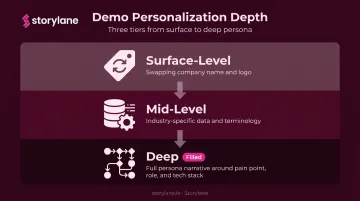
The spectrum runs wide:
- Surface-level: Swapping in a prospect's logo and company name
- Mid-level: Showing industry-specific data sets or terminology
- Deep: Building a full workflow narrative around the prospect's specific pain point, persona, and tech environment
How Personalized Demos Differ from Standard Live Demos
Live demos require a rep (and often a solutions engineer) on every call, running in a live environment that can break, lag, or expose unfinished features. Personalized demos are pre-built, stable, and repeatable.
For AEs managing a full pipeline, that difference is practical. A personalized demo can be:
- Sent asynchronously before a call to warm the prospect up
- Used during the call as a controlled, narrative-driven walkthrough
- Shared post-call with the full buying committee — no additional calls required
One well-built demo can cover every stage of the deal — without scheduling another session.
Why AEs Need Demo Personalization Tools
The Core Bottleneck
AEs manage too many accounts to custom-build a unique demo environment per prospect. But sending a generic recording creates what you might call a generic demo tax: when prospects can't see their own industry's workflows or terminology reflected on screen, they disengage.
Forrester reports that 86% of B2B purchases stall during the buying process, with dissatisfied buyers and unclear value among the leading causes. A demo that feels like it was built for someone else accelerates that stall.
The Multi-Stakeholder Problem
The challenge goes well beyond a single AE call. Forrester's 2024 research puts the average B2B buying group at 13 people across two or more departments. An AE can't run a live demo for every stakeholder — but they can send a demo that each persona can self-explore on their own schedule.
Personalization tools make this possible by enabling:
- Shareable links that require no login or sign-up
- Demo hubs organized by role or use case
- Engagement tracking showing which stakeholders watched what
How Personalization Shifts Deal Momentum
Prospects who receive a tailored demo before a follow-up call arrive with specific questions rather than generic skepticism. The conversation shifts from product education to negotiation — and AEs spend their time closing instead of re-explaining features that a well-built async demo already covered.
McKinsey's research on personalization shows it can reduce customer acquisition costs by up to 50% and lift revenues by 5–15% — a signal that relevance pays off at every stage of the deal.
Key Features to Look for in a Demo Personalization Tool
Dynamic Variable Tokens
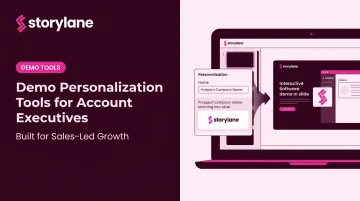
Tokens like {{company_name}}, {{logo}}, and {{currency}} let AEs generate a personalized demo in minutes by filling in account-specific fields. No code required, no rebuilds, and no dependency on a solutions engineer.
Storylane supports text tokens, date tokens, and image tokens — covering company names, geographies, currencies, and logos. The result is a single master demo that spins up into dozens of account-specific versions without duplicating effort.
No-Code Editing and AI-Assisted Creation
AEs aren't engineers. The best tools let them clone a master demo, swap content, add annotations, and publish — ideally with AI doing the heavy lifting on guides and voiceovers.
Storylane's AI suite generates contextual annotations and guides as you capture screens, with one-click voiceovers in 25+ languages and AI video avatars for guided walkthroughs. There's no recording equipment to set up and no production team in the loop.
Engagement Analytics and Buyer Intelligence
Knowing that a prospect opened a demo is useful. Knowing they spent 4 minutes on the pricing screen and skipped the onboarding flow entirely is actionable.
The analytics layer should surface:
- Time per screen and feature click data
- Completion rates and drop-off points
- Stakeholder-level activity (who on the buying committee viewed what)
Storylane's Account Reveal de-anonymizes demo visitors with firmographic data and triggers Slack alerts the moment a prospect engages — so AEs can follow up while the prospect's interest is active rather than days later.
CRM and Sales Stack Integration
Personalization only compounds value when demo engagement data flows into your CRM automatically. Demo views, shares, and time-on-screen should appear as deal activities in Salesforce or HubSpot — not sit in a separate dashboard AEs have to manually check.
Storylane integrates with Salesforce, HubSpot, Marketo, Pardot, Outreach, and Gong, automatically logging session data and attributing engagement to active deals in Salesforce or HubSpot.
Shareable Links and Self-Serve Options
After the call, the demo needs to travel independently. The right tool generates shareable links prospects can explore without creating an account — no friction, no login wall. Meanwhile, the AE tracks every interaction in the background:
- Which stakeholders viewed the demo and for how long
- Which screens received the most attention
- Re-engagement alerts when a prospect returns to the link days later
Top Demo Personalization Tools for Account Executives
The right tool depends on whether you need quick personalization at scale, deep environment cloning, or self-serve buyer journeys. These five cover that full spectrum.
Storylane
Storylane is an interactive demo platform built specifically for AEs and GTM teams. The core workflow: clone a master HTML or screenshot demo, apply variable tokens (name, logo, currency, brand colors), and publish a personalized version in minutes.
Standout features for AEs:
- Generates one-click annotations, voiceovers in 25+ languages, and AI video avatars (AI suite)
- Consolidates demos, PDFs, and videos into a single shareable link for buying committee self-serve (Demo Hub)
- De-anonymizes demo visitors with firmographic data and fires Slack alerts when a prospect engages (Account Reveal)
- Runs demos, qualifies leads, and answers objections 24/7 through an AI sales agent, even when the AE is offline (RepX)
- Downloads for conferences and on-site meetings where WiFi is unreliable (Offline demos)
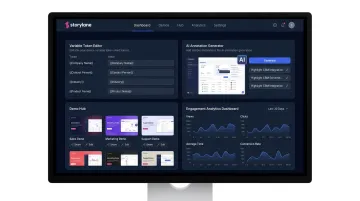
Personalization tokens are available on the Growth plan and above. Presenter demos with hidden guides and notes for live calls, plus Deal Intelligence for pipeline influence tracking, unlock at the Premium tier.
Consensus
Consensus centers on video-based demo automation with a strong internal sharing mechanic. AEs send personalized video demos that prospects can forward internally, while Demolytics tracks which stakeholders watched which features.
When a prospect forwards the demo to their IT lead or CFO, Consensus captures that activity and surfaces it for the AE. For multi-threading enterprise deals without scheduling additional live calls, that visibility is the core value.
Demostack
Demostack is a product simulation layer designed for high-fidelity demo environments. Its AI Data Generator creates personalized demo libraries segmented by persona, industry, and use case, replacing PII with realistic data that survives technical scrutiny.
Best fit: AEs at companies with complex enterprise products where generic demo data creates credibility risk during technical evaluations. The post-call sandbox leave-behind (a trial-like environment the prospect can explore after the live demo) is a differentiator for late-stage deals.
Navattic
Navattic prioritizes speed for no-code interactive product tours. AEs can capture a click-through demo without engineering support, then embed it in outreach emails or landing pages and track engagement.
The sweet spot is top-of-funnel warm-up: getting prospects interacting with the product before they've agreed to a call. Less suited for deep, persona-specific personalization at scale.
Best for: Pre-meeting engagement, outreach sequences, and landing page demos where speed matters more than depth.
Reprise
Reprise supports both guided product tours and fully cloned environments with deep customization options. Analytics and CRM sync are built in, with pre-built connectors for Salesforce, HubSpot, Google Analytics, and Marketo.
It's better suited for organizations where presales and AEs co-own the demo process. That depth makes it more capable but more dependent on coordination between roles.
How to Build a Personalized Demo Workflow as an AE
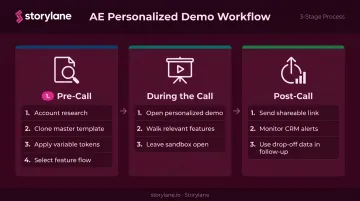
Most AEs lose deals not because their product is weak — but because their demo isn't built for the person in the room. Here's a practical three-stage workflow to fix that:
Pre-call
- Research the account: industry, ICP role, known pain points
- Clone your master demo template in Storylane or your demo platform
- Apply variable tokens — swap company name, logo, relevant use case data
- Select the feature flow most relevant to their role (not the full product tour)
During the call
- Open your personalized demo — the prospect sees their company name and context from slide one
- Walk through only the features relevant to their role using AI-guided annotations to stay on narrative
- Leave the sandbox open if prospects want to explore on their own
Post-call
- Send a personalized demo link the prospect can share internally with their buying committee
- Watch Slack or CRM alerts for engagement — who opened it, how long they spent, where they dropped off
- Use drop-off data in your follow-up: if they spent 6 minutes on the integrations screen, lead with integrations in the next conversation
Frequently Asked Questions
What is a personalized demo?
A personalized demo is a product walkthrough customized to reflect a specific prospect's company, industry, role, or use case. Unlike a standard screen recording, it incorporates the prospect's company name, data, and terminology — so the product feels immediately relevant rather than off-the-shelf.
What are the best tools for building product demos that prospects can explore without signing up?
Storylane, Navattic, and Consensus all generate shareable links that prospects can click into and explore without creating an account. The AE tracks engagement in the background — views, time spent, drop-off points — while the prospect gets a no-login, self-serve experience.
What tools do account executives use?
AEs typically rely on CRM (Salesforce, HubSpot), conversation intelligence (Gong), and increasingly, demo personalization platforms (Storylane, Demostack, Consensus). Demo tools are becoming standard as buyers expect to self-evaluate before live calls — Salesforce reports AEs already use an average of 8 tools to close deals.
How do you personalize a demo for different prospects?
Start with a master demo template, apply dynamic variable tokens to swap company name, logo, and relevant data, then select the feature flow most relevant to the prospect's role or pain point. Most tools do this in under 10 minutes without engineering help.
How does demo personalization affect win rates?
No single stat ties win rate lift directly to personalized demos, but McKinsey's personalization research points to up to a 50% reduction in acquisition costs and 5–15% revenue lift. Practically, prospects who receive relevant demos arrive at follow-up calls with specific questions, shortening the education phase and accelerating close.
What is the difference between a live demo and an interactive demo?
A live demo is a real-time walkthrough by a rep in a live product environment — it requires scheduling, an SE, and a working environment. An interactive demo is a pre-built, guided experience prospects explore on their own. Interactive demos scale across accounts and time zones without an AE present.