Introduction
Most B2B sales teams know their demo platform and CRM should be connected. Fewer understand what that connection actually does, how data moves between the two systems, or why integrations that look complete on the surface often fail to change rep behavior.
This guide covers all of it. Specifically, it explains how no-code interactive demo platforms sync prospect engagement data (steps completed, features explored, CTAs clicked) into the CRM records sales teams work in every day.
If you're a sales leader, RevOps professional, or product marketer, this guide moves you past "the integration is active" to understanding what actually drives outcomes.
That matters more than most teams realize. According to 6sense's 2024 B2B Buyer Experience Report, 69% of the B2B purchase process happens before a buyer ever engages a seller. If demo engagement data isn't flowing into your CRM before that first sales call, your reps are walking in blind.
Key Takeaways
- 69% of the B2B buying journey happens before a prospect talks to sales — demo engagement data in the CRM is your earliest intent signal
- No-code demo platforms sync engagement events (steps completed, CTAs clicked, time spent) to CRM records via native connectors or middleware like Zapier
- A working integration comes down to three steps: connect the platforms, map events to CRM fields, then configure triggers
- Data quality and field mapping determine whether the integration creates signal or noise
- Storylane connects natively with Salesforce, HubSpot, Freshsales, Dynamics 365, and 10+ other CRMs
- Storylane's Account Reveal identifies anonymous demo visitors before they fill out a form
What Is the No-Code Demo Tool–CRM Integration?
At its simplest, this integration is an automated connection between a no-code interactive demo platform and a CRM system. When a prospect engages with a product demo, those engagement events — steps completed, features explored, drop-off points — sync directly into the CRM as activities, lead properties, or deal signals. No manual data entry required.
The result: sales reps get product-level buyer intent data inside the CRM they already work in, so follow-up is faster and grounded in exactly what each prospect actually did.
How This Differs From Other Integrations
Teams often conflate demo-CRM integrations with other data connections they've already set up. The difference matters.
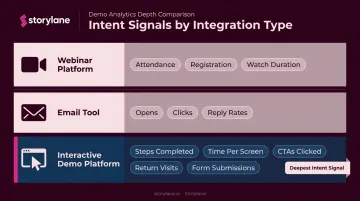
| Integration Type | What It Captures |
|---|---|
| Webinar platform | Attendance, registration, watch duration |
| Email tool | Opens, clicks, reply rates |
| Interactive demo platform | Steps completed, time per screen, CTAs clicked, return visits, form submissions |
The gap isn't just granularity — it's the precision of the intent signal. A prospect who replayed your pricing walkthrough three times is telling you something an email open never could. That's what makes demo engagement data genuinely useful for prioritizing outreach.
Why This Integration Is Critical for B2B SaaS Sales
Buyers Arrive Already Educated
Today's B2B buyers do their homework long before a rep enters the picture. Gartner reported in 2025 that 61% of B2B buyers prefer a rep-free buying experience overall — a figure that climbed to 67% in 2026.
TrustRadius found that 70% of technology buyers preferred vendors that offered demos or free trials, with 59% using product demos during their evaluation. These buyers don't arrive at a sales call cold — they've already formed opinions.
Without a demo-CRM integration, reps have no visibility into any of that pre-call research.
What the Absence of Integration Costs You
When demo engagement analytics stay siloed in the demo platform:
- Reps must toggle between two tools to reconstruct a prospect's journey
- High-intent signals — a prospect who revisited the pricing demo twice, or spent eight minutes on one feature screen — go unnoticed
- Follow-up emails are generic, sent without context about what the prospect actually cared about
- Pipeline attribution is incomplete, because demo influence on deals is invisible
Personalization at scale becomes impossible. Every rep sends the same follow-up regardless of what the prospect explored — a missed opportunity that compounds across every deal in the pipeline.
The Pipeline and Attribution Angle
The downstream cost isn't just lost personalization — it's invisible revenue. Revenue operations teams can't measure what they can't see, and without demo engagement flowing into CRM deal records, demo influence on win rate and deal velocity stays untracked.
Storylane's Deal Intelligence feature addresses this directly. In one documented example, Dreamdata used their own revenue attribution platform to validate Storylane's impact and found that 40.9% of their closed-won new business was influenced by interactive demos (including 17% of renewals). That kind of data changes how leadership invests in demo programs.
How the Integration Works: End-to-End Flow
The demo platform captures engagement events in real time, pushes that data to the CRM via a connector, matches it to an existing contact or lead record (or creates a new one), and triggers downstream automations.
The Three Connection Methods
Each method has meaningful tradeoffs:
1. Native connectors (such as Storylane's direct integrations with Salesforce, HubSpot, Freshsales, Dynamics 365)
- Highest data fidelity, real-time or near-real-time sync
- Predefined CRM object mappings reduce setup complexity
- No engineering involvement required
2. Middleware tools (Zapier, Make)
- Flexible — connects demo platforms to CRMs not covered by native connectors
- Zapier polling intervals range from 1 to 15 minutes depending on plan; Make runs scenarios every 15 minutes by default
- Requires custom logic configuration per workflow
3. Embedded lead capture forms
- A form inside the demo creates a CRM contact record at the moment of submission
- Cleanest identity matching — the visitor self-identifies
- Works in combination with native connectors for a complete data picture
Once you've chosen a connection method, setup follows three steps.
Step 1: Connect the Demo Platform to the CRM
Authenticate the demo platform with the CRM — most native connectors use OAuth or API key and complete in a few clicks without engineering involvement. Storylane's integrations are designed to be set up independently by sales ops or marketing ops teams.
Select the integration type, map the CRM instance to the demo workspace, and verify the connection is live.
Step 2: Map Demo Engagement Events to CRM Fields
The mappings you configure here determine what your CRM knows about each prospect's demo behavior — and what automations fire as a result.
Common mappings include:
- "Demo completed" → updates Lead Status or adds to a nurture sequence
- "CTA clicked" → increments lead score
- "Form submitted inside demo" → creates or updates Contact record
- Completion percentage milestones (20%, 50%, 75%, 100%) → updates a custom engagement field
- Time spent → populates a "demo engagement level" property
Set filtering conditions here too. Not every demo view warrants a rep alert — define thresholds that separate genuine interest from casual browsing.
Step 3: Configure Sales Automation Triggers
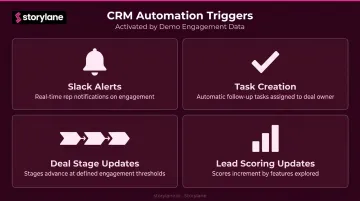
Once data flows, activate the downstream automations:
- Slack alerts — instant notifications fire when a prospect engages or re-engages, so reps can follow up while the demo is still fresh
- Task creation — follow-up tasks are assigned automatically to the deal owner, no manual logging required
- Deal stage updates — pipeline stages advance when a prospect crosses a defined engagement threshold
- Lead scoring updates — scores increment based on which specific features a prospect explored
Key Factors That Affect Integration Success
Data Quality and Contact Matching
The integration can only update a CRM record if the demo visitor can be identified. Visitors who submit an embedded form are easy to match. Anonymous visitors are the harder problem — and 6sense reports that only 3–4% of B2B website visitors fill out forms, with only about 20% of actual buyers from target accounts submitting forms.
That means anonymous demo traffic is the default, not an edge case.
Storylane's Account Reveal feature addresses this directly. It de-anonymizes demo visitors with enriched firmographic data, identifying which companies are exploring your demos even when visitors never fill out a form. The feature delivers instant company insights and Slack alerts to sales teams — giving reps actionable context before the first outreach.
Account Reveal is available on tiered plans: 250 identifications/month on Starter, 2,500 on Growth, and 10,000 on Premium.
CRM Configuration Readiness
A brief audit before activating the integration prevents significant headaches:
- Do the custom fields needed to receive demo data exist in your CRM?
- Are there existing automation workflows that might conflict with new triggers?
- Are contact ownership records clean enough for demo data to route correctly?
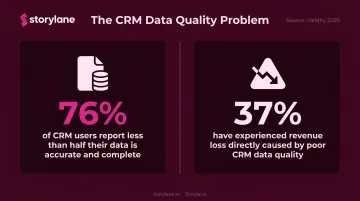
Validity's 2025 CRM data management report found that 76% of CRM users report less than half of their CRM data is accurate and complete, and 37% have experienced revenue loss as a direct result of poor data quality. Syncing demo data into a CRM with duplicate records and missing ownership fields produces noise, not signal.
Demo Design Quality
Demo structure shapes what the integration can actually do:
- Gated demos (with embedded forms) generate cleaner CRM records with direct identity capture
- Ungated demos produce richer engagement analytics but require Account Reveal or prior contact matching for identity resolution
Identity is only half the picture. Bidirectional data flow adds another layer of value: when CRM data (contact name, company name, role) feeds back into the demo as personalization tokens, every prospect sees a demo tailored to them. Confirm that your integration supports bidirectional sync, not just a one-way push.
Integration Method and Latency
Latency matters more than teams typically expect. A native connector syncing data in near-real time means a rep can call a prospect who just revisited the pricing demo while the conversation is still relevant. A middleware batch sync arriving 15 minutes later (or longer) turns a high-intent moment into a missed one.
For time-sensitive follow-up scenarios, native connectors outperform scheduled middleware polling.
Common Issues and Misconceptions
"The integration is set up, so it's working." Technical connection is only the first step. Without deliberate field mapping, trigger configuration, and rep training on how to interpret engagement signals, data lands in the CRM and creates no behavioral change. The setup isn't done until reps know what to do when an alert fires.
"All demo viewers are identifiable contacts." They're not — most aren't. Teams that skip de-anonymization capabilities and assume existing CRM contacts cover their demo audience will miss the majority of engagement signals their demos generate.
"A prospect who dropped off at step 4 of 12 isn't interested." Completion percentage is one metric, not the full picture. A prospect who spent disproportionate time on step 4 — say, a specific security feature or pricing comparison — is often more interested in that capability than someone who clicked through all 12 steps in 90 seconds.
CRM field mapping should capture engagement depth — time per step, return visits, CTA clicks — not just completion rate.
Correcting these misconceptions matters most when the integration is actually the right fit. Not every team is ready for it yet.
When this integration adds complexity without value:
- Teams without a defined follow-up process — alerts fire and go unacted upon
- Companies with severe CRM hygiene issues — expect misattributed or duplicate data
- Very early-stage teams running founder-led sales with no CRM motion — get the process repeatable first
Frequently Asked Questions
What is an interactive demo?
An interactive demo is a no-code, guided walkthrough of a software product that lets prospects explore features hands-on without accessing the actual product. These demos can be embedded on websites, shared via email, or used in sales follow-ups, and they come in screenshot, HTML, and video formats.
Why use a no-code platform for demo-CRM integration?
No-code platforms eliminate the need for engineering involvement in setup and ongoing maintenance. Sales ops and marketing ops teams configure integrations independently, cutting the time between "demo viewed" and "CRM record updated."
What is a low-code CRM platform?
A low-code CRM is a customer relationship management system that allows non-developers to customize fields, workflows, and automations through visual interfaces rather than custom code. This makes it much easier to receive and act on new data sources like interactive demo engagement without waiting on engineering resources.
How does demo engagement data sync with CRM contact records?
The demo platform sends engagement events (steps completed, CTAs clicked, form submissions) to the CRM via a native API connector or middleware. That data is matched to an existing contact by email or company domain, then written to configured CRM fields — in near-real time for native integrations, or within minutes via middleware.
Can no-code demo tools integrate with both Salesforce and HubSpot?
Yes. Storylane offers native integrations with both. Note that Salesforce integration (including the dedicated Salesforce App) is available on the Premium plan and above, while HubSpot integration is available starting from the Starter tier.
What CRM fields does interactive demo data typically populate?
Common fields populated include:
- Last demo viewed date
- Demo engagement score or level
- Specific demo name or URL
- Lead source
- CTA click events
- Completion percentage milestones
Exact fields depend on how the integration is configured during the field mapping step.