Introduction
Picture this: a sales rep jumps on a discovery call, pulls up a generic deck, spends the first five minutes on company history, then fires through 40 product slides. The prospect checks their phone twice. The meeting ends with "I'll think about it" — and nothing happens.
Now picture a different rep. She opens with three specific challenges she found in the prospect's recent earnings call. She quantifies exactly what those challenges cost. She shows — not tells — how the product solves them. The call ends with a booked follow-up and a signed mutual action plan.
The gap between those two outcomes comes down to structure — not skill, not charm, not product quality.
According to Forrester's 2024 State of Business Buying report, 81% of buyers express dissatisfaction with their chosen providers — and an average of 13 stakeholders are involved in each B2B purchase decision. Winning that room requires more than enthusiasm. It requires a framework.
Below, you'll find a practical 5-step sales presentation framework, a slide-by-slide outline template, and delivery tips grounded in real sales data.
Key Takeaways
- A sales presentation outline maps key content in the right sequence — not a script, but a structural compass
- Winning presentations move through a clear arc: pain → impact → urgency → solution → next steps
- Know your prospect's role, industry, and pain points before building a single slide
- The demo moment (Step 4) drives the most decisions — personalize it to the prospect's specific challenges
- A well-timed, interactive follow-up keeps deals alive after the meeting ends
What Is a Sales Presentation Outline (and Why It Matters)
A sales presentation outline is a structured document that maps out the key points, sequence, and talking notes for a sales meeting. Think of it as a compass: it keeps the conversation on track even when a prospect pulls you in a different direction.
Without one, presentations tend to drift in a few common ways:
- Too much time on company history and awards nobody asked about
- Feature walkthroughs disconnected from the prospect's actual problems
- No clear moment where the prospect understands what to do next
Sales Pitch vs. Sales Presentation
These terms get conflated, but they serve different purposes.
A sales pitch is short and focused — a single problem, a single ask. Think cold outreach or a 2-minute elevator conversation. It typically lands after research and qualification, once you know enough about the prospect to make a targeted ask.
A sales presentation is a fuller engagement: a 30–60 minute meeting-based conversation used mid-to-late in the sales cycle, typically accompanied by a live demo and built around a complete problem-to-solution narrative. The outline is what keeps that narrative coherent from slide one to close.
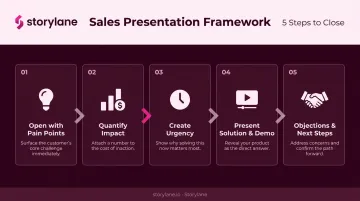
How to Structure a Sales Presentation: A 5-Step Framework
The most compelling sales presentations follow a story arc where the prospect is the hero, the problem is the antagonist, and your product is the tool that helps them win. Here's how each act plays out.
Step 1: Open with the Prospect's Pain Points
The first minutes of your presentation should never be about your company. They should reflect the prospect's world back to them.
Before building a single slide, pull from:
- ICP research and LinkedIn activity
- Discovery call notes
- CRM history and product usage data
- Recent news, earnings calls, or job postings
Surface the 2–3 most pressing pain points specific to this prospect. When you open with demonstrated knowledge of their challenges, you establish credibility instantly and hold attention from the very first slide.
Generic decks fail here. Accenture found that 80% of frequent B2B buyers switched suppliers at least once in 24 months because those suppliers couldn't align with buyer expectations. Opening with insight rather than a company overview is the simplest fix.
Step 2: Quantify the Impact of the Problem
Knowing you have a problem and feeling urgency to fix it are two different mental states. Numbers close the gap.
Move from "here's your problem" to "here's what it's costing you" with concrete figures:
- Hours lost per week to manual processes
- Deals missed due to slow response times
- Revenue leakage from operational inefficiencies
Even rough estimates work. The goal is to make the problem tangible, not theoretical. Once a prospect can see the dollar or time cost on a slide, the decision to act becomes much easier to justify internally.
Step 3: Create Urgency — Why Change Now?
This is the "fork in the road" section. Show the prospect what they stand to lose by not acting.
The JOLT Effect research reports that 40–60% of lost deals end in no decision — not a loss to a competitor, but a loss to inertia. Of those no-decision losses, 56% stem from indecision rather than a preference for the status quo.
Frame this section around competitive disadvantage or compounding costs — not fear. A simple "if nothing changes, here's where you'll be in 12 months" is enough. Heavy-handed urgency backfires; the goal is clarity, not pressure.
Step 4: Present Your Solution — The Demo Moment
This is the core of your presentation, and it should not be a feature walkthrough. It should be a targeted demonstration of how your product solves the specific pain points from Steps 1 and 2.
Show only what's relevant to this prospect. Every extra feature you demo dilutes the ones that matter.
For live sales calls, the format of the demo matters as much as the content. Storylane's HTML sandbox demos are built for this scenario: they deliver a pixel-perfect, interactive product experience without the risks of a live environment — bugs, slow load times, or unexpected data exposure.
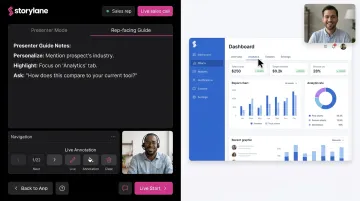
Reps can use Presenter Mode via the Storylane Chrome Extension, which keeps guide content and presenter notes visible only to the rep in a separate browser tab, while the prospect sees a clean, click-through experience.
Before the call, reps can personalize demos using dynamic tokens — swapping in the prospect's company name, logo, and currency in seconds. That level of specificity signals that this demo was built for them, not recycled from last week's call.
Gong's analysis of 67,149 B2B sales demos found that successful demos had no uninterrupted pitch longer than 76 seconds and had 21% more speaker switches per minute than unsuccessful ones. The demo should be a conversation, not a monologue.
Step 5: Address Objections and Define Next Steps
The closing section has three jobs:
- Summarize the value — one or two sentences connecting the demo back to their stated pain points
- Pre-empt objections — address the top 2–3 most common objections with prepared responses (budget, timing, internal buy-in)
- Define a specific next step — not "any questions?" but a concrete ask: schedule the technical review, start a trial, review the proposal together
Gong's data shows that close rates drop 71% when next steps aren't discussed on the first call. Successful demos spend about four minutes on next-step discussion at the end. Miss that window and you're chasing the deal instead of closing it.
Sales Presentation Outline Template (Slide-by-Slide)
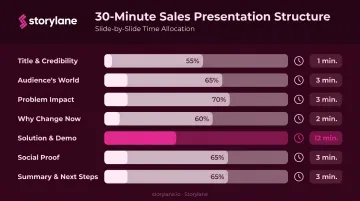
Use this as a copy-and-adapt reference for a 30-minute presentation. It's not a rigid script — adjust timing based on how the conversation flows.
| Slide | Content | Time |
|---|---|---|
| 1 | Title / Credibility — company name, your name, one-line framing of the meeting's purpose | ~1 min |
| 2–3 | Audience's World — their industry context, the 2–3 pain points you've identified | ~3 min |
| 4–5 | Problem Impact — quantified costs: time lost, revenue at risk, operational drag | ~3 min |
| 6 | Why Change Now — competitive landscape, cost of inaction, the fork in the road | ~2 min |
| 7–11 | Solution + Demo — targeted demo of features that address slides 2–5 specifically | ~12 min |
| 12–13 | Social Proof — 1–2 relevant case studies or customer results from similar companies | ~3 min |
| 14–15 | Summary + Next Steps — value recap, objection responses, specific call to action | ~3 min |
Speaker Notes That Actually Help
For each slide, include three things in your speaker notes:
- The core question this slide answers for the prospect
- The point to land before advancing
- One engagement prompt or question to ask the audience mid-slide
Build an Appendix
Build a bank of supporting slides — competitor comparisons, pricing breakdowns, detailed case studies — that sit outside the main deck and surface only when needed. This keeps your core presentation tight while giving you ready answers when objections come up.
Slide Design Principles
- One key idea per slide (not five bullet points that compete for attention)
- Visuals over text walls — a chart communicates faster than a paragraph
- Write to the audience: "you'll save 3 hours a week" lands harder than "our platform reduces admin time"
These three principles work together — a focused slide, a clear visual, and prospect-centered language signal that you understand their world before you've said a word.
Tips to Deliver a More Effective Sales Presentation
Do the Homework First
Generic presentations fail because they force prospects to mentally translate your content into their own context. That's work they shouldn't have to do.
Spend 20–30 minutes before every meeting reviewing the prospect's website, recent LinkedIn activity, CRM notes, and any prior call recordings. Walk in with at least one insight they didn't expect you to have. It signals investment — and investment earns attention.
Engage Throughout, Not Just at the End
The instinct to save Q&A for the final five minutes is a mistake. Prospects who feel like an audience disengage; prospects who feel like participants stay in the conversation.
Build one question into each major section of your outline. After the problem-impact slides: "Does that math reflect what you're seeing on your end?" After the demo: "Which of those workflows would matter most to your team?" These micro-check-ins keep the conversation two-directional — and Gong's demo data confirms this: winning demos had 36% more speaker switches per minute in the second half of the call.
Respect the Clock
Guy Kawasaki's 10/20/30 rule — 10 slides, 20 minutes of content, minimum 30-point font — was written for VC pitches, but the principle applies: most sales reps over-present and under-converse. Cap your active presentation at 20 minutes. The remaining 10–15 minutes of a 30-minute meeting should be dialogue, objection handling, and next-step alignment.
For slide design specifically, both the 5-5-5 rule (five words per line, five lines per slide, five consecutive text-heavy slides maximum) and the 7-7-7 rule (seven lines, seven words, seven text-heavy slides) exist to enforce the same discipline: if your audience is reading your slides, they're not listening to you.
Follow Up with Something Worth Sharing
The follow-up is where many deals stall. A PDF recap or a recording link doesn't move a deal forward; it gets filed and forgotten.
Instead, send a personalized interactive demo within 24 hours of the meeting. With Storylane, reps can customize a leave-behind demo using tokens — the prospect's company name, relevant use case, their specific workflow — so the experience feels built for them, not broadcast to everyone.
The timing advantage is real: when the prospect shares it with a colleague or revisits it before a stakeholder meeting, the rep gets a Slack alert. Reps can respond at exactly the right moment, when the prospect is already thinking about the solution.
For deals with multiple stakeholders, Storylane's Demo Hubs let reps organize several demos under one link, grouped by persona or product area. A technical evaluator and a business buyer can each explore what's relevant without the rep sending six separate assets.
Rehearse the Transitions, Not the Lines
Memorizing a script produces robotic delivery. What matters is internalizing the structure well enough to navigate the conversation fluidly, regardless of where the prospect takes it.
Practice specifically:
- The transition from pain points to quantified impact (Steps 1 → 2)
- The pivot from urgency to solution (Steps 3 → 4)
- Your responses to the top three objections you hear most often
These are the hinges the presentation turns on. Nail those, and the rest follows naturally.
Frequently Asked Questions
How do you structure a sales presentation?
Follow a five-step arc: open with the prospect's specific pain points, quantify the cost of those problems, create urgency around acting now, present your solution through a targeted demo, then close with a value summary and a specific next step. Each section should build on the last.
What is the 5-5-5 rule in presentations?
The 5-5-5 rule is a slide design guideline: no more than five words per line, five lines per slide, and five consecutive text-heavy slides in a row. The goal is to keep slides visual and prevent audiences from reading instead of listening.
What is the 7-7-7 rule for presentations?
The 7-7-7 rule is a more permissive slide design variant: no more than seven lines per slide, seven words per line, and seven text-heavy slides per presentation.
How long should a sales presentation be?
Most B2B sales presentations run 30–45 minutes total when Q&A is included. Kawasaki's 10/20/30 rule recommends capping actual content delivery at 20 minutes. The remaining time should go toward conversation, objection handling, and confirming next steps.
What is the difference between a sales pitch and a sales presentation?
A sales pitch is short and focused on a single problem or ask — typically used in early-stage outreach. A sales presentation is a more comprehensive meeting-based engagement covering the full problem-to-solution story, usually in the mid-to-late stages of the sales cycle.
What are the most common mistakes in sales presentations?
Three mistakes account for most failures: opening with company history instead of prospect challenges, overwhelming buyers with features instead of focusing on relevant benefits, and ending without a specific call to action or defined next step.