
.svg)

No-code demo creation platforms solve this directly. They let anyone on a GTM team — sales, marketing, presales — build polished, clickable product demos in hours, not weeks.
The stakes are real: a 2024 Factors.ai analysis of 110,257 web sessions found prospects who engaged with interactive demos converted at 24.35% versus just 3.05% for traditional approaches. That gap is too large to ignore.
This guide covers six platforms worth evaluating in 2026, what makes each one different, and how to pick the right fit for your team's use cases.
Key Takeaways
- No-code demo platforms let sales, marketing, and presales teams build interactive demos without writing a single line of code
- The best tools support multiple formats: screenshot tours, HTML captures, video walkthroughs, and shareable demo hubs
- Key selection criteria: ease of creation, demo formats supported, personalization depth, CRM integrations, and analytics
- Top platforms in 2026: Storylane, Arcade, Navattic, Walnut, Reprise, and Supademo
- Storylane stands out with AI-powered creation, buyer intelligence, and CRM-connected analytics combined in one platform
What Are No-Code Demo Creation Platforms?
No-code demo creation platforms are software tools that let non-technical users capture, edit, and publish interactive product demos through visual, drag-and-drop interfaces — no developer involvement required.
They're fundamentally different from screen recorders or product videos. Demos built on these platforms are clickable, personalized, and trackable. They behave like the actual product, not a passive recording — prospects navigate at their own pace, and teams get engagement data on every interaction.
Gartner's 2024 Market Guide recognizes this as a distinct software category, describing these tools as helping organizations "simplify, accelerate, and scale demo creation and delivery" while decreasing workloads and shortening sales cycles.
The Three Core Demo Formats
Most platforms support some combination of these formats — and the right choice depends on where the demo is being used:
| Format | How It Works | Best Use Case |
|---|---|---|
| Screenshot/screen capture | Stitches UI screenshots into a guided flow | Top-of-funnel website tours |
| HTML capture | Clones the actual frontend for interactive, editable demos | Live sales demos, leave-behinds |
| Video walkthrough | Screen recordings with narration or annotations | Async outbound, onboarding |
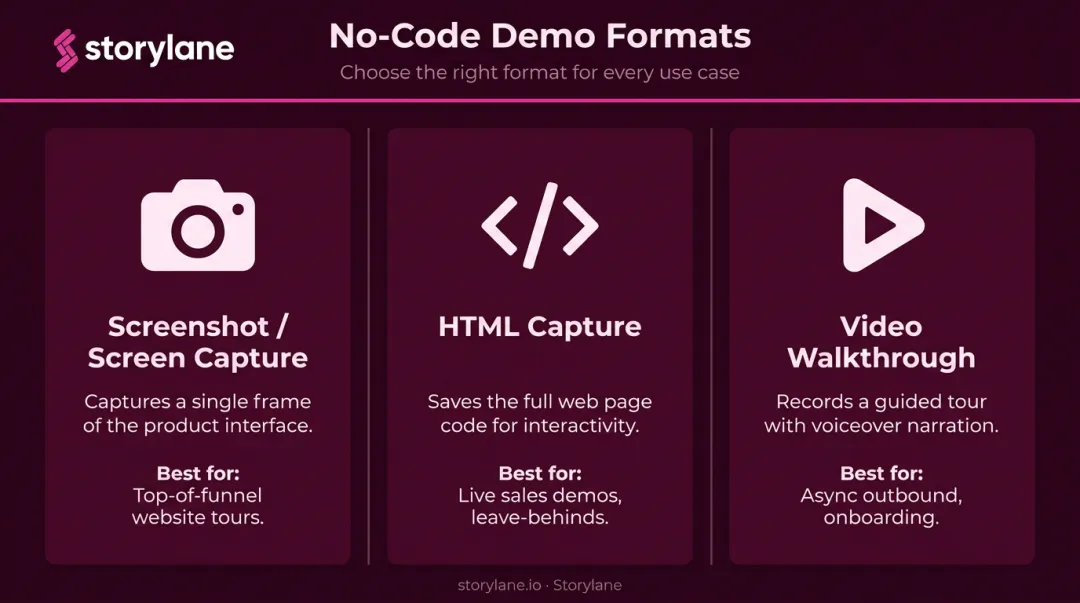
Format choice matters more than most teams realize. A screenshot tour works well on a landing page but falls flat in a live enterprise demo — that's where HTML capture earns its place.
Best No-Code Demo Creation Platforms in 2026
These six platforms were selected based on ease of use, demo format flexibility, personalization features, integration depth, analytics, and overall value for GTM teams.
Storylane
Storylane is the most comprehensive option on this list, trusted by teams at Gong, Rippling, Sprout Social, Nasdaq, SentinelOne, and 5,000+ others. It supports every demo format a GTM team needs across the full funnel.
Demo formats available:
- Screenshot demos for quick top-of-funnel tours
- HTML capture demos with a full code editor for pixel-perfect replicas
- Sandbox demos for free-exploration live sales environments
- Demo Hubs (Buyer Hubs) that combine demos, PDFs, videos, and embeds into one shareable room
- Offline demos that run without WiFi, built for conferences and trade shows
What separates Storylane from the rest is the depth of its AI Suite and buyer intelligence layer. Once you capture your product, AI handles annotations, voiceovers, and guides in one click. At the Growth tier and above, you can edit HTML content with AI and translate demos automatically.
Standout features:
- Account Reveal: De-anonymizes demo visitors with firmographic data (250/month on Starter, up to 10k/month on Premium)
- RepX: An AI sales rep that qualifies leads, answers objections, and routes prospects to CRM — 24/7, inside the demo
- Deal Intelligence: Connects demo engagement directly to pipeline metrics in Salesforce and HubSpot
- Slack alerts: Real-time notifications when high-intent prospects engage
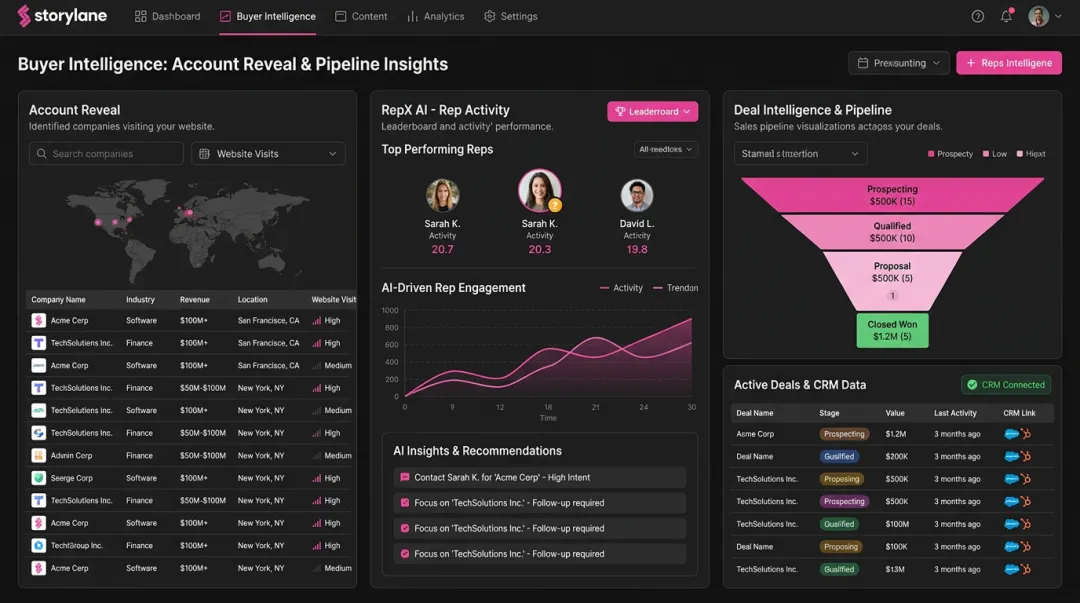
SentinelOne's Senior PMM noted that within two months of implementing Storylane, demos were running across demand gen campaigns, events, and sales enablement tools simultaneously.
| Attribute | Details |
|---|---|
| Best For | Teams needing AI-powered demo creation, buyer intelligence, and CRM automation in one platform |
| Key Features | Multi-format demos, AI Suite, Demo Hubs, Account Reveal, RepX, Deal Intelligence, offline demos, Slack alerts |
| Pricing | Free: $0 (1 demo) · Starter: $40/mo · Growth: $500/mo · Premium: $1,200/mo · Enterprise: contact sales |
Arcade
Arcade is built for speed. It's a lightweight, fast-growing tool popular with product-led growth teams who need embeddable product tours live on a landing page within the hour.
Creation is simple: capture your screen, organize it into chapter-based flows, and embed or share via link. The low barrier to entry is the whole appeal.
That simplicity comes with tradeoffs. Arcade works well for top-of-funnel discovery demos, but it's not designed for complex, personalized sales demos or live SE-assisted conversations. HTML capture is only available on the Enterprise tier.
| Attribute | Details |
|---|---|
| Best For | Marketing teams embedding quick product tours on landing pages |
| Key Features | Screen capture, chapter-based flows, embed widgets, AI translations (Growth+), demo branching, basic branding controls |
| Pricing | Free: $0 · Growth: $42.50–$50/mo per seat · Enterprise: contact sales |
Navattic
Navattic is a screenshot- and HTML-capture platform aimed at SMBs and product marketing teams building guided product tours without SE involvement. It's straightforward to use, supports basic analytics and personalization, and integrates with common CRM and marketing tools.
The platform works well for linear, guided tours on websites and in email campaigns. Editing depth is limited compared to HTML code-level tools, and it's not built for live demo scenarios. Paid pricing beyond the free Starter tier requires contacting sales.
| Attribute | Details |
|---|---|
| Best For | SMBs building guided product tours for websites and email campaigns |
| Key Features | Screenshot and HTML capture, guided tooltips, demo analytics, basic personalization, A/B testing (Base+), account identification (Growth+) |
| Pricing | Starter: Free · Base, Growth, Enterprise: contact sales for pricing |
Walnut
Walnut is an HTML screen capture platform built for SaaS sales reps who need shareable, personalized click-through demos for outbound without any technical help. Reps can edit text and logos, apply templates, and track engagement per demo (our Walnut vs Reprise comparison shows how it differs from Reprise).
One friction point: G2 reviewers flag demo maintenance as a recurring challenge — keeping demos updated during busy periods can slow teams down. Worth factoring in if your product ships frequently.
| Attribute | Details |
|---|---|
| Best For | Sales reps needing shareable, personalized click-through demos for outbound |
| Key Features | HTML capture, text and logo edits, demo templates, engagement tracking, CRM integrations, sandbox demos (Accelerate+) |
| Pricing | Ignite: $575/mo (billed annually) · Accelerate: $1,550/mo (billed annually) · Scale/Startup: contact sales |
Reprise
Reprise is the most technically powerful platform on this list — and the most complex. It offers the widest range of demo types: HTML capture tours, full application cloning, and live data injection into production or self-contained demo environments.
Gartner named Reprise a Sample Vendor in the Interactive Demo Applications category in its 2025 Hype Cycle for Revenue and Sales Technology. That recognition fits: Reprise is purpose-built for enterprise presales teams running complex live demos with data injection. It's less suited for teams wanting true self-serve, no-code demo creation.
| Attribute | Details |
|---|---|
| Best For | Enterprise presales teams running complex live demos with data injection |
| Key Features | HTML capture + code edits, full app cloning, live data injection, centralized demo library, advanced analytics, SOC 2 Type II, ISO 27001, SSO, RBAC |
| Pricing | Contact sales (single annual platform fee + per-user licenses; no public dollar pricing) |
Supademo
Supademo is a budget-friendly, beginner-accessible option that uses AI to auto-generate step-by-step product demos from screen recordings. It's popular with early-stage startups and small teams who need demos up fast without a large platform investment.
AI narration and auto-annotation speed up creation considerably. The limitations show at scale: deep personalization, enterprise-level integrations, and advanced analytics are thinner compared to higher-tier platforms. HTML demos and sandbox demos are available, but only on the Growth plan ($350/mo for 5 creators).
| Attribute | Details |
|---|---|
| Best For | Startups and small teams wanting fast, affordable AI-assisted demo creation |
| Key Features | AI auto-annotations, screen capture, voice narration, branching, variables, shareable links, basic analytics |
| Pricing | Starter: $0 · Scale: $38/mo per creator · Growth: $350/mo (5 creators) · Enterprise: contact sales |
How We Chose the Best No-Code Demo Creation Platforms
Platforms were evaluated on whether they're genuinely usable without developer or SE involvement, what demo formats they support, and how well they serve the full GTM lifecycle — from top-of-funnel discovery through post-demo leave-behinds.
Evaluation Criteria
Each platform was assessed across seven dimensions:
- Ease of creation — Can a non-technical marketer or AE build a demo independently?
- Demo format flexibility — Does it support screenshot, HTML, video, guided tours, and hubs?
- Personalization depth — Can demos be customized per account with dynamic tokens?
- CRM and analytics integrations — Do engagement signals flow directly into the sales pipeline?
- Buyer engagement tracking — Can teams see where prospects drop off or click through?
- AI capabilities — Does AI accelerate creation, narration, or lead qualification?
- Pricing transparency — Are plans and limits publicly available?
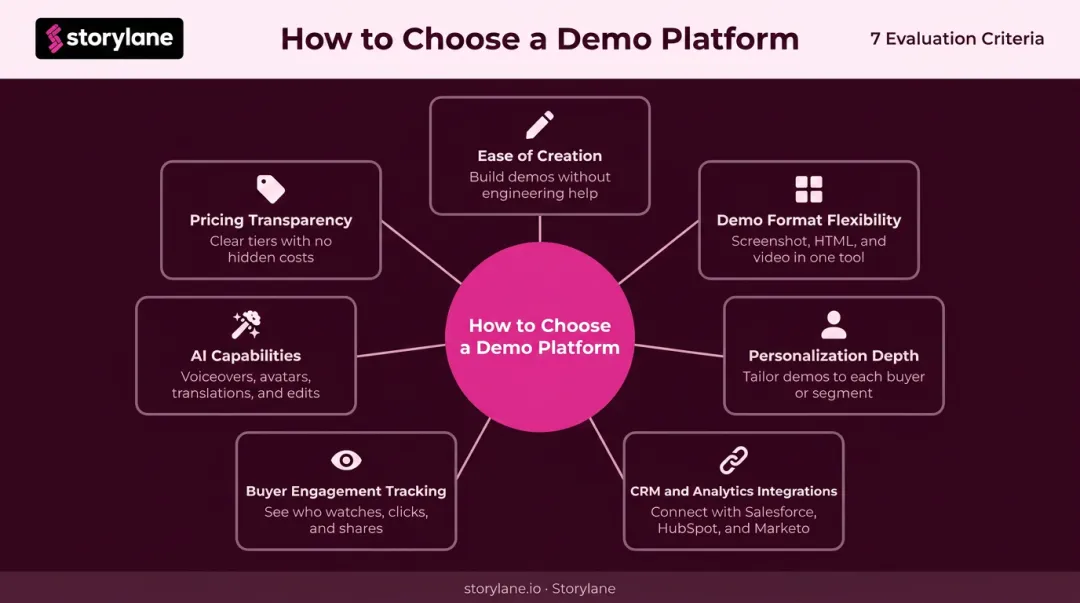
Personalization depth is worth calling out specifically. Prospects who interact with demos tailored to their company and use case convert at higher rates — sometimes 2–3x compared to generic demos. Skipping robust personalization to save on cost usually costs more in the long run.
Common Buyer Mistakes
- Choosing a cheaper tool that only handles screenshot tours — then discovering it won't cover live demos or leave-behinds
- Buying a website tour tool for top-of-funnel, then needing a second platform entirely for live sales demos
- Ignoring engagement analytics until leadership asks for demo ROI — at which point there's no data to show
Conclusion
The right no-code demo platform depends on three things: where your demos get used, who builds them, and what action you want buyers to take afterward.
A startup embedding a quick product tour on a landing page has different needs than an enterprise presales team running multi-stakeholder demos with data injection. No single platform fits every team. For those who need AI-powered creation, buyer intelligence, demo personalization, and CRM-connected analytics under one roof, Storylane is the strongest option.
Start by testing platforms against your most common demo use case. Embedding a tour on a website? Arcade or Navattic may be enough. Equipping reps with personalized leave-behinds or running AI-assisted demos that qualify prospects around the clock? You need a platform built for that workload.
Start a free Storylane trial and build your first interactive demo — no code, no SE required.
Frequently Asked Questions
What is a no-code demo creation platform?
A no-code demo creation platform is a software tool that lets sales, marketing, and presales teams build interactive product demos through visual interfaces — no coding or developer involvement required. The resulting demos are clickable, trackable experiences that prospects can explore at their own pace.
How is an interactive demo different from a product demo video?
Interactive demos are clickable — prospects can navigate the product themselves, at their own pace. Videos are passive recordings. Interactive demos also generate engagement analytics and can be personalized per account, which standard video cannot.
What types of demos can I build without coding?
The four main formats are: screenshot-based guided tours (best for websites), HTML capture tours (best for live sales and leave-behinds), video walkthroughs (best for async outbound), and demo hubs that combine multiple formats into one shareable room.
Can no-code demo tools integrate with Salesforce and HubSpot?
Yes. Platforms like Storylane offer native integrations with Salesforce, HubSpot, Marketo, and other tools, so demo engagement data and captured leads flow directly into the sales pipeline without manual syncing.
How long does it take to build an interactive demo without coding?
People.ai's Director of Product Marketing reported capturing, anonymizing, publishing, and sharing her first Storylane demo in 10 minutes. AI-generated annotations, voiceovers, and guides cut that time down further once you're familiar with the workflow.
Are no-code demo platforms suitable for enterprise sales teams?
Enterprise-ready platforms like Storylane (Premium and above) and Reprise include SSO, whitelabel URLs, advanced analytics, offline demos, SOC 2 compliance, and dedicated support. That feature set covers the full range of requirements for large GTM teams with complex demo workflows.