According to a Gartner survey of 632 B2B buyers, 61% now prefer a rep-free buying experience — meaning your demo needs to do real selling work before a human ever joins a call. The good news: the tools built for this don't require enterprise budgets.
This guide covers five budget-friendly demo tools — Storylane, Supademo, Arcade, Navattic, and Loom — selected specifically for early-stage teams that need fast setup, no-code creation, and pricing that doesn't burn runway.
Key Takeaways
- Interactive demo software lets prospects click through your product without a login, a live call, or access to your actual environment
- All five tools here have free plans or starter tiers under $50/seat/month
- Screenshot demos cover most early-stage needs — HTML demos earn the higher price only once your UI is stable and you need pixel-level fidelity
- The right upgrade trigger is when free plan limits actively block pipeline — not before
- For lead capture, AI features, and room to scale, Storylane's free and Starter plans are the strongest entry point for early-stage teams
Why Early-Stage Startups Need Demo Software
The startup-specific problem is straightforward. You can't afford to spend 45 minutes in an unqualified discovery call, but prospects won't book a meeting without proof. TrustRadius found that 94% of B2B buyers say demos tailored to their specific use case are important — and 100% want to self-serve at least part of the buying journey.
A prospect who can evaluate your product on their own schedule arrives at your first call already primed. You spend your limited sales time on conversations that actually close, not on ones that should have been an email.
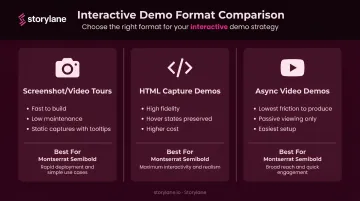
Interactive demo software falls into three main formats — each with different tradeoffs for small teams:
- Screenshot/video tours — static screen captures with guided tooltips; fast to build, low maintenance
- HTML capture demos — replicate the actual product interface, including hover states and dynamic elements; higher fidelity, higher cost
- Async video demos — screen recordings shared via link; lowest friction to produce, but passive viewing only
Given those constraints, the tools below were selected based on four criteria:
- Transparent pricing with a free plan or low-cost entry point
- No-code creation (no engineering time required)
- Suitable for small GTM teams running lean
- Accessible enough for a solo founder to ship a demo in an afternoon
Best Budget-Friendly Demo Software for Early-Stage Startups
These tools were chosen for pricing transparency, free plan availability, ease of use for non-technical teams, and fit for startup GTM motions.
Storylane
Storylane is an interactive demo platform built for GTM teams that need to ship demos fast. Its free plan covers one published demo, AI voiceover, AI content assistant, and lead capture — enough for most early-stage teams to go live without a credit card. Companies like Gong, Rippling, and Sprout Social adopted it as they scaled.
What makes it practical for startups:
- Personalization tokens let one demo display a prospect's name, company, logo, and custom metrics dynamically — no re-recording required
- Account Reveal de-anonymizes demo visitors with company-level data, so you know who's engaging before you reach out
- HubSpot and Salesforce integrations on paid plans push demo engagement directly into your pipeline
- Non-technical users can publish a working screenshot demo in under a day — Storylane's own documentation cites setup times as short as 2 minutes for straightforward demos
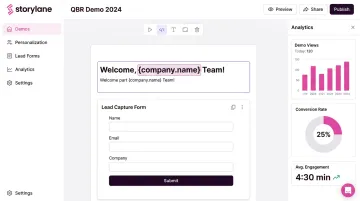
HTML demos, A/B testing, advanced analytics, and personalization tokens unlock at the Growth tier, so check the pricing page to confirm which features match your current needs before committing.
| Plan | Details |
|---|---|
| Free Plan | 1 published demo, AI voiceover, AI content assistant, lead capture forms |
| Starter | ~$40–50/seat/month; adds AI video avatars (20 min/mo), AI translations, unlimited published demos |
| Growth | ~$500–625/month (5 seats); adds HTML demos, personalization tokens, A/B testing, advanced analytics, Account Reveal |
| Best For | Early-stage startups wanting no-code interactive demos with room to grow into HTML and deeper CRM analytics |
Supademo
Supademo is a screenshot and video-based demo platform designed for speed. A non-technical user can go from signup to a published, shareable demo in under 15 minutes using its Chrome extension. It supports web apps, desktop apps, and mobile screenshots.
Pricing scales per creator — predictable per-seat costs that don't spike as your team adds viewers or reviewers.
Strengths worth noting:
- AI-generated voiceovers, AI text personalization, dynamic variables, and conditional demo branching on paid plans
- Figma plugin included for design-forward teams
- Free forever plan covers 1 creator and 5 demos — enough to test before committing
The main trade-off: HTML-guided demos and sandbox demos only unlock at the Growth tier (~$350/month for 5 creators), so teams with simpler products extract the most value from the Scale plan.
| Plan | Details |
|---|---|
| Free Plan | 1 creator, 5 guided demos, 50 video recordings, unlimited screenshots |
| Scale | ~$38/creator/month; AI voiceovers, branching, variables, trackable links |
| Growth | ~$350/month (5 creators); adds HTML demos and sandbox environments |
| Best For | Solo founders and tiny teams shipping demos fast — especially for help docs, onboarding, and short sales walkthroughs |
Arcade
Arcade is used by more than 30,000 companies and generates both interactive tours and polished demo videos from the same screen recording. A small startup team can produce a website demo and a social video asset in one workflow, without two separate subscriptions.
The free plan includes one published demo and one published video with AI voiceover, with no credit card required.
Differentiators at the Growth plan:
- Demo branching, CTAs, lead capture forms, and translation features
- Pan and zoom video editing for polished output
- HubSpot Forms can be embedded via the Embed step (Growth and Enterprise plans)
- Recording options include Chrome extension, desktop app, media uploads, and Figma plugin — not Chrome-only
The main limitation: Arcade lacks deep pipeline analytics, making it better suited for top-of-funnel marketing demos than for tracking prospect engagement through a sales cycle.
| Plan | Details |
|---|---|
| Free Plan | 1 demo + 1 video, 200 AI credits/month, unlimited views |
| Growth | ~$42.50/seat/month (billed annually); demo branching, CTAs, forms, advanced analytics, translations |
| Enterprise | Custom pricing; HTML capture, SSO, custom domains |
| Best For | Small marketing-focused teams that want an interactive tour and a demo video from one tool, without needing deep CRM analytics |
Navattic
Navattic's HTML capture technology produces demos that look and feel like the actual product — preserving hover states and dynamic elements — rather than relying on static screenshots. Its free plan (1 seat, 1 HTML demo, unlimited views) is one of the most capable free tiers in the category for teams that prioritize demo quality.
What sets it apart for data-driven teams:
- Account-level engagement analytics sync directly to HubSpot, Salesforce, and Marketo on paid plans
- Base plan includes A/B testing and embedded lead capture forms out of the box
- AI Copilot, voiceover, and avatar tools are included — not locked behind the top tier
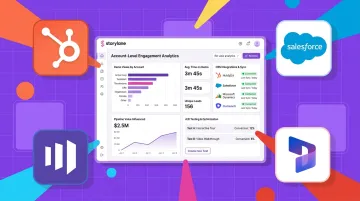
The key trade-off: the Base plan requires a bigger jump from free than Supademo or Arcade, and dollar pricing wasn't publicly listed on the pricing page at time of writing — verify directly at navattic.com/pricing before budgeting.
| Plan | Details |
|---|---|
| Free Plan | 1 seat, 1 HTML demo, unlimited views |
| Base | 5 seats, unlimited HTML demos, HubSpot/Salesforce/Marketo integrations, A/B testing, embedded forms (verify current pricing directly) |
| Growth | 10 seats, account identification, advanced analytics (verify current pricing directly) |
| Best For | Seed-to-Series A SaaS teams that want high-fidelity HTML demos with demo engagement data feeding directly into their CRM |
Loom
Loom — now owned by Atlassian and used by more than 25 million people — is an async video tool, not a full interactive demo platform. Sales and GTM teams record their screen plus webcam and share via link, embed, or email. At roughly $12.50–$15/user/month on the Business plan (verify the current billing toggle on loom.com/pricing), it's the most affordable option here.
Why it belongs on this list:
- Variables personalize names and company details across video and audio without re-recording — similar in concept to Storylane's tokens
- AI captions, transcripts, drawing tools, and embedded CTAs on the Business plan
- Viewer-level analytics show which prospects watched and for how long
- Salesforce integration confirmed for Enterprise Workspace; Gmail recording confirmed
The critical limitation: Loom is passive — prospects watch, they don't click. It doesn't replace a self-guided interactive tour for website visitors, but it fills the async follow-up gap at a price most early-stage teams can absorb from day one.
| Plan | Details |
|---|---|
| Free Starter | 25 videos/person, 5-minute screen recordings |
| Business | ~$12.50–$15/user/month (verify current pricing); AI captions, transcripts, Variables, embedded CTAs, viewer analytics |
| Business + AI | ~$24/user/month; advanced AI editing and automation |
| Best For | Early-stage teams needing affordable async video for outbound, follow-up, and onboarding — best paired with a self-guided tour tool |
How to Choose the Right Demo Software for Your Startup
Two common mistakes drive most poor decisions here.
Over-buying means purchasing an enterprise plan with sandbox demos and advanced CRM sync before you have the volume to justify it. That's runway spent on features you won't touch for six months.
Under-buying means using a screenshot tool when your product's value is genuinely hard to show in static screens, and losing deals because the demo doesn't land.
Matching the Tool to the Job
Ask these questions before committing:
- Has a usable free plan — all five tools here let you publish at least one demo at no cost before paying
- Lets a non-engineer build a demo in under a day; if it can't, it won't get done
- Captures leads and connects to your CRM so that data lands in your pipeline, not a spreadsheet
- Matches your UI update cadence — screenshot demos rebuild faster, while HTML demos take more maintenance
Budget Reality Check
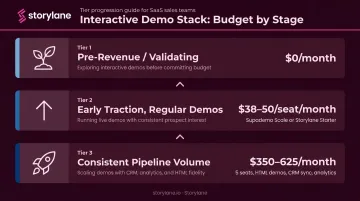
| Stage | Typical Spend |
|---|---|
| Pre-revenue / validating | Free tier (all five tools have one) |
| Early traction, regular demos | $38–50/seat/month (Supademo Scale or Storylane Starter) |
| Consistent pipeline volume | $350–625/month (5-seat plans with HTML demos, CRM sync, analytics) |
Pricing in this category changes frequently. Verify current rates directly on vendor sites before budgeting. The figures in this guide reflect publicly available pricing at time of writing.
Conclusion
The best demo software for an early-stage startup is the one that gets a quality demo in front of prospects this week. Not the most feature-rich platform — the one your team will actually use.
Match the tool to the job:
- Interactive tours for website visitors: Storylane, Supademo, or Arcade
- High-fidelity pipeline demos: Navattic or Storylane's HTML tier
- Async follow-up and outbound video: Loom
Plan to reassess when free-tier limits start blocking pipeline. That's the signal to upgrade.
If you want one tool that covers screenshot demos, lead capture, and a clear upgrade path to HTML demos and CRM integration, Storylane's free plan is worth starting with. Most startups have a working demo live the same day — no engineering involvement needed.
Frequently Asked Questions
What are the best budget-friendly interactive demo platforms for early-stage startups?
Storylane, Supademo, and Arcade are the top picks for startups on a budget. Each offers a free plan and lets teams publish a self-guided demo that prospects can click through without logging in or signing up for the product — no engineering required to get started.
What is a good free demo tool for startups?
Four tools offer solid free tiers:
- Storylane — 1 published demo with lead capture
- Supademo — 1 creator, 5 demos, forever free, no credit card required
- Arcade — 1 demo + 1 video, no credit card required
- Navattic — 1 HTML demo with unlimited views
Check current sign-up pages for Storylane and Navattic to confirm whether a credit card is required.
How much should an early-stage startup budget for demo software?
Most early-stage teams can start for free. Paid starter plans run $38–50/creator or seat per month. Growth-tier plans with HTML demos and CRM integrations start around $350–625/month for 5 seats. That investment makes sense once you're running consistent demo volume and need systematic engagement tracking.
What is the difference between screenshot demos and HTML demos?
Screenshot demos use static captures of your product screens — fast to build and easy to maintain. HTML demos replicate the actual product interface including hover states and dynamic elements, making them feel closer to the real product. HTML demos typically cost more and take longer to set up, but they're worth it when your product's value is hard to convey in static images.
Can I build an interactive demo without engineering help?
Yes. All five tools covered here are built for non-technical users, with browser extensions or desktop apps for capturing product screens and drag-and-drop editors for adding tooltips, CTAs, and branding. No code required at any stage of the process.
When should a startup upgrade from a free demo plan?
Upgrade when the free plan's limits — demo count, creator count, analytics depth, or missing CRM sync — are preventing pipeline generation. A practical signal: if you're running more than a few demos per week and manually tracking who's watched them, it's time to pay for a plan that does that work automatically.