Introduction
Picture this: you're on a live call with a prospect who's clearly interested. They ask for a case study from their industry. You know it exists somewhere, so you start searching: shared drives, email threads, Slack messages. The prospect waits. The moment passes, and the call ends without the momentum you needed.
This scenario plays out across B2B sales teams every day. The content exists — the problem is that no one can find it fast enough to matter.
According to Forrester's 2022 State of B2B Content Survey, 65% of business and technology professionals report that buyer content goes unused due to findability, relevance, or quality challenges. Meanwhile, Salesforce research shows reps spend only 28% of their week actually selling, with the remainder lost to administrative tasks, tool-switching, and searching.
Better content management directly addresses both problems. This guide covers what sales content management actually is, the content types your team needs at each deal stage, the measurable benefits of getting it right, and the system features that make it sustainable.
Key Takeaways
- Sales content management is a process and a platform, not a filing system
- Different buyer stages require different content types; organizing by funnel stage drives usage
- Poor content management drains rep productivity and stalls deals when key assets go missing
- Modern systems track buyer engagement and tie content activity to real pipeline outcomes
- Interactive demos are one of the highest-impact MOFU content formats available to sales teams
What Is Sales Content Management?
Sales content management (SCM) is the end-to-end strategy and system for creating, organizing, distributing, and measuring sales-related content — so sellers can access the right materials at the right moment in the buyer journey. It's both a process and a platform.
The distinction from general cloud storage matters. Google Drive, Dropbox, and SharePoint passively store files. A sales CMS treats content as a dynamic, searchable, trackable asset that connects to CRM workflows and surfaces contextually to reps. One keeps files available; the other puts the right file in front of the right rep at the right time.
The Sales Content Lifecycle
A well-run SCM system manages five stages:
- Creation and governance — content is built, reviewed, and approved before entering the library
- Centralized storage — all assets live in one searchable repository with consistent tagging
- Seller access and personalization — reps find, customize, and deploy content within their workflow
- Buyer sharing — content reaches prospects through tracked links, hubs, or email
- Analytics and optimization — engagement data informs what gets updated, promoted, or retired
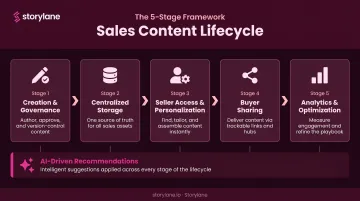
Modern systems add a sixth layer: AI-driven recommendations. Rather than requiring reps to search, the platform surfaces the right asset based on deal stage, prospect persona, and past seller behavior — turning passive libraries into active sales tools.
Sales Content Management vs. Sales Enablement
That lifecycle sits inside a larger discipline — and understanding where SCM ends and sales enablement begins prevents a lot of technology confusion.
Sales enablement is the broader discipline — it encompasses training, coaching, onboarding, process design, and technology. Sales content management is a specific component within that framework: the infrastructure that organizes and delivers content assets.
Gartner defines sales enablement as "the process of providing the sales organization with information, content, and tools that help sellers sell more effectively." SCM is what operationalizes the content piece of that definition — ensuring assets are findable, current, and tied to measurable outcomes. When content management is strong, every other enablement layer — coaching, onboarding, deal guidance — builds on a reliable foundation of accurate, accessible materials.
Types of Sales Content Across the Buyer's Journey
Different stages of the buyer journey require different content formats. A well-managed content library organizes assets by funnel stage, persona, and deal context — not just by file type or department.
Top-of-Funnel Content (Awareness Stage)
Awareness-stage content sparks initial interest and establishes credibility. Reps use these assets in early outreach and nurture campaigns, where the goal is to earn attention — not close deals.
Common TOFU formats:
- Thought leadership articles and market research reports
- Intro product videos and explainer content
- Customer pain point briefs
- Infographics and data visualizations
Marketing creates most of this content, which makes the marketing-sales alignment challenge real. Without a centralized SCM system, sellers either can't find these assets or revert to outdated versions sitting in their own folders.
Middle-of-Funnel Content (Evaluation Stage)
This is where deals are won or lost. Mid-funnel content helps prospects differentiate your solution, build internal confidence, and move toward a decision.
Key MOFU formats:
- Case studies (especially industry-matched)
- Competitor battle cards
- Product one-pagers and industry-specific decks
- Customer testimonials and use case briefs
- Product demo videos
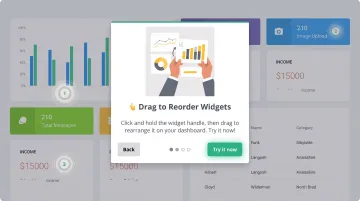
Interactive demos are worth singling out here. Tools like Storylane let sales teams build clickable, self-guided product experiences that prospects can explore before a live call. Instead of arriving cold, prospects have already navigated the product, identified relevant features, and formed initial opinions.
PDQ and PaySauce (both Storylane customers) specifically designed their demo strategy around this gap: prospects were losing interest between the demo request and the actual sales call. Interactive demos closed that gap, ensuring buyers arrived primed and engaged. Storylane's Buyer Hub takes this a step further by centralizing multiple demos in one destination — organized by use case, role, or product area — so prospects can self-discover rather than wait for a rep to share each asset manually.
Bottom-of-Funnel Content (Decision Stage)
BOFU content removes the final barriers to commitment. These assets address risk, justify budget, and align stakeholders.
Common BOFU formats:
- ROI calculators and pricing/packaging decks
- Executive summaries and security/compliance documentation
- Mutual action plans (MAPs)
- Proposal templates
Internal enablement content also belongs in this section of the library: battle cards, objection-handling scripts, persona cheat sheets, and sales playbooks. Reps need these to prepare for complex late-stage conversations — they're content too, just not buyer-facing.
Key Benefits of Sales Content Management
Increase Rep Productivity
When content is scattered across drives, inboxes, and Slack threads, finding the right asset mid-deal becomes a full-time job. Salesforce's research showing reps spend only 28% of their week selling reflects exactly this kind of friction. A centralized, searchable SCM system eliminates the hunting and gives that time back to actual selling.
Ensure Content Accuracy and Brand Consistency
Without centralized management, reps do what's practical: they create their own versions or use the last deck they remember saving. That creates inconsistent messaging, off-brand materials, and in regulated industries, compliance risk.
A CMS with version control ensures only approved, current content reaches buyers. When marketing updates a case study or refreshes a deck, reps find the new version automatically — not a 14-month-old copy from someone's downloads folder.
Enable Personalization at Scale
Forrester research shows 75% of technology buyers say it's important for reps to provide tailored, relevant content. The problem: personalizing individually is manual and doesn't scale.
Modern SCM systems solve this with dynamic fields and CRM data. Storylane's smart variable system, for example, lets teams build one base demo and automatically populate it with prospect-specific data — company name, logo, relevant metrics — without building separate versions for every account. Across 50 active deals, that eliminates dozens of hours of manual customization per rep per quarter.
Accelerate Deal Cycles
Content availability directly affects pipeline velocity. When a rep can immediately share a case study matching a prospect's exact industry, or pull up an ROI calculator built around the prospect's own numbers, conversations move faster.
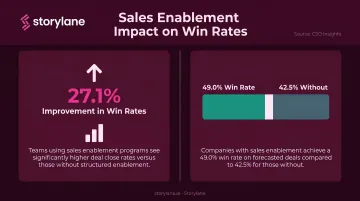
CSO Insights research found that implementing a content strategy was associated with a 27.1% improvement in win rates, and organizations with sales enablement reported 49.0% win rates versus 42.5% for those without. Content that's findable and relevant isn't just convenient — it measurably affects outcomes.
Drive Data-Driven Content Optimization
Without usage analytics, content strategy is guesswork. A proper SCM system shows marketing and enablement teams which assets reps actually use, which content buyers engage with most, and which materials correlate with closed-won deals.
Storylane's analytics dashboard ties content activity directly to live pipeline. It captures:
- Time spent, completion rates, and drop-off points per session
- CTA click data pushed into HubSpot and Salesforce records
- Real-time Slack alerts when high-intent engagement is detected
Must-Have Features in a Sales Content Management System
Centralized Repository with Intelligent Search
A folder structure isn't a content strategy. Look for:
- AI-powered auto-tagging and semantic search
- Filters by deal stage, persona, product line, and competitor
- Results that surface the right asset in seconds — not by exact file name
Forrester identifies findability as a core SCM requirement, and poor tagging remains one of the leading causes of content going unused.
CRM and Workflow Integrations
The best SCM systems surface content inside the tools reps already use — Salesforce, HubSpot, email, Slack — rather than requiring a separate login to a separate platform. Contextual delivery is the difference between high and low adoption.
Some platforms extend this further by layering in buyer engagement signals alongside content delivery. Storylane's Account Reveal, for example, de-anonymizes demo viewers and sends real-time Slack alerts when known accounts engage — giving reps firmographic context, session timing, and engagement depth so outreach happens at the right moment, not just with the right asset.
Analytics, Version Control, and Access Permissions
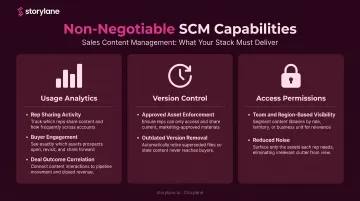
Three non-negotiable capabilities:
- Usage analytics — which assets reps share, which buyers engage with, how content correlates with deal outcomes
- Version control — ensures reps always access the current, approved asset; outdated versions are removed from circulation
- Access permissions — each team or region sees only relevant content, reducing noise and improving the rep experience
Sales Content Management Best Practices
Map Every Asset to a Buyer Stage
Every asset should map to a specific funnel stage, persona, and sales scenario. Content built without a clear "when and why to use this" gets ignored — regardless of quality. Before publishing anything to your library, define the deal stage it supports and the buyer persona it addresses.
Build Governance Before You Need It
Assign content owners responsible for keeping assets current. Forrester's 2024 data shows 65% of buyer content goes unused due to findability, relevance, or quality issues — a direct result of neglected governance.
Schedule periodic audits to catch outdated, duplicate, or abandoned materials before they pollute the library. Without this structure, even a well-built library degrades within months.
Train Reps on When to Use Content, Not Just Where to Find It
A library without guidance is just a folder. Reps need to know which assets fit each deal stage, how to tailor them for specific personas or industries, and how to read buyer engagement signals. This is where enablement training pays off.
For example, an interactive demo shared after discovery hits differently than one sent cold. Knowing how to sequence content — not just locate it — is what moves deals forward.
Let Engagement Data Drive Optimization
Track content usage by reps, buyer engagement patterns, and correlation with pipeline progression. Feed those insights back into the creation process.
Over time, the library becomes more effective: assets that drive deals get promoted, and ones that don't get retired or rebuilt. This feedback loop is what separates a static content dump from a system that compounds results.
Frequently Asked Questions
What is sales content management?
Sales content management is the process and system for organizing, distributing, and measuring sales materials so reps can access the right content at the right time during the buyer journey. Unlike passive file storage, it treats content as a trackable asset connected to CRM workflows and buyer engagement data.
What is a sales CMS with an example?
A sales content management system centralizes all sales and marketing assets in one searchable, trackable location. Storylane, for instance, functions as both an interactive demo platform and a sales enablement tool: reps share personalized demo content directly from their CRM workflow, while analytics track exactly how buyers engage with it.
What are the 5 C's of content marketing?
The 5 C's of content marketing are:
- Clarity — messaging is easy to understand
- Consistency — brand voice and format stay uniform
- Creativity — content stands out from competitors
- Credibility — claims are backed by evidence
- Customer-focus — content addresses real buyer needs
These principles apply directly when building assets for a sales content library.
How is a sales CMS different from cloud storage?
Cloud storage (Google Drive, Dropbox) passively stores files with no context about how or when to use them. A sales CMS makes content searchable by deal stage and persona, tracks buyer engagement, integrates into sales workflows, and enforces version control , turning content from a static archive into an active sales asset.
What types of content should be in a sales content library?
Four main categories cover most sales content libraries:
- Awareness: articles, intro videos
- Evaluation: case studies, battle cards, interactive demos
- Decision: proposals, ROI calculators, mutual action plans
- Internal enablement: playbooks, objection-handling guides, persona cheat sheets
How do you measure the effectiveness of sales content?
Key metrics include content usage by reps, buyer engagement (time spent, completion rate, pages viewed), influence on stage progression, and correlation with win rates and deal velocity. A proper SCM system like Storylane provides visibility into all of these without requiring manual tracking.