Introduction
Sales reps are hired to sell — but according to the Salesforce State of Sales, Sixth Edition, reps spend only 30% of an average week actually selling. The remaining 70% disappears into administrative work — data entry, scheduling, reporting, and manual follow-ups.
Sales automation exists to reclaim that time. By using software to handle repetitive, low-judgment tasks, teams can close more deals without hiring more people or burning out the ones they have.
This guide walks through what sales automation is, how it works, which tasks to automate first, and a practical path to get started — including the common mistakes that trip up first-timers. The goal isn't to replace salespeople. It's to clear the administrative backlog so they can spend more time in front of buyers.
Key Takeaways
- Sales automation uses software to handle repetitive tasks — data entry, email follow-ups, lead scoring, and reporting — so reps spend more time selling.
- It works by connecting your CRM to existing tools and triggering automatic actions based on prospect behavior.
- The highest-impact areas to automate first: lead management, email outreach, demo delivery, CRM updates, and reporting.
- Start small — audit your process, pick a CRM foundation, and add automation tools incrementally.
- Automation doesn't replace salespeople; it removes the admin work so they can focus on relationships and closing.
What Is Sales Automation?
Sales automation is the use of software to perform repetitive, manual sales tasks automatically — logging data, sending follow-up emails, scoring leads, updating pipeline stages, and generating reports. The goal is straightforward: reduce the time reps spend on administrative work and redirect that time toward selling.
Two categories have historically defined the space:
- Data capture and organization — automatically pulling contact information, email activity, and web behavior into a CRM without manual input
- Workflow automation — triggering predefined actions (send an email, assign a lead, schedule a call) when a prospect reaches a certain stage or behavior threshold
AI has expanded what's possible beyond these two foundations. Modern automation doesn't just organize and trigger — it analyzes pipeline data, predicts deal risk, and generates content like email drafts and call summaries. The result: fewer hours spent on admin, more signal for reps to act on.
Sales Automation vs. Marketing Automation
This distinction matters for beginners. Marketing automation handles top-of-funnel activity: content distribution, ad campaigns, email nurture programs, and lead generation. Sales automation takes over once those leads enter the pipeline — managing outreach, follow-ups, demo scheduling, and pipeline movement through to close.
When a marketing platform passes a qualified lead to sales, automation ensures that lead is instantly assigned, contacted, and moved through the pipeline. No manual handoff, no delay while a rep catches up on their queue.
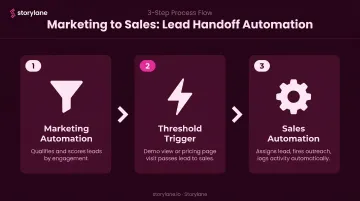
In practice, the handoff between the two looks like this:
- Marketing automation qualifies and scores leads based on engagement
- A threshold trigger (a demo view, a pricing page visit) passes the lead to sales
- Sales automation assigns the lead, fires the first outreach, and logs the activity — all without human intervention
How Sales Automation Works
The core engine is integration. Sales automation connects your CRM — the central record of all customer data — with the tools your team uses every day: email, calendar, communication platforms, and analytics dashboards. Instead of manually entering or transferring data between systems, information flows automatically.
Here's how that plays out across four stages:
Step 1 — Data Is Captured and Organized
Prospect data enters your system from multiple sources: web forms, chatbot conversations, email replies, and event sign-ups. Automation routes all of it directly into the CRM, enriching records with firmographic data (company size, industry, job title) without any rep involvement.
Platforms like Storylane add another layer here. When a prospect interacts with an interactive product demo, Storylane captures behavioral data (which features they explored, how long they spent, where they dropped off) and syncs it directly to Salesforce or HubSpot. Embedded lead forms within the demo capture contact details at the point of interest, so the CRM record is populated before a rep makes contact.
Step 2 — Leads Are Scored and Routed
Automation analyzes prospect behavior (email opens, pricing page visits, demo requests, time spent on key content) and assigns a score reflecting purchase readiness. Once a lead crosses a defined threshold, the system routes them to the right rep based on territory, product line, or account size.
Speed matters here. Research published in Harvard Business Review found that companies contacting online leads within one hour are nearly 7x more likely to qualify them than companies that wait one additional hour. Automated routing closes that gap before the lead goes cold.
Step 3 — Actions Are Triggered Automatically
Behavior-based triggers remove the need to manually manage next steps at every stage. A prospect downloading a case study queues a follow-up email sequence. A rep moving a deal to "Proposal Sent" automatically schedules a check-in reminder. A high-intent demo engagement fires a Slack alert to the account executive.
RAIN Group research shows it takes an average of 8 touchpoints to get an initial meeting with a new prospect. Trigger-based automation handles the cadence consistently, without relying on a rep to track and manage each touch.
Step 4 — Performance Is Tracked in Real Time
Automation feeds live data into analytics dashboards, giving sales managers visibility across the entire pipeline. AI layers on top of this data to surface anomalies and recommend corrective actions early.
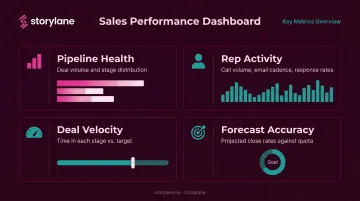
Dashboards typically surface:
- Pipeline health — deal volume and stage distribution
- Rep activity — call volume, email cadence, response rates
- Deal velocity — time spent in each stage versus target
- Forecast accuracy — projected close rates against quota
When a deal stalls too long in one stage or a rep's contact rate drops, AI flags it before a deal slips past forecast.
Key Sales Tasks You Can Automate
You don't need to automate everything at once. For beginners, the highest-impact starting points are the tasks that consume the most rep time and introduce the most room for human error.
Lead Management and Nurturing
Automation handles lead capture from every channel, deduplicates records, enriches contact profiles with firmographic data, scores each lead, and places them into the appropriate nurture sequence. No lead goes cold because of a missed follow-up — the system handles the cadence automatically.
Email Outreach and Follow-Ups
Email sequences trigger based on prospect behavior or time delays: a welcome email after a form fill, a follow-up three days after a demo, a re-engagement message after 30 days of silence. These sequences deliver personalized messages at scale without manual scheduling. Outreach data shows the average sequence email reply rate sits at 2.9% — which means volume and consistency matter. Automation makes both sustainable.
Demo and Discovery Automation
The product demo is one of the most time-intensive parts of the sales cycle. Interactive demo platforms let prospects self-serve a guided product experience before ever speaking to a rep — arriving at the sales conversation already educated and primed.
Storylane enables this with multi-format interactive demos — screenshot, HTML, video, and guided tours — that prospects can explore on their own schedule. Its RepX feature extends that further with an AI sales representative available 24/7. RepX can:
- Engage prospects in real-time conversation and handle objections
- Run full product demos without a rep present
- Qualify leads against predefined criteria
- Route qualified contacts directly to the CRM
Once a high-intent prospect engages, Storylane's Demo Signals feature fires a real-time Slack or email alert to the account executive, surfacing which features the prospect explored, their engagement depth, and an intent score. The rep enters the follow-up call with full context — no cold opening required.
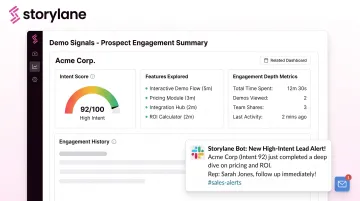
As Melany Hallgren, Sales Manager at Campminder, put it: "Prospects see the product. We skip over the discovery and jump straight into a high-intent demo. Time saved for buyers and sellers."
CRM Updates and Reporting
Manual data entry is the task sales reps complain about most — and it's also one of the easiest to automate. Automation logs calls, updates deal stages, syncs contact information across systems, and generates performance reports on a set schedule. Reps and managers get accurate, current data without spending time maintaining it.
Benefits of Sales Automation for Your Business
Salesforce workplace automation research found that 89% of workers are more satisfied with their jobs when automation handles repetitive tasks. For sales teams facing high turnover, that's a direct retention lever worth acting on.
The three business-critical outcomes:
- Increased rep productivity — McKinsey research on sales automation found early adopters report 10% to 15% efficiency gains, with reps recovering meaningful selling time previously lost to admin work. In one McKinsey example, a lead-management chatbot increased reps' selling time by 15% to 20%.
- Improved lead conversion — faster routing and consistent follow-up sequences mean fewer leads fall through the cracks. McKinsey also found up to 10% sales uplift among early automation adopters.
- Better forecasting accuracy — real-time pipeline data replaces end-of-quarter guesswork, giving managers reliable revenue visibility throughout the month.
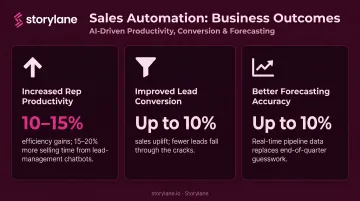
Those efficiency gains compound at the team level. McKinsey estimates more than 30% of sales-related activities can be automated with current technology — meaning a lean team can handle volume that would otherwise require meaningfully more headcount. For growing businesses that can't simply hire their way to higher output, scalability becomes the real payoff: the same 10-person team operating with the output of 13 or 14.
How to Implement Sales Automation (Step-by-Step for Beginners)
Step 1: Audit Your Current Process
Before selecting any tools, map every step in your sales cycle from lead capture to close. Identify which tasks are repetitive, time-consuming, or error-prone. Those are your automation candidates.
A quick audit also protects you from a common beginner mistake: automating a broken process and scaling the problem.
Step 2: Start with Your CRM as the Foundation
Automation without a single source of truth creates more problems than it solves. Choose a CRM that centralizes customer data and either includes native automation features or integrates cleanly with the tools you plan to add. Everything else layers on top of this foundation.
Step 3: Add Task-Specific Tools One at a Time
Layer in tools incrementally — email sequencing, lead scoring, scheduling, or demo automation — and test the impact of each before adding the next. The stakes are real:
- Sales reps already use an average of 8 tools to close deals
- 42% report feeling overwhelmed by too many platforms
- Overwhelmed sellers are 45% less likely to hit quota, according to Salesforce
The goal is fewer, better-integrated tools — not more of them.
Getting these three steps right creates the conditions for automation to actually work. Once the foundation is solid, you can start layering in more specialized tools with confidence.
Common Challenges (and How to Avoid Them)
Over-Automating the Human Touch
The most common beginner mistake is automating so many touchpoints that prospects feel like they're talking to a machine. Reserve automation for logistics and data tasks — scheduling, lead routing, follow-up sequences. Discovery conversations, negotiation, and relationship-building moments require a real person.
Dirty Data Undermining Your Results
Automation is only as good as the data it acts on. Dirty, duplicate, or incomplete CRM records produce wrong lead scores, misdirected emails, and inaccurate forecasts. Gartner puts the average annual cost of poor data quality at $12.9 million per organization — which means data hygiene isn't optional groundwork, it's a condition for automation working at all.
Rep Resistance and Change Management
Reps who've done things a certain way for years may resist new tools, particularly if they fear automation signals job replacement. Bring them in early — involve reps in tool selection, train them properly, and frame every change around making their quota more achievable. When automation removes admin overhead, it frees them to spend more time actually selling.
Frequently Asked Questions
What is sales automation?
Sales automation is the use of software to handle repetitive sales tasks automatically — including data entry, email follow-ups, lead scoring, and reporting. The goal is to free sales reps from administrative work so they can focus on closing deals and building relationships.
What is an example of sales automation?
When a prospect fills out a contact form, automation instantly adds them to the CRM, assigns them to a rep, sends a personalized welcome email, and places them in a lead nurture sequence — all without any manual action from the sales team.
What are the 4 types of automation?
The four main types relevant to sales are:
- Task automation — data entry and scheduling
- Workflow automation — trigger-based email and action sequences
- AI-powered automation — lead scoring and predictive analytics
- Content automation — email generation and report creation
Does sales automation replace sales reps?
No. Sales reps spend roughly 70% of their week on administrative work that automation can handle. That frees them to focus on relationship-building, discovery conversations, and deal-closing — the work that actually requires human judgment.
What is the difference between sales automation and marketing automation?
Marketing automation manages top-of-funnel activities: campaigns, content distribution, and lead generation. Sales automation takes over once a lead enters the pipeline — handling outreach, follow-ups, demos, and pipeline management to convert those leads into customers.
How do I get started with sales automation as a beginner?
Start by auditing your current sales process to identify your most time-consuming tasks. Implement a CRM as your central data foundation, then add automation tools incrementally — beginning with email sequencing or lead scoring before expanding to more complex workflows.