Introduction
B2B buyers today arrive at demos already informed. They've read your G2 reviews, watched your explainer videos, and compared you against three competitors — before you've said a single word. Yet most demos they sit through are still generic product tours that ignore everything the prospect just told you in discovery.
According to Gartner's 2025 survey of 632 B2B buyers, 73% actively avoid suppliers that send irrelevant outreach. That number extends to demos. When a prospect doesn't see their workflows, their pain points, or their language reflected back at them, the message lands clearly: you didn't prepare.
Personalization is now the baseline expectation. This guide covers a practical framework for building pre-demo intelligence, specific in-demo personalization techniques, and scaling the entire process without burning out your team.
Key Takeaways
- Research firmographics, strategic context, stakeholder roles, and engagement signals 48–72 hours before every demo
- Open with a situation summary, not a product overview — then tailor the feature flow to their top pain point
- Build 3–5 persona-based demo templates and inject account-specific variables rather than rebuilding from scratch
- Use dynamic variable tokens to personalize names, logos, currencies, and terminology at scale
- Track step-level demo engagement to sharpen your demo flow and follow-up
Why B2B Buyers Expect Personalized Demos Now
Buyers no longer wait for a sales rep to educate them. They arrive at demos with a shortlist already formed. Forrester's 2026 analysis found that 68% of B2B buyers identify a front-runner before the purchase process even begins, and that front-runner wins 80% of the time.
Your demo, in most cases, isn't changing minds. It's either confirming a preference that already exists or giving the buyer a reason to cross you off the list.
What a Generic Demo Actually Costs You
When a prospect sits through a feature walkthrough that doesn't reflect their industry, their role, or their stated priorities, the credibility damage is immediate:
- They disengage within the first few minutes
- They mentally disqualify you — even if the product is objectively a fit
- You extend the sales cycle by forcing another call to address what should have been covered the first time
- Win rates drop because competitors who did personalize look more capable by comparison
What "Personalized" Actually Means
Using a prospect's company name on a title slide isn't personalization. Real personalization means:
- Showing the right features in the right order for their role and use case
- Using data that mirrors their industry reality — not placeholder "Acme Corp" dummy data
- Speaking to the outcomes they care about, in the language they use to describe the problem
- Reflecting back what you heard in discovery, before you've clicked a single button
McKinsey's 2026 Global B2B Pulse Survey of 4,000 decision-makers found that market leaders are 4x more likely to deploy true one-to-one personalization (20% vs. 5%) compared to the rest of the field. That 15-point gap compounds over time: more relevant demos, higher win rates, and shorter cycles — while everyone else keeps running the same generic show.
Build Your Pre-Demo Intelligence Profile
Effective demo personalization starts 48–72 hours before the call. The goal is a concise internal document — a pre-demo intelligence profile — that consolidates everything you know about the prospect before you open the meeting.
The Four Research Categories
| Category | What to Find |
|---|---|
| Firmographic basics | Company size, industry, growth stage, current tech stack |
| Strategic context | Recent funding, product launches, competitive pressures, news |
| Stakeholder roles | Who's attending and what each person cares about (revenue, security, ease of use) |
| Engagement signals | Pages visited, emails opened, content downloaded, prior demo activity |
The engagement signals row is often the hardest to fill manually. Storylane's Account Reveal feature automates it — surfacing firmographic data and showing which demo features a prospect already explored before the call, so you walk in knowing exactly what caught their attention.
Turn Discovery Into Personalization Intel
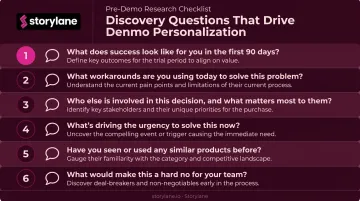
The discovery call is your best research opportunity. These six questions yield the most useful demo customization data:
- "What does success look like in 90 days?"
- "What's your current workaround for [specific problem]?"
- "Who else will be evaluating this internally?"
- "What's driven urgency around solving this now?"
- "What did you see in our product that made you agree to this call?"
- "What would make you walk away from a vendor at this stage?"
Map Research to Demo Flow
Once you have the profile, convert it into a demo hypothesis: "This prospect cares most about X, so we'll open with that and build toward Y."
That means deciding:
- Which feature to lead with (tied to their #1 pain point)
- Which features to skip entirely (irrelevant to their role)
- What business outcome to anchor the session around
Log everything in your CRM before the demo — not after. Insights gathered in discovery disappear in notebooks, and in multi-stakeholder deals, the same contact often resurfaces weeks later with a different set of decision-makers. What you capture now shapes every touchpoint that follows.
Techniques to Personalize the Demo Itself
Start With a Situation Summary, Not a Product Overview
Replace the generic "here's what we do" opener with two to three sentences that reflect back what you learned. Something like: "Based on our conversation last week, your team is managing manual handoffs between three systems, and your current workaround is costing roughly half a sprint per cycle. Today I want to show you specifically how we'd address that."
This earns credibility in the first 60 seconds. It signals preparation without needing to open with a product tour.
Customize the Visual Environment
Prospects notice placeholder data immediately. It signals a template, not a tailored experience.
Storylane's dynamic variable token system lets reps swap in the prospect's company name, logo, industry-specific terminology, and even currency directly inside the demo UI, without rebuilding the demo from scratch. Text tokens handle names and roles, image tokens replace logos, and the same base demo adapts for dozens of accounts in minutes.
Show workflows that mirror their day-to-day reality. If you're demoing to a cybersecurity team, the data in your environment should look like a SOC dashboard — not a generic SaaS metrics screen.
Lead With Their Top Pain Point, Not Menu Order
Most reps walk through the product the way the navigation menu is organized. Prospects make their engagement decision in the first few minutes — so if you spend those minutes on context-setting and secondary features, you've already lost them.
Identify the capability that directly addresses the pain point they ranked highest in discovery, and open with that. Everything else builds from there.
Speak Their Language, Not Yours
Sales reps default to feature names. Buyers think in outcomes. The translation matters.
| Rep says | CFO hears | VP of Engineering hears |
|---|---|---|
| "Automated workflow triggers" | "Reduces manual labor cost across the team" | "No more one-off scripts to maintain" |
| "Real-time dashboard" | "Single source of truth for board reporting" | "Replaces three internal tools" |
| "Role-based permissions" | "Audit trail for compliance" | "Granular access control with zero overhead" |
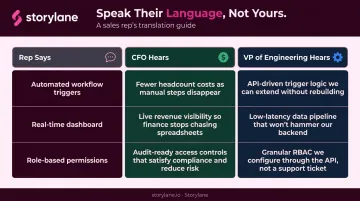
Frame every feature around the outcome that matters to the person across the table — before moving to the next one.
Make It a Dialogue, Not a Monologue
Pause at key moments and ask role-specific questions:
- "Does this map to how your team currently handles X?"
- "Is this the workflow that's causing the most friction, or is it something else?"
Allowing stakeholders to redirect parts of the demo based on their curiosity does two things: it surfaces real buying intent in real time, and it prevents you from spending 20 minutes on features nobody in the room cares about.
Storylane's Presenter Mode supports this directly: the rep sees guide content and notes privately while the prospect sees a clean, uncluttered demo experience — built for live calls where the conversation needs room to move.
Scale Personalized Demos Without Burning Out Your Team
The Real Scaling Problem
According to Consensus' 2024 Sales Engineering Compensation and Workload Report, a typical demo requires 3 hours of preparation. Meanwhile, Salesforce data shows reps spend only 28% of their workweek actually selling. At volume, manual personalization doesn't just slow teams down — it consumes the capacity that should go toward closing. The fix is decoupling the personalization logic from the execution effort.
Build Templates With Personalization Layers
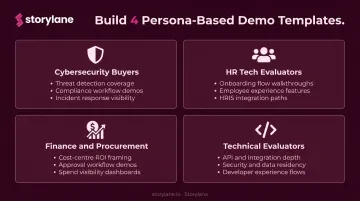
Rather than rebuilding from scratch for each account, teams build 3–5 industry- or persona-based demo templates and inject account-specific variables on top:
- One template for cybersecurity buyers
- One for HR tech evaluators
- One for finance and procurement-led deals
- One for technical evaluators (developers, architects, IT)
Storylane's demo token system makes this practical. One base demo can be tailored to a specific account in seconds by swapping company names, logos, currencies, and terminology — no need to duplicate the entire demo environment.
Whispli, for example, built a full roster of templates for different personas (user-based, feature-based, in-depth). Their sales team can now customize and send demos without any technical bottleneck.
Organize Everything in a Centralized Hub
When demos live in scattered folders and personal drives, reps default to whatever they built last time, regardless of fit.
Storylane's Buyer Hub consolidates all demo variants, templates, videos, PDFs, and collateral into a single curated link. For sales teams managing multiple verticals, this means reps can quickly find the right starting point, copy it, add account-specific tokens, and send — without escalating to presales for every deal.
The hub also enables self-serve scenarios: prospects can explore relevant demo tracks on their own before or after a live call, with every click tracked and surfaced back to the rep.
Measure Whether Your Demo Personalization Is Working
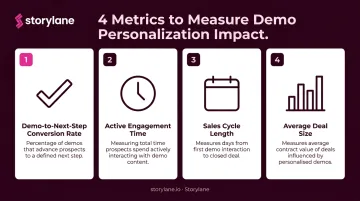
Gut feel isn't a feedback loop. These are the four metrics worth tracking:
- Demo-to-next-step conversion rate — Did the prospect agree to a follow-up, trial, or proposal?
- Active engagement time — How long did prospects stay engaged, and where did they drop off?
- Sales cycle length — Are personalized demos moving deals faster than generic ones?
- Average deal size — Does higher personalization correlate with larger contracts?
Go Deeper Than Calendar Outcomes
Calendar outcomes tell you whether someone moved forward. Demo engagement data tells you why — and what to do differently next time.
Tools like Storylane's analytics give reps visibility into where prospects get hooked and where they drop off — with engagement automatically synced to Salesforce and HubSpot. Deal Intelligence maps individual demo interactions back to CRM deal records, so you can see which demo content influenced which pipeline stage, not just which prospects booked a follow-up call. Real-time Slack alerts fire when a prospect re-engages with a demo after the call, which is one of the strongest buying intent signals you'll get.
Close the Feedback Loop Monthly
Data only improves demos if someone reviews it regularly. A simple monthly practice:
- Pull engagement data across the last 30 days of demos
- Identify the top three sections by time-on-step and completion rate
- Identify where drop-offs concentrate
- Update templates to front-load the high-engagement content and remove or reposition the dead zones
Run this review consistently and your demo templates get sharper every month — each iteration informed by what real prospects actually engaged with, not assumptions about what they should care about.
Frequently Asked Questions
What are the 4 D's of personalization?
McKinsey's established framework defines the 4 D's as Data, Decisioning, Design, and Distribution. In a demo context: Data means what you know about the prospect; Decisioning is choosing which features and flow to show; Design is how the demo environment looks and feels for that account; Distribution is how and when the demo reaches each stakeholder.
What is the 3-3-3 rule in sales demos?
The 3-3-3 rule is a sales demo framework: the first 3 seconds grab attention, the next 3 minutes establish relevance, and the following 3 days determine whether follow-up lands. The definition varies across sales communities, but the core principle holds — earn attention fast, prove fit quickly, and follow up while the demo is still fresh.
What is the 2-2-2 rule in sales?
The 2-2-2 rule is a follow-up cadence framework, not a demo structure rule. It refers to following up at 2 days, 2 weeks, and 2 months after an interaction to maintain relationships and secure repeat business. Applied post-demo, it's a practical cadence for keeping deals moving without overwhelming the prospect.
What are the steps in the personal selling process?
The standard personal selling process runs seven steps: prospecting and qualifying, pre-approach, approach, presentation, handling objections, closing, and follow-up. The demo lives inside the presentation stage — the moment where abstract interest either converts to genuine buying intent or stalls out entirely.
How do you personalize a demo for multiple stakeholders in one deal?
Build role-specific demo tracks: one for technical evaluators focused on integrations and architecture, one for economic buyers focused on ROI and risk reduction, one for end users focused on daily workflow. Run separate sessions for each group, or use a demo hub where stakeholders self-navigate the track most relevant to their role, with engagement data flowing back to the deal record.