How to Create a Sales Enablement Process From Scratch

Chayanika Sen
June 29, 2026
Table Of Contents

Sam works as a marketing manager in a SaaS product company and his team is working on a new product launch campaign. 

To launch the campaign that comprises various marketing and sales enablement collateral, the team has created assets that can drive sales and generate excitement among potential customers.

However, they encountered a problem when they realized some assets were either outdated or had inconsistent sales content.

Frustrated, the sales reps began deviating from the marketing-created scripts. They improvised their pitches to replace outdated or irrelevant content.

Result? Misaligned content assets far off from the original goal.

In this guide, we will take you through the process of creating a sales enablement process from scratch, where teams work in collaboration and not in silos to achieve common revenue goal.

What is Sales Enablement?

Sales enablement is a strategic function that aims to equip sales teams with the tools, resources, and knowledge they need to effectively engage with customers, close deals, and drive revenue growth.

It involves providing sales professionals with the right content, training, technology, and support throughout the sales process to enhance their productivity, efficiency, and overall performance.

Benefits of Sales Enablement

Companies that have created sales enablement process have seen the following results:
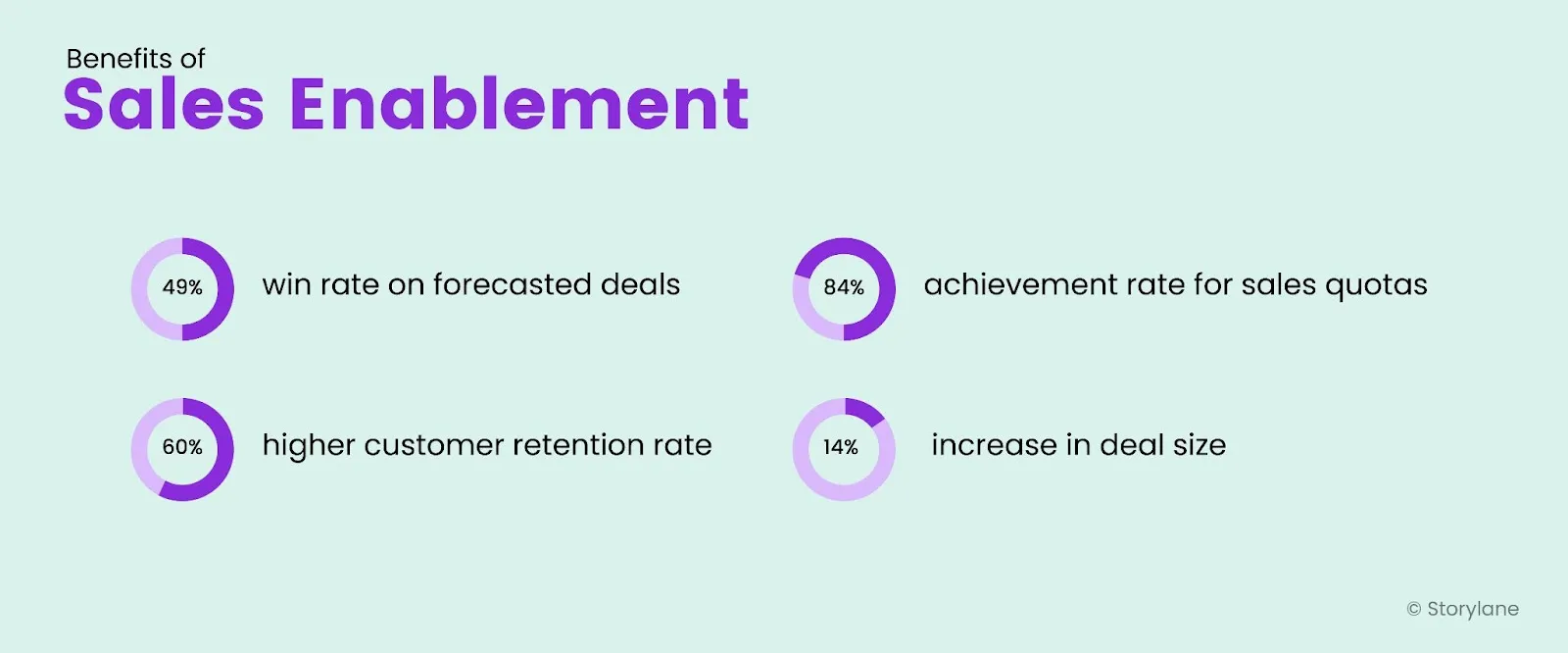
Benefits of Sales Enablement
Source

So, if you’re not yet spending time creating a sales enablement process, this is your cue to get started!

What Does the Sales Enablement Process Look Like?

According to Alex Kracov, CEO and Founder of Dock, a sales enablement process is based on five pillars. These include:

Pillar 1: Research

Creating any process from the start begins with thorough research. For sales enablement managers, it means knowing:

  • Your ideal customer profile (ICP)
  • Where your top customers spend time
  • Their interests 
  • The current market trend
  • Shifts in the customer behavior
  • Activities of the competition

Knowing the answer to such questions helps you set a strong foundation for your process.

Pillar 2: Process

Systems are processes that are critical to streamlining your operations to achieve success. For sales enablement, it means setting up processes for content delivery or sales training. 

For example, the sales reps should be aware of training at key points like a product update, while anyone involved in the sales team should know where to find the latest content assets.

The Pillars of a Sales Enablement Process

Pillar 3: Training

Sales coaching is a key aspect that determines the success of the sales enablement team. So the sales enablement team should regularly plan and conduct training program for the sales team. 

For example, a sales coaching program must be mandatory after every new product update.

Pillar 4: Sales Enablement Content

Content is a significant facet of sales enablement. Content can be further categorized as:

  • Client-facing: Think pitch deck, ROI case studies, white papers, interactive product demo, etc 
  • Internal-facing: Think pricing sheets, competitor battle cards, consistent messaging brief, etc.

Also Read: Why Interactive Product Tours is Your Strongest Sales Collateral 

Pillar 5: Sales Enablement Software

Finally, using sales enablement tools like content management tools, revenue intelligence tools, customer engagement tools like interactive product tour platform, and more.

A Step-by-Step Guide to Creating a Sales Enablement Process

Creating a sales enablement process needs a clear direction and strategy. If you’re unsure where to start, here’s a step-by-step guide to help you get started. 

Step 1: Get Internal Buy-ins

For the success of any process, it’s important to have all the internal teams on the same page, more so when you’re working towards forming a process that has its foundation on internal team collaboration. So, to make your sales enablement process a success, ensure everyone understands why the process is important and how everyone can be benefited from it. 

Step 2: Define Goals and Objectives 

Andy Paul, host of Sales Enablement Podcast, mentions starting by clearly defining your goals and objectives for the sales enablement process. This will help you align your efforts and measure success. Identify what you want to achieve, such as:

  • Increasing sales revenue
  • improving customer satisfaction or 
  • Reducing sales cycle time

Define specific, measurable, attainable, relevant, and time-bound (SMART) goals.

Step 3: Identify Target Audience and Buyer Personas

Understand your target audience and buyer personas to tailor your sales enablement efforts. Analyze your ideal customer's pain points, motivations, and buying behaviors. This information will guide your content creation and training materials.

Step 4: Foster Collaboration Between Sales and Marketing

Aligning sales and marketing teams is crucial for effective sales enablement. When these teams collaborate, they can share insights, knowledge, and resources, resulting in a more streamlined and successful sales process. Here are some key points to consider:

  • Dedicated sales enablement resources often include marketing content that salespeople can use to inspire and educate customers, highlighting the synergy between the two departments.
  • Collaboration between sales and marketing is essential to ensure that basic sales enablement strategies align with the overall marketing strategy and company messaging.
  • Sales and marketing alignment can be further facilitated by leveraging sales enablement platforms that provide content management and enable seamless sales communication and collaboration.

Regular communication, joint planning sessions, and sharing feedback and insights between sales and marketing departments are vital to fostering collaboration and are key to a high-impact sales enablement strategy. This collaboration ensures that marketing efforts effectively support the sales team and that sales feedback influences marketing strategies and content creation.

Creating a Sales Enablement Process

Step 5: Assess the Current Sales Process and Content

Evaluate your current sales process and content to identify areas for improvement. Analyze your sales pipeline data and metrics to gain insights into conversion rates, bottlenecks, and areas of inefficiency. This assessment will help you identify gaps and determine the needed content and training materials.

Step 6: Develop Sales Content and Training Materials

Based on the assessment from the previous step, develop sales content and training materials that align with your goals, target audience, and buyer personas. 

Create engaging and relevant content that educates and empowers sales professionals. This includes:

  • Product/service information
  • Competitive analysis
  • Objection-handling guides and 
  • Value propositions

“Documentation of every sales enablement program is critical. That’s why I prepare and document the marketing plan that aligns with our sales goals to generate more qualified leads and improve the closing rate. So I make sure everyone is on the same page and sales readiness is 100% to pitch the same USP whenever any prospect shows interest. We have created a lot of social proofs, like case studies and client testimonials, on multiple platforms. It helps us build trust and credibility with our prospects and showcase our results and benefits. 

Also, I create sales call scripts and solution decks for each of our customers. It enables our sales reps to structure their conversations and demonstrate value to each customer. It has improved the efficiency of our sales professionals by 70%.” —- Jyoti Sahoo, Head of Marketing, Revnew, Inc.
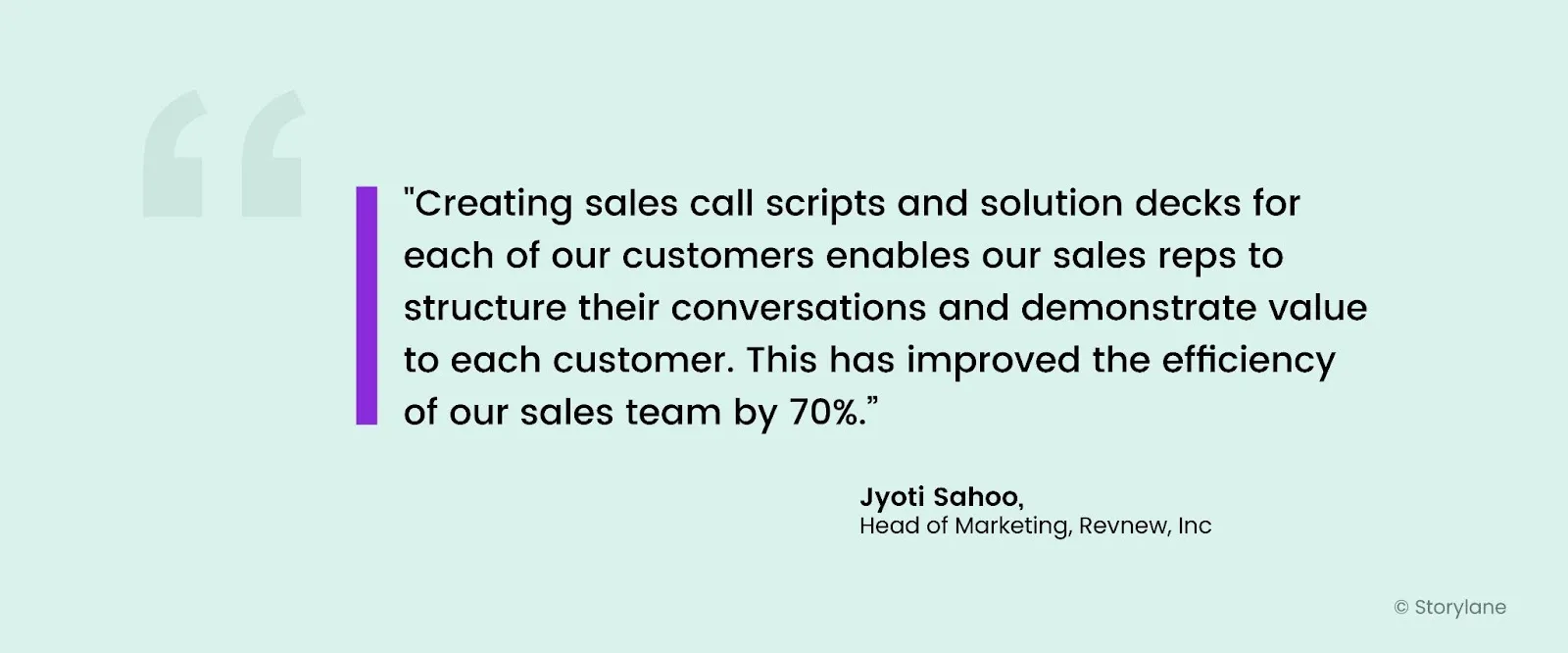
Creating sales call scripts has improved Revnew's sales team's efficiency by 70%

Step 7: Implement Sales Technology and Sales Enablement Software 

Leverage sales technology and tools to streamline and enhance the sales enablement process. Sales enablement software comes in various forms. It includes:

  • Sales process CRM (Customer Relationship Management) that helps manage customer data, track interactions, and automate sales tasks like sales follow-ups etc.
  • Content Management platforms that help store your sales enablement collateral and provide analytics on how they perform 
  • Sales training platforms that help create training modules and track sales performance
  • Demo automation software to build customized product demos that not just highlight product features but actually show how the product can solve the ICP’s pain points
Storylane review by a G2 user
Source: G2 Reviews

Step 8: Establish Metrics and Performance Tracking

Set up metrics and performance tracking mechanisms to monitor the effectiveness of your sales enablement process. Define key performance indicators (KPIs) aligned with your goals, such as: 

  • Conversion rates
  • Revenue growth and 
  • Customer satisfaction

Regularly analyze and assess the data to make informed decisions and optimize your process. 

Step 9: Provide Ongoing Sales Training and Feedback

Continuous training and sales coaching are crucial for the success of the sales enablement process. Conduct regular training sessions to equip your sales professionals with the necessary skills, product knowledge, and sales techniques. Offer sales coaching and mentorship programs to help individual sales representatives improve their performance.

A sales enablement process works best when there is a dedicated sales enablement team that constantly facilitates communication between the marketing and the sales team, collate ideas, and provide feedback.

Step 10: Continuously Iterate and Improve

Continuous iteration and improvement are vital to keeping the sales enablement process effective and aligned with changing market dynamics. You can optimize your sales enablement efforts by constantly evaluating and adjusting your strategies and tactics. 

  • Sales enablement leaders play a crucial role in developing and optimizing the sales enablement strategy, ensuring its execution is continually improved.
  • Applying techniques such as onsite training and online classes helps keep sales representatives up-to-date and knowledgeable about the latest developments in sales strategies.
  • By leveraging sales enablement technology, teams can align on common ground, facilitate personal connections with prospects, and establish a single source of truth for buyers and sellers.
  • Continuously monitoring key performance indicators (KPIs) such as conversion rates, revenue growth, and customer satisfaction allows you to measure the impact of your sales enablement efforts and make data-driven decisions for improvement.

Implementation Challenges While Setting Up a Sales Enablement Process

Setting up any process from scratch is no easy feat and creating a sales enablement process is no exception. To understand the common challenges and how to mitigate them we reached out to some sales enablement experts who have first-hand customer experience. This is what they have to say.

Not Having Enough Resources

Even a dedicated sales enablement team can only do so much. But if you want them to do more, you need to invest in their upskilling and investing in right set of sales enablement software.

“We have worked hard to set up our sales org for success - be it investing in tools, upskilling, or resources, we've done it all. For example, we realized that having multiple engagement points is the key to leads - so we quickly got in sales enablement software like Reply, Upscale to help them with leads.

For better and crisepr communication, we decided to have subscriptions for tools like Grammarly which helped draft the perfect emails and upskilled the writing ability of our team. We have also started using AI tools like Chat GPT to research about competition, prospects, organisations. Upskilling sessions with experts helped our AEs to learn negotiation techniques, consultative selling etc. Finally, we brought in tools like Hubspot to keep a track of all leads, and deals - following up hasn't been easier.” —--- Saahil Sachdeva, Strategy Lead at Limechat

Seeing Sales Enablement as a Support Function

One of the biggest challenge is often sales enablement is not seen as a strategic function, rather it’s considered as a support function The biggest problem to this mindset is there’s no synchornized efforts of enablement rather teams take up random acts of enablement that hardly moves the needle.

“The biggest challenge is seeing sales enablement as a support appendage. This is where having alignment on common goals and KPIs with all stakeholders can help. Whether it is content, training or tools, it is important to show how sales enablement adds value to the sales team and the entire organization in reaching those common  business goals.” —-- Nehal Firdous, PMM at GTM Buddy

Teams Working in Silos

In most companies, sales and marketing teams have different objectives, strategies, processes, and metrics and can create no alignment between sales and marketing. This can result in wasted resources, inconsistent company messaging, poor lead quality, and lost opportunities. This is a big problem as sales enablement is not the responsibility of any one team, but a collaboration between teams.

“We foster a culture of collaboration and communication between our sales and marketing teams. We also have established clear roles and responsibilities, shared objectives and  sales enablement metrics, and integrated systems and platforms to facilitate alignment and feedback.” —-- Jyoti Sahoo, Head of Marketing at Revnew, Inc.
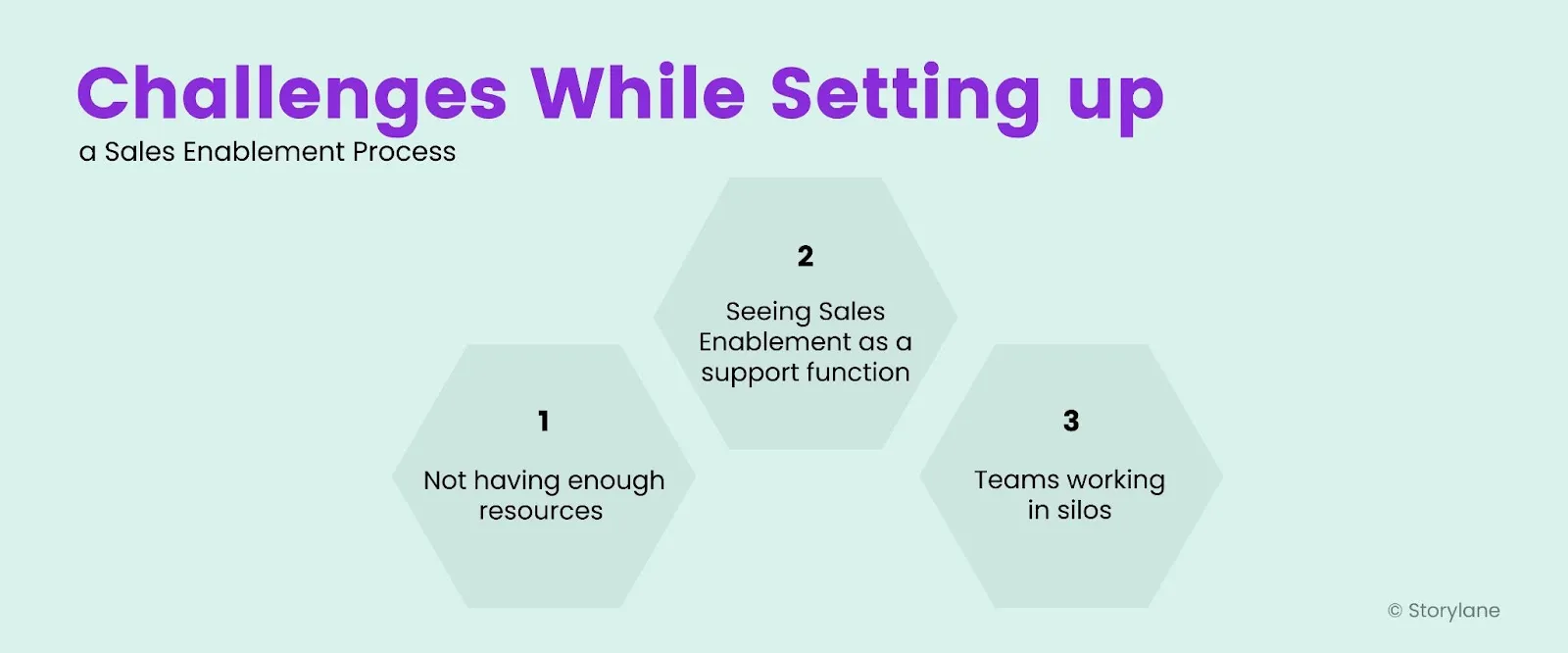
Challenges While Setting up a Sales Enablement Process

Measuring the Success of Your Sales Enablement Process

Now that you know what a sales enablement process looks like and how to set it up, it’s time to dive deep into the metrics to measure the success of your process. While you can measure multiple metrics, sales enablement experts recommend measuring the following metrics:

Time to Ramp

This metric measures the time new hires take to attain complete sales productivity. For salespeople, time to ramp means the time it takes to hit quota. There are ways to measure leading indicators like off-ramp quota, time to first deal, and time to second deal.

“We analyze if the ramp is shorter now with the tools we have implemented, this is typically tied to the quota attainment projected for a ramping rep over their first 90 days / actual quota attainment in that period for that rep. The faster a ramping rep can hit the full cycle quota, the better for the rep and the business. Post Sales Enablement implementation, we expect a decrease in time to full quota attainment. Once we have these metrics being consistently reported, sales enablement leaders are expected to actively review the metrics with the reps and coach on gaps weekly.

Overall standardized sales reports typically occur weekly for the first 8 - 12 weeks; if consistent, this becomes a monthly reporting cadence with leadership, but again metrics and results are reviewed by the sales enablement leaders daily/weekly in dashboard views and reporting.” —--- 

Michael Orndoff, Senior Manager, Sales Operations, EverCommerce
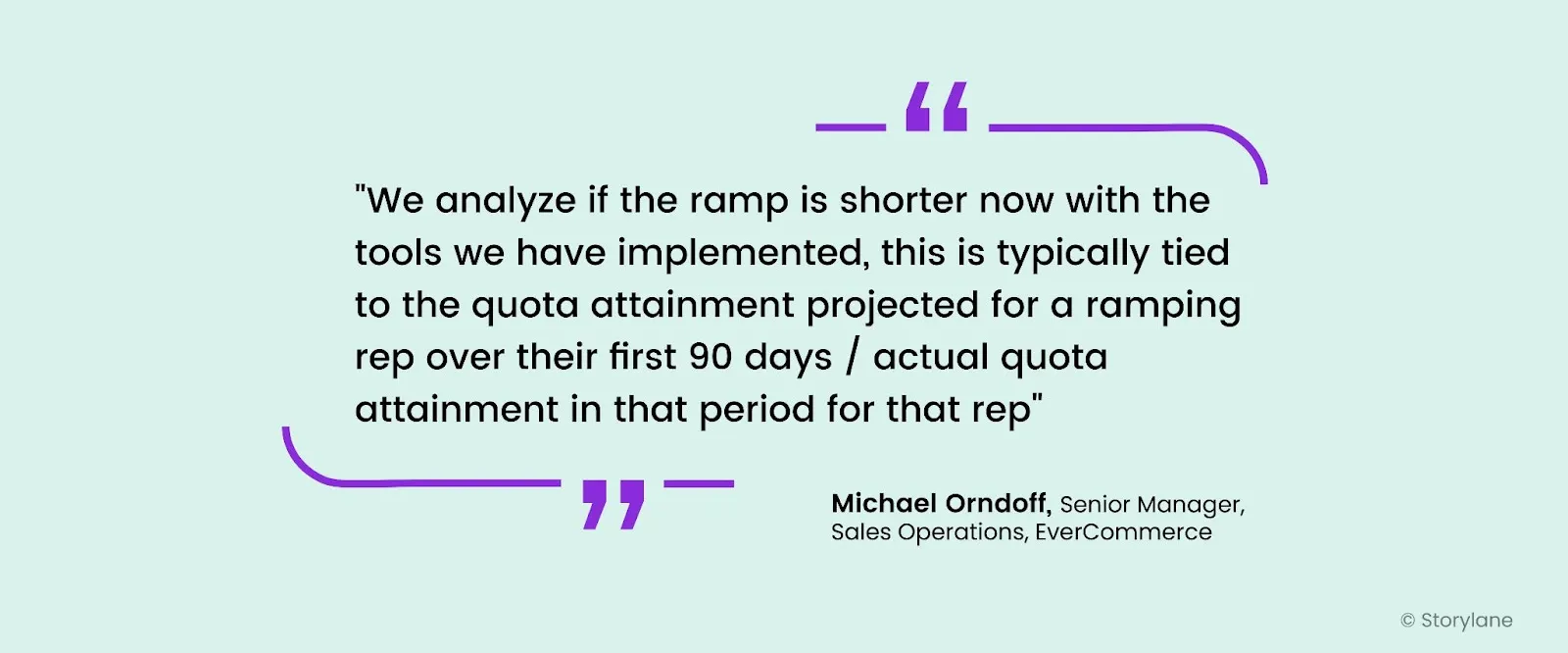
Measuring time to ramp to determine sales enablement effectiveness

Average Deal Size

By measuring the deal size, you can measure how many higher-value closed deals you have been able to close. To drive higher-value deals, the sales and marketing team needs to work together to create strategies to upsell and cross-sell products and services.

“Setting up the right key metrics was one of the biggest challenges when we first set up the function because it was hard to identify key metrics uniquely owned by Sales Enablement. So, one of the metrics we measured was the average deal size, which our enablement team mostly focused on supporting.” —-- Anneliese Niebauer, Independent B2B Sales Strategy Consultant.

Sales Velocity

 Sales velocity is a sales metric that measures the average speed at which sales are finalized and revenue is collected. It shows how quickly they can be added and moved down a pipeline to become paying customers. It’s a good metric to measure the efficiency and inefficiency of the process.

“I leverage Sales Velocity to measure the successful business impact of changes made in the Sales Process. I take a baseline Velocity pre-implementation and audit the impact of implementation over time while also considering usage. This is a key element because if velocity is not moving and usage is not there, the business impact is meaningless.

Once we have consistent usage(I tell leaders 15 - 30 days of consistent use is a good benchmark) and we have allowed a full sales cycle to complete, the sales velocity can be compared to the benchmark from pre-implementation to see the impact among the full cycle reps.” —--Michael Orndoff, Senior Manager, Sales Operations, EverCommerce
Wrapping Up

The sales enablement process helps to empower your sales department with the right resources, communication tools, and materials that will enable them to sell more. This can translate to more revenue, brand advocates, and loyal customers. While traditionally, sales enablement has been the marketing team's responsibility, to see its full potential, sales and marketing teams need to collaborate for shorter sales cycles, closing deals, and converting more leads into customers. 

Looking for an effective way to shorten sales cycles and close more deals? Create your first interactive product demo on Storylane and wait as the results kick in!

Killer demos for every stage

Build demos and agents that turn curious buyers to closed won
Book a demo

Related Articles

Read All Articles
Research
July 3, 2026
6 min read

68,000 deals, 3 findings: Measuring the ROI of interactive demos

This report analyzes ~68,000 deals (~50,000 of them closed) across 20+ anonymized B2B SaaS pipelines to measure what interactive demos actually do for pipeline metrics..
Ranga Kaliyur

This report analyzes ~68,000 deals (~50,000 of them closed) across 20+ anonymized B2B SaaS pipelines to measure what interactive demos actually do to pipeline metrics. Most demo benchmarks stop at engagement rates and time on page. I wanted the part that matters: do deals where buyers use a demo do better than deals where they don't?

My approach is simple. Using aggregated, anonymized Deal Intelligence data, I connected demo activity to real CRM outcomes, then compared deals with Storylane demos against deals without, inside each pipeline.

In summary

When buyers use an interactive demo, deals tend to...

  • Win 20% more often (38% vs 46% win rate), and it climbs the more they engage.
  • Reach 60% more of the buying committee (more stakeholders on the deal).
  • Land 2.75x bigger specifically in enterprise motions (flat in SMB and mid-market).

Methodology

  1. Using Storylane's Deal Intelligence, I connected demo engagement to CRM deal records (HubSpot and Salesforce) across 20+ anonymized pipelines: ~68,000 deals, nearly 50,000 closed.
  2. For each deal, I compared two groups: buyers who engaged with a demo (at least one demo session tied to the deal) and buyers who didn't. I measured win rate, deal size, and number of stakeholders.
  3. I report the median within each pipeline, then across pipelines, so a handful of large accounts don't skew the average (Simpson’s Paradox). The findings come from the 20 pipelines where the demo-to-deal link was clean enough to compare.

One caveat worth stating up front: this is a pattern, not proof of causation. Reps demo the deals worth demoing, so demo use partly reflects deal quality. Read these as strong, repeatable signals.

1. Conversion Lift: Buyers that engage with interactive demos close 20% more often

This is the big one: deals where the buyer engaged with an interactive demo won 46% of the time, versus 38% for deals with no demo  (about 20% more often), and it held in 14 of 20 pipelines analyzed.

The most interesting part is that the impact compounds with every session. The more a buyer returned to the demo, the higher the win rate. In our own pipeline the climb was steady: 87% (no demo) → 90% (1 session) → 91% (2–3) → 96% (4+ sessions). 

Across the dataset, deals with 4+ sessions won more often than zero-session deals in 71% of pipelines analyzed. A single view nudges the odds; repeat engagement moves them.

The logic is intuitive: a buyer who keeps coming back to a demo is a buyer building conviction. A static page can tell someone your product is good; a demo lets them prove it to themselves, and repeat visits usually mean they're selling it internally too.

🥡 Takeaway: Treat repeat demo use as a buying signal. When an account keeps coming back, get Sales in early.

2. Stakeholder Reach: Demos bring 60% more people into the deal

Deals with an interactive demo carried about 60% more stakeholders: a median of 1.6 contacts per deal vs 1.0 without, and more stakeholders in 15 of 17 pipelines. The gap was widest in enterprise pipelines, where one averaged 4.6 stakeholders per interactive demo-influenced deal vs 2.7 without, and another 5.2 vs 3.8.

Here's why it matters: B2B software isn't bought by one person anymore, it's bought by a committee. A demo is the rare sales asset that's easy to forward and relevant across functions, so it travels. One champion shares it, and suddenly the economic buyer, a security reviewer, and two end users have all seen the product for themselves. Deals that reach more of the committee are the deals that close.

🥡 Takeaway: Multi-thread on purpose. Send shareable, role-specific demos so the whole committee sees the product firsthand, not just your champion's secondhand pitch.

3. ACV Lift: In enterprise, deals with a demo are 2.75x bigger

Demos don't inflate every deal, and that's the honest part. The deal-size effect depends entirely on who you sell to.

  • Enterprise motions (large, complex, multi-team deals like GRC/compliance and enterprise healthcare): deals with a demo were 2.75x bigger at the median, and larger in 4 of 5 such pipelines. In one, median deal size went from roughly $16k without a demo to $127k with one; in another, from about $170k to $468k.
  • SMB and mid-market: no size difference. Demos there still won more deals and reached more people, they just didn't make deals bigger.

This tracks with how big deals actually get done. The larger and more complex the purchase, the more people and the more scrutiny involved, and the more room a demo has to do the explaining across stakeholders, functions, and weeks of evaluation. In a quick self-serve motion there's simply less for it to move.

🥡 Takeaway: if you sell enterprise, use demos as a late-stage lever, not just a top-of-funnel asset. That's where they move deal size.

How to read this report

The honest question is cause versus correlation. Demos land on the deals worth demoing, so some of this reflects deal quality alongside demo impact. To me that's what makes it worth taking seriously: across dozens of independent pipelines, the same three patterns keep showing up next to the deals that win, spread, and grow.

A few caveats. This is a first look at a subset of pipelines, deal values span multiple currencies, and a handful of accounts run against each trend. I've held an industry-by-industry breakdown for the next version, once there's enough data per vertical to say something solid.

What's next

A larger, cleaner dataset and a proper apples-to-apples comparison of similar deals with and without a demo, to turn these patterns into measurable lift, with industry and company-size cuts.

Guides
June 29, 2026
6 min read

Five ways B2B teams are using interactive demos that nobody talks about

What a conference booth in London, an EHR rollout for a differently-abled community, and a fintech triage system have in common — and what it tells us about where demo automation is actually going.
Ranga Kaliyur

What a conference booth in London, an EHR rollout for a differently-abled community, and a fintech triage system have in common — and what it tells us about where demo automation is actually going.

The standard demo automation playbook is predictable: marketing website tour, sales leave-behind, email nurture embed. That is what most companies start with.

But spend time in actual customer conversations and you see something different: teams using demos to solve problems the standard playbook never imagined.

This week, we reviewed a working session with an engineer at a large cloud computing company preparing for a technology summit in London. Her problem: she needed a product demo to play on a loop at her conference booth (no clicks, no one to navigate it, just a screen running in the background while conversations happened around it.)

Nobody markets demo automation as a conference booth tool. But that's exactly what she needed it for. And it wasn't the only unexpected use case this week.

1. Trade show and conference booth displays

The conference loop use case has specific requirements: autoplay enabled, 4-6 second transitions on title cards and pause slides, video clips set to 1.5-2x playback speed for longer recordings, and the entire thing downloaded onto the device. Conference WiFi is unreliable. You need the offline version ready before you walk in the door.

The structural formula that worked: technology stack slide (static) -> 4-second pause slide (blank) -> demo 1 with title card framing the problem ("Can I detect performance issues before they cause outages?") -> demo 2 -> repeat on loop. The problem-framing title cards are what make this work at a booth — a passerby reads a question they recognize and stops.

2. Staff onboarding for organizations with diverse accessibility requirements

A director of organizational performance at a nonprofit came to us mid-EHR transition. Her organization (200-plus staff, statewide) was moving to a new electronic health records platform and needed tutorials for everyone from clinicians to program administrators. Complicating factor: their staff includes a deaf and hard-of-hearing community.

Her requirements were specific: self-paced clicking rather than auto-advancing video, AI voiceover as an optional layer, and demos organized by function and embedded in SharePoint so staff could browse by department and role.

The training-center use case of interactive demos replacing annotated PDFs  is not new. The accessibility angle is. When a demo is self-paced, the viewer controls the speed versus video. That's a meaningful accommodation for populations that need more time, and it requires zero additional effort from the team building the content.

3. Multi-system integration demos

"We get asked all the time: what do these integrations actually look like?" said a co-founder at an early-stage health tech company. They had been answering that question in live demos, switching between systems in real-time and hoping nothing broke.

What they discovered: you can capture from multiple platforms in a single demo session. Finish recording in system one, click "add to existing demo," then capture from system two. The viewer moves between platforms seamlessly — without any live switching, without any risk of a broken environment. 

Live integration demos are high-risk, tedious (from a data management pov) and unrepeatable. Captured integration demos are neither. For a company whose primary sales objection is "show me exactly how the integration works," this is not a minor workflow change; it's a competitive differentiator.

4.Inside sales automation for long-tail accounts

An inside sales leader at a fintech company described a problem his team lives with daily: they manage accounts "where we're seeing very less revenue and more effort going from an account manager's point of view." His team's solution was a self-serve portal paired with interactive demos that replace human demos entirely for lower-priority accounts. Reps focus on the accounts with revenue potential; the demo handles the education and qualification for everyone else.

He had used this approach at a previous company and was replicating it here. The key insight: he was not evaluating demo automation as a way to improve existing demos; He was using it as a triage mechanism for a coverage problem. Interactive demos let you maintain a presence in accounts that don't justify a rep's time. That's a fundamentally different value proposition than "make your demos better," and it's one that VP of Sales audiences will understand immediately.

5. Localized demos for non-English-speaking markets

An inside sales team at a fintech company with a large India-based sales operation had one specific question: how many languages does the AI voiceover support? The answer, over 30, prompted an immediate workflow: build the demo once in English, then translate and duplicate into regional languages.

In markets where English-language demos create friction in the sales process, this is not a nice-to-have. It is a conversion rate issue. Prospects engage more deeply with content in their first language. The ability to generate a localized demo without re-recording or hiring a voice actor changes the economics of localization for inside sales teams that are already stretched thin.

Research
June 29, 2026
6 min read

Interactive demos vs. product videos: why revenue teams are switching over

Should you use interactive demos or product videos for sales? Compare creation time, maintenance, personalization, and analytics to decide.
Ranga Kaliyur

When sharing async product demos, sales teams have traditionally reached for a couple of options: quick and dirty screen recordings (think Loom, Vidyard, etc.) and high-end video productions (think Camtasia, Consensus, etc.). While there’s a time and place for both; AEs, SEs, and PMMs are increasingly adopting a third format — interactive demos — as a “better than both worlds” alternative. Here's why:

Interactive Demos vs Video: Feature Comparison
Compare Interactive demos
(Storylane)
Screen recordings
(Loom, Vidyard)
Video productions
(Camtasia, Consensus)
Time to create ✅ Fast, capture and creation often completed in minutes ✅ Fast but requires narration, timing, retakes, etc. ❌ Slow, can take weeks to script, shoot, and edit
Editing ✅ Self-serve, easy: replace screens, tweak text, reorder steps; no re-recording ❌ Limited scope: re-recording, trimming, stitching clips, fixing audio ❌ Technical dependency: needs expertise in pro editing software
Polish and branding ✅ Professional, consistent themes built-in; no editing software needed ❌ Low production value. Harder to maintain consistency; requires design/video tools ✅ Cinematic quality but requires video editing expertise
Publishing ✅ One-click publish; instantly updates everywhere ❌ Requires re-uploading and re-sharing new versions ❌ Requires re-uploading and re-sharing new versions
Maintenance & Updates ✅ Replace screens and content in minutes, auto-update instantly ❌ Requires re-recording entire sections/full-video ❌ Requires re-producing entire sections/full-video
Personalization ✅ Personalize at scale with dynamic tokens ❌ Hard to scale: Requires re-recording ❌ Impossible to scale: Requires re-production
Analytics ✅ Granular: Track views, interests, completion, and time-spent per step ❌ Limited to views, no actionable analytics or Opinions ❌ Limited to views, no actionable analytics or Opinions
Buyer experience ✅ Interactive, two-way experience ❌ Passive, one-way experience ❌ Passive, one-way experience
Ideal for… Across the board Ad-hoc touches, quick Q&A Top-of-funnel brand awareness campaigns

Why revenue teams are adopting interactive demos

Since our inception, we've noticed revenue teams of all sizes, from early-stage startups to Fortune 500 enterprises, switch over from videos to interactive demos. Here are the most common reasons we hear from customers.

Reason #1 - Speed without sacrificing quality

Screen recordings are quick and easy to produce but lack the polish and quality needed for high-value deals. On the other hand, producing polished video demos means days of planning, hours of environment prep, multiple recording attempts, and extensive editing. Interactive demos eliminate this friction entirely, especially now with AI, to instantly generate product-specific content (Guides, voiceovers, etc) from captured screens — no need for multiple takes. 

"Video is really strong at capturing people's attention and welcoming them into your story. But the thing that video can't do is provide a “click-through experience” allowing users to actually get their hands on the product — to feel it, to see it, to understand what the actual day in and day out of working with your tool is going to be like. Especially with its AI and automation, Storylane allowed us to build demos in such a quick amount of time."
- Michael DeMarco, PMM, Phenom

Reason #2 - Asset maintenance and scalability

Traditional videos are like baked cakes — once ingredients (product screens, click path, narrative) are combined into a video, it’s difficult to swap individual components. When your product UI changes six months from now, you face full reproduction from scratch.

Interactive demos keep these elements separate. Update a screen in minutes without touching the narrative. Adjust messaging without re-recording. Reorder workflows without starting over. This durability enables demos to stay current as your product evolves.

Further, creating persona-specific, industry-tailored, or localized video content means producing multiple versions of each asset — a multiplication problem that quickly becomes unmanageable. Storylane's AI editor recontextualizes entire demos for different personas or industries in seconds. Dynamic tokens automatically swap prospect information without creating separate versions. One base demo adapts to dozens of scenarios without manual overhead.

Reason #3 - Modern buying preferences 

Interactive demos respect buyer time by letting them jump to relevant sections, skip familiar concepts, and control their pace. Video forces a fixed timeline — even if viewers only care about one feature, they must scrub through the entire recording to find it. This level of control and self-serve flexibility reflects the preference of modern buyers, who'd rather click around a product tour for themselves than rely on a passive, one-way video.

"Nobody wants to watch a 5-minute video anymore. So my team sends a Storylane demo and the prospect sees the demo in 5 clicks."
- Jon Dolan, Sales Director, Cognism

The difference in analytics is equally striking. Video platforms show watch time and opens. Interactive demos reveal which features prospects explored, where they spent time, which stakeholders engaged, and where they dropped off. These step-level Opinions enable targeted follow-up conversations that video simply can't support.

Make buying easy with Storylane