
.svg)

Demo automation platforms promise the same thing: help GTM teams create interactive product demos without engineering. On paper, Demoboost and Storylane check the same boxes. Both create interactive demos, offer personalization features, and improve the overall speed of your demo delivery.
The real differences appear when you ask: How fast can they start? What's the actual cost? And who do they really cater to?
If you're choosing between Demoboost and Storylane, you're in the right place.
Yes, this comparison comes from Storylane — but while we’re biased, every claim here is backed by objective product testing, customer interviews, and verified G2 reviews. We evaluated both platforms across:
- User experience - Ease of demo creation and who can build them
- Platform capabilities - AI maturity and multi-channel distribution
- Pricing and product access - Self-serve vs sales-gated, pricing transparency
Both platforms deliver core demo automation features:
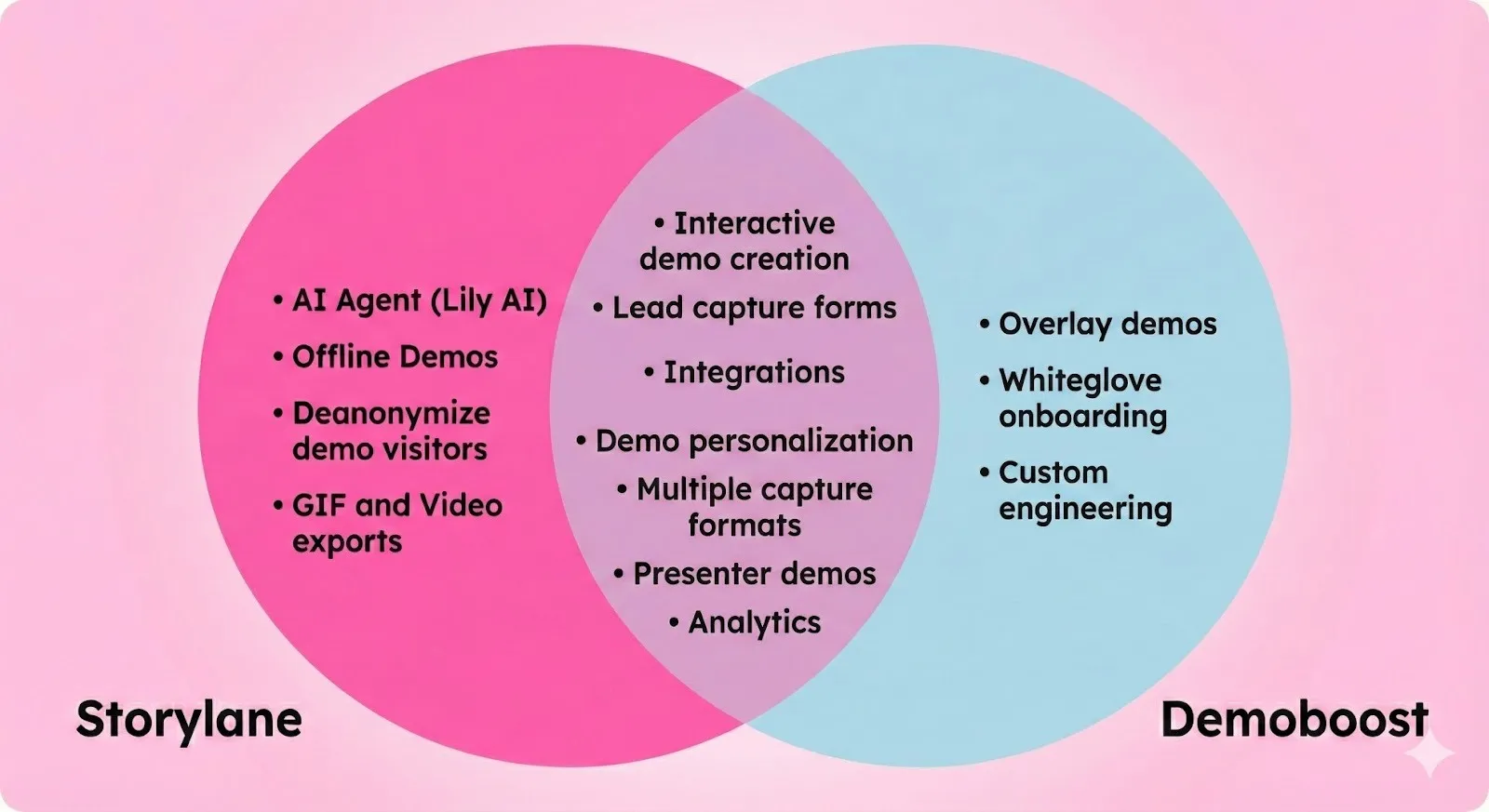
The real question is how they work and who they're designed for.
That's where Demoboost and Storylane diverge.
TLDR: Demoboost vs Storylane comparison
What Demoboost does well
Credit where it's due. Demoboost has genuine strengths:
- Live overlays - Demoboost lets you create reusable industry or use case overlay templates. Apply a customization layer on top of your live product with zero setup.
- Five demo formats - Tours, overlays, sandboxes, video demos, and mobile demos. More format variety than most competitors.
- Included consulting - 4 hours per month of professional services bundled into the base subscription. Demo narrative, delivery, and distribution guidance included.
- Custom engineering services - Demoboost helps you rebuild complex elements that don't capture well.
These strengths matter for presales-specific use cases. But these benefits come with tradeoffs.
Where Demoboost falls short:
- No self-serve access or pricing transparency. You must contact sales, sit through demos, and wait for custom quotes. No free tier. No trial. No public pricing on their website. Add-ons are seperate.
- Steeper learning curve. You cannot start creating demos from day one. Demoboost needs you to go through white-glove onboarding to get going. G2 reviews note this: "Initial setup can be a bit complex without proper guidance."
- Presales focus. Demoboost markets primarily to presales and sales engineers. Despite claiming to serve entire GTM teams, their own positioning emphasizes presales teams as the main focus.
- Late to AI innovation. Demoboost's AI features appeared in 2025 based on G2 reviews. Additionally, they still don't have an AI agent for demo discovery.
- Limited demo sharing features. You can't download them as GIFs for email campaigns. You can't create videos for social posts. One format, one channel.
- No Deanonymization. Demoboost's Analytics show aggregate traffic, but can't identify which companies viewed your demos unless they fill out forms.
Here's how Storylane solves these problems
1. Easiest to use, quick to set up
Storylane is self-serve. Sign up, install the browser extension, and start building. No sales call or long implementation project to block you from creating your first demo. And that first demo takes minutes to build and ship. G2 reviewers confirm: "It only took me five minutes to get onboarded and record my first demo."
Demo creation takes 2 minutes
Once you're set up, creating each new demo is fast:
- Launch Storylane's Chrome extension and click through your product screens
- Each click automatically captures a step in your demo
- AI generates tooltips and annotations based on what's on screen
G2 reviewers rate Storylane 9.5/10 for ease of use across 1,132 users, with feedback like
"incredibly easy and fast to produce high-quality interactive demos without needing support from engineering or design."
Demoboost is sales-gated with extended implementation timelines. No free tier. No trial. Contact sales, sit through demos, wait for custom quotes. Once you've completed the sales cycle, Demoboost requires white-glove onboarding before you can start building.
G2 reviews note: "Initial setup can be a bit complex without proper guidance." Your team learns the platform gradually, building simple demos first before moving to more complex ones. First demo creation can take up to a month from initial contact.

2. Built for horizontal adoption across GTM teams
Storylane is designed for your entire GTM organization. PMMs build website tours. Demand gen creates campaign variations. AEs personalize demos for deals. SEs handle complex technical evaluations.
Demoboost is presales-first
On paper, Demoboost serves GTM teams. In practice, they position "presales and sales engineers" as their "main focus." This design choice affects who can effectively use the tool without SE involvement—marketing and sales teams often need technical support to build and customize demos.
Why this matters: PMMs build website demos independently. Demand gen creates nurture sequences without SE support. AEs personalize demos based on the prospect—no SE bottlenecks.
3. Category first AI features

Storylane launched AI in July 2023. The platform includes:
- Create with AI - Build demos in minutes. Click through your product, and AI creates relevant tooltips and hotspots with annotations based on product context. Includes AI voiceovers, AI HTML editing, and one-click translations.
- AI Tones - Storylane's AI adapts to your use case. Pick a tone (technical, conversational, executive-focused) and the AI generates contextual guides based on your clicks. Marketing teams use conversational tones for website tours. SEs use technical tones for deep-dive evaluations. AEs use executive tones for C-suite demos.
- Lily AI is a conversational sales agent that answers questions about your product like your best sales representative. She engages prospects directly in your demos.
Demoboost launched AI features in 2025. And has been lagging in AI innovation. They still don't have AI agents like Lily for buyer enablement.
Why this matters: Mature AI means fewer bugs, more use cases, and proven ROI. Early adopters already scaled with it.
4. Export demos as videos and GIFs for multi-channel distribution
Storylane lets you download demos as MP4 videos or GIFs for multi-channel distribution. You can export demos and use them in email campaigns, sales follow-ups, social posts, training decks, and conference presentations. One interactive demo becomes five assets across different channels.
Export features are available across all standard Storylane plans
Storylane also offers Offline Demos
Offline Demos are available at Premium Plan. These are different from the exported demos we mentioned earlier and are fully interactive demos that run without a WiFi connection—especially useful during events and conferences where WiFi is unreliable.
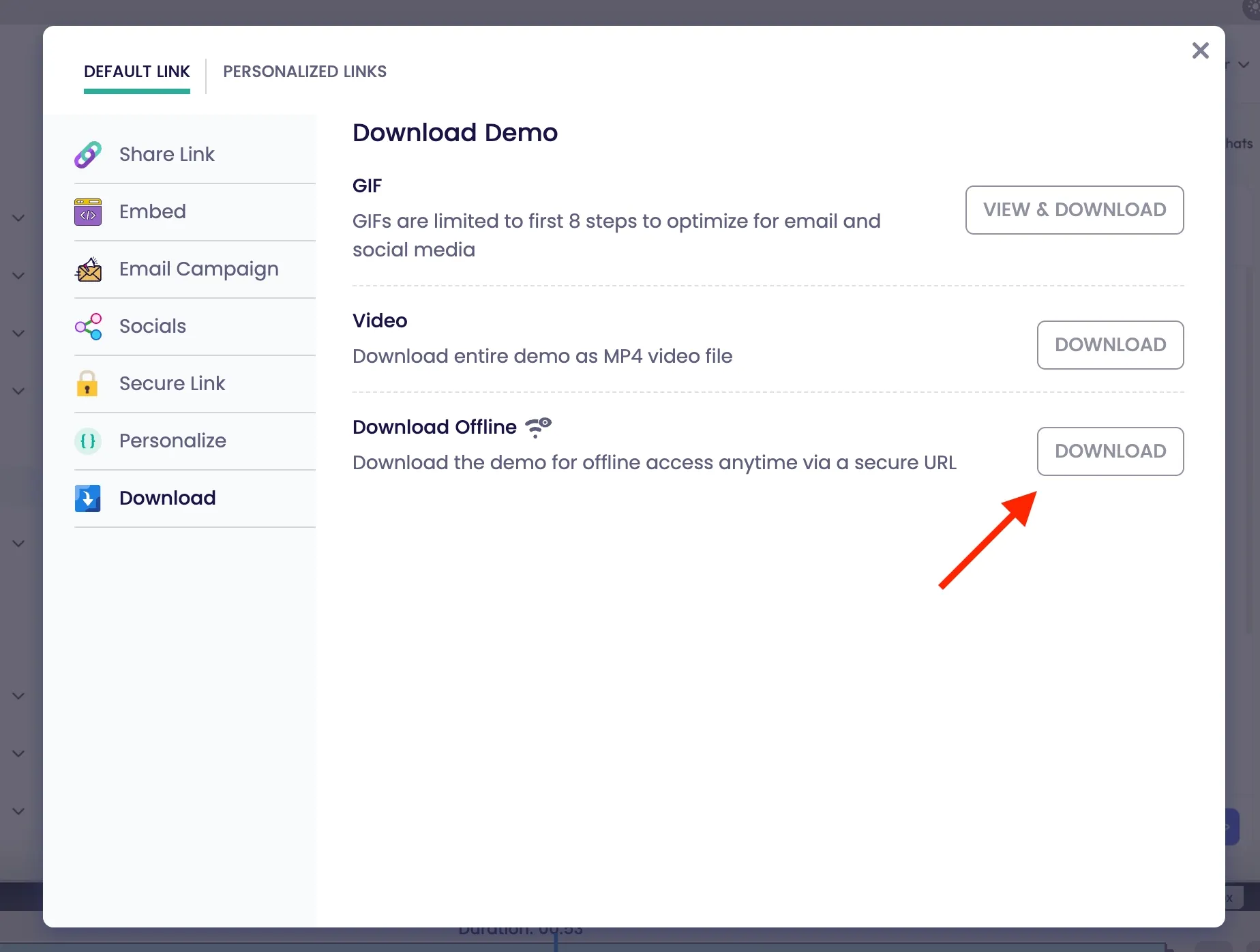
However, Demoboost demos exist as interactive links only. No export or offline access available.
Why this matters: Create once, distribute everywhere. Your interactive demo powers multiple channels instead of living on a single webpage.
5. A/B testing built for conversion optimization
Storylane lets you test two demo versions side-by-side and measure which performs better based on real user behavior. Instead of guessing which demo narrative works, you run controlled experiments and optimize for:
- Higher completion rates
- More CTA clicks
- More leads captured
- Stronger buyer intent
This feature is designed specifically for marketing and growth teams using demos as conversion assets. Demand gen teams test variations in nurture campaigns. Product marketing tests messaging angles on website tours.
Demoboost doesn't offer native A/B testing capabilities. You'd need external tools and manual tracking to compare demo performance.
Why this matters: Marketing teams can optimize demos like landing pages. Test, measure, improve—without technical dependencies.
6. Account Reveal identifies companies viewing your demos
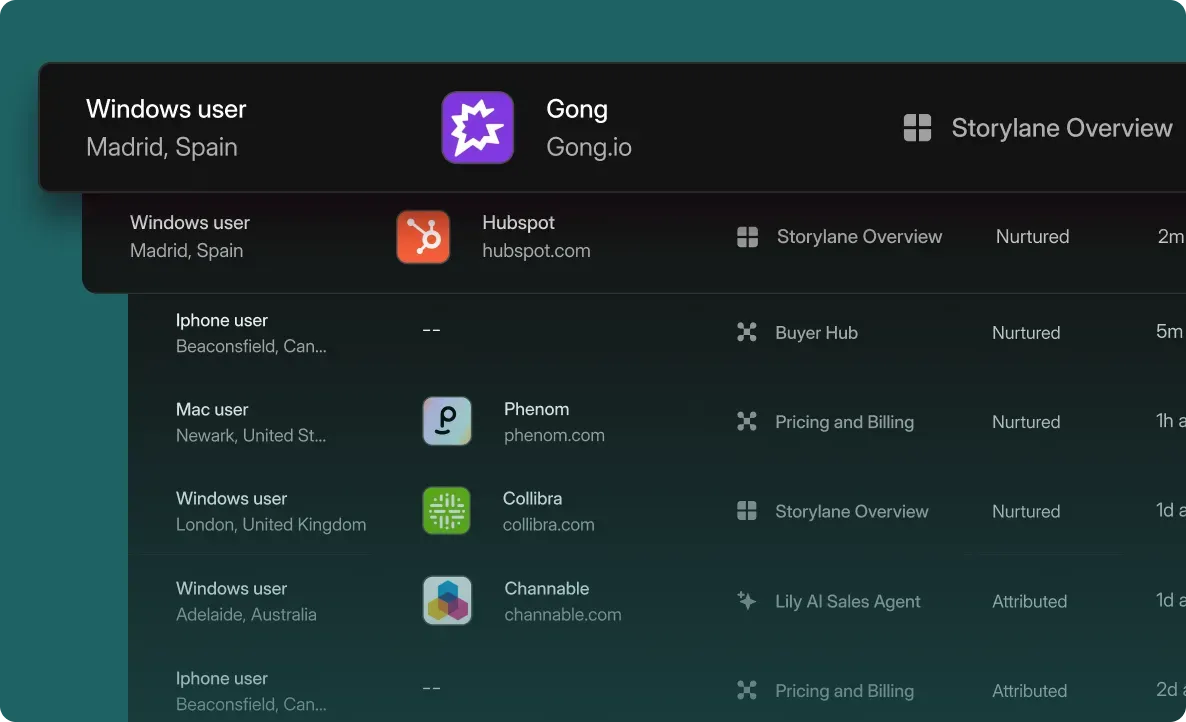
Storylane deanonymizes demo viewers without an additional integration. Identify who is viewing your demos, see firmographic data before they fill forms, and route high-intent accounts to sales immediately.
Demoboost doesn't have comparable features like this. You get standard analytics only—you see traffic volume and general engagement insights
This is useful because it helps you learn which companies are researching your product. You get a pretty solid intent data.
7. Transparent pricing with self-serve access
Storylane has transparent pricing. With a flexible monthly billing option, no long-term contracts. You can see all the costs on the website:
- Free plan with 1 published demo with unlimited views and sharing.
- Starter: $40/month, unlimited demos
- Growth: $500/month, HTML editing, 5 seats
- Premium: $1200/month (with Buyer Hub), 10 seats
You can sign up for free right now and start building.
However, Demoboost doesn't give you this kind of transparency or access. You need to contact their team for custom quotes, which typically range from $15,000 to $25,000/year (as per past users). Additionally, Demoboost locks standard features behind paid add-ons. Most of those add-on features are already included in Storylane's standard plans.
Business impact: Your finance team can budget accurately. No procurement bottleneck. No surprise costs six months in.
Decision framework: Which platform fits your team?
Choose Storylane if:
- You value speed for demo creation (demos in minutes)
- You want mature AI features, including an AI agent to aid buyer enablement
- You value transparent pricing and want to try the tool before you buy
- You need multi-channel distribution (export to video/GIF)
- You want advanced analytics with account deanonymization features to identify demo viewers
Choose Demoboost if:
- You need live overlays for late-stage demos
- You need bundled white-glove onboarding and consulting
- Your product makes HTML capture difficult, needing custom engineering for your demos
Conclusion
Demoboost and Storylane both automate product demos, but they're built for different priorities. Demoboost delivers if you need live overlays, bundled consulting, and you're comfortable with sales-gated access, while Storylane works if you need ease of use, speed, transparency, and cross-team adoption.
Frequently asked questions - Demoboost vs Storylane
Q. Which demo platform is easier to use: Demoboost or Storylane?
Storylane wins here by a lot. It has a 9.5/10 ease of use rating on G2 from over 1,100 reviews. One reviewer said it took them "5 minutes to get onboarded and record my first demo." You can literally sign up and start building without any training.
Q. Who should choose Demoboost over Storylane?
Choose Demoboost if you need live overlays for late-stage demos, require bundled white-glove onboarding and consulting (4 hours/month included), have a product that makes HTML capture difficult requiring custom engineering, or have a dedicated presales team that will be the primary users of the platform.
Q. How long does it take to create demos in Demoboost vs Storylane?
With Storylane, you're talking minutes. Install the Chrome extension, click through your product, and the AI generates tooltips and annotations for you automatically. With Demoboost, you're looking at 2-4 weeks just for onboarding. From your first contact to your first live demo, it can take up to a month.
Q. Does Storylane or Demoboost have better AI features?
Storylane's AI is more mature. They launched in July 2023 and have been refining for 18+ months. You get AI-powered demo creation, AI tones for different use cases, AI voiceovers, AI HTML editing, and Lily—an AI sales agent that talks to your prospects. Demoboost just launched their AI features in 2025, and they don't have an AI agent yet.
Q. Can I export demos as videos or GIFs from these platforms?
Storylane lets you download your demos as MP4 videos or GIFs—super useful for email campaigns, social posts, sales follow-ups, and presentations. This works across all their standard plans. Demoboost only gives you interactive links. No exports, no offline access.
Q. Can I try Demoboost or Storylane before buying?
Storylane has a free plan. You can sign up right now, no sales call required, and get 1 published demo with unlimited views. Test it out before spending a dime. Demoboost doesn't offer a free tier or trial. You have to go through their sales process and wait for quotes before you even see the product.
Q. How much does Demoboost cost compared to Storylane?
Demoboost doesn't publish pricing—you'll need to request a quote. Based on what past users report, expect $10,000-$20,000+ annually. Storylane shows everything upfront: there's a free plan with 1 demo, a $40/month starter tier with unlimited demos, $500/month for the growth plan (HTML editing, 5 seats), and $1,200/month for premium (includes Buyer Hub, 10 seats). Plus, Storylane offers monthly billing while Demoboost requires annual contracts.