.svg)
How to build a career moat with interactive demos




.svg)
NiCE — a leading enterprise customer service automation platform — spans dozens of products across the CX space, from contact center software to AI workforce management tools. Complex stuff, with lots of moving parts.
When Michael Burr joined NiCE as a sales engineer, he was getting on calls and running live demos. Today he's Sr. Sales Enablement Manager — and his expertise over interactive demos runs through every step of that progression.
It started with a gap he noticed early on: every time a potential customer wanted to understand what NiCE's software did, it took a full discovery session, a custom demo build, and significant SE resources — just to give someone a taste of the product.
“I realized that we needed something, at least on our website, that was a little more interactive, a little more proactive. Something that engages customers right when they hit our website to give them a taste of what our software was about.”
That’s where Storylane fits in. What happened next is less of a typical "we adopted a tool and got results" story, and more of a playbook for how to make yourself indispensable at work.
.svg)
3 lessons: Turning demo expertise into critical infrastructure
Michael structures his experience with Storylane around three lessons. Together, they describe a progression that any SE, PMM, or enablement professional can follow.
Lesson #1: Own tool mastery
Most people learn a tool until they can do their job with it. Michael went further.
He spent time deliberately breaking Storylane’s platform — experimenting with edge cases, testing HTML capture vs. screenshot demos on different products, and hunting for features and use cases that may be overlooked by most users. Three examples stand out:
The first is search-and-replace. NiCE's demo environment contains real employee names and data. Rather than manually anonymizing each demo, Michael uses Storylane's search-and-replace to sweep the entire demo in seconds. Simple feature, but it saves him significant time on every build.

The second is localization via chapters. Rather than building and maintaining separate demos for each language market, Michael uses Storylane's chapters feature to bundle multiple language versions inside a single demo. English, Portuguese, and other languages all live in the same demo. A dropdown menu lets the viewer pick their language at the start. When something needs updating, he updates once and every language version reflects the change.

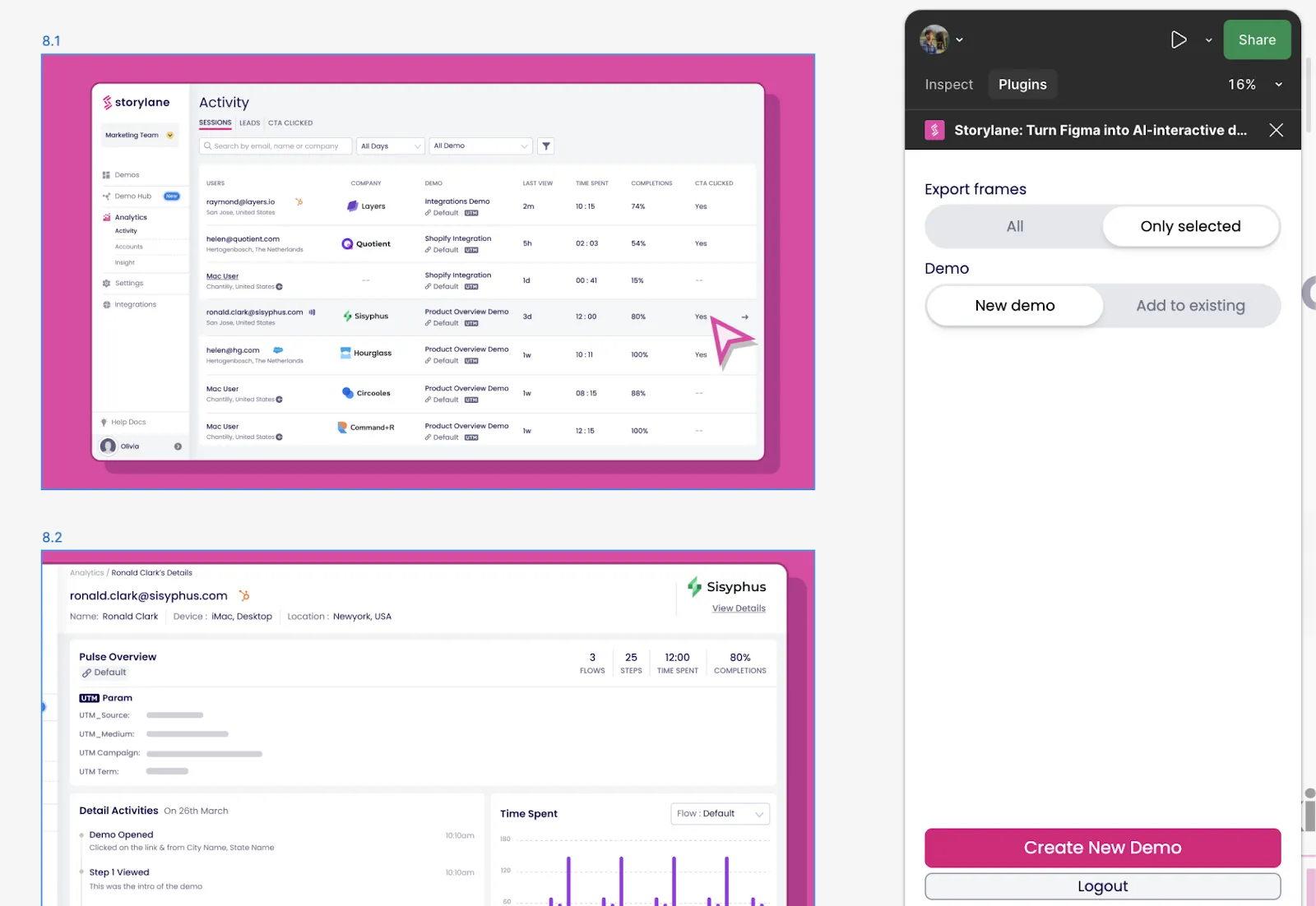
The third is Storylane’s Figma plugin. When NiCE's product team is building something new, the software doesn't exist yet — only the designs do. Rather than waiting for a working build, the team pulls those Figma designs directly into Storylane and creates clickable flows via Storylane’s native Figma plugin. The result is a realistic, interactive prototype that sales and marketing can use in the field before engineering has shipped a single line of code.
"Really try to break the system — dive in and see what kinds of functions might be available in the tools that people are kind of not thinking about."
The takeaway isn't about any specific Storylane feature. It's about the larger mindset: most people stop at "good enough." Those who become irreplaceable keep going. And when you're the only one who truly knows the platform, other teams start to notice.
Lesson #2: Own the infrastructure
Once Michael had deep tool expertise of Storylane, the next move was to build systems that the larger team could depend on.
The clearest example: NiCE's Learning Management System (LMS), hosted on Cornerstone.
Before Storylane, updating training modules was a multi-team ordeal:
- Identify what needs updating
- Contact the LMS team
- Coordinate with design and product
- Navigate approvals
- Upload the new file
- Repeat for every single change.
If a module was built in 2021 and another in 2023, they'd look completely different — different logos, different formatting, different chapter structures. The result was a disjointed learning experience for the reps going through training.
Michael's fix was to embed Storylane demos directly into the LMS modules. The demo link stays the same. The visual formatting is consistent. And when something needs to change? Open Storylane. Make changes. Done.
No upload process. No approval chain. No coordinating across three teams. Changes go live the moment he hits publish. He demonstrated this live during the webinar — updated a button label from "Begin Training" to "Let's Go," published, refreshed the LMS module, and the change was live in under 60 seconds.
"I'm not jumping through multiple hoops, ping-ponging emails back and forth. To have that quick turnaround is pivotal when it comes to tech — especially being an innovation leader and being able to make those changes on the fly."
When you control how updates to critical infrastructure take place, you become someone the organization can't easily replace. Tactical work is replaceable. Infrastructure isn't.
Lesson #3: Own the expansion
Tool mastery plus infrastructure ownership creates a natural gravity. Other teams start coming to you. For Michael, it started with marketing demos on the NiCE website. Then the product team came to him — they needed to show off a new feature that only existed in Figma. Then sales needed a way to run live demos without risking a broken live environment. Then the enablement team discovered what he'd done with the LMS.

Each new use case deepened his position. And eventually, it flipped: the team stopped publishing product pages without checking with Michael first. Interactive demos are now a launch requirement, not an afterthought. That's the career moat — not a title change, but a shift in how the organization depends on you.
“Your larger team may not know what is capable of the product. So if you can experiment in your off time, come up with interesting ways, thinking outside of the box, and then show those as presentations — that will capture attention. From there, you expand strategically across functions.”
How NiCE uses Storylane today
Here's what Michael and team’s implementation of Storylane looks like at NiCE today:
- Product pages don't go live without an interactive demo attached — across a platform of 40+ products
- Sales teams use Storylane demos in live calls — running through hidden guide flows that appear to be live software (presenter mode)
- LMS training modules across multiple languages are maintained by one person, updated in minutes
- Product uses Storylane to demo features that don't exist yet — via the Figma plugin
.webp)