
.svg)

TL;DR
- A digital sales room (DSR) is a single shared link where a buying committee finds everything they need to evaluate a purchase: demos, pricing, case studies, and video, organized in one place.
- The buying committee problem is the real driver. Deals now involve six to ten stakeholders, most of whom will never get on a live call with the seller. A DSR is the async bridge.
- Most DSRs are document repositories. Building the room around interactive product demos keeps stakeholders engaged, generates intent signals, and shows who in the committee is actually paying attention.
- Hubs is Storylane's take on the digital sales room software category: one link, multiple content formats, and interest screens that let each stakeholder self-route by role or use case.
Here is how deals die without anyone noticing. A champion walks out of a discovery call genuinely excited. They promise to share the product with three colleagues before the next meeting. Two weeks pass. The champion sends a PDF. Nobody reads it. One VP asks a question that was already answered in the call. Another stakeholder the champion did not mention materializes with a completely different set of objections. The sales cycle stretches from four weeks to four months, and the rep never had visibility into any of it.
This is not an edge case. B2B purchases now involve an average of six to ten stakeholders. Most of them will never get on a live call with the seller. The champion is the only bridge between the product and the committee, and most champions are sent into that room with a PDF and a prayer.
The digital sales room exists to solve this problem. Not by replacing the champion, but by giving them something they can actually use.
What is a digital sales room?
When your champion shares a digital sales room, your entire buying committee can evaluate the product on their own schedule, without a single additional meeting. A digital sales room (DSR) is a purpose-built, shared environment where a seller consolidates everything a buyer needs to evaluate a product: demos, pricing, case studies, video walkthroughs, and mutual action plans. Everything lives at a single link. The buyer accesses it on their own schedule, shares it internally, and the seller gets real-time visibility into who is engaging and with what.
The category goes by several names depending on the vendor: deal room, buyer hub, digital deal room, mutual success plan. The label varies, but the core function is the same. The goal is to replace the fragmented, untraceable back-and-forth of email attachments and one-off demo links with a single contained environment that both sides can navigate. Gartner's digital sales room category and G2's digital sales room category both track this space, and the market is expanding as buying committees get larger and deal cycles get longer.
What a DSR is not: it is not a proposal tool, though proposals can live inside one. It is not a CRM, though it can integrate with one. Think of it as the last-mile delivery layer of the sales process, the thing the champion sends when the deal moves from evaluating to deciding.
How you can implement it: Audit the last deal you lost and count how many stakeholders the champion mentioned after the fact. If there were more than three, map which of those people received any product content directly. If the answer is none, that is the gap a DSR closes.
Why buying committees changed the sales motion
Knowing how the buying committee grew is how you diagnose why your deal stalled. Six to ten stakeholders now control most B2B purchase decisions, and most of them will never speak to your rep directly. The full story of the B2B buying process shift explains why. A lot of deals used to be closed by a single decision-maker who had budget authority and signed things themselves. That buyer is increasingly rare. Procurement, legal, IT security, and finance have all inserted themselves into the evaluation process. A sales rep at a mid-market SaaS company now routinely navigates five or six stakeholders on a deal they would have closed with two people a few years ago. A director of sales at a B2B SaaS company we spoke to recently described the dynamic recently:
"It typically needs three or four different stakeholders within an organization for them to be able to make a decision. Being able to give them something they can take and run through internally changes the whole equation."
The calendar problem compounds everything. Getting six stakeholders on a call simultaneously is nearly impossible. One is in a different time zone. Two are back-to-back all week. The CFO will only join if the champion can make the ROI case in a ten-minute slot. Scheduling a group demo adds two to four weeks to every deal by default.
The DSR is the async solution to that scheduling problem. Instead of a live call with all six people, the champion gets a single link they can share in Slack or email. Each stakeholder explores on their own time. The seller sees exactly who opened it, what they looked at, and whether any new stakeholders surfaced. The committee conversation that used to require a two-hour all-hands call now happens asynchronously over two days.
How you can implement it: If your enterprise sales strategy involves multi-stakeholder deals, audit your last five closed-lost opportunities. Count how many had more than three stakeholders. If most of them did, you are likely losing deals to the coordination gap that a DSR solves.
What belongs in a digital sales room
A well-stocked room reduces the champion's coordination burden to a single link. These are the five components that make that possible.
1. Interactive product demos
Not a recording and not a live walkthrough, but an on-demand interactive product demo that each stakeholder can click through themselves. Interactive demos generate richer intent data than static formats because each click produces a trackable signal, showing which features each stakeholder explored and where they dropped off. The stakeholder is not passively watching; they are exploring. That exploration generates real intent data that the seller can act on: which features each person spent time on, where they dropped off, and how many times they returned.
2. Short explainer videos
A 60- to 90-second overview narrated by the rep provides human context that a static document cannot. Champions use this to frame the room before sharing it, which matters because most committee members are coming in cold with no context from the original discovery call.
3. Relevant case studies
One or two customer stories that match the prospect's industry or use case. A generic "5x ROI" case study for a SaaS company has far less impact than a story from a company in the same vertical at a similar growth stage. The specificity is what makes it land.
4. Pricing or ROI framing
Not necessarily a formal proposal, but enough context for a financial stakeholder to understand the rough cost-benefit case without asking. This reduces the number of follow-up emails the champion has to field internally, which helps keep deal velocity up.
5. A mutual action plan
A simple list of next steps, who owns each one, and the target close date. This keeps the deal moving even when the seller is not in the room and gives the champion something concrete to reference when they are pushing internally for a decision.
How you can implement it: After your next discovery call, build a deal room with these five components. Organize demos by stakeholder role (one for the technical evaluator, one for the business buyer) and include a one-page ROI summary the champion can forward to their CFO without additional context.
Where most digital sales rooms Fall Short
Knowing why most digital sales rooms fail to engage buyers tells you exactly what to build instead. Most digital sales room software is built around static documents: PDFs, slide decks, and video recordings. These formats are familiar and easy to assemble, but they do not engage buyers the way sellers assume they do.
A Director of Marketing at an education technology company put it plainly when evaluating her options:
"If it's just video or PDFS, it will be inherently less interactive for the viewer than the clickable demo. It leads to lower engagement rates and faster drop-offs. And there won't be any analytics, so you can't track how many people have seen the video."
That last point is the real problem. Static content is invisible. A PDF sent by a champion gets forwarded to five people the seller has never heard of, and the seller has no idea it happened. A video linked in an email gets watched by one person for under a minute before they close the tab. None of this surfaces in the CRM. None of it informs the next sales conversation. The seller goes into their follow-up call with the same information they had after the first meeting, flying blind through a committee they cannot see.
There is also what you might call the brochure trap. A content manager at a B2B training platform described the moment her team recognized they needed something different: "Whenever our clients need something, we want to show them rather than just sharing a brochure or something. We just wanted to go ahead and share an interactive or customized demo." The brochure describes the product. The demo shows it. For a buying committee member who was not on the original discovery call, that distinction matters enormously. They are forming a first impression of the product in the seller's absence, and a PDF is not doing that job well.
The gap between "we sent them a PDF" and "we know exactly which stakeholders engaged, with which content, and for how long" is the gap most digital sales rooms leave open. Better buyer enablement tools close that gap by putting the product itself at the center, not a document about the product.
How you can implement it: Review your current deal room setup. If the primary content type is a PDF or a recorded video, identify one deal currently in mid-cycle and replace the static content with an interactive demo. Track whether the champion's stakeholders open and engage with it more than once.
Where Storylane fits: The demo-native dgigital sales room
If you build your deal room around the product itself rather than documents about it, every stakeholder who opens the link generates a trackable intent signal. That is the distinction Hubs makes in the digital sales room category. Hubs is Storylane's implementation built around interactive product demos, not document storage. Most DSR tools are essentially file-sharing platforms with a nicer URL. Hubs is designed to put the product itself at the center of the buying experience. A CMO at a cybersecurity SaaS company described what he was looking for the moment he saw a Hub for the first time:
"This is what I had in my mind. Something sort of like a data room, but also a place where we can send all of the members of the buying committee. All in one place to say 'This is what you're about to buy. Click through it.'"
That reaction captures what separates a demo-native DSR from a document repository. The buying experience is active, not passive. Stakeholders are not reading about the product. They are clicking through it, which means they are self-educating at their own pace, in their own time, and generating engagement signals as they go.
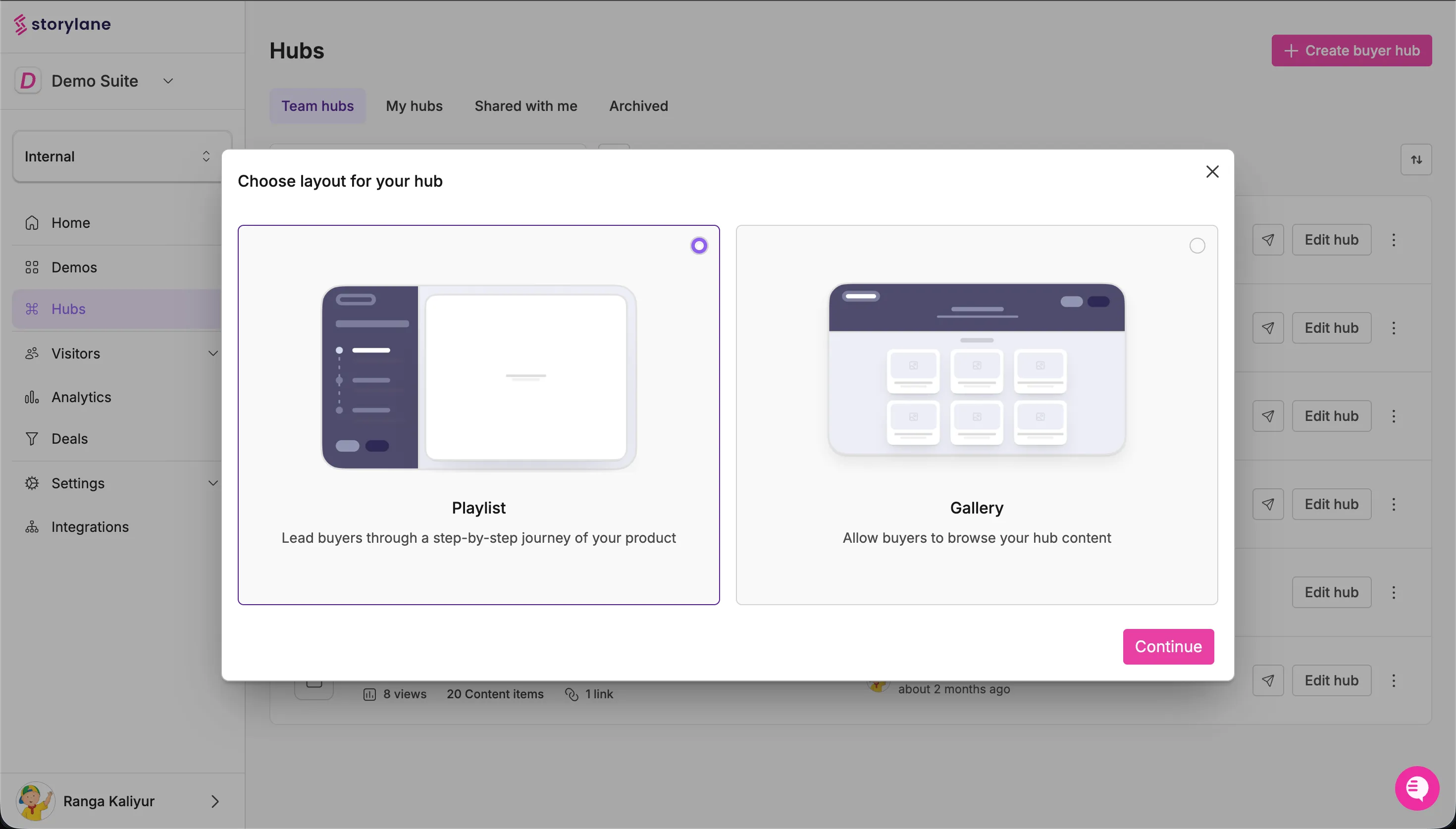
A Hubs link can contain multiple formats in a single environment: interactive demos organized by use case, video walkthroughs, PDFs, and case studies. Reps choose from Gallery view, which is a visual grid of demo cards suited for self-directed exploration, or Playlist view, which is a guided, sequential experience that walks stakeholders through a specific narrative. Each format serves a different audience and selling motion, and reps can mix both within the same hub.
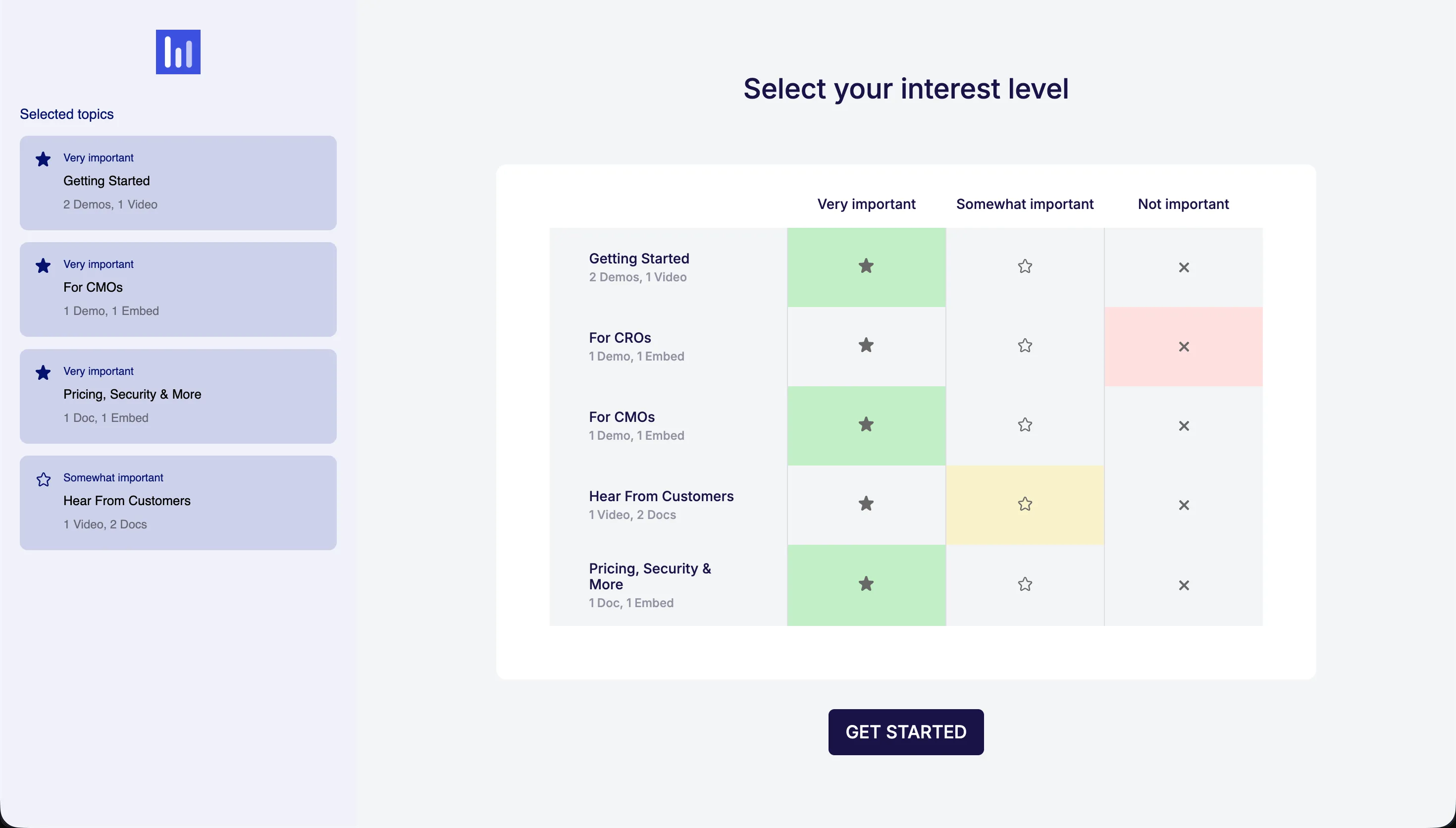
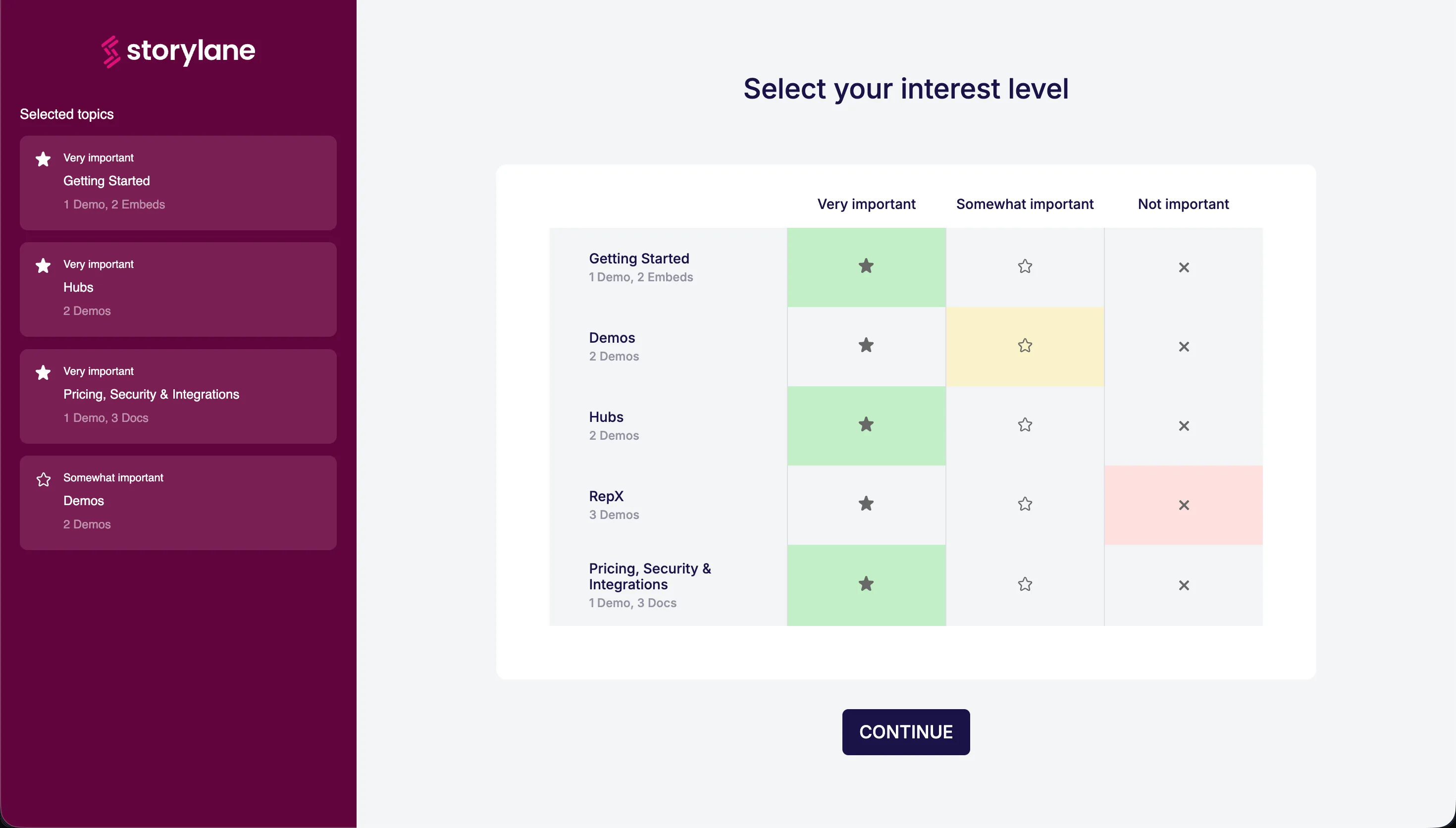
The Interest Screen changes how committees navigate a hub. When a champion shares the link, each new visitor lands on a checklist where they select their role or area of interest: Operations, IT, Finance, Executive, or whatever sections the rep has configured. The rep builds the paths before the link goes out. An operations leader gets the workflow demos. A CFO gets the ROI framing. The security team gets compliance documentation. Each path is tailored, and every selection generates an intent signal the seller can act on.
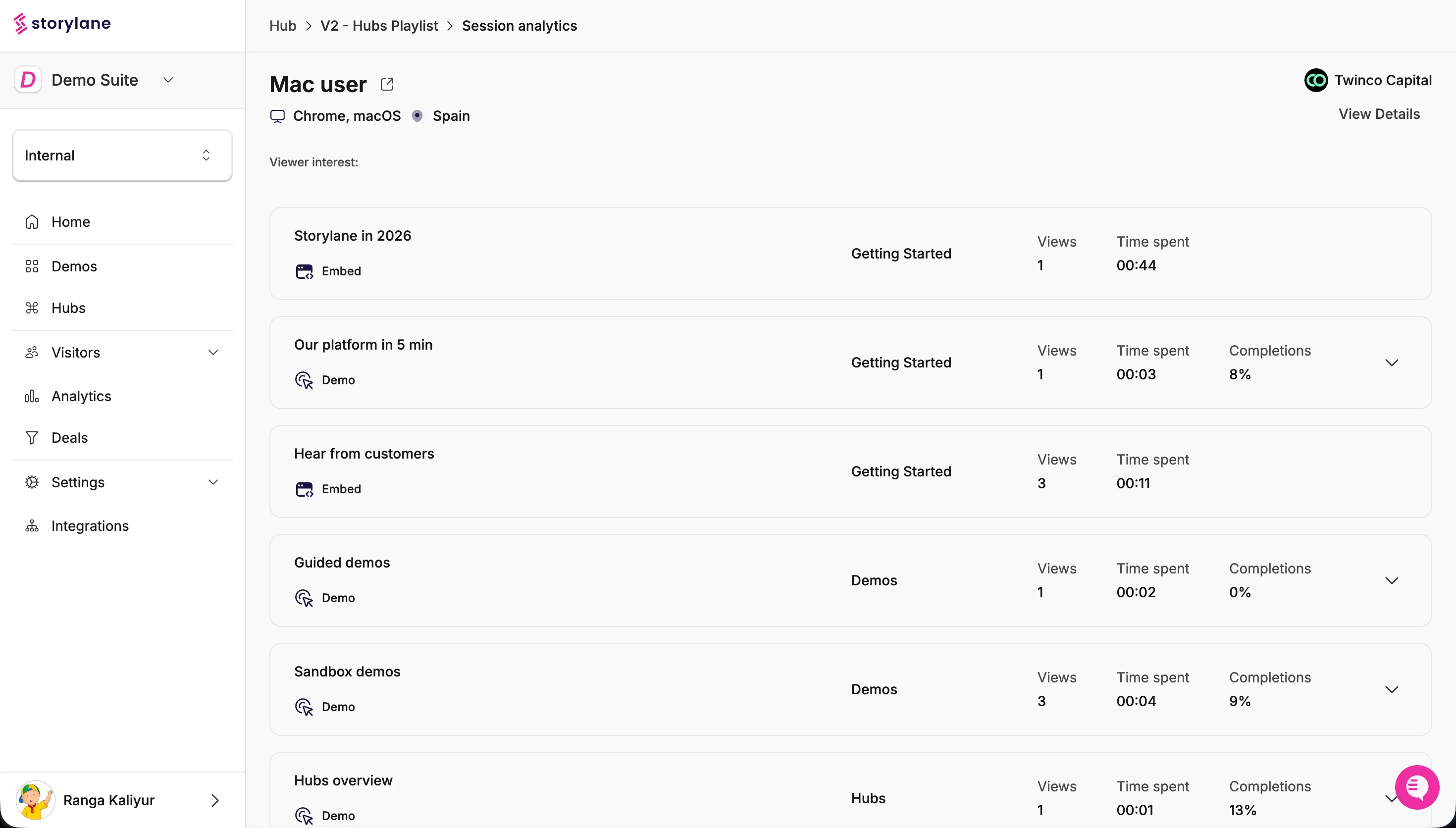
All of this is tracked. The seller sees which stakeholders opened the hub, which sections they spent time on, and when someone new from the buying committee accesses the room. New stakeholders the champion never mentioned appear in the analytics. The rep follows up with context rather than cold outreach, which means the follow-up is relevant rather than generic.
Hubs also connects to the Deals dashboard, available on Growth+ accounts, which pulls open deal and opportunity data from HubSpot or Salesforce and surfaces it alongside demo engagement signals. Reps can see buying intent and buyer reach per deal, filterable by stage, owner, or pipeline. Outreach gets timed to engagement instead of guesswork. That is the kind of signal that sales enablement tools should surface but rarely do.
Hubs is included in Storylane's Premium plan, which also covers Interest Screens, custom domain, and offline demos for conference deployments. A standalone add-on is available for Growth-tier accounts. Storylane is the #1 rated demo automation platform on G2, with 4.8 stars across 1,400+ reviews, used by 5,000+ teams.
How you can implement it: Start with one active deal. Build a Hubs room with sections mapped to each stakeholder role in the deal. Configure an Interest Screen so each visitor self-routes on arrival. Connect Hubs to your CRM via the Deals dashboard and set Slack alerts for engagement events. Review hub analytics 24 hours after the champion shares the link to identify which stakeholders engaged and which new ones surfaced.
Building a digital sales room that champions can actually use
A deal room built around the discovery conversation gives the champion the right asset for each stakeholder, which removes the coordination gap that stalls deals between meetings. A generic room sent cold does not do that.
The practical sequence works like this: After the discovery call, the rep identifies which stakeholders the champion needs to enable. For a deal involving a VP of Sales, a CFO, and an IT security lead, those are three audiences with three different questions. The rep builds a hub with three sections, one per persona, and configures an interest screen so each stakeholder routes themselves on arrival. Storylane's AI Quick Build can scaffold the hub automatically from a description of the deal context, compressing setup from 30 minutes to a few minutes.
The champion's job then becomes dramatically simpler. Instead of scheduling a three-way call or drafting separate follow-up emails with different attachments for each stakeholder, they send one link: here is everything the team needs, organized by role. That is a much easier ask for a champion to make internally, and it removes the coordination overhead that usually causes deals to stall between meetings.
For reps managing a high volume of deals, the analytics layer is where the advantage compounds over time. Deals where multiple stakeholders have explored multiple hub sections are qualitatively different from deals where the champion is the only person who has seen the product. The digital sales room makes that invisible engagement visible, so you can invest your time where the intent is highest rather than following up on deals that have already gone cold on the committee's side.
How you can implement it:
- After every discovery call, build a deal room within 24 hours while context is fresh.
- Organize content by stakeholder role, not by content type. A CFO section is more useful than a "Documents" section.
- Use interest screens to let each stakeholder self-route on arrival.
- Set Slack notifications for hub engagement so you follow up within the window of interest, not days later.
- Review hub analytics before every follow-up call. Know who has engaged and who has not before you dial.
Digital Sales Room FAQ
What is a digital sales room?
A digital sales room is a secure, shared online space where sellers organize all the content a buying committee needs to evaluate and approve a purchase: demos, pricing, case studies, videos, and mutual action plans. Everything lives at a single link the champion can share across their organization.
How does a digital sales room work?
The seller creates a personalized room after a discovery call, loads it with relevant content organized by stakeholder role, and shares a single link with the champion. Each buyer accesses the room on their own schedule. The seller gets analytics on who opened it, what they viewed, and how long they spent on each section, giving them real-time visibility into committee engagement.
Why use a digital sales room instead of email attachments or document sharing?
Email attachments are untraceable. You have no idea who forwarded your PDF, whether anyone read it, or which stakeholders are engaged. A digital sales room centralizes everything in one place, gives the champion a single link to share, and gives the seller engagement analytics that reveal the real shape of the buying committee. When you can see which stakeholders are engaged, you invest follow-up time where intent is highest.
What should a digital sales room include?
The five core components: interactive product demos, which generate per-stakeholder engagement signals that static formats cannot, a short explainer video, relevant case studies matched to the prospect's industry, pricing or ROI context for financial stakeholders, and a mutual action plan with clear next steps and owners. A demo center approach, where demos are organized by persona or use case, tends to outperform a flat document list.
How is a digital sales room different from a shared drive or proposal tool?
A shared drive is a storage layer with no engagement tracking, no personalization, and no structure. A proposal tool focuses on a single document. A digital sales room is a purpose-built buying environment that combines multiple content formats, routes stakeholders to relevant sections, and gives the seller analytics on who engaged with what. It is the last-mile delivery layer between "interested" and "approved."