
.svg)

Your potential customer has stumbled upon your product that promises to change their life but is hesitant.
How can they be sure it lives up to the hype?
Reading or hearing about it isn't enough. That's where live sales demos come in.
Live sales demos are dynamic, interactive experiences bridging the gap between prospective customers and your product's value.
"Successful sellers need to think of themselves as 'buyer coaches.'"
— Garin Hess, Founder & CEO of Consensus
Think of them as an opportunity to bring your product to life right in front of their eyes and make a compelling case for why they should choose you.
Let’s find out how you can make the best of live demos for sales!
What is a Live Sales Demo?
A live sales demo is a real-time product demonstration for your potential customers. It gives a first-hand experience of what your product brings to the table.
No matter the format, the ultimate goal of a live sales demo remains constant: to help potential customers truly understand the value and benefits of your product.
"The demo shows our buyers how they can be the hero, it's got to be simple, it's got to have real language, and it has to be fun, and I definitely believe that less is more. You got to be creative."
— Amin Ibrahim, Senior Director, Pre Sales, Strategy, and Training, Hootsuite
Unlike reading about your product or watching a pre-recorded video, a live demo allows prospects to ask questions, provide feedback, and gain firsthand knowledge about how your product can address their specific needs.
What Your Live Sales Demo Must Not Look Like
We found a demo for that as well! 😉
Here's Sanjeev NC, the Co-Founder of Supermeme.ai, with his witty take on a (not so) successful sales demo:
What Happens in a Live Sales Demo
The demo's purpose is crystal clear—to give you a taste of what it's like to skillfully navigate and utilize the product, all while highlighting features that specifically cater to your needs and desires.
Lock the basics first by watching this quick explainer video on the live sales demo process by ManyCam:
What happens in a live sales demo can vary from one SaaS organization to another, but let's focus on the four main elements of a demo:
Set the Demo Environment
One of the most important decisions is establishing the environment where the demo will take place. It involves creating the necessary conditions and choosing the appropriate setting that aligns with your requirements.
There are two major types of environments:
What Happens in a Sandbox Environment?
Sandbox environments eliminate the risks associated with unstable demo environments, ensuring a smooth and glitch-free experience. They mirror a live product login's look, feel, and responsiveness. It's like having a playground designed to showcase the potential results of using the product without any real-world consequences.
In a sandbox-like environment, the viewer can interact with the product and use various features–whichever you’ve set up for the demo.
You can freely explore its features, experiment with functionalities, and get a genuine feel for how the product can transform your daily tasks.
What Happens in a Production Environment?
In a production environment, the primary focus is showcasing the software application or system to potential customers or stakeholders in a live setting.
You can use the production environment to:
- Demonstrate the software application's key features, functionalities, and benefits to the audience.
- Highlight specific use cases and show how the system solves specific problems, emphasizing its unique selling points.
- Customize or personalize the software application during the live demo to showcase its flexibility and adaptability.
Maintain a Dummy Account to Use for Demos
Moving along, a live product login to a "dummy account" is reserved exclusively for the sales teams to use during their live sales calls. These accounts are valuable because they allow customization, protect sensitive data, and ensure a smooth experience.
Create a PowerPoint Deck
If you find yourself without other options, don't worry! A well-crafted PowerPoint deck can still be a valuable tool to showcase your product, educate potential customers, and leave them excited about its possibilities.
While it may not be as immersive as other formats, it offers a visual guidebook with screenshots and detailed descriptions. It's like flipping through pages that highlight your product's key features.
In this deck, you can outline how to use your product, showcase common use cases, and highlight its benefits. It's a chance for the sales team to bring each slide to life with their explanations and insights, painting a vivid picture of how your product can make a difference.
How to Prepare for a Live Sales Demo?
No two live sales demos are the same. Some demos may be concise and to the point, while others may take a more in-depth and immersive approach.
The perfect demo is the one that resonates with your audience. Amin Ibrahim, Senior Director of Value and Solutions at Hootsuite, sheds more light on this in his podcast:
But what about the preparation before creating interactive sales demos?
Before diving into the specifics of creating an interactive product demo, it's important to lay the groundwork.
Know your audience
Get to know your target audience inside out. Understand their needs, challenges, and preferences to create a demo that speaks directly to them.
Scope out the competition
Take a good look at what your competitors are doing. Identify their strengths and weaknesses, and use that knowledge to highlight what makes your product shine.
Stay in the loop
Keep your finger on the pulse of industry trends. Stay updated with the latest happenings, emerging technologies, and shifts in customer preferences to ensure your demo is fresh and relevant.
Here are the main steps to create an interactive product demo to leave prospects feeling inspired and confident in their decision to choose your product:
Step 1: Run a discovery call to get prospect insights
Before jumping on a call with a prospect, it is imperative to lay the foundation of the sales demo call — determine the prospect’s problem(s) to connect with them better.
First, cover the basics:
Who your prospect is: find out their role, responsibilities in the company, what their typical day looks like, and the challenges that they have.
The prospect’s company: understand the type of company it is, where it is based, the industry it belongs to, and its customers.
Narrowing down on pain points: research deep enough to get to know the problems the prospect faces.
Step 2: Craft a Script
Writing a demo script is essential whether you're a product expert or still getting acquainted with the ins and outs. Outline the key points you want to cover and the flow of the conversation. Here’s how:
- Practice makes perfect! To ensure a seamless delivery, take the time to rehearse the demo flow before the actual thing.
- No robotic recitations from the slides, please! Your prospects want to see the power of your product in action. Instead of relying on slides, let the product itself take center stage.
Step 3: Create a Sales Demo Environment
Design a sales demo environment that reflects a seamless and engaging experience for your prospects. Here’s how:
- Pay attention to the visual elements, layout, and overall user interface to create an inviting atmosphere.
- Map out the key steps, transitions, and highlights you want to showcase, ensuring a logical progression that engages your prospects.
- Instead of bombarding your prospects with every feature, tailor your demo to their specific needs. Show them how your product solves their unique problem effortlessly and effectively in just a few simple steps.
- Incorporate relevant dummy data into your demo to create a sense of familiarity. For example, take their logo from their website and inject it into your product.
Leverage a demo platform that can streamline your sales demo process.

Step 4: Test First, Demo Later!
Any technical hiccups can disrupt the flow of your demo. So it’s pertinent that you test your demo before you hop on a demo.
Follow these handy tips to ensure a glitch-free experience:
- Test your webinar software in advance to ensure it's running smoothly. Verify the audio-video quality and any interactive features you plan during demo usage.
- Ensure your headset, room setup, and other equipment work properly to avoid unexpected issues during the demo.
- If your current product version is missing an important feature, provide a timeline for its release during the demo.
Step 5: Explore the Path Forward
Now, it's time to pave the way for a successful close:
- Engage in a conversation about the prospect's buying process, timeline, and objections regarding budget and competitors to provide reassurance and demonstrate product value. Gain insights, alleviate concerns, and move closer to a successful sale.
- Determine the optimal time to follow up with your prospect. Are they ready to decide immediately, or do they need time for internal evaluations?
Read More: Building an Effective Presales Process
What to Do After a Live Sales Demo?
Now that you've seen how to prepare a live sales demo let's explore how you can gain valuable insights and make the prospect your client.
A deal is not won after a sales call. Getting on a live sales call with prospects is just one of the essential steps to have them consider your product over the host of other options in the market.
Creating interactive self-guided demos empowers prospects to explore your product freely. Analyzing engagement data allows you to optimize follow-up timing and personalize your messaging, ensuring your outreach adds value and resonates with prospects.
With prospects freely exploring interactive self-guided demos and engagement data in mind, let's shift our focus to the next vital step: follow-up.
- Follow up with a sales leave-behind
After a product demo call, the final stage in the sales process is following up with the prospect by including a demo leave-behind in the email. This also helps your brand stay on top of their minds.
You can send a summary as a product demo video using Storylane that captures all the major features that apply to their business needs.
- View engagement rates
As and when prospects interact with your product demos attached via email, you want to know what works and what doesn’t in your demos. You want to send demos that stick with a prospect. To do this, you will need access to demo data. From seeing the demo completion percentage, where prospects stop in demos, which step in the demo most time is spent on, and more, you get to shape your demos to best resonate with your prospect.
Live Sales Demo Best Practices
The following best practices can help you elevate your demo game and increase the chances of conversion:
1. Allow Time for Feedback
To ensure a productive custom demo call, structure your meeting as follows:
- 5 minutes to set the stage and build a rapport with your prospect.
- 5 minutes to summarize the insights gathered during the discovery phase
- 15-20 minutes to showcase your product or service, addressing specific pain points and highlighting key features
- 5-10 minutes to actively seek feedback, confirm that your solution meets their challenges, and address any questions or concerns
- 5 minutes to discuss the next course of action, such as a follow-up call, trial period, or contract discussion
2. Schedule the Demo Promptly
Aim to schedule the demo while you're still on the call with the prospect. Encourage them to open their calendar and suggest a time that works for both parties. If immediate scheduling isn't feasible, follow up with an email that includes your booking link or suggested time slots.
As a general rule, strive to schedule the demo within 5 business days. This is because:
- You avoid losing prospects to competitors who may secure their attention faster.
- You create a sense of urgency, ensuring that your demo remains a priority among other topics that may arise.
Prompt scheduling increases the chances of your prospect attending the demo and engaging with your product effectively.
3. Paint a Captivating Vision with Storytelling
Use storytelling techniques to set the stage. Provide context and paint a picture of why your product's features are essential for them to engage your prospects:
- Use descriptive language in the demo flow and product screenshots to illustrate the opportunity loss of not solving their problem with your product and the ROI from your product or services because numbers can speak louder than words.
- Share real-world examples or case studies of how your product has helped other clients overcome similar challenges. Highlight specific results or success stories to build credibility and demonstrate the value your solution can deliver.
4. Highlight Social Proof
One effective demo best practice is leveraging social proof to instill confidence in your prospects. Here’s how you can do it:
- Highlight specific success stories and detailed case studies where satisfied customers have achieved remarkable results using your product.
- Describe their challenges, how your solution helped them overcome them, and the positive outcomes they experienced.
- Feature testimonials from happy customers who have benefited from your product. Include quotes or video snippets that capture their positive feedback, emphasizing your solution's value and impact on their business.
Integrating social proof into your demo helps prospects envision the possibilities and benefits your product offers, increasing their confidence in making a purchase decision.
For instance, Horizon Education Eliminated stands out as an excellent example of effectively attracting prospects by showcasing the tangible return on investment (ROI) they can expect.
By sharing relevant success stories, they have increased their credibility and significantly improved their chances of converting potential customers.

Thus, Integrating social proof into your demo helps prospects envision the possibilities and benefits your product offers, increasing their confidence in making a purchase decision.
How to provide value in different demo stages using Storylane
A deal is not won after a sales call. Getting on a live sales call with prospects is just one of the essential steps to have them consider your product over the host of other options in the market. The number of times you have to send custom product demos differs according to the prospect in question. With Storylane, you can create different kinds of demos for different stages of the buyer journey all with zero code and much ease.
- Show a product preview during a discovery call
At this stage, it is of utmost importance to understand the prospects' needs and suggest key features of your product. Merely presenting screenshots or using a generic sandbox account to demonstrate these features will not cut it. Prospects want to see their exact use case addressed.
One of the best ways to present their exact use case and convince them that this is the right solution for their problems, is to present a product walkthrough. This is possible through Storylane’s ‘Flows and Walkthroughs’ where you can capture your product and present it in the form of short guides, different workflows, or stage-wise walkthroughs.
- Share demo as a sales leave-behind
The final stage in the sales process post a product demo call is sharing a sales leave-behind for the prospect. This step is underrated. To make sure the prospect remembers why they must choose your product over the competition, you need to send a sales leave-behind that will remind them of this.
You can send a summary in the form of a product demo video using Storylane that captures all the major features that apply to their business needs. This will ensure that your product stays on top of their minds when they decide to move forward with a product that tackles their particular problem.
- Send demos after different POC stages
When you go the traditional route of sending presentations, docs, and slides that talk about your product to your prospect, you’re missing out on an opportunity to present again a strong case of why they need your product.
Traditional methods are outdated and fail to deliver the essence of your product which can make you win or lose the deal. On the other hand, if you send across a product demo using Storylane, you are giving prospects an easier and faster way to see the potential of your product. To be able to interact with a version of your product at their own pace and in their own time reinforces the idea of how your product is a better fit for them.
- View engagement rates
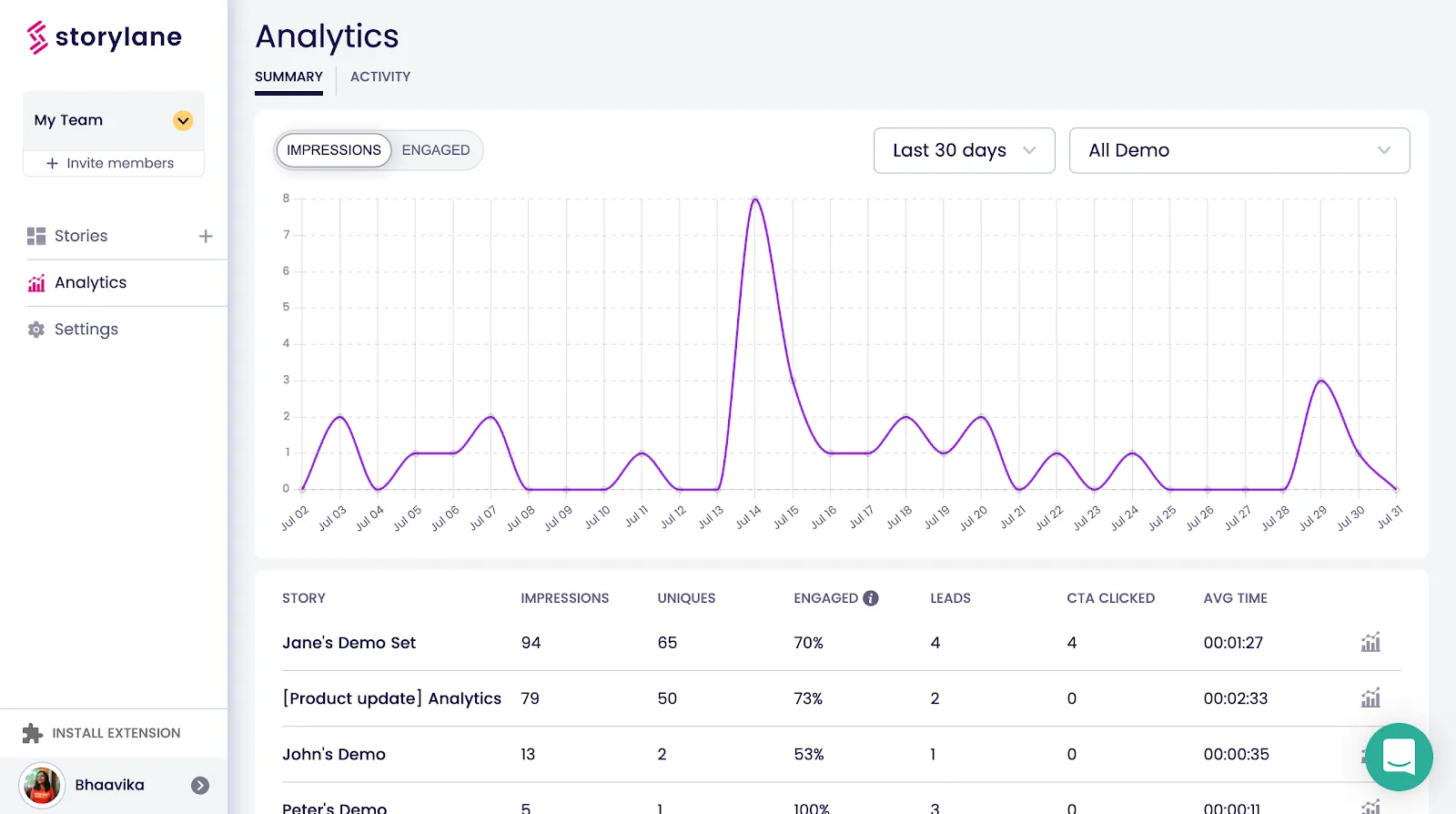
As and when prospects interact with your product demos, you want to know what works and what doesn’t in your demos. You want to send demos that stick with a prospect. To do this you will need access to demo data. With Storylane, you get a consolidated view of how prospects respond to your product demos. From seeing the demo completion percentage, where prospects stop in demos, which step in the demo most time is spent on, and more, you get to shape your demos in a way that will best resonate with your prospect.
Win Your Deals Faster
You can shave an entire step in your sales process by using product demos in your sales cycle sans any engineering dependencies. This will save your sales team hours of repetitive work, which they can use to reach out to more prospects.
To give a prospect a nudge towards considering your product, equip your sales champion with a power-packed product demo that makes it easier for your champion to talk the prospect through each feature. It will increase the chances of getting your prospects onboarded higher.
You can create product demos that influence multiple stakeholders to build a case of your product’s capabilities. By finding out everyone else involved in the buying process, you can create different versions of a product demo in Storylane that will help convince every stakeholder involved.
When they can better understand how your product works and why it is a good fit for their company, they can become advocates for your product in their company.
“Storylane has been a huge enabler for sales engineers (SE) to accelerate our entry into the Grocery segment and save a lot of repetitive work. Our deal close times have shortened and engineering does not have to serve requests from SE teams, which makes everybody happy. Storylane was able to get us started quickly and is very responsive to our needs.”
— Sastry Penumurthy, VP of Strategic Sales at Punchh
Want your live sales demo ready ASAP? Book ours to create yours — it’s free! 😉
FAQs
1. What are the different types of sales demos?
Here are some common types of sales demos:
- Live Product Demo: A real-time product demonstration given to potential customers by a sales rep
- Virtual Demo: A demo conducted remotely using video conferencing tools or screen-sharing software
- Pre-Recorded Demo: A pre-recorded video created to demonstrate the product
- Self-Service Demo: A demo that allows prospects to explore the product on their own through a trial version or a limited-access account
2. Who gives a live sales demo?
A presales engineer or consultant, along with the account executive or a sales team member, gives a live sales demo.
3. What makes an excellent live sales demo?
Effective communication, thorough preparation, and an unwavering focus on solving the prospect's problem characterize a good live sales demo. The problem with most demos is that they can become a monologue with the prospects snoozing. You have to engage them in the demo to get them interested. A good demo is always a consistent dialogue consisting of feedback and questions.
4. What are a few live sales demo examples?
- Clari's sign-in-free live demo demonstrates revenue leak detection, precise projections based on historical data, efficient book-of-business management, and powerful forecasting abilities.
- Gong's product demo starts with showing its CRM filters, then goes on to activity timeline, call & email tracking, AI-generated Deal Warnings, the entire team's pipeline view, AI-generated Deal Insights, and coaching capabilities.
- Stairwell’s product demo starts with a straightforward checklist, including a platform overview, rich file analysis, operationalizing threat intelligence, and more. So, if you want to view a specific feature, you can choose it from the list.