
.svg)

Reprise has established itself as a comprehensive demo automation platform for enterprise teams, offering everything from interactive tours to live demo overlays and sandbox environments. With SOC2 compliance and enterprise-grade security, it's built to handle complex B2B sales processes at scale.
While Reprise delivers on enterprise capabilities, it often creates more complexity than most teams actually need. For the full head-to-head breakdown, see our dedicated Storylane vs Reprise comparison.
Here are some issues teams using Reprise report:
- It’s for tech-savvy folks. Basic customization needs engineering bandwidth
- It’s hard to learn. Multiple reviewers confirm it's "not a tool you can just jump in and create a demo in an hour"
- It’s expensive. Ranging from $30-50k annually, it is challenging for growing teams to justify
- It’s slow. David Brudnicki from Outreach even goes as far as to say, “their platform has only become more unusable quarter by quarter.”
As a PMM at Storylane, it’s my job to try out all our competitors. And even if you don’t get Storylane (no hard feelings), get these instead.
Top Reprise alternatives at a glance
| Tool | Best For | Demo Capabilities | Pricing |
|---|---|---|---|
| Saleo | Personalized live demo environments | Live demos | $40,000/year |
| Storylane | Easiest and affordable Reprise alternative | Screenshot, video and HTML demos | Generous free plan with paid plans starting at $6000/year |
| Walnut | A full-funnel sales solution | HTML and screenshot demos | $10,000/year |
| Demoboost | Best for pre sales use cases | Screenshot and HTML demos | Starts at $10,000/year |
| Demostack | Best for cloned product tours | Screenshot, video and HTML demos | Start at $50,000/year |
| Consensus | Best for enterprise teams with video demo needs | Video demos | Starts from $40-50,000/year |
| Navattic | For simple marketing use cases | Screenshot based demos | Starts at $6000/year with unlimited users |
| Tourial | Best for website demo galleries | Screenshot based demos | Starts at $16,000/year |
| Arcade | Best for marketing teams on a budget | Screencast demos | Paid plans start at $384/year |
| Tesbox | Best for solution engineers | Live demos | Starts at $44,750/year |
Here are my top 3 picks for Reprise competitors
- Saleo: For sales teams who want to personalize the live demo experience with overlays directly on top of their existing product.
- Storylane: An ideal choice for both sales and marketing teams, known for its ease of use and affordability.
- Walnut: Caters to sales teams seeking a full-funnel solution for creating interactive demos with guided walkthroughs.

Best Reprise alternatives: In-depth analysis
1. Saleo - Best for live demo overlays
Saleo is laser-focused on one thing: making your live product demos perfect. It does that by overlaying custom data on your live product during sales calls. While Reprise tries to be everything to everyone, Saleo is purpose-built for this use case.
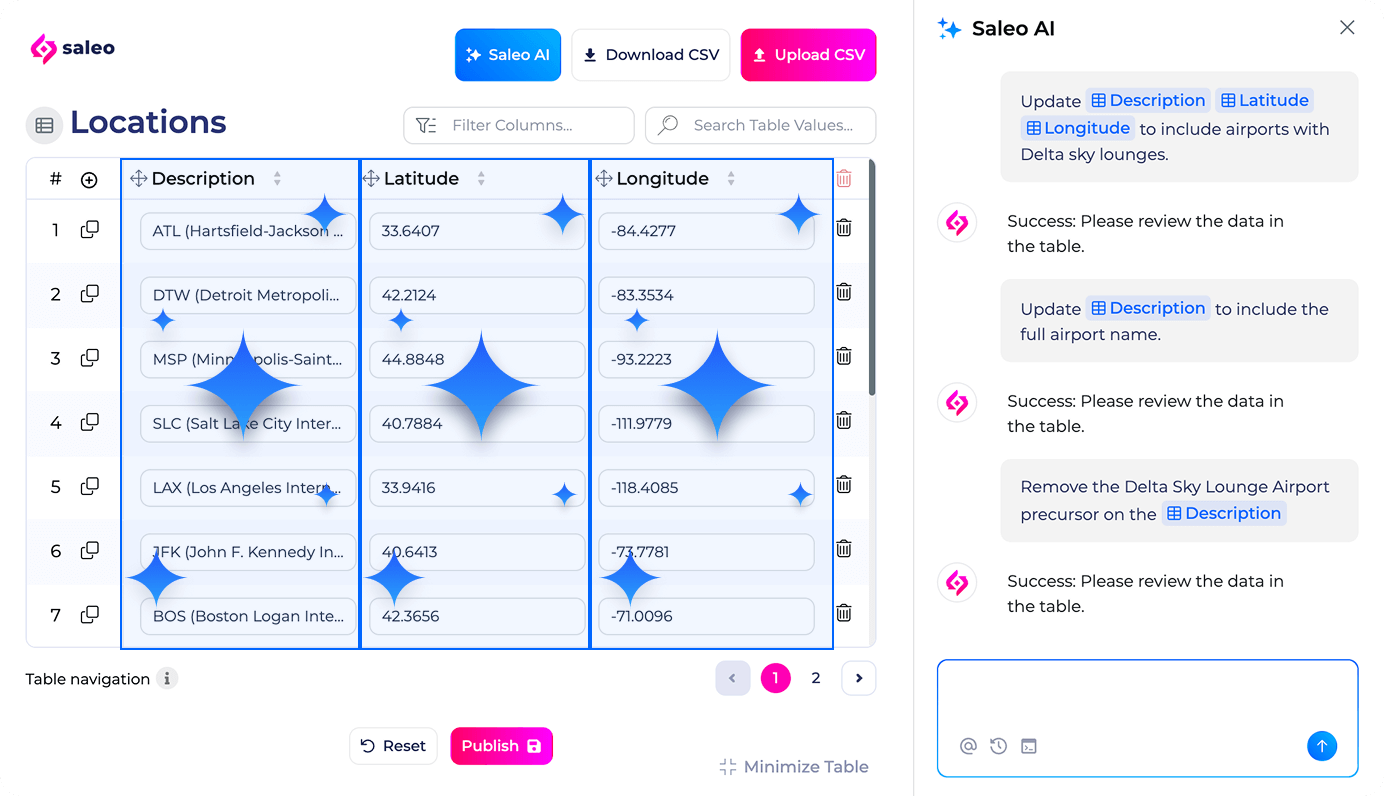
Demo capability: Live demos
Customers choose Saleo over Reprise because
- Best-in-class live demo overlays, rather than being one component of a larger platform
- 3x faster demo prep: Customizes demos in real-time during actual sales conversations
- Gets you live in weeks, not months - Saleo takes 2-3 weeks to set up vs. Reprise's implementation, which can span a few months
- Automates real-time personalization - Change graphs and data during calls without pre-building scenarios. Adapt instantly when prospects ask, "But, what about our industry?"
- Edit demos collaboratively with role-based access and a central demo library to empower your team to create demos quickly and in real-time.
How pricing works: Starting at $40,000/year - comparable to Reprise Reveal pricing.
Best fit for: Sales teams doing live product demos who want a tool with mature overlay functionality.
When to skip Saleo: You don't want to spend $40k+ on overlay technology that requires dedicated demo engineer bandwidth, especially when other demo automation platforms deliver reliable results for a fraction of the cost.
2. Storylane - Easiest and affordable Reprise alternative
Storylane is an AI-powered interactive demo platform that solves the core problem with Reprise: complexity. While Reprise requires technical teams and months of setup, Storylane gets anyone creating demos in minutes—without sales engineering dependencies or enterprise budgets.
The interactive demo platform at the core of Storylane is called Demo Suite. It covers HTML and screenshot capture, guided flows, demo hubs, lead-capture gates, and AI-powered personalisation - the direct functional replacement for Reprise's demo environment cloning. Where Reprise requires engineering involvement and enterprise contracts ($30K+ entry), Demo Suite is no-code and accessible from a Starter plan.
Storylane also ships RepX - an AI website agent that no other platform on this list offers. RepX sits on your website, qualifies inbound visitors through natural AI conversation, and books meetings directly into rep calendars. For teams replacing Reprise, the Demo Suite handles the demo creation; RepX handles the inbound pipeline that those demos generate.
Demo capabilities: HTML demos + Screenshot & video demos
Customers choose Storylane over Reprise because:
- No technical expertise required - Create demos without engineering bandwidth - Storylane's no-code editor works for marketers, not just Solution Engineers
- AI does the heavy lifting - Storylane's AI creates demos, generates voiceovers in 65+ languages, and builds AI avatars - not just data injection like Reprise
- Better cross-team adoption designed for collaboration across marketing, sales, and customer success teams with features like Buyer Hub, shared workspaces, and creator seats
- Automate early-stage product discovery with Lily AI, our category-first sales agent designed for lead qualification conversations
- Affordable at any scale, with a free plan available. Growth plans with HTML features start at $6k/year vs. Reprise's $30-50k+ enterprise-only pricing
- Branching demo flows let prospects "choose their own adventure" with buyer-centric navigation
"Storylane is so intuitive! I was able to create my first product tour in minutes and that was without any real instruction. Our onboarding experience was smooth and they helped us convert our tours from our previous vendor to Storylane so all we had to do was swap them out on our website." - Michelle Robin, Director of Product Marketing (201-500 employees) | G2
How pricing works: Free plan (1 demo), paid plans from $40/month for screenshot demos, $500/month for HTML capture.
Best fit for: Sales and marketing teams wanting an easy-to-use, cost-effective alternative that doesn't require technical expertise or months-long implementations.
When to skip Storylane: You specifically need live demo overlays on your actual product (like Reprise Reveal) or require code-level application cloning. (like Reprise Replicate)
3. Walnut: A full-funnel sales solution
Walnut is an interactive demo software (similar to Storylane) that caters to sales over marketing, making it a sales-focused Reprise competitor (see our Walnut vs Reprise comparison). It’s optimized specifically for sales workflows and revenue teams who need demos that accelerate deals.

Demo capability: HTML and screenshot demos
Customers choose Walnut over Reprise because:
- NuttyAI acceleration to help create demos faster and improve demo guide content
- Built for deal progression with sales-optimized workflows and CRM integrations to log each demo event in your CRM.
- Scales demo management efficiently with bulk editing capabilities and screen reuse to update multiple demos at once
- Personalized buyer experiences: Highlight product sections and customize annotations for specific personas and industries
- In-demo prospect feedback: Collect engagement data and analyze what resonates with buyers during the sales process
- Sales-focused analytics: Better engagement tracking and deal intelligence specifically designed for revenue teams
How pricing works: Starting at $10,000/year
Best fit for: Sales teams with enterprise security requirements who want demo automation tools that allow you to scale and personalize demos across different industries.
When to skip Walnut: You need marketing automation integrations, customer support for demo building, or live demo overlay capabilities like Saleo. Walnut users also report a steep learning curve and limited customer support for building demos.
4. Demoboost: Best for pre-sales use cases
Demoboost is a demo automation platform that focuses on pre-sales use cases with advanced analytics and A/B testing capabilities. While Reprise offers basic demo analytics, Demoboost is built specifically for teams who want to measure and optimize their demo performance at every stage of the buyer journey.

Demo capability: Screenshot, video, and HTML demos
Customers choose Demoboost over Reprise because:
- Advanced demo analytics with step-by-step analysis, time spent per section, and A/B testing for CTAs and messaging to optimize conversion
- Comprehensive integrations beyond standard CRM connections, including Slack, Mailchimp, and Pipedrive for workflow automation
- Pre-sales optimization focus, built specifically for teams wanting detailed insights into demo performance and buyer behavior
How pricing works: Starting at $10,000/year, no free plan available.
Best fit for: Pre-sales teams who want detailed analytics and optimization capabilities to improve demo conversion rates and understand buyer behavior.
When to skip Demoboost: You want self-service demo creation without waiting on support calendars, need marketing autonomy from presales teams, or require scalable personalization without manual variable setup bottlenecks.
5. Demostack - Best for product cloning
Demostack is the only platform that fully replicates your product environment, similar to Reprise's Replicate functionality. While Reprise requires months of technical setup to clone applications, Demostack uses a Chrome extension approach to recreate your product's front-end and back-end functionality more efficiently.

Demo capability: Screenshot, video, and HTML demos with full product cloning
Customers choose Demostack over Reprise because:
- Complete application cloning replicates full front-end and back-end functionality, including dropdowns, filters, and interactive elements
- Always updated demos - cloned environment automatically reflects your actual product functionality and updates
- Custom demo libraries to build searchable collections of demos that prospects can access and share independently
- Popular integrations that work seamlessly with Salesforce, HubSpot, and Marketo for sales workflow integration
How pricing works: Starting from $50,000/year
Best fit for: Teams who need complete product replication capabilities and have budget for premium cloning technology
When to skip Demostack: You need frequent product updates (requires re-cloning), prefer phone/chat support over email-only, or want more cost-effective demo solutions
6. Consensus - Best for enterprise video demos
Consensus focuses on personalized video demos at scale for enterprise teams. While Reprise offers interactive sandbox environments, Consensus excels at creating personalized video demo experiences that guide prospects through customized buying journeys based on their specific questions and needs. See our dedicated Storylane vs Consensus comparison for a closer look at how the two stack up.

Demo capability: Video demos with personalized microsites+HTML demos
Customers choose Consensus over Reprise because:
- Personalized demo boards create microsites that launch different videos based on prospect questions and buying stage
- Advanced stakeholder engagement to track which team members interact with demos and understand buying committee dynamics
- Merge link personalization pre-populates demos with recipient information using personalization tokens for seamless experiences
- Research-focused integrations beyond standard CRMs, including Outreach, Salesloft, and Zapier for advanced sales workflows
How pricing works: Starting from $40-50,000/year
Best fit for: Enterprise teams who prefer video-based demos and need sophisticated personalization for complex B2B sales cycles.
When to skip Consensus: You need sandbox environments or need product overlay capabilities for live demo use cases.
7. Tourial - Best for website demo galleries
Tourial specializes in creating demo centers and galleries on websites, allowing visitors to choose demo experiences based on their industry and use case. While Reprise focuses on sales-led demos, Tourial optimizes for self-service website experiences.

Demo capability: Screenshot-based demos with demo center functionality
Customers choose Tourial over Reprise because:
- Demo center creation to set up galleries on your website where visitors choose their demo path
- Automated lead capture with custom form overlays that capture prospect information during demo interactions
- Upcoming release demos using Figma screenshots to promote features before they're built
- Calendar integration with built-in scheduling through Calendly and Chilipiper for seamless booking
- Enterprise security with SOC 2 Type II certification and role-based access controls
How pricing works: Starting at $16,000/year
Best fit for: Marketing teams wanting sophisticated website demo experiences with visitor personalization and self-service capabilities.
When to skip Tourial: You need data blurring capabilities, extensive analytics, or live demo functionality beyond website galleries.
8. Arcade - Best for marketing teams on a budget
Arcade creates screencast demos similar to Loom, focusing on recording clicks, scrolls, and audio for marketing use cases like social media and email campaigns. While Reprise targets enterprise budgets, Arcade provides demo capabilities for budget-conscious marketing teams.

Demo capability: Screencast demos
Customers choose Arcade over Reprise because:
- Low barrier to entry with a free plan available and paid plans starting at just $384/year
- Screencast simplicity with a download the Chrome extension to start recording demos immediately
- Marketing integrations that work with Google Tag Manager, Amplitude, HubSpot, Clearbit, and Salesforce
- AI and HTML capture features in higher tiers. It includes AI voiceovers and automated video editing
How pricing works: Free plan (3 demos), paid plans from $384/year; HTML demos only on enterprise plans.
Best fit for: Marketing teams with tight budgets who need simple screencast demos for campaigns and social media.
When to skip Arcade: You need role-based sharing, advanced analytics, or bulk editing capabilities for complex demo management.
9. Testbox: Best for solution engineers
Testbox creates live sandbox instances of your product while automatically generating realistic demo data. With automated data management, your demos always showcase the latest features and realistic data.

Demo capabilities: Live demo environments
Customers choose Testbox over Reprise because:
- Always up-to-date demos automatically reflect product changes without manual rebuilding or maintenance
- Multiple SE use cases support self-guided onboarding, personalized POCs, and technical sales demonstrations
- Custom integrations built during implementation to work seamlessly with your specific tool stack
- Solution engineering focus designed specifically for SE workflows and technical selling processes
- Live product instances provide real sandbox environments, not screenshots or overlays
How pricing works: Starting at $44,750/year for 15 users, additional users at $1,200/year each.
Best fit for: Solution engineering teams who want live, always-current product sandboxes for technical selling without demo maintenance overhead.
When to skip Testbox: You need detailed user behavior analytics, prefer screenshot-based demos over live instances, or want a self-service setup without implementation support.
10. Navattic - Best for HTML-specific demos
Navattic is an interactive demo platform that focuses on HTML capture for marketing teams. While Reprise requires months of technical setup, Navattic enables teams to quickly create demos for website integration, lead generation, and early-stage sales with their Launchpad extension for sales teams. For a direct comparison, see our full Storylane vs Navattic breakdown.

Demo capability: HTML demos with interest-level routing
Customers choose Navattic over Reprise because:
- Marketing-first design built specifically for website integration, blog posts, and landing page embedding without technical complexity
- Interest-level demo routing allows visitors to choose their path based on their level of interest in different features
- Account identification reveals deanonymized accounts who view demos without requiring form fills
- Launchpad for sales teams enables reps to share demos early in the sales process and understand buyer interest
- Unlimited demo views with pricing based on seats, not usage volume
- Real-time engagement alerts via Slack and email when prospects engage with demos to act on buying intent
How pricing works: Free starter plan, paid plans from $500/month (billed annually), with Growth plan at $1,000/month, including Launchpad features
Best fit for: Marketing teams wanting HTML demos for website integration and sales teams needing early-stage demo sharing without SE involvement
When to skip Navattic: You need live demo overlays, advanced video editing capabilities, or code-level product cloning beyond HTML capture
How to choose the right alternative
Choose Storylane if:
- You want the fastest time to value
- You wanna save your presales engineers' bandwidth on high-value initiatives
- You need both marketing and presales functionality
- Budget is a consideration
Choose Saleo if:
- Live demo overlays are your primary need
- You have a budget for specialized tooling
- You have dedicated technical resources for demo engineering
Choose Walnut if:
- You're focused on sales use cases
- You need to build and customise demos at scale
- You can handle some complexity for advanced features
Choose Demostack if:
- You need perfect product cloning
- You have technical resources for maintenance
Reprise alternatives - Frequently asked questions
Q. How much does Reprise cost compared to these alternatives?
Reprise starts at $30-50k annually with no free trial. Budget-friendly options include Storylane ($6k/year with a free tier) and Arcade ($384/year). Enterprise alternatives like Saleo and Demostack range from $40-50k (we compare lighter Demostack alternatives separately).
Q. How long does it take to implement each Reprise alternative?
Reprise requires 2-4+ months of technical setup. Storylane and Arcade launch in 10 minutes. Navattic takes 2 weeks, while Saleo and Walnut need 2-4 weeks. Testbox requires 4-8 weeks but eliminates ongoing maintenance.
Q. Do I need a dedicated demo engineer for these alternatives?
Reprise, Demostack, Testbox, and Saleo require technical resources. Storylane, Navattic, Arcade, and Tourial are no-code platforms for non-technical teams. Walnut needs initial technical setup, then becomes self-serve.
Q. How much ongoing maintenance do these platforms require?
Reprise demands constant recapture after UI changes, consuming 20-24% of SE weekly time. Testbox requires zero maintenance by reflecting your live product. Storylane and Navattic allow quick demo edits without rebuilding.
Q. Can I integrate the Reprise alternatives with my existing sales tech stack?
All major platforms integrate with Salesforce and HubSpot. Storylane connects to Marketo for marketing automation. Navattic offers native MAP integrations. Consensus integrates with Outreach and Salesloft. API access varies by vendor.
Q. What demo types does each alternative support?
Saleo and Reprise Reveal use live product overlays. Storylane, Walnut, Navattic, and Demoboost capture HTML. Arcade, Tourial, and Consensus create screenshot or video demos. Demostack, Testbox, and Reprise Replicate clone full product environments.
Q. How does Storylane compare to Reprise for sandbox demos?
Reprise creates full application clones with backend functionality, while Storylane uses HTML capture for guided demos. Reprise requires 2-4 months setup and $30-50k annually. Storylane launches in 10 minutes at $6k/year. Choose Reprise for fully functional product exploration, Storylane for fast guided tours without backend complexity.
Q. Which Reprise alternative is best for sales engineers?
Storylane—no technical support needed and launches in 10 minutes. It eliminates the 20-24% weekly maintenance time Reprise demands after UI changes. For live overlay demos, use Saleo. For sandbox environments like Reprise but faster, choose Testbox.
Ready to move beyond Reprise's complexites? Start free with Storylane and see why it's the #1 rated demo automation platform for cross-functional teams.