Storylane 2.0 – Build a killer demo in few minutes
Today, we are thrilled to launch Storylane 2.0 - the fastest way ever to build an interactive demo of your product. Over the last year, we have continued to iterate on Storylane with feedback and support from our customers.
One feedback we always get from our users is that Storylane is extremely easy to use when compared to other demo products. We doubled down on this and decided to continue to make it even easier to build demos. Also, it made sense for us to let any marketing, sales or sales engineering person to signup and try out Storylane for themselves and share it with the rest of the team.
When promoting Product-led growth, it was imperative for us to have a product which had a PLG soul. And today, we are proud to say that we have accomplished it with making a self signup available to everyone.
We even decided to have a freemium plan for people who just would like to build one demo and share it with their customers and if that succeeds, then purchase our paid plans.
Storylane 2.0 product covers each of these popular use cases including new ones
(1) Embedded product tour on the website
(2) Email shares of interactive demo
(3) Leave behind interactive demo as a followup
(4) Embedding Storylane demos in blog posts, knowledge base, and training material
Here is a summary of key improvements over the last few months that is rolled into the Storylane 2.0 launch -
1. Freemium: A plan for startups who want to have a single product tour.
2. Improved UX: You can signup and onboard yourself - It only takes a few minutes minutes to build a product tour. This is accomplished with screenshot captures using our chrome plugin as you navigate the product. For advanced use cases in sales, you can send hyper personalized demos to prospects with HTML captures.
3. Analytics: Companies are able to capture leads, view analytics and understand the heat map of how prospects are engaging with their demos.
4. Integrations: You can push analytics and leads to any CRM and marketing automation platform - Hubspot, Marketo, Salesforce, Segment, and Zapier integration.
5. Teams feature: Multiple teams can have their own spaces in Storylane and organize demos by folders. Users can have various permission levels as viewers, editors, and admins.
Now there is also a Video capture feature for dynamic interactions in the product that you can’t stop loving! You can access it if you’ve been best buddies with Storylane for a while now. All you’ve to do is ask us for beta access and let us know how it goes.
What a conference booth in London, an EHR rollout for a differently-abled community, and a fintech triage system have in common — and what it tells us about where demo automation is actually going.
The standard demo automation playbook is predictable: marketing website tour, sales leave-behind, email nurture embed. That is what most companies start with.
But spend time in actual customer conversations and you see something different: teams using demos to solve problems the standard playbook never imagined.
This week, we reviewed a working session with an engineer at a large cloud computing company preparing for a technology summit in London. Her problem: she needed a product demo to play on a loop at her conference booth (no clicks, no one to navigate it, just a screen running in the background while conversations happened around it.)
Nobody markets demo automation as a conference booth tool. But that's exactly what she needed it for. And it wasn't the only unexpected use case this week.
1. Trade show and conference booth displays
The conference loop use case has specific requirements: autoplay enabled, 4-6 second transitions on title cards and pause slides, video clips set to 1.5-2x playback speed for longer recordings, and the entire thing downloaded onto the device. Conference WiFi is unreliable. You need the offline version ready before you walk in the door.
The structural formula that worked: technology stack slide (static) -> 4-second pause slide (blank) -> demo 1 with title card framing the problem ("Can I detect performance issues before they cause outages?") -> demo 2 -> repeat on loop. The problem-framing title cards are what make this work at a booth — a passerby reads a question they recognize and stops.
2. Staff onboarding for organizations with diverse accessibility requirements
A director of organizational performance at a nonprofit came to us mid-EHR transition. Her organization (200-plus staff, statewide) was moving to a new electronic health records platform and needed tutorials for everyone from clinicians to program administrators. Complicating factor: their staff includes a deaf and hard-of-hearing community.
Her requirements were specific: self-paced clicking rather than auto-advancing video, AI voiceover as an optional layer, and demos organized by function and embedded in SharePoint so staff could browse by department and role.
The training-center use case of interactive demos replacing annotated PDFs is not new. The accessibility angle is. When a demo is self-paced, the viewer controls the speed versus video. That's a meaningful accommodation for populations that need more time, and it requires zero additional effort from the team building the content.
3. Multi-system integration demos
"We get asked all the time: what do these integrations actually look like?" said a co-founder at an early-stage health tech company. They had been answering that question in live demos, switching between systems in real-time and hoping nothing broke.
What they discovered: you can capture from multiple platforms in a single demo session. Finish recording in system one, click "add to existing demo," then capture from system two. The viewer moves between platforms seamlessly — without any live switching, without any risk of a broken environment.
Live integration demos are high-risk, tedious (from a data management pov) and unrepeatable. Captured integration demos are neither. For a company whose primary sales objection is "show me exactly how the integration works," this is not a minor workflow change; it's a competitive differentiator.
4.Inside sales automation for long-tail accounts
An inside sales leader at a fintech company described a problem his team lives with daily: they manage accounts "where we're seeing very less revenue and more effort going from an account manager's point of view." His team's solution was a self-serve portal paired with interactive demos that replace human demos entirely for lower-priority accounts. Reps focus on the accounts with revenue potential; the demo handles the education and qualification for everyone else.
He had used this approach at a previous company and was replicating it here. The key insight: he was not evaluating demo automation as a way to improve existing demos; He was using it as a triage mechanism for a coverage problem. Interactive demos let you maintain a presence in accounts that don't justify a rep's time. That's a fundamentally different value proposition than "make your demos better," and it's one that VP of Sales audiences will understand immediately.
5. Localized demos for non-English-speaking markets
An inside sales team at a fintech company with a large India-based sales operation had one specific question: how many languages does the AI voiceover support? The answer, over 30, prompted an immediate workflow: build the demo once in English, then translate and duplicate into regional languages.
In markets where English-language demos create friction in the sales process, this is not a nice-to-have. It is a conversion rate issue. Prospects engage more deeply with content in their first language. The ability to generate a localized demo without re-recording or hiring a voice actor changes the economics of localization for inside sales teams that are already stretched thin.
When sharing async product demos, sales teams have traditionally reached for a couple of options: quick and dirty screen recordings (think Loom, Vidyard, etc.) and high-end video productions (think Camtasia, Consensus, etc.). While there’s a time and place for both; AEs, SEs, and PMMs are increasingly adopting a third format — interactive demos — as a “better than both worlds” alternative. Here's why:
Interactive Demos vs Video: Feature Comparison
Compare
Interactive demos (Storylane)
Screen recordings (Loom, Vidyard)
Video productions (Camtasia, Consensus)
Time to create
✅ Fast, capture and creation often completed in minutes
✅ Fast but requires narration, timing, retakes, etc.
✅ Granular: Track views, interests, completion, and time-spent per step
❌ Limited to views, no actionable analytics or Opinions
❌ Limited to views, no actionable analytics or Opinions
Buyer experience
✅ Interactive, two-way experience
❌ Passive, one-way experience
❌ Passive, one-way experience
Ideal for…
Across the board
Ad-hoc touches, quick Q&A
Top-of-funnel brand awareness campaigns
Why revenue teams are adopting interactive demos
Since our inception, we've noticed revenue teams of all sizes, from early-stage startups to Fortune 500 enterprises, switch over from videos to interactive demos. Here are the most common reasons we hear from customers.
Reason #1 - Speed without sacrificing quality
Screen recordings are quick and easy to produce but lack the polish and quality needed for high-value deals. On the other hand, producing polished video demos means days of planning, hours of environment prep, multiple recording attempts, and extensive editing. Interactive demos eliminate this friction entirely, especially now with AI, to instantly generate product-specific content (Guides, voiceovers, etc) from captured screens — no need for multiple takes.
"Video is really strong at capturing people's attention and welcoming them into your story. But the thing that video can't do is provide a “click-through experience” allowing users to actually get their hands on the product — to feel it, to see it, to understand what the actual day in and day out of working with your tool is going to be like. Especially with its AI and automation, Storylane allowed us to build demos in such a quick amount of time." - Michael DeMarco, PMM, Phenom
Reason #2 - Asset maintenance and scalability
Traditional videos are like baked cakes — once ingredients (product screens, click path, narrative) are combined into a video, it’s difficult to swap individual components. When your product UI changes six months from now, you face full reproduction from scratch.
Interactive demos keep these elements separate. Update a screen in minutes without touching the narrative. Adjust messaging without re-recording. Reorder workflows without starting over. This durability enables demos to stay current as your product evolves.
Further, creating persona-specific, industry-tailored, or localized video content means producing multiple versions of each asset — a multiplication problem that quickly becomes unmanageable. Storylane's AI editor recontextualizes entire demos for different personas or industries in seconds. Dynamic tokens automatically swap prospect information without creating separate versions. One base demo adapts to dozens of scenarios without manual overhead.
Reason #3 - Modern buying preferences
Interactive demos respect buyer time by letting them jump to relevant sections, skip familiar concepts, and control their pace. Video forces a fixed timeline — even if viewers only care about one feature, they must scrub through the entire recording to find it. This level of control and self-serve flexibility reflects the preference of modern buyers, who'd rather click around a product tour for themselves than rely on a passive, one-way video.
"Nobody wants to watch a 5-minute video anymore. So my team sends a Storylane demo and the prospect sees the demo in 5 clicks." - Jon Dolan, Sales Director, Cognism
The difference in analytics is equally striking. Video platforms show watch time and opens. Interactive demos reveal which features prospects explored, where they spent time, which stakeholders engaged, and where they dropped off. These step-level Opinions enable targeted follow-up conversations that video simply can't support.
Conference season is here! If your company is hosting an event or a booth, you've probably noticed that standing out in a crowded in-person environment is easier said than done.
Our customers are increasingly adopting Storylane to address this challenge; so we thought it might be helpful to share this quick checklist on how to attract, engage and convert conference attendees with interactive demos.
Key takeaways
Set your in-booth demos on autoplay
Download your demos for offline use
Include forms to streamline lead gen
Use QR codes to improve accessibility
Service a broader audience with Demo Hub
Why use interactive demos at events, booths, and conferences?
There are several reasons why interactive demos work so well at in-person events.
For one, they stand out from the usual product decks, brochures, and videos.
More importantly, they let conference goers experience the product’s value on their own accord — with minimal sales intervention.
Also, as compared to live demos, interactive demos provide a safe and flexible product environment for smooth, guided discovery.
5-point checklist for interactive demos at events, booths, and conferences
1. Improve foot traffic with autoplay demos
Conference attendees don’t want another branded water bottle or pad of paper — they want to see innovative products like yours in action. Set your in-booth demos on autoplay to attract attention, improve foot traffic, and give attendees a relevant, hands-on product experience.
How it works: To set up Autoplay, toggle the Auto play demos option under the CONFIG menu of your demo settings.
2. Secure your product experience with offline demos
Remember that one time Steve Jobs ran into an unexpected internet issue during his keynote presentation for the iPhone? Well, if spotty Wi-Fi can affect the largest technology company in the world, there’s a good chance it can affect your product walkthroughs and presentations as well.
Also, can we take a minute to talk about the Wi-Fi prices at these events and conferences? Especially given their unreliability, conference Wi-Fi can be absurdly expensive; as much as $2,000 per day! Yeesh!
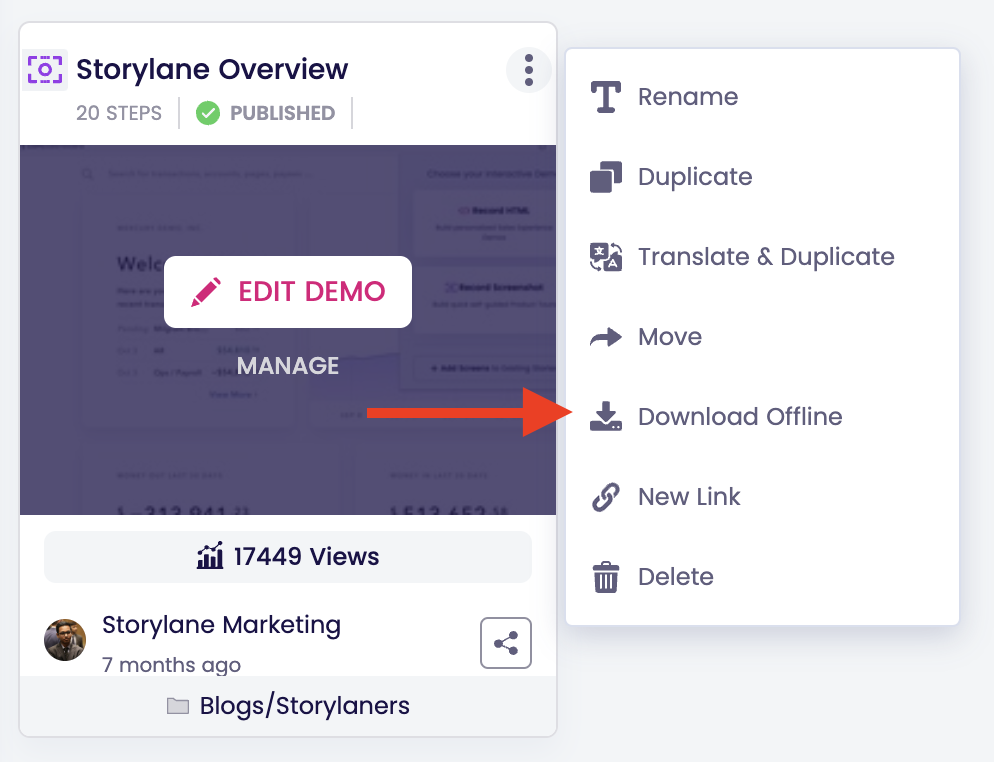
This is where Storylane’s offline demos help. Offline demos support interactive demos even without an active internet connection. This is an effective way to avoid tedious ops works, awkward product crashes, and exorbitant Wi-Fi charges — all in a single click.
How it works: Select “Download offline” to create a demo link. Once downloaded, you needn't worry about refreshing the page or losing progress during outages.
It’s also worth noting that Storylanedoesn't require any additional software to work offline. These demos are built to run directly on your browser via a shareable URL — anytime, anywhere.
3. Convert prospects on the spot with lead gen forms
Interactive demos can encourage attendees to convert on the spot during events and conferences. Prospects are usually happy to share their contact details in exchange for relevant product demos.
If your booth receives a lot of foot traffic, make sure to include a lead gen form in your demos. This is a good way to capture leads, even when your on-ground sales team is occupied with other prospects. Alternatively, offer to share a guided demo to high-intent prospects via email, LinkedIn, etc. to initiate personalized nurturing efforts.
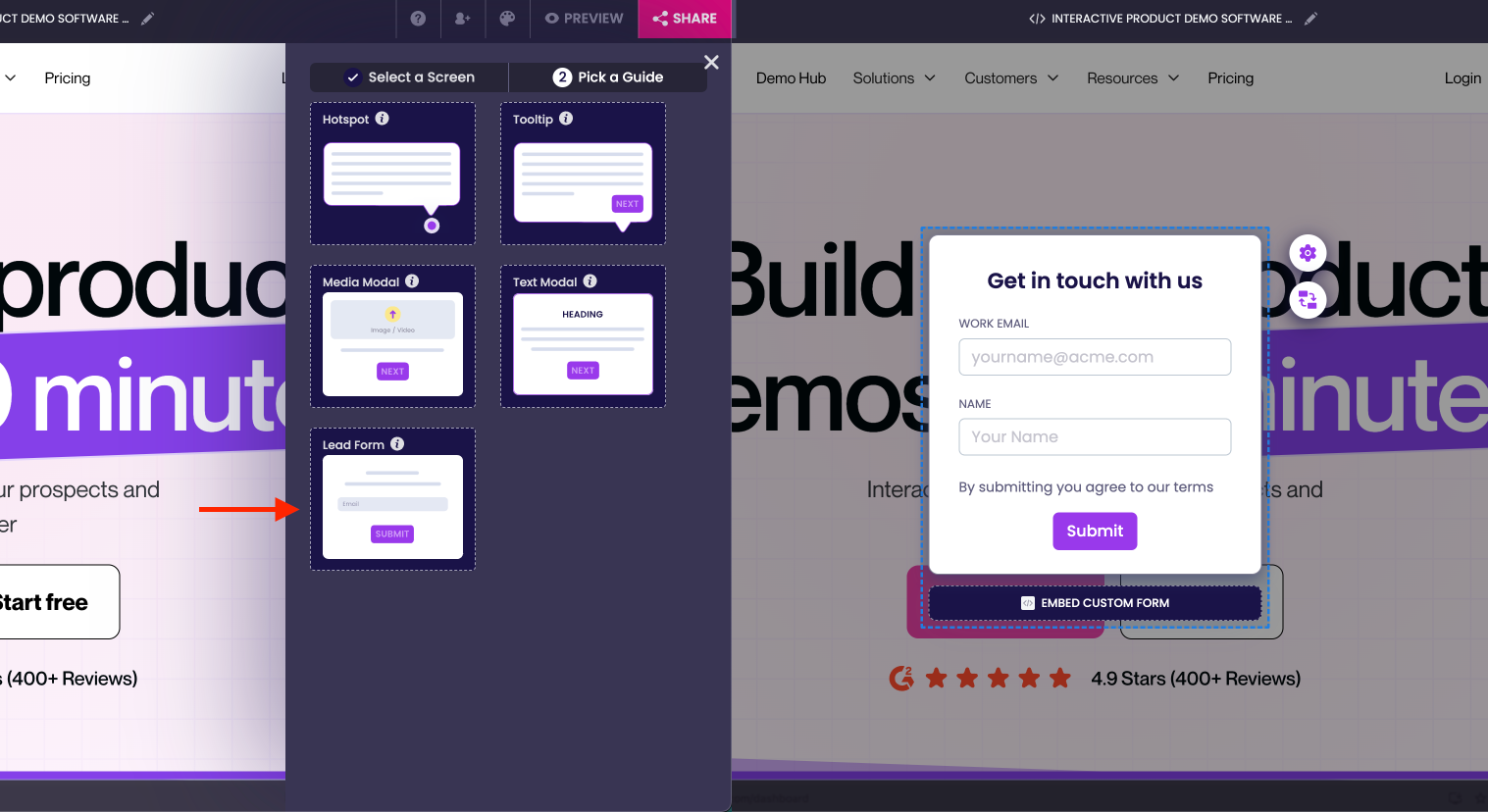
How it works: Head over to “Guide” on Storylane’s demo editor, add a step, select the screen of your choice, and pick “lead form” as your guide of choice. You can either use Storylane’s lead gen form or embed your own custom form.
4. Empower better buyer enablement with QR codes
Furnish your booth, swag, presentations, and other marketing efforts with QR codes linked to interactive demos. This is a low-lift, non-invasive approach for prospects to take your product back home with them.
For one, this helps prospects review your product in their own time, rather than rushing through a demo at a busy booth. For another, this helps prospects share your demo with the rest of their team async.
How it works: Once you publish your demo, simply copy and enter the link into a QR code generator of your choice. Distribute this QR code across your marketing efforts to improve visibility and engagement.
5. Address multiple buyer personas and use-cases with Demo Hub
A single demo is rarely enough to convert multiple buyer personas. Accordingly, we recommend creating demo hubs as a centralized repository to address a range of audiences and use-cases simultaneously. Here’s a little more on how SentinelOne, a leading cyber security company, goes about this:
SentineOne created a demo-enabled “GeniusBar” kiosk at this year's RSA conference. This involved several iPads, displays, and on-ground sales reps showcasing Storylane demos to prospects while on the move. Since Storylane is device agnostic, prospects had a clean, true-to-life product experience.
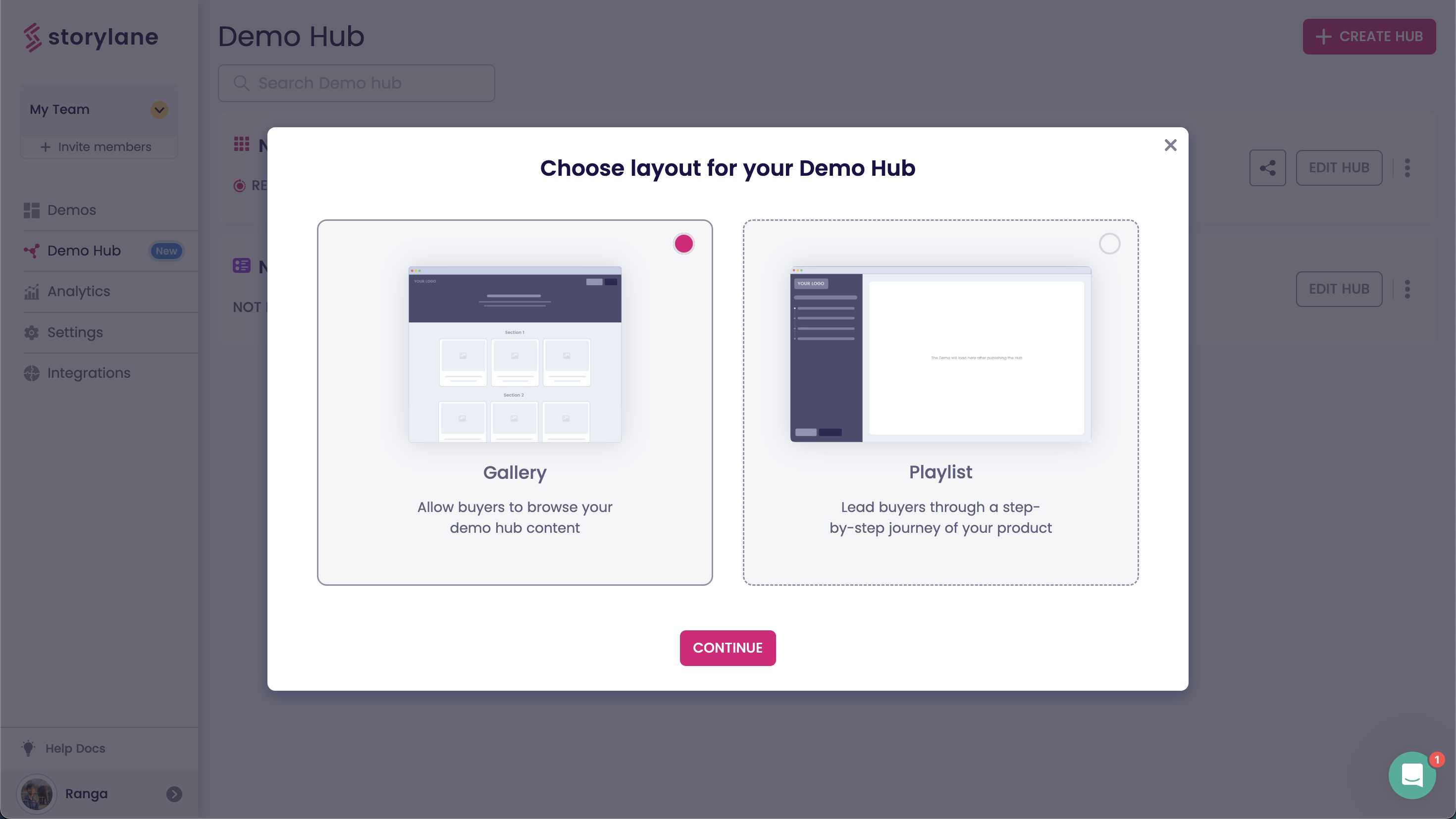
How it works:Head over to "Demo Hub" in Storylane, and select "+ Create Hub" to get started. We typically recommend the Gallery layout for quick and snappy in-booth use-cases.
6. Bonus tips to make the most of your conference demos
Before signing off, here are a few short bonus tips to keep in mind when creating interactive demos for your next booths and conferences
Build a narrative: Like the interactive demos that go on your website, your conference demos should tell a relevant story about the pain-points and use-cases that your product solves for. Tailor this narrative based on the nature of the conference and its attendees.
Keep it short: Conferences are busy, jam packed affairs. Attendees are usually short on time, and even shorter on attention spans. Keep your demos concise and highlight only the most valuable, differentiated aspects of your product.
Clean up the data: Needless to say, it’s important that your interactive demos reflect your product in the best possible light. Use the HTML editor to blur sensitive information and update the data and copy.
Enable speakers: Using the real product during panel discussions or breakout sessions can be precarious, especially when you're presenting to a large, highly qualified audience. Storylane enables speakers with pre-curated demo flows, in-built presenter notes, and safe demo environments.

.svg)