SaaS Implementation in 2026 (Best Practices + Checklist)

Janhavi Nagarhalli
June 29, 2026
Table Of Contents

Every business today uses software products to simplify mundane, admin-heavy tasks. Companies with less than 50 employees use an average of 16 SaaS applications, whereas organizations with over 1,000 employees use 177 SaaS applications!

But what stings is investing in a SaaS product only to realize the team never uses it! When the product isn’t implemented well across the organization, your teams will never realize its value, and it’ll keep adding to your SaaS spend.

If you want team members to adopt your tool into their tech stack, you must master the art of successful SaaS implementation.

Scroll ahead to learn about the SaaS implementation best practices you must follow to drive product adoption. 

What does SaaS Implementation Mean?

SaaS implementation is the process of fully integrating a new software application into an existing workflow in a phased-out manner until it is used to its fullest potential. Implementation of SaaS products varies on several different aspects. However, at its core, SaaS implementation includes:

What does SaaS implementation

A successful implementation means businesses have streamlined workflows, cut costs, and boosted productivity. For instance, if you are adopting a new sales CRM platform, you must ensure that the sales team has complete clarity on how to use it. 

SaaS implementation can be as simple as providing the client with onboarding materials and an interactive product demo or as complex as a month-long implementation period to integrate your software into their current IT infrastructure. 

Types of SaaS Implementation Process

Software implementations differ mainly based on two aspects:

  • Your product complexity
  • Your client’s company size

Let’s take Hubspot as an example.  If an organization of less than 50 employees uses Hubspot, the integration is simple enough to implement without assistance. However, if a large corporation with 10,000+ employees uses the product, Hubspot must provide serious implementation planning to manage multiple integrations, security, onboarding, etc.

Let’s dive into the 3 types of SaaS implementations:

3 types of SaaS implementation

1. Self-guided SaaS Implementation

When the product is easy to use and doesn’t have many complex features, you can either automate or manage the implementation process on your own. 

This holds true for tools that don’t need deep customization or multiple integrations. Implementation is no-touch or low-touch on your end as long as you provide:

  • Clear in-product setup/onboarding sequence
  • Instructional onboarding emails
  • Thorough help documentation
  • Access to your support team
  • Personalized demos 

Find out how Whispli used personalized demos to give prospects a complete picture of their product in just 15 minutes. 

2. Enterprise SaaS Implementation

If you’re part of an enterprise, you’d require a more hands-on approach when implementing SaaS products into your tech stack.  In these cases, software implementation will include:

  • IT implementation
  • Security compliance
  • Admin/leader training
  • Integration with other tools
  • Creating employee accounts
  • Provisioning and single sign-on (SSO) setup
  • Employee communication and training

The best example is Salesforce, a company offering a suite of products and integrations for sales, marketing, and customer support. At first, these products would seem complicated, so a company must hire Salesforce consultants to train employees and install the product according to the proper security metrics and privacy standards. 

In such cases, you must ensure your SaaS implementation is thorough and to the point where your team members should ultimately feel comfortable using the product. 

3. Hybrid SaaS implementation

Most software implementations fall under this category. If you have a simple product that hundreds of employees will use, you can provide self-guided product demos, help videos, or a live training session.

Checklist to Implement Your SaaS Product

Implementing Software as a Service (SaaS) can be complex, but having a well-structured checklist can help ensure a successful deployment. 

Here are the critical points for a SaaS implementation checklist:

Checklist to Implement Your SaaS Product

Let’s have a look at each of these steps in detail:

Set SMART Goals for SaaS Implementation

While this is the most obvious advice given, it is also the most overlooked. Clearly define your goals and expectations for the SaaS implementation. Identify the specific problems or needs the SaaS solution should address.  Using the SMART Goals method is the best way to ensure successful SaaS implementation. 

An infographic explaining the full form of SMART Goals

Here are a few examples:

Specific: Define precisely what you want to achieve with the SaaS implementation.

Example: "Implement a customer relationship management (CRM) SaaS solution to improve lead conversion rates and customer retention."

Measurable: Establish concrete metrics to track your progress and success.

Example: "Increase lead conversion rates by 20% and improve customer retention by reducing churn by 15% within the first 12 months of SaaS implementation."

Achievable: Ensure that your goals are realistic and attainable, given your resources and constraints.

Example: "Allocate a budget of $50,000 for SaaS subscription and training, and designate a cross-functional team to manage the implementation."

Relevant: Make sure your goals align with your organization's broader objectives and are relevant to the SaaS solution being implemented.

Example: "Enhance customer relationships through the CRM system to align with our company's strategic focus on improving customer satisfaction."

Time-bound: Set a specific timeframe for achieving your goals.

Example: "Achieve the specified lead conversion and churn reduction targets within the first 12 months of implementing the CRM SaaS solution."

Additional Goal for Training: To ensure effective adoption of the SaaS solution, you can also set a goal related to training and user proficiency.

Example: "Provide training to all relevant employees within the first 2 months of SaaS implementation, ensuring that 90% of users can proficiently use the CRM system."

Data Security Goal: Given the sensitivity of customer data, set a goal related to data security.

Example: "Implement robust data security measures to ensure compliance with industry standards and regulations, such as GDPR, within the first 6 months of SaaS implementation."

Cost Control Goal: To manage expenses, consider a cost-control goal.

Example: "Optimize the SaaS solution's usage and cost by conducting a quarterly review, identifying opportunities to reduce expenses while maintaining performance."

Assign an Implementation Manager

There are multiple stakeholders involved in purchasing a SaaS solution, be it a team lead or a procurement team. Regardless of who owns the purchase, it’s essential that the same person or team always manages the implementation of these new software tools. 

The implementation manager is typically part of the IT team. They then collaborate with other teams on the software rollout, such as with a sales team leader responsible for training their staff.

Focus on Core Features First

Most SaaS solutions want to offer an “all-in-one” solution from the get-go and add multiple features to the platform. A wide range of features might seem appealing initially, but it's often the cause of complex implementations. The more features you want to adopt, the harder it becomes to implement everything properly.

Let's say you're implementing a new sales CRM. You wouldn’t directly jump to personalization because you need first to train sales reps to use simple pipeline functionality, send emails, and make calls from within the platform. Once they've got this down, move on to more complex tasks like personalized outreach and designing automated lead nurture sequences. Leave the "nice-to-haves" for later to avoid getting lost in the implementation process.

Integrate with Existing Tech Stack 

Using different SaaS products and constantly switching between each of them can get time-consuming. You need to make sure your tech stack integrates seamlessly, allowing you to smoothen business operations. For example, If you are using Slack and want to invest in a project management solution, make sure the products you use integrate with Slack so that your team is aware of the projects in their pipeline. 

Design a Rollout Plan

Use the goals and milestones you've set to design a roadmap for rolling out the new software tool and training relevant team members. For example, implementing a new CRM platform for marketing, sales, support, and success teams is a large-scale rollout. A good strategy can be to stagger implementation across the teams. 

This plan should also include details on how to approach training. For instance, will the training be the domain of the department head or the IT leader responsible for SaaS implementation? Will this training be conducted in a group or individually, in person or online? Answer these questions in your rollout blueprint so all stakeholders and team members know how to educate users. 

User Training

Develop a training plan for employees to ensure they can effectively use the SaaS solution.

“The path to successful SaaS implementation isn’t all smooth. The resistance to change among team members poses a significant challenge. The best way to overcome this is to implement comprehensive training programs and conduct regular sessions to educate the team on the benefits of the new system.” Fawaz Naser – CEO, Softlist.io

Create a knowledge base on your website where users can easily find their answers without contacting your support team. 

Screenshot of Storylane’s help docs

While reading through loads of documentation can get tedious, another great way to train first-time users is to embed demos on different platforms where they can easily get all the answers without the endless scrolling. 

User Feedback

“What gets measured, gets managed,” and user feedback is the best way to track SaaS implementation. Encourage feedback from team members to improve user adoption. Address issues and incorporate suggestions where required. Create feedback mechanisms such as sending out surveys or having feedback sessions to capture input on the SaaS solution's performance and effectiveness. 

Here are a few questions you can ask:

  • How would you rate your overall experience with the new SaaS platform on a scale of 1 to 10?
  • Are there any features or functionalities of the platform that you find particularly valuable or useful for your day-to-day tasks?
  • Has the SaaS platform positively impacted your team's productivity or efficiency? If so, can you provide examples?
  • How well does the platform integrate with other tools and software you use in your daily workflow?
  • Are there any security concerns or data privacy issues you've encountered while using the platform? If so, please elaborate.
  • How do you feel about the training and onboarding process for the platform? Were the resources provided sufficient for you to get started?

Measure Your Success

Finally, taking a breather and measuring your project's success is a must. You can review your project scope and check it against your results. Analyze the satisfaction level of your stakeholders (internal or external), user experience, and the time saved by implementing the new solution.

Google uses an interesting HEART framework where they can understand how users engage with their apps. You can follow a similar approach to understand the impact of your software implementation plan. 

A table explaining Google’s HEART framework to increase product adoption
Source: Appcues

Saas Implementation Best Practices to Follow

Software implementation can get arduous, but you can simplify the entire process with a few tips in mind. Here are some best practices to keep in mind for a successful SaaS implementation plan:

Foster Open Communication

“Communication is key,” a phrase especially applicable in the business world. You and your team members must be on the same page throughout the SaaS implementation process. 

Open communication keeps everyone informed on progress and ensures all concerns are addressed without major setbacks.

You can have regular calls to understand how users find the platform while keeping them in the loop about any new upgrades.

Manage Data Security and Accessibility

Data security is a major concern for businesses because data on the cloud is prone to cyber-attacks. Ensure that the solution offers robust security measures, like encrypted storage and two-factor authentication. Moreover, incorporating evolved pentesting methodologies to review data accessibility and controls can go a long way.

Tracking SaaS usage helps check who is using the software and for what purpose. You can ensure that data is used only for business purposes and not accessed by unauthorized users.

Ensure a Smooth Transition

Using a SaaS tool for the first time with zero instructions is like driving blind with the breaks cut off. You need to make sure your team members can have a smooth transition into using the platform. Implementation managers can make informed decisions that align with organizational goals, resources, and overall implementation objectives.

Here are a few ways you can help team members transition from the existing platform to the new one:

  • Direct implementation: A complete switch to the new SaaS product immediately after removing the pre-existing solution
  • Parallel implementation: Using both old and new software simultaneously until the transition is complete. 
  • Phased implementation: Migrating users or systems sequentially, with each stage building upon the previous one. 
  • Incremental implementation: Migration is done in phases, usually by functionality.

Monitor Implementation Regularly 

Implementing your SaaS solution is never a one-and-done ordeal. You want to make sure that the implementation project goes the way it was promised, which is to improve and streamline operations. You could set up monitoring tools and metrics to track your new app’s performance.

But don’t expect positive outcomes immediately after the initial rollout plan. You can track key performance indicators, such as customer satisfaction or operational costs. This allows you to measure your SaaS adoption’s success and identify improvement areas.

Wrapping Up (+FAQs)

Rolling out new software in a business is never easy. Delivering a successful SaaS implementation relies on many aspects, from collaboration to training to regular monitoring. With product adoption being a core factor in successful software implementation, you must put your users at the center and ensure they can use your product with no hassles.

Want to know how Storylane can help improve product-led growth with interactive demos? Book a call with us today to find out how we’ve helped 700+ customers show their products in an engaging way. 

Q1. What is SaaS Implementation?

SaaS implementation involves the integration of software into an organization's existing IT infrastructure. It involves tasks like planning, selecting the right SaaS provider, configuring the software, integrating it with other systems, testing, training, and deploying it for use. For example, incorporating a VPN can help ensure secure connections and data transfers across all your SaaS applications.

Q2. What are the steps of a SaaS implementation?

The steps of a SaaS implementation are as follows:

  • Planning: Define objectives and requirements.
  • Configuration: Set up the software to meet needs.
  • Integration: Integrate with existing systems.
  • Testing: Ensure functionality and security.
  • Training: Train users on the new software.
  • Deployment: Roll out the SaaS to users.
  • Monitoring: Continuously monitor performance and security.

Q3. What are the three methods of implementation?

The 3 methods of SaaS implementation are:

  • Self-guided SaaS Implementation
  • Enterprise SaaS Implementation
  • Hybrid SaaS Implementation

Killer demos for every stage

Build demos and agents that turn curious buyers to closed won
Book a demo

Related Articles

Read All Articles
Research
July 3, 2026
6 min read

68,000 deals, 3 findings: Measuring the ROI of interactive demos

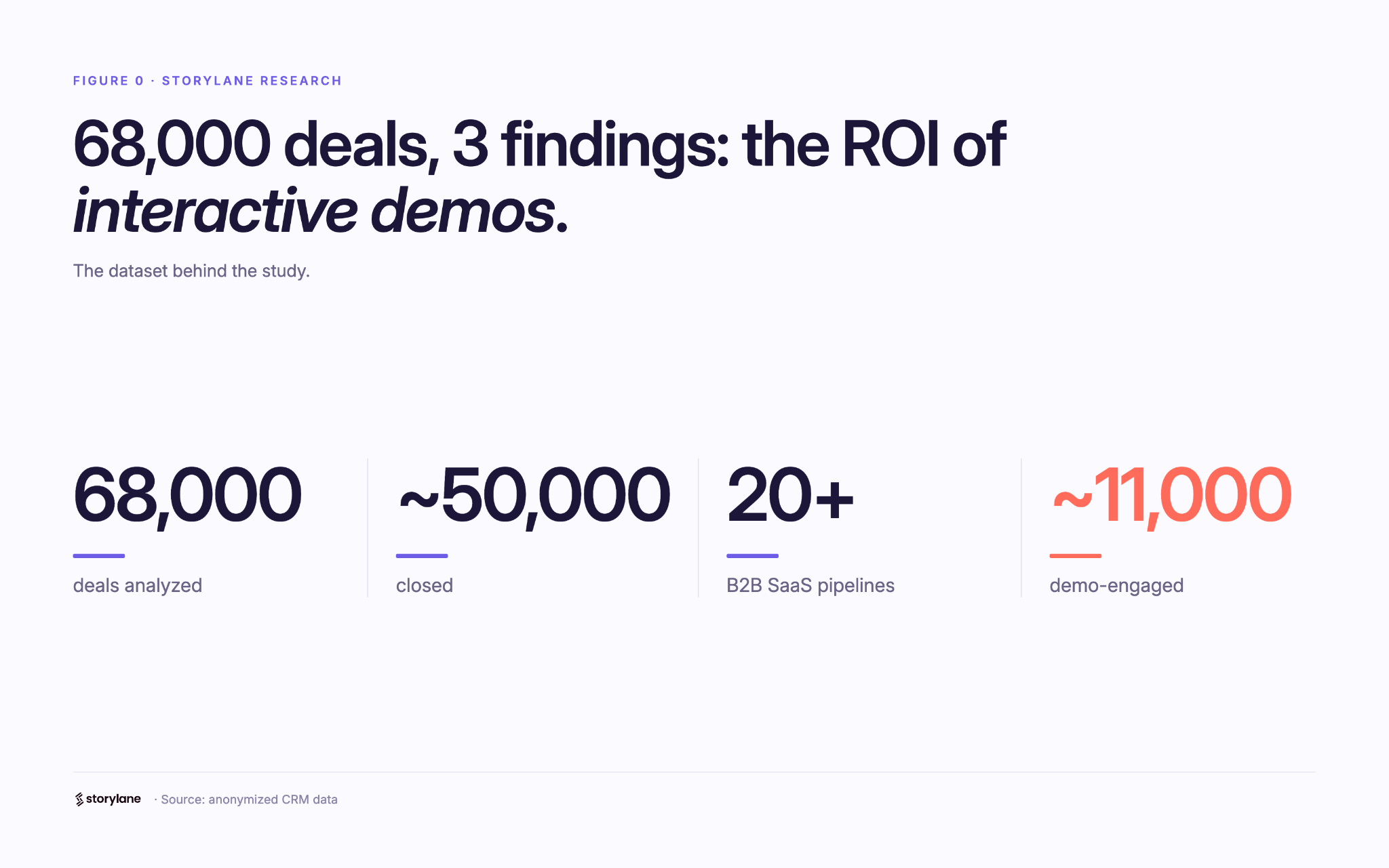
This report analyzes ~68,000 deals (~50,000 of them closed) across 20+ anonymized B2B SaaS pipelines to measure what interactive demos actually do for pipeline metrics..
Ranga Kaliyur

This report analyzes ~68,000 deals (~50,000 of them closed) across 20+ anonymized B2B SaaS pipelines to measure what interactive demos actually do to pipeline metrics. Most demo benchmarks stop at engagement rates and time on page. I wanted the part that matters: do deals where buyers use a demo do better than deals where they don't?

My approach is simple. Using aggregated, anonymized Deal Intelligence data, I connected demo activity to real CRM outcomes, then compared deals with Storylane demos against deals without, inside each pipeline.

In summary

When buyers use an interactive demo, deals tend to...

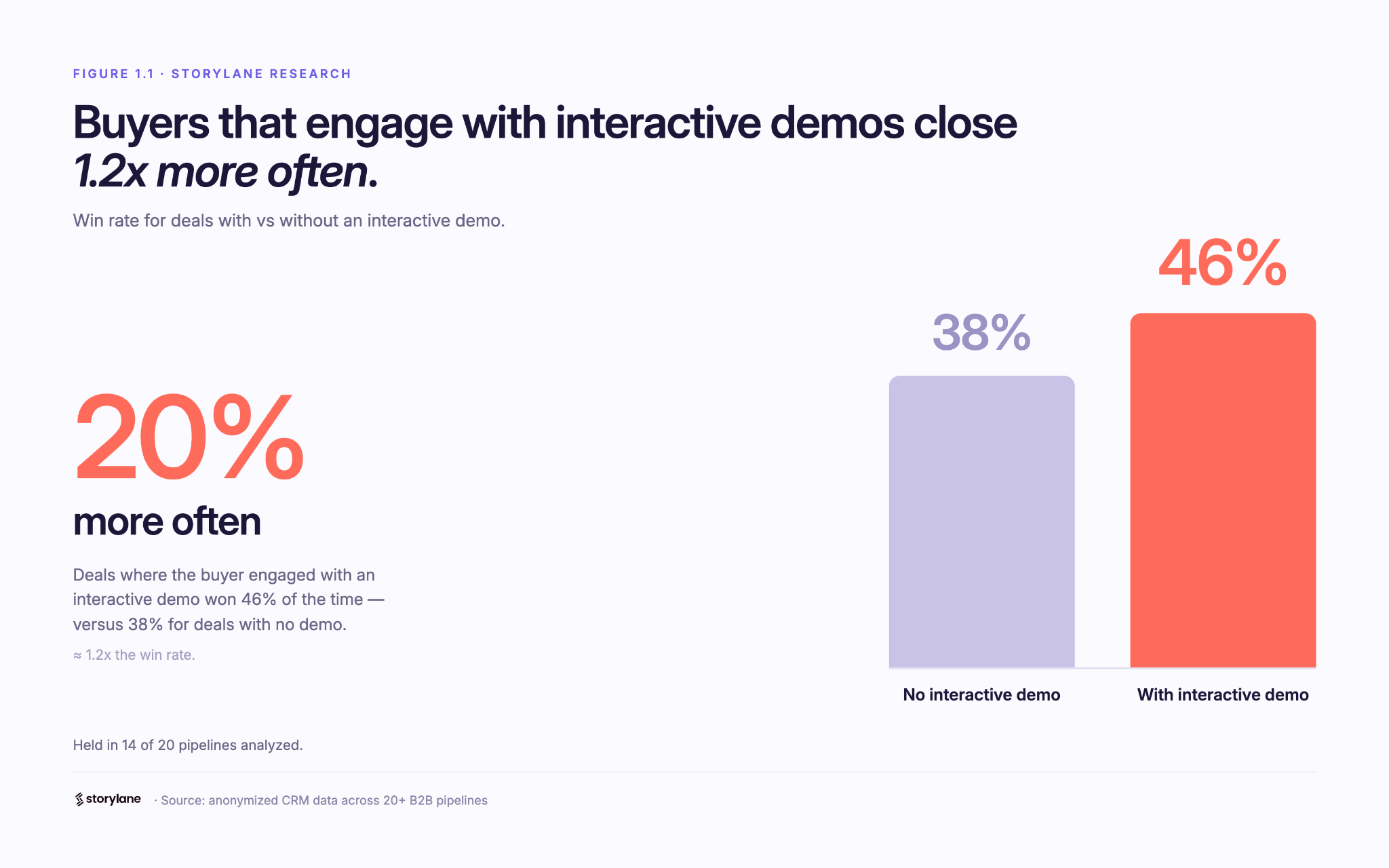
  • Win 20% more often (38% vs 46% win rate), and it climbs the more they engage.
  • Reach 60% more of the buying committee (more stakeholders on the deal).
  • Land 2.75x bigger specifically in enterprise motions (flat in SMB and mid-market).

Methodology

  1. Using Storylane's Deal Intelligence, I connected demo engagement to CRM deal records (HubSpot and Salesforce) across 20+ anonymized pipelines: ~68,000 deals, nearly 50,000 closed.
  2. For each deal, I compared two groups: buyers who engaged with a demo (at least one demo session tied to the deal) and buyers who didn't. I measured win rate, deal size, and number of stakeholders.
  3. I report the median within each pipeline, then across pipelines, so a handful of large accounts don't skew the average (Simpson’s Paradox). The findings come from the 20 pipelines where the demo-to-deal link was clean enough to compare.

One caveat worth stating up front: this is a pattern, not proof of causation. Reps demo the deals worth demoing, so demo use partly reflects deal quality. Read these as strong, repeatable signals.

1. Conversion Lift: Buyers that engage with interactive demos close 20% more often

This is the big one: deals where the buyer engaged with an interactive demo won 46% of the time, versus 38% for deals with no demo  (about 20% more often), and it held in 14 of 20 pipelines analyzed.

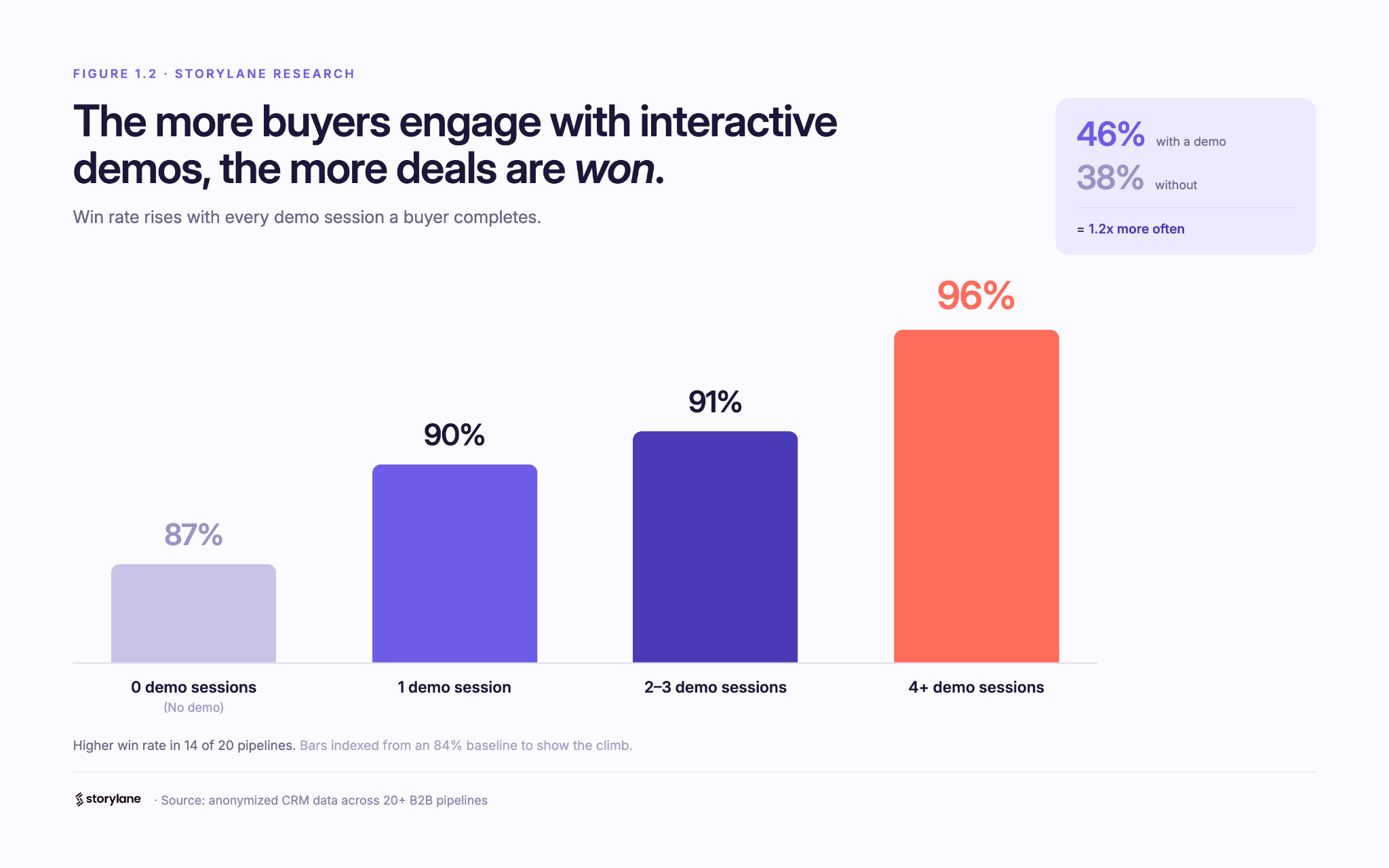
The most interesting part is that the impact compounds with every session. The more a buyer returned to the demo, the higher the win rate. In our own pipeline the climb was steady: 87% (no demo) → 90% (1 session) → 91% (2–3) → 96% (4+ sessions). 

Across the dataset, deals with 4+ sessions won more often than zero-session deals in 71% of pipelines analyzed. A single view nudges the odds; repeat engagement moves them.

The logic is intuitive: a buyer who keeps coming back to a demo is a buyer building conviction. A static page can tell someone your product is good; a demo lets them prove it to themselves, and repeat visits usually mean they're selling it internally too.

🥡 Takeaway: Treat repeat demo use as a buying signal. When an account keeps coming back, get Sales in early.

2. Stakeholder Reach: Demos bring 60% more people into the deal

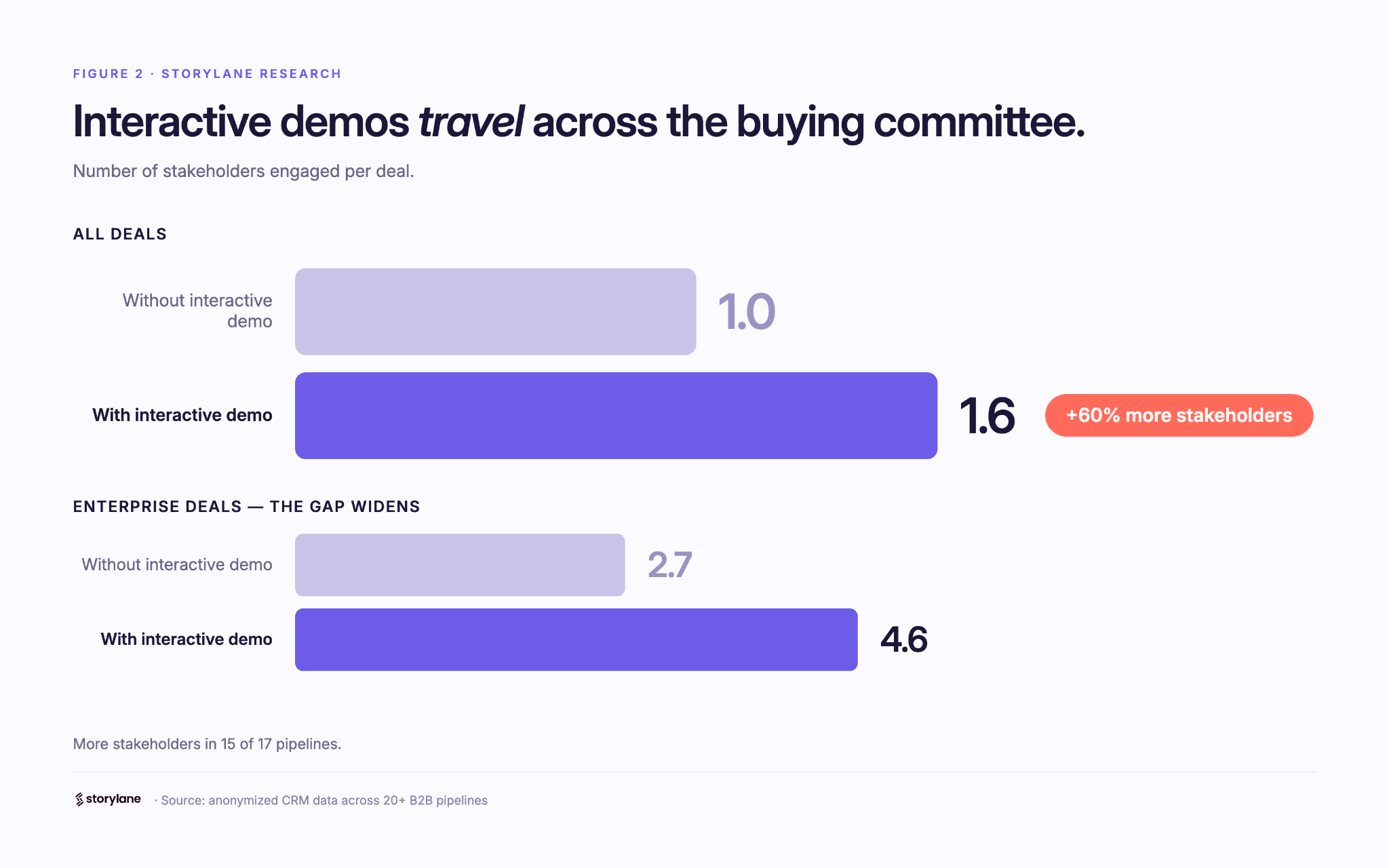
Deals with an interactive demo carried about 60% more stakeholders: a median of 1.6 contacts per deal vs 1.0 without, and more stakeholders in 15 of 17 pipelines. The gap was widest in enterprise pipelines, where one averaged 4.6 stakeholders per interactive demo-influenced deal vs 2.7 without, and another 5.2 vs 3.8.

Here's why it matters: B2B software isn't bought by one person anymore, it's bought by a committee. A demo is the rare sales asset that's easy to forward and relevant across functions, so it travels. One champion shares it, and suddenly the economic buyer, a security reviewer, and two end users have all seen the product for themselves. Deals that reach more of the committee are the deals that close.

🥡 Takeaway: Multi-thread on purpose. Send shareable, role-specific demos so the whole committee sees the product firsthand, not just your champion's secondhand pitch.

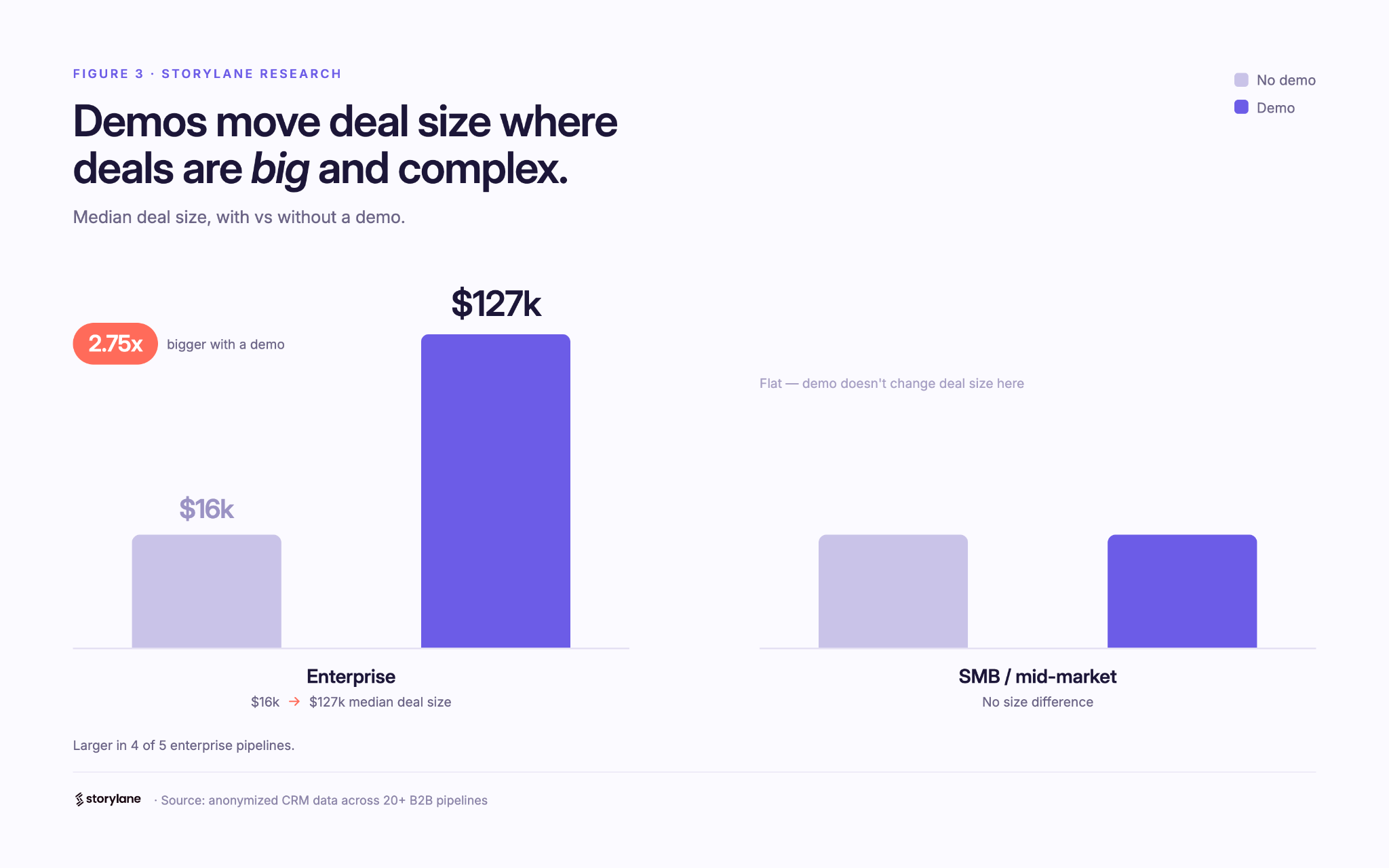
3. ACV Lift: In enterprise, deals with a demo are 2.75x bigger

Demos don't inflate every deal, and that's the honest part. The deal-size effect depends entirely on who you sell to.

  • Enterprise motions (large, complex, multi-team deals like GRC/compliance and enterprise healthcare): deals with a demo were 2.75x bigger at the median, and larger in 4 of 5 such pipelines. In one, median deal size went from roughly $16k without a demo to $127k with one; in another, from about $170k to $468k.
  • SMB and mid-market: no size difference. Demos there still won more deals and reached more people, they just didn't make deals bigger.

This tracks with how big deals actually get done. The larger and more complex the purchase, the more people and the more scrutiny involved, and the more room a demo has to do the explaining across stakeholders, functions, and weeks of evaluation. In a quick self-serve motion there's simply less for it to move.

🥡 Takeaway: if you sell enterprise, use demos as a late-stage lever, not just a top-of-funnel asset. That's where they move deal size.

How to read this report

The honest question is cause versus correlation. Demos land on the deals worth demoing, so some of this reflects deal quality alongside demo impact. To me that's what makes it worth taking seriously: across dozens of independent pipelines, the same three patterns keep showing up next to the deals that win, spread, and grow.

A few caveats. This is a first look at a subset of pipelines, deal values span multiple currencies, and a handful of accounts run against each trend. I've held an industry-by-industry breakdown for the next version, once there's enough data per vertical to say something solid.

What's next

A larger, cleaner dataset and a proper apples-to-apples comparison of similar deals with and without a demo, to turn these patterns into measurable lift, with industry and company-size cuts.

Guides
June 29, 2026
6 min read

Five ways B2B teams are using interactive demos that nobody talks about

What a conference booth in London, an EHR rollout for a differently-abled community, and a fintech triage system have in common — and what it tells us about where demo automation is actually going.
Ranga Kaliyur

What a conference booth in London, an EHR rollout for a differently-abled community, and a fintech triage system have in common — and what it tells us about where demo automation is actually going.

The standard demo automation playbook is predictable: marketing website tour, sales leave-behind, email nurture embed. That is what most companies start with.

But spend time in actual customer conversations and you see something different: teams using demos to solve problems the standard playbook never imagined.

This week, we reviewed a working session with an engineer at a large cloud computing company preparing for a technology summit in London. Her problem: she needed a product demo to play on a loop at her conference booth (no clicks, no one to navigate it, just a screen running in the background while conversations happened around it.)

Nobody markets demo automation as a conference booth tool. But that's exactly what she needed it for. And it wasn't the only unexpected use case this week.

1. Trade show and conference booth displays

The conference loop use case has specific requirements: autoplay enabled, 4-6 second transitions on title cards and pause slides, video clips set to 1.5-2x playback speed for longer recordings, and the entire thing downloaded onto the device. Conference WiFi is unreliable. You need the offline version ready before you walk in the door.

The structural formula that worked: technology stack slide (static) -> 4-second pause slide (blank) -> demo 1 with title card framing the problem ("Can I detect performance issues before they cause outages?") -> demo 2 -> repeat on loop. The problem-framing title cards are what make this work at a booth — a passerby reads a question they recognize and stops.

2. Staff onboarding for organizations with diverse accessibility requirements

A director of organizational performance at a nonprofit came to us mid-EHR transition. Her organization (200-plus staff, statewide) was moving to a new electronic health records platform and needed tutorials for everyone from clinicians to program administrators. Complicating factor: their staff includes a deaf and hard-of-hearing community.

Her requirements were specific: self-paced clicking rather than auto-advancing video, AI voiceover as an optional layer, and demos organized by function and embedded in SharePoint so staff could browse by department and role.

The training-center use case of interactive demos replacing annotated PDFs  is not new. The accessibility angle is. When a demo is self-paced, the viewer controls the speed versus video. That's a meaningful accommodation for populations that need more time, and it requires zero additional effort from the team building the content.

3. Multi-system integration demos

"We get asked all the time: what do these integrations actually look like?" said a co-founder at an early-stage health tech company. They had been answering that question in live demos, switching between systems in real-time and hoping nothing broke.

What they discovered: you can capture from multiple platforms in a single demo session. Finish recording in system one, click "add to existing demo," then capture from system two. The viewer moves between platforms seamlessly — without any live switching, without any risk of a broken environment. 

Live integration demos are high-risk, tedious (from a data management pov) and unrepeatable. Captured integration demos are neither. For a company whose primary sales objection is "show me exactly how the integration works," this is not a minor workflow change; it's a competitive differentiator.

4.Inside sales automation for long-tail accounts

An inside sales leader at a fintech company described a problem his team lives with daily: they manage accounts "where we're seeing very less revenue and more effort going from an account manager's point of view." His team's solution was a self-serve portal paired with interactive demos that replace human demos entirely for lower-priority accounts. Reps focus on the accounts with revenue potential; the demo handles the education and qualification for everyone else.

He had used this approach at a previous company and was replicating it here. The key insight: he was not evaluating demo automation as a way to improve existing demos; He was using it as a triage mechanism for a coverage problem. Interactive demos let you maintain a presence in accounts that don't justify a rep's time. That's a fundamentally different value proposition than "make your demos better," and it's one that VP of Sales audiences will understand immediately.

5. Localized demos for non-English-speaking markets

An inside sales team at a fintech company with a large India-based sales operation had one specific question: how many languages does the AI voiceover support? The answer, over 30, prompted an immediate workflow: build the demo once in English, then translate and duplicate into regional languages.

In markets where English-language demos create friction in the sales process, this is not a nice-to-have. It is a conversion rate issue. Prospects engage more deeply with content in their first language. The ability to generate a localized demo without re-recording or hiring a voice actor changes the economics of localization for inside sales teams that are already stretched thin.

Research
June 29, 2026
6 min read

Interactive demos vs. product videos: why revenue teams are switching over

Should you use interactive demos or product videos for sales? Compare creation time, maintenance, personalization, and analytics to decide.
Ranga Kaliyur

When sharing async product demos, sales teams have traditionally reached for a couple of options: quick and dirty screen recordings (think Loom, Vidyard, etc.) and high-end video productions (think Camtasia, Consensus, etc.). While there’s a time and place for both; AEs, SEs, and PMMs are increasingly adopting a third format — interactive demos — as a “better than both worlds” alternative. Here's why:

Interactive Demos vs Video: Feature Comparison
Compare Interactive demos
(Storylane)
Screen recordings
(Loom, Vidyard)
Video productions
(Camtasia, Consensus)
Time to create ✅ Fast, capture and creation often completed in minutes ✅ Fast but requires narration, timing, retakes, etc. ❌ Slow, can take weeks to script, shoot, and edit
Editing ✅ Self-serve, easy: replace screens, tweak text, reorder steps; no re-recording ❌ Limited scope: re-recording, trimming, stitching clips, fixing audio ❌ Technical dependency: needs expertise in pro editing software
Polish and branding ✅ Professional, consistent themes built-in; no editing software needed ❌ Low production value. Harder to maintain consistency; requires design/video tools ✅ Cinematic quality but requires video editing expertise
Publishing ✅ One-click publish; instantly updates everywhere ❌ Requires re-uploading and re-sharing new versions ❌ Requires re-uploading and re-sharing new versions
Maintenance & Updates ✅ Replace screens and content in minutes, auto-update instantly ❌ Requires re-recording entire sections/full-video ❌ Requires re-producing entire sections/full-video
Personalization ✅ Personalize at scale with dynamic tokens ❌ Hard to scale: Requires re-recording ❌ Impossible to scale: Requires re-production
Analytics ✅ Granular: Track views, interests, completion, and time-spent per step ❌ Limited to views, no actionable analytics or Opinions ❌ Limited to views, no actionable analytics or Opinions
Buyer experience ✅ Interactive, two-way experience ❌ Passive, one-way experience ❌ Passive, one-way experience
Ideal for… Across the board Ad-hoc touches, quick Q&A Top-of-funnel brand awareness campaigns

Why revenue teams are adopting interactive demos

Since our inception, we've noticed revenue teams of all sizes, from early-stage startups to Fortune 500 enterprises, switch over from videos to interactive demos. Here are the most common reasons we hear from customers.

Reason #1 - Speed without sacrificing quality

Screen recordings are quick and easy to produce but lack the polish and quality needed for high-value deals. On the other hand, producing polished video demos means days of planning, hours of environment prep, multiple recording attempts, and extensive editing. Interactive demos eliminate this friction entirely, especially now with AI, to instantly generate product-specific content (Guides, voiceovers, etc) from captured screens — no need for multiple takes. 

"Video is really strong at capturing people's attention and welcoming them into your story. But the thing that video can't do is provide a “click-through experience” allowing users to actually get their hands on the product — to feel it, to see it, to understand what the actual day in and day out of working with your tool is going to be like. Especially with its AI and automation, Storylane allowed us to build demos in such a quick amount of time."
- Michael DeMarco, PMM, Phenom

Reason #2 - Asset maintenance and scalability

Traditional videos are like baked cakes — once ingredients (product screens, click path, narrative) are combined into a video, it’s difficult to swap individual components. When your product UI changes six months from now, you face full reproduction from scratch.

Interactive demos keep these elements separate. Update a screen in minutes without touching the narrative. Adjust messaging without re-recording. Reorder workflows without starting over. This durability enables demos to stay current as your product evolves.

Further, creating persona-specific, industry-tailored, or localized video content means producing multiple versions of each asset — a multiplication problem that quickly becomes unmanageable. Storylane's AI editor recontextualizes entire demos for different personas or industries in seconds. Dynamic tokens automatically swap prospect information without creating separate versions. One base demo adapts to dozens of scenarios without manual overhead.

Reason #3 - Modern buying preferences 

Interactive demos respect buyer time by letting them jump to relevant sections, skip familiar concepts, and control their pace. Video forces a fixed timeline — even if viewers only care about one feature, they must scrub through the entire recording to find it. This level of control and self-serve flexibility reflects the preference of modern buyers, who'd rather click around a product tour for themselves than rely on a passive, one-way video.

"Nobody wants to watch a 5-minute video anymore. So my team sends a Storylane demo and the prospect sees the demo in 5 clicks."
- Jon Dolan, Sales Director, Cognism

The difference in analytics is equally striking. Video platforms show watch time and opens. Interactive demos reveal which features prospects explored, where they spent time, which stakeholders engaged, and where they dropped off. These step-level Opinions enable targeted follow-up conversations that video simply can't support.

Make buying easy with Storylane