Everything You Need to Know About Target Account Selling (Strategies + Examples)

Janhavi Nagarhalli
June 29, 2026
Table Of Contents

Tired of running sales campaigns that barely attract qualified leads? We know that finding high-quality leads is like searching for a 4-leafed clover in a meadow of weeds. Creating a sales funnel where every lead is high value, every prospect is a perfect fit, and every deal turns into a lifetime customer is the ultimate goal for any sales team.

However, achieving this requires a shift in approach and an innovative sales strategy prioritizing quality over quantity instead of chasing countless leads. Enter: Target account selling.

Target account selling (TAS) is designed to help sales reps stay focused on high-potential buyers. You can increase your chances of success by focusing solely on selective high-value accounts, tailoring your approach to their specific needs, and delivering a personalized, consultative sales experience.

In this article, we'll break down the basics of the target account selling process and how it can help optimize sales plans by filling your pipeline with high-value leads. 

What is Target Account Selling?

Target account selling is a strategic B2B sales methodology that focuses on a select group of high-value accounts rather than casting a wide net. It involves identifying specific, high-potential accounts, creating personalized marketing and sales strategies for each, and nurturing these accounts through tailored sales outreach.

TAS helps you unlock the doors to enterprise-level opportunities by concentrating resources and efforts on these critical accounts, organizations aim to increase conversion rates, revenue, and customer retention. It is a strategic, focused, and data-driven approach that can be adapted and scaled to align with changing organizational goals.

What are the benefits of target account selling?

Target account selling offers a plethora of benefits in comparison to traditional sales tactics, some of which are as follows:

A checklist depicting the benefits of Target Account Selling
  • Higher Conversion Rates: Tailored solutions boost conversion rates.
  • Increased Revenue: Focus on high-value accounts for substantial revenue growth.
  • Improved Customer Retention: Personalization builds lasting relationships and upselling opportunities.
  • Resource Efficiency: Efficient resource allocation minimizes waste.
  • Enhanced Customer Experience: Personalization leads to positive word-of-mouth.
  • Sales-Marketing Alignment: Promotes better collaboration and consistent messaging.
  • Data-Driven Insights: Deeper data analysis aids strategy refinement.
  • Competitive Advantage: Personalized value propositions differentiate your brand.
  • Scalability: Adaptable to various segments and industries.
  • Faster Sales Cycles: Shortened sales cycles due to direct engagement with decision-makers.

How to Implement Target Account Selling in Your Sales Strategy? 

Target account selling outreach is not about quick wins but building sustainable, mutually beneficial relationships with key accounts. 

Here are a few steps you must follow when implementing TAS:

Step 1: Set goals for your sales teams

Target account selling requires focused effort and resources; hence, setting clear goals for salespeople from the get-go is essential for achieving success.

Some TAS goals can include:

  • Revenue Growth: Increase overall revenue by targeting high-value accounts such as enterprises with 1000+ employees
  • Profit Maximization: Improve profitability through focused efforts on these accounts that offer better margins and long-term value.
  • Account Selection: Analyze the current market and identify and prioritize accounts that align with your ICP.
  • Expansion and Upselling: Not only secure initial sales but also seek opportunities to expand and upsell within target accounts.
  • Accelerate Sales Cycle: Shorter sales cycles contribute to cost savings and ensure that sales efforts are spent on accounts ready to convert within the desired time frame, maximizing revenue and minimizing resource wastage.

Step 2: Create an Ideal Customer Profile (ICP)

Yes, we know we’re stating the obvious, but creating a robust Ideal Customer Profile (ICP) is crucial for target account selling. Identify key factors such as industry, company size, geographic location, pain points, decision-makers, budget, solution fit, and cultural alignment. Prioritize those that align with your business objectives and competitive strengths. Regularly review and refine your ICP to ensure it remains relevant.

A table showcasing different elements of a sales ICP

A streamlined ICP serves as a guiding document for sales and marketing teams to identify, prioritize, and engage high-value accounts, enabling customized sales strategies for more effective engagement, relationship-building, and revenue maximization. The ICP must evolve as your business goals and market dynamics change to ensure continued alignment with your ideal customers.

Step 3: Make your Target Account List

Creating a list of target accounts and conducting due diligence is critical in the sales process. The goal is to make meaningful relationships with prospects and advance your sales process while continuously refining your list of target accounts as you gain more insights and feedback from your outreach efforts. 

To get started, follow these key steps:

  • Use various resources like industry reports, business directories like Bombora or Apollo.ai, and social media platforms to identify companies that match your ICP.
  • Investigate whether these companies have expressed interest in products or services similar to yours in the past. ‍Identifying the buyer intent data can provide valuable insights into their potential needs and interests.
  • Identify the key decision-makers within these companies who have the authority to make purchasing decisions, which may include CEOs, CTOs, or procurement managers.
  • Analyze whether these companies have a budget likely to accommodate your product or service.
  • Once you have gathered this information, prioritize the companies that appear to be the best fit based on your research.
  • Start reaching out to these companies with personalized messaging and tailored solutions, addressing their specific needs and pain points.

Step 4: Personalize Your Selling

Once you've identified your target accounts that fit the ICP, the next step involves crafting tailored messages and value propositions that speak directly to their needs, challenges, and pain points. Building relationships with key decision-makers is paramount. Each contact should receive a unique, customized message showcasing your understanding of their company's situation and how your product or service can provide a solution.

To engage with your potential buyers, utilize multiple communication channels, such as email, phone, social media, and in-person meetings whenever possible. Being responsive, persistent, and attentive to their changing needs paves the way for long-term campaigns and constant engagement that leads to sustainable partnerships with your target accounts.

However, personalization isn’t simply about adding “Hi, First Name” in the email. Here’s an example of personalized outreach:

Subject Line: Are you missing your (insert KPI) targets?

Hi {prospect name},

Has {company name} ever {missed/failed to achieve specific results}? While you and {key decision makers} look for {ways to resolve the issue}, we have a {product/service} that can help.

[Insert image] 

A {feature name} with {how it helps deal with pain points} that ensures you never fail to meet your (insert KPI) targets.

What's the best way to show this to you, {prospect name}?

Best

(Your Name)

But if you want to go above and beyond for your prospects, you can provide personalized demo experiences to really highlight your product’s UVP.
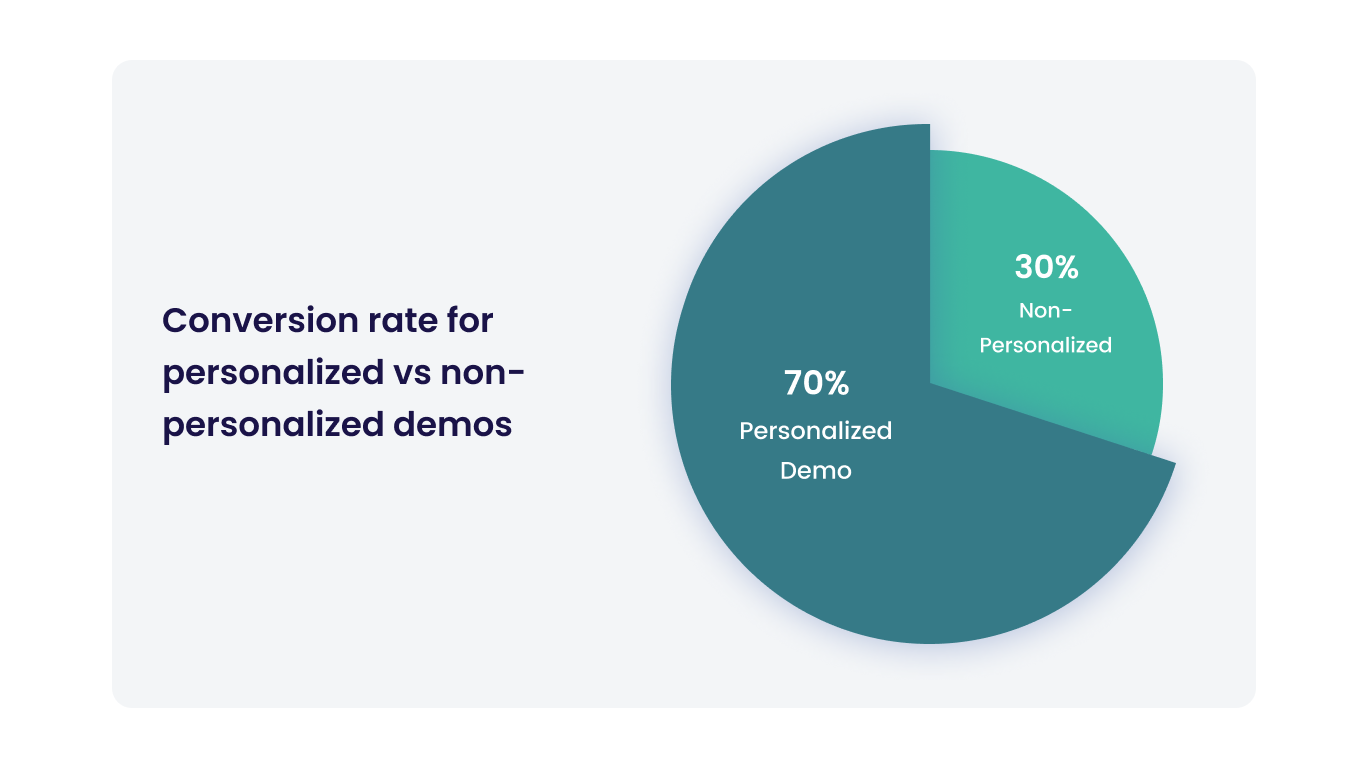
A pie chart explaining the conversion rate for personalized and non-personalized demos
Source: Storylane 

A personalized approach sets target account selling outreach apart from traditional sales models, focusing on quality over quantity and fostering lasting connections. Continuously analyze and adapt your approach to sales based on feedback and data to maximize your sales team's success

5 Target Account Selling Strategies You Can Follow

The goal of target account selling is to assign resources efficiently and increase the likelihood of closing complex deals with key accounts. Here are 5 Target Account Selling strategies:

1. Account Segmentation and Prioritization

Begin by categorizing your potential target accounts into different tiers based on criteria such as revenue potential, industry relevance, or strategic fit. Prioritize your efforts, with the highest priority given to Tier 1 accounts. Allocate your resources, time, and efforts according to these priorities. Your top-tier accounts should receive the most attention and resources.

For instance, if enterprises in the SEA region seem to show more interest in your product, prioritize them and nurture them through the sales cycle.

 Here are a few aspects in which you can segment your customers:

A flowchart explaining the different ways to segment customers

2. Account Research and Personalization

TAS encourages in-depth research on each target account. While this research takes time, it ensures that sales professionals understand the account's needs and challenges completely. This insight helps develop a deep understanding of the key decision-makers and influencers within the target account, making interactions more productive.

Gartner has released an “Account-based Everything” framework, making account research a breeze for B2B sales teams.

Gartner’s “Account-based Everything” framework

Personalizing your B2B sales approach for each target account can take more time upfront but often results in shorter sales cycles. By addressing the account's specific pain points and needs, you're more likely to gain their interest and trust, speeding up the sales process.

3. Multi-Channel Sales Engagement and Account-Based Marketing (ABM):

Engage with target accounts through various channels, such as email, social media, phone calls, direct mail, and in-person meetings. A multi-channel approach enhances your chances of reaching key decision-makers.

A flowchart explaining the different sales enablement channels

Implement ABM tactics to create highly personalized and targeted marketing campaigns for each account. This could involve creating custom content, webinars, or events designed explicitly for a particular target account. Collaborate closely with marketing and leverage their expertise in reaching and engaging key accounts effectively.

Read more: What is ABM Funnel and How to Create a Perfect ABM Funnel?

4. Collaborate and Automate

Automation and tools such as sales automation software and CRM systems are pivotal in enhancing efficiency for sales reps. They effectively streamline time-consuming administrative tasks like data entry and appointment scheduling, liberating valuable hours for sales professionals to focus on meaningful interactions with their target accounts.

Collaboration with marketing and cross-functional teams further compounds these gains. Sharing insights and resources with marketing can lead to more personalized and impactful campaigns. At the same time, coordination with other departments ensures a cohesive approach, ultimately saving time and effort and increasing the chances of success in targeting high-value accounts.

5. Use Personalized Interactive Demos

Interactive demos have a “show, don’t tell” approach that speeds up the buying process. With Storylane’s no-code platform, sales reps can create personalized interactive demos for different stakeholders in the buying process in as short as 10 minutes. These interactive demos can be used in various types of sales engagement activities which will eventually help shorten the sales cycle.

Here’s an example of an interactive demo that was made for users with a specific intent. Sevdesk created product-specific product demos and showcased them on pages that people who had a high buying intent visited. They were able to convert up to 25% of the visitors and generate 527 leads.

Also Read: Personalize Email Campaigns with Interactive Product Demos

4 Examples of Target Account Selling

Here are a few examples that illustrate how well-established companies use targeted and customized strategies to approach key accounts in different industries:

1. Amazon Web Services (AWS)

AWS assigns dedicated account managers and solutions architects to enterprise-level customers. These teams work closely with consumers to understand their needs and provide customized solutions. They also organize events and training programs tailored to individual customer accounts.

This approach has helped AWS establish long-term relationships with large enterprises, offering solutions that meet their unique demands and, in turn, drive significant revenue growth.

2. Salesforce

Salesforce uses its own CRM software to track and manage interactions with its target accounts. They have a dedicated account team for each major customer and provide tailored solutions, along with extensive training and support, to help customers maximize the value of their platform.

Salesforce's account-based selling approach has successfully retained large enterprise clients and expanded their usage of Salesforce products over time. This has contributed significantly to their consistent growth.

3. Adobe

Adobe uses a combination of personalized marketing campaigns, dedicated account managers, and customized product offerings to cater to the needs of its enterprise customers. They also leverage their data analytics capabilities to better understand customer behavior and preferences.

Adobe's account-based selling approach has resulted in strong relationships with enterprise customers, higher customer satisfaction, and increased cross-selling of their various software solutions.

4. Groundswell

Groundswell is a modern philanthropy-as-a-service platform for companies that aim to make philanthropy an employee benefit. They implemented target account selling by tailoring product demos to different personas. By using Storylane, they could spin up multiple demos in minutes, and the sales representatives could improve the sales experience for prospects while easily updating demos as per the new features released. 

Improve Target Account Selling with Storylane

Targeting the right prospect is crucial for boosting sales, and when you have done your research – closing the deal becomes easy as pie. Interactive product demos can take your selling up a notch, and that’s where Storylane can help!

With personalized demos in your arsenal, you can shorten your sales cycle and win more deals in no time. Schedule a demo with us today to find out how you can supercharge your funnel. 

Q1. What are some target account-selling best practices companies can follow?

Target Account Selling best practices include thorough account research, tailored value propositions, personalized sales engagement, cross-functional collaboration, continuous nurturing, and effective use of technology, such as CRM systems. Companies should prioritize relationships, stay agile, and measure success with metrics like customer satisfaction, revenue growth, and customer retention.

Q2. How can you use technology to implement target account selling?

You can use software throughout the TAS process in the following ways:

  • Customer Relationship Management (CRM) software for account data management.
  • Data analytics tools to identify target accounts and track their behavior.
  • Sales engagement tools for personalized cold outreach that you can scale.
  • Sales enablement software to provide sales teams with valuable insights.
  • Communication tools for consistent and efficient customer engagement.
  • Artificial intelligence for predictive analytics and account prioritization.
  • Interactive demo software for the sales, marketing, and CS teams.

Q3. How do we measure the success of target account selling?

You can measure the success of your Target Account Selling (TAS) efforts by tracking key metrics such as revenue growth from target accounts, and the successful completion of account-specific goals and milestones.

Killer demos for every stage

Build demos and agents that turn curious buyers to closed won
Book a demo

Related Articles

Read All Articles
Research
July 3, 2026
6 min read

68,000 deals, 3 findings: Measuring the ROI of interactive demos

This report analyzes ~68,000 deals (~50,000 of them closed) across 20+ anonymized B2B SaaS pipelines to measure what interactive demos actually do for pipeline metrics..
Ranga Kaliyur

This report analyzes ~68,000 deals (~50,000 of them closed) across 20+ anonymized B2B SaaS pipelines to measure what interactive demos actually do to pipeline metrics. Most demo benchmarks stop at engagement rates and time on page. I wanted the part that matters: do deals where buyers use a demo do better than deals where they don't?

My approach is simple. Using aggregated, anonymized Deal Intelligence data, I connected demo activity to real CRM outcomes, then compared deals with Storylane demos against deals without, inside each pipeline.

In summary

When buyers use an interactive demo, deals tend to...

  • Win 20% more often (38% vs 46% win rate), and it climbs the more they engage.
  • Reach 60% more of the buying committee (more stakeholders on the deal).
  • Land 2.75x bigger specifically in enterprise motions (flat in SMB and mid-market).

Methodology

  1. Using Storylane's Deal Intelligence, I connected demo engagement to CRM deal records (HubSpot and Salesforce) across 20+ anonymized pipelines: ~68,000 deals, nearly 50,000 closed.
  2. For each deal, I compared two groups: buyers who engaged with a demo (at least one demo session tied to the deal) and buyers who didn't. I measured win rate, deal size, and number of stakeholders.
  3. I report the median within each pipeline, then across pipelines, so a handful of large accounts don't skew the average (Simpson’s Paradox). The findings come from the 20 pipelines where the demo-to-deal link was clean enough to compare.

One caveat worth stating up front: this is a pattern, not proof of causation. Reps demo the deals worth demoing, so demo use partly reflects deal quality. Read these as strong, repeatable signals.

1. Conversion Lift: Buyers that engage with interactive demos close 20% more often

This is the big one: deals where the buyer engaged with an interactive demo won 46% of the time, versus 38% for deals with no demo  (about 20% more often), and it held in 14 of 20 pipelines analyzed.

The most interesting part is that the impact compounds with every session. The more a buyer returned to the demo, the higher the win rate. In our own pipeline the climb was steady: 87% (no demo) → 90% (1 session) → 91% (2–3) → 96% (4+ sessions). 

Across the dataset, deals with 4+ sessions won more often than zero-session deals in 71% of pipelines analyzed. A single view nudges the odds; repeat engagement moves them.

The logic is intuitive: a buyer who keeps coming back to a demo is a buyer building conviction. A static page can tell someone your product is good; a demo lets them prove it to themselves, and repeat visits usually mean they're selling it internally too.

🥡 Takeaway: Treat repeat demo use as a buying signal. When an account keeps coming back, get Sales in early.

2. Stakeholder Reach: Demos bring 60% more people into the deal

Deals with an interactive demo carried about 60% more stakeholders: a median of 1.6 contacts per deal vs 1.0 without, and more stakeholders in 15 of 17 pipelines. The gap was widest in enterprise pipelines, where one averaged 4.6 stakeholders per interactive demo-influenced deal vs 2.7 without, and another 5.2 vs 3.8.

Here's why it matters: B2B software isn't bought by one person anymore, it's bought by a committee. A demo is the rare sales asset that's easy to forward and relevant across functions, so it travels. One champion shares it, and suddenly the economic buyer, a security reviewer, and two end users have all seen the product for themselves. Deals that reach more of the committee are the deals that close.

🥡 Takeaway: Multi-thread on purpose. Send shareable, role-specific demos so the whole committee sees the product firsthand, not just your champion's secondhand pitch.

3. ACV Lift: In enterprise, deals with a demo are 2.75x bigger

Demos don't inflate every deal, and that's the honest part. The deal-size effect depends entirely on who you sell to.

  • Enterprise motions (large, complex, multi-team deals like GRC/compliance and enterprise healthcare): deals with a demo were 2.75x bigger at the median, and larger in 4 of 5 such pipelines. In one, median deal size went from roughly $16k without a demo to $127k with one; in another, from about $170k to $468k.
  • SMB and mid-market: no size difference. Demos there still won more deals and reached more people, they just didn't make deals bigger.

This tracks with how big deals actually get done. The larger and more complex the purchase, the more people and the more scrutiny involved, and the more room a demo has to do the explaining across stakeholders, functions, and weeks of evaluation. In a quick self-serve motion there's simply less for it to move.

🥡 Takeaway: if you sell enterprise, use demos as a late-stage lever, not just a top-of-funnel asset. That's where they move deal size.

How to read this report

The honest question is cause versus correlation. Demos land on the deals worth demoing, so some of this reflects deal quality alongside demo impact. To me that's what makes it worth taking seriously: across dozens of independent pipelines, the same three patterns keep showing up next to the deals that win, spread, and grow.

A few caveats. This is a first look at a subset of pipelines, deal values span multiple currencies, and a handful of accounts run against each trend. I've held an industry-by-industry breakdown for the next version, once there's enough data per vertical to say something solid.

What's next

A larger, cleaner dataset and a proper apples-to-apples comparison of similar deals with and without a demo, to turn these patterns into measurable lift, with industry and company-size cuts.

Guides
June 29, 2026
6 min read

Five ways B2B teams are using interactive demos that nobody talks about

What a conference booth in London, an EHR rollout for a differently-abled community, and a fintech triage system have in common — and what it tells us about where demo automation is actually going.
Ranga Kaliyur

What a conference booth in London, an EHR rollout for a differently-abled community, and a fintech triage system have in common — and what it tells us about where demo automation is actually going.

The standard demo automation playbook is predictable: marketing website tour, sales leave-behind, email nurture embed. That is what most companies start with.

But spend time in actual customer conversations and you see something different: teams using demos to solve problems the standard playbook never imagined.

This week, we reviewed a working session with an engineer at a large cloud computing company preparing for a technology summit in London. Her problem: she needed a product demo to play on a loop at her conference booth (no clicks, no one to navigate it, just a screen running in the background while conversations happened around it.)

Nobody markets demo automation as a conference booth tool. But that's exactly what she needed it for. And it wasn't the only unexpected use case this week.

1. Trade show and conference booth displays

The conference loop use case has specific requirements: autoplay enabled, 4-6 second transitions on title cards and pause slides, video clips set to 1.5-2x playback speed for longer recordings, and the entire thing downloaded onto the device. Conference WiFi is unreliable. You need the offline version ready before you walk in the door.

The structural formula that worked: technology stack slide (static) -> 4-second pause slide (blank) -> demo 1 with title card framing the problem ("Can I detect performance issues before they cause outages?") -> demo 2 -> repeat on loop. The problem-framing title cards are what make this work at a booth — a passerby reads a question they recognize and stops.

2. Staff onboarding for organizations with diverse accessibility requirements

A director of organizational performance at a nonprofit came to us mid-EHR transition. Her organization (200-plus staff, statewide) was moving to a new electronic health records platform and needed tutorials for everyone from clinicians to program administrators. Complicating factor: their staff includes a deaf and hard-of-hearing community.

Her requirements were specific: self-paced clicking rather than auto-advancing video, AI voiceover as an optional layer, and demos organized by function and embedded in SharePoint so staff could browse by department and role.

The training-center use case of interactive demos replacing annotated PDFs  is not new. The accessibility angle is. When a demo is self-paced, the viewer controls the speed versus video. That's a meaningful accommodation for populations that need more time, and it requires zero additional effort from the team building the content.

3. Multi-system integration demos

"We get asked all the time: what do these integrations actually look like?" said a co-founder at an early-stage health tech company. They had been answering that question in live demos, switching between systems in real-time and hoping nothing broke.

What they discovered: you can capture from multiple platforms in a single demo session. Finish recording in system one, click "add to existing demo," then capture from system two. The viewer moves between platforms seamlessly — without any live switching, without any risk of a broken environment. 

Live integration demos are high-risk, tedious (from a data management pov) and unrepeatable. Captured integration demos are neither. For a company whose primary sales objection is "show me exactly how the integration works," this is not a minor workflow change; it's a competitive differentiator.

4.Inside sales automation for long-tail accounts

An inside sales leader at a fintech company described a problem his team lives with daily: they manage accounts "where we're seeing very less revenue and more effort going from an account manager's point of view." His team's solution was a self-serve portal paired with interactive demos that replace human demos entirely for lower-priority accounts. Reps focus on the accounts with revenue potential; the demo handles the education and qualification for everyone else.

He had used this approach at a previous company and was replicating it here. The key insight: he was not evaluating demo automation as a way to improve existing demos; He was using it as a triage mechanism for a coverage problem. Interactive demos let you maintain a presence in accounts that don't justify a rep's time. That's a fundamentally different value proposition than "make your demos better," and it's one that VP of Sales audiences will understand immediately.

5. Localized demos for non-English-speaking markets

An inside sales team at a fintech company with a large India-based sales operation had one specific question: how many languages does the AI voiceover support? The answer, over 30, prompted an immediate workflow: build the demo once in English, then translate and duplicate into regional languages.

In markets where English-language demos create friction in the sales process, this is not a nice-to-have. It is a conversion rate issue. Prospects engage more deeply with content in their first language. The ability to generate a localized demo without re-recording or hiring a voice actor changes the economics of localization for inside sales teams that are already stretched thin.

Research
June 29, 2026
6 min read

Interactive demos vs. product videos: why revenue teams are switching over

Should you use interactive demos or product videos for sales? Compare creation time, maintenance, personalization, and analytics to decide.
Ranga Kaliyur

When sharing async product demos, sales teams have traditionally reached for a couple of options: quick and dirty screen recordings (think Loom, Vidyard, etc.) and high-end video productions (think Camtasia, Consensus, etc.). While there’s a time and place for both; AEs, SEs, and PMMs are increasingly adopting a third format — interactive demos — as a “better than both worlds” alternative. Here's why:

Interactive Demos vs Video: Feature Comparison
Compare Interactive demos
(Storylane)
Screen recordings
(Loom, Vidyard)
Video productions
(Camtasia, Consensus)
Time to create ✅ Fast, capture and creation often completed in minutes ✅ Fast but requires narration, timing, retakes, etc. ❌ Slow, can take weeks to script, shoot, and edit
Editing ✅ Self-serve, easy: replace screens, tweak text, reorder steps; no re-recording ❌ Limited scope: re-recording, trimming, stitching clips, fixing audio ❌ Technical dependency: needs expertise in pro editing software
Polish and branding ✅ Professional, consistent themes built-in; no editing software needed ❌ Low production value. Harder to maintain consistency; requires design/video tools ✅ Cinematic quality but requires video editing expertise
Publishing ✅ One-click publish; instantly updates everywhere ❌ Requires re-uploading and re-sharing new versions ❌ Requires re-uploading and re-sharing new versions
Maintenance & Updates ✅ Replace screens and content in minutes, auto-update instantly ❌ Requires re-recording entire sections/full-video ❌ Requires re-producing entire sections/full-video
Personalization ✅ Personalize at scale with dynamic tokens ❌ Hard to scale: Requires re-recording ❌ Impossible to scale: Requires re-production
Analytics ✅ Granular: Track views, interests, completion, and time-spent per step ❌ Limited to views, no actionable analytics or Opinions ❌ Limited to views, no actionable analytics or Opinions
Buyer experience ✅ Interactive, two-way experience ❌ Passive, one-way experience ❌ Passive, one-way experience
Ideal for… Across the board Ad-hoc touches, quick Q&A Top-of-funnel brand awareness campaigns

Why revenue teams are adopting interactive demos

Since our inception, we've noticed revenue teams of all sizes, from early-stage startups to Fortune 500 enterprises, switch over from videos to interactive demos. Here are the most common reasons we hear from customers.

Reason #1 - Speed without sacrificing quality

Screen recordings are quick and easy to produce but lack the polish and quality needed for high-value deals. On the other hand, producing polished video demos means days of planning, hours of environment prep, multiple recording attempts, and extensive editing. Interactive demos eliminate this friction entirely, especially now with AI, to instantly generate product-specific content (Guides, voiceovers, etc) from captured screens — no need for multiple takes. 

"Video is really strong at capturing people's attention and welcoming them into your story. But the thing that video can't do is provide a “click-through experience” allowing users to actually get their hands on the product — to feel it, to see it, to understand what the actual day in and day out of working with your tool is going to be like. Especially with its AI and automation, Storylane allowed us to build demos in such a quick amount of time."
- Michael DeMarco, PMM, Phenom

Reason #2 - Asset maintenance and scalability

Traditional videos are like baked cakes — once ingredients (product screens, click path, narrative) are combined into a video, it’s difficult to swap individual components. When your product UI changes six months from now, you face full reproduction from scratch.

Interactive demos keep these elements separate. Update a screen in minutes without touching the narrative. Adjust messaging without re-recording. Reorder workflows without starting over. This durability enables demos to stay current as your product evolves.

Further, creating persona-specific, industry-tailored, or localized video content means producing multiple versions of each asset — a multiplication problem that quickly becomes unmanageable. Storylane's AI editor recontextualizes entire demos for different personas or industries in seconds. Dynamic tokens automatically swap prospect information without creating separate versions. One base demo adapts to dozens of scenarios without manual overhead.

Reason #3 - Modern buying preferences 

Interactive demos respect buyer time by letting them jump to relevant sections, skip familiar concepts, and control their pace. Video forces a fixed timeline — even if viewers only care about one feature, they must scrub through the entire recording to find it. This level of control and self-serve flexibility reflects the preference of modern buyers, who'd rather click around a product tour for themselves than rely on a passive, one-way video.

"Nobody wants to watch a 5-minute video anymore. So my team sends a Storylane demo and the prospect sees the demo in 5 clicks."
- Jon Dolan, Sales Director, Cognism

The difference in analytics is equally striking. Video platforms show watch time and opens. Interactive demos reveal which features prospects explored, where they spent time, which stakeholders engaged, and where they dropped off. These step-level Opinions enable targeted follow-up conversations that video simply can't support.

Make buying easy with Storylane