
.svg)

Click-through demos, also known as clickable or self-guided demos, allow prospects to explore your product autonomously, without fixed paths or hand-holding.
Tools that qualify as clickable demo software offer one or more capabilities: HTML capture, live product overlays, or demo environment creation.
These capabilities are important to mimic the experience of interacting with the real product, which video demos can not match.
Let’s look at the top click-through demo software options available in 2026, carefully selected based on their features, user reviews, market presence, and overall value proposition.
List of best click-through demo software
| Tool Name | Best For | Pricing |
|---|---|---|
| Storylane | Rapid demo creation for both sales and marketing use cases | Generous free plan with paid plans starting at $6000/year for HTML demos |
| Walnut | AI-powered demo personalization | Starts at $10,000/year. |
| Navattic | Simple marketing demo needs | Starts at $6,000/year. |
| Demoboost | Pre-sales-focused demos | Starts at $10,000/year |
| Saleo | Personalized live demos using your actual product environment | Starts at $40,000/year |
| Reprise | Enterprise teams needing a comprehensive demo platform | Starts at $40,000/year |
| Testbox | Creating quick, no-code sandbox environments | Starts at $33,000/year |
| Demostack | Enterprise sales teams requiring highly secure demo environments | Starts at $50,000/year |
In-depth review of best clickable demo software
1. Storylane [Get Started Now]
Best for: Rapid demo creation for both sales and marketing use cases
Whether you wish to create a clickable demo to embed on your website, share as a leave-behind, or use during a live demo call, Storylane is the easiest interactive demo software to use.
It is also one of the fastest-innovating demo platforms, suitable for all company-sizes.
Storylane provides a valuable service for today's B2B marketing and sales organizations, the ability to quickly build interactive, click-through demos." - Kristie Conner, VP of Product Marketing, ContractPodAi (201-500 employees) | G2
Key features:
- HTML capture: Allows for accurate replication of your product's interface by capturing the HTML structure of your web application. This ensures that demos closely mimic the actual user experience.
- Advanced branching logic: Enables the creation of multiple paths within a single demo. Users can make choices that lead to different sections, simulating various use cases or user roles.
- Integrated analytics: Tracks user interactions within the demo, providing data on time spent on each feature, click-through, and completion rates. This helps in understanding which aspects of the product resonate most with prospects.
- Collaboration tools: Includes features like version control, commenting, and shared demo libraries. This allows multiple team members to work on demos simultaneously and maintain consistency across the organization.
- Customization: Modify your product screens according to the prospect. Click on any text, logos, images, or graphs, to edit it and blur delete or hide any sensitive data.
Ready to showcase your product in action? Start your free Storylane demo and build your first clickable tour in under 2 minutes.
Pros:
- Allows creating video and screenshot based demos as well
- Balances ease of use with powerful customization options
- Enterprise-level security with SOC 2 Type II and GDPR compliance
- Quick CRM integration (within 45 seconds)
- User-friendly for both technical and non-technical users
- Tiered pricing plan that accommodates
Cons:
- Inability to customize live product environment (clones front-end for interactive demos)
- No unlimited user seats
Pricing:
Generous free plan with paid plans starting at:
- $480/year for screenshot capture
- $6000/year for screenshot and HTML capture
G2 Rating: 4.8/5
Build your first product tour in under 2 minutes with Storylane. Start free!

2. Walnut

Best for: AI-powered demo personalization
Walnut is an HTML demo tool that integrates Open AI to suggest demo script outlines and personalize content based on your product and target audience.
Some of its other notable features are:
Key features:
- Template library: Create a set-and-forget template library for AEs to create interactive demos on the go.
- Collaboration: Allow multiple team members to collaborate with multi-editing capabilities and on-demo commenting.
- Conditional branching: Allows for the creation of dynamic demos that adapt to user choices, providing a personalized experience for each prospect.
- Access controls: Provides granular control over who can view, edit, and share demos, ensuring data security and maintaining version control.
Pros:
- Robust security features, including data anonymization and access controls.
- Advanced branching logic to effectively capture complex product flows
Cons:
- Comes with a steep learning curve.
- For simpler demo needs, Walnut's advanced features might introduce unnecessary complexity.
- Lacks basic features like auto-save.
Pricing:
Starts at $10,000/year
Also read: Walnut.io Alternatives
3. Navattic
Best for: Simple Marketing demo needs
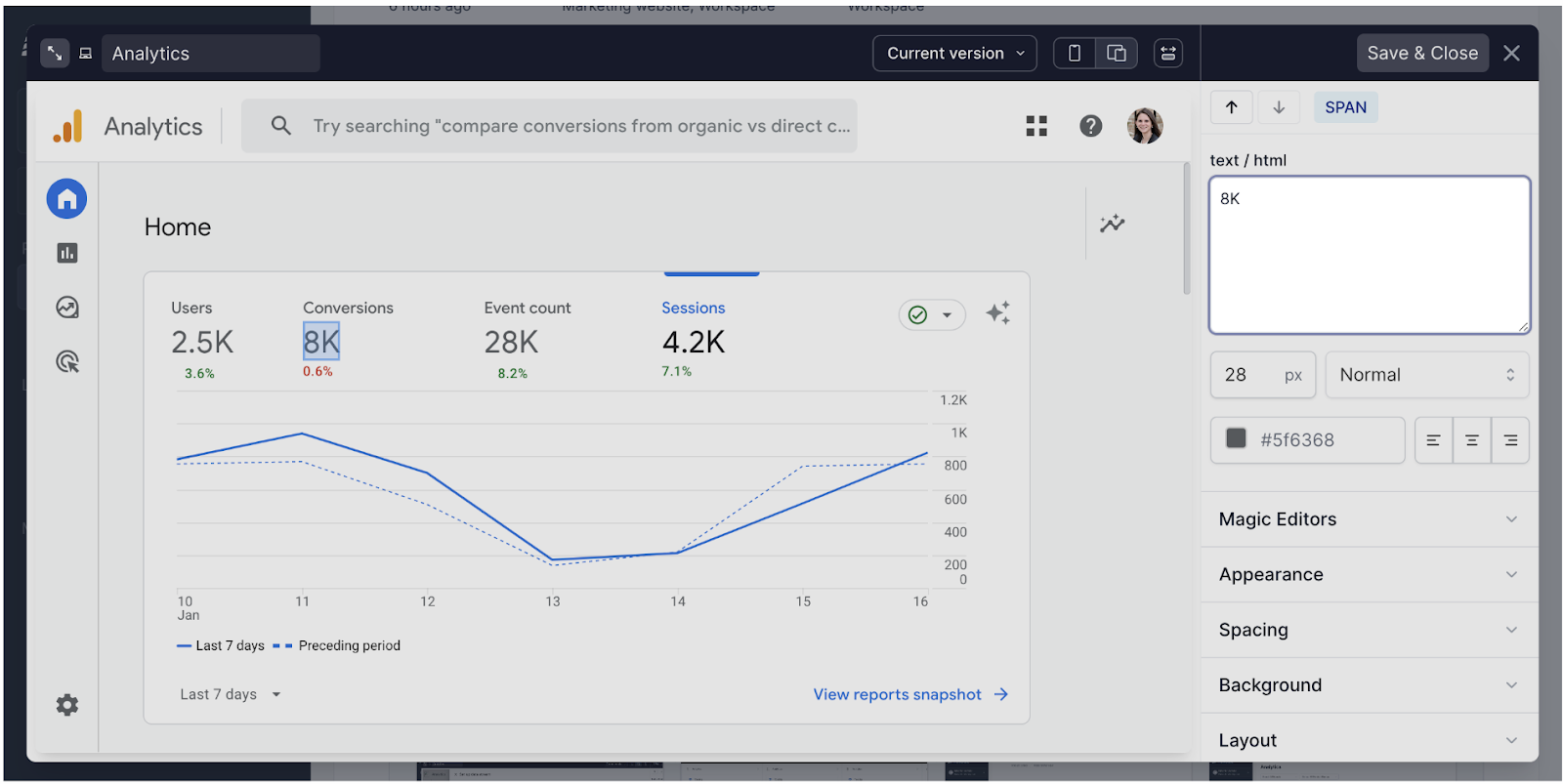
Navattic allows marketing teams to quickly build and embed interactive demos on websites and in marketing materials.
Key features:
- Automated flow creation: Navattic's Chrome extension automatically creates a flow, linking captured screens and pre-adding text boxes.
- Embed analytics: Navattic provides detailed analytics specifically for embedded demos, allowing teams to track how users interact with demos on different pages of their website.
- Quick demo updates: When you make changes to your product, you can quickly recapture screens and update your demos without recreating them from scratch.
Pros:
- Easy to use, with a low learning curve
- Supports both self-serve and sales-assisted demo processes
Cons:
- Limited advanced customization options compared to some competitors
- Primarily focused on marketing use cases, may not be as suitable for complex sales demos
- Fewer integration options for sales-focused tools
- Does not offer a free trial.
Pricing:
Starts at $6,000/year with unlimited user seats.
Also read: Navattic Alternatives
4. Demoboost

Best for: Pre-sales-focused demos
Demoboost stands out for its live demo features. It allows sales engineers to create demo templates or custom overlays for live products that AEs can use during live demos.
Key features:
- Live demo analytics: Get data per AE and time spent on each step to gain insights into your live sessions.
- In-demo commenting system: Allows prospects to leave comments or questions directly within the demo interface, and sends real-time notifications to sales representatives.
- Real-time customization: Allows sales reps to modify demo content on-the-fly during live presentations, including changing data points, adjusting workflows, or emphasizing different features based on the prospect's reactions.
Pros:
- You can automate sending personalized follow-up demos to keep prospects engaged.
- Lets you improve sales rep performance through live demo insights.
Cons:
- Capturing dropdowns in demos may require seeking assistance from the demoboost team.
- Demos take time to load when switching from one screen to the other.
- You need coding skills to edit images or graphs in the demo and blur or remove elements.
Pricing:
Starts at $10,000/year
Also read: Demoboost Alternatives
5. Saleo

Best for: Personalized live demos using your actual product environment
Saleo allows to add an HTML and CSS layer to your existing product to change its appearance without altering core functionality, allowing you to demo your native product environment.
Standout Features:
- Chrome extension for live modifications: Easily modify graphs, text, images, metrics, or workflows directly in your SaaS product during demos.
- Multiple product skins: Create and save various personalized versions of your product demo environment for different accounts or buyer personas.
- Native functionality preservation: Maintain core product features, including workflows, drop-downs, graphs, and filters, during demos.
Pros:
- Complete control over data in live demos
- Easy personalization for different accounts or buyer personas
- No disruption to normal product functionality
Cons:
- Initial setup can be challenging
- Data modification in demos requires Saleo support
- No compliance certifications, which may raise security concerns
Pricing:
Starts at $40,000/year
Also read: Saleo Alternatives
6. Reprise

Best for: Enterprise teams needing a comprehensive demo platform
Reprise stands out by offering a range of tools tailored to different stages of the buying process. You can create product walkthroughs, live demo overlays, and even sandbox environments.
This versatility is ideal for large teams needing unified sales and marketing solutions with enterprise-level security.
Key Products:
- Reprise Reveal: Injects custom data into live demos for personalized presentations.
- Reprise Replicate: Builds a separate, fully functional demo environment that mimics your product.
- Reprise Replay: Capture your product's screens or entire application in one go to create demos for embedding on website or sharing as leave behinds.
Pros:
- Enables template replication for faster setup after initial configuration.
- Enterprise-grade security, including SOC 2 Type 2 certification.
- Supports both live demos and interactive demo creation
Cons:
- Limited integrations and customization options.
- Bulky platform with a learning curve.
- One of the most expensive options on the market.
Pricing:
Starts $40,000/year
Also read: Reprise Alternatives
7. Testbox

Best for: Creating quick, no-code sandbox environments
TestBox is a tool that enables sales teams to create unique, data-filled sandboxes for every lead. This allows them to demonstrate a product's value in seconds without requiring engineering support.
Key features
Pre-configured integrations: Includes ready-to-use connections with common third-party tools and services, allowing prospects to see how the product would work within their existing tech stack.
PII-free data population: Automatically fills the demo environment with realistic, anonymized data, providing an authentic feel without risking exposure of sensitive information.
Full product functionality: Allows prospects to access and test all features of the product, including those that might be restricted in traditional demos, giving a complete picture of the product's capabilities.
Pros
- Eliminates the need for extensive demo preparation or data setup
- Supports A/B tests for demo variations
- Does not require maintenance everything something in the product changes
Cons:
- Fully integrates with your product and thus requires careful data management and security
- Implementation requires developer support
- Not enough customization options as compared to other tools like Storylane, Walnut, or Saleo.
Pricing:
Starts at $33,000/year for 15 users
8. Demostack

Best for: Enterprise sales teams requiring highly secure, customizable demo environments
Demostack lets you create glitch-free, personalized demos directly within your live application, eliminating downtime and allowing for on-the-fly data and visual adjustments.
Key Features:
- Dedicated demo environments: Creates isolated instances of the product for each prospect or demo scenario, ensuring that demonstrations don't interfere with each other or with the live product.
- Granular access control: Allows precise management of what different users can see or do within the demo environment, particularly useful for products with complex permission structures or when demonstrating to large buying committees.
- Demo library: Provides a centralized repository for storing and managing multiple demo versions, allowing sales teams to quickly access and deploy the most appropriate demo for each prospect.
- Real-time editing capabilities: Enables on-the-fly modifications during live presentations, allowing AEs to adjust data, features, or workflows to address specific prospect questions or scenarios.
Pros:
- Provides a highly controlled demo environment suitable for sensitive industries
- Offers robust compliance features, including GDPR and HIPAA
- Enables the creation of complex, multi-product demo scenarios
Cons:
- High costs may be justifiable only for large enterprises
- Complexity might be excessive for simpler product demonstrations
- Requires creating new demos for each product update
Pricing:
Starts at $50,000/year
Also read: Demostack Alternatives
5 SaaS Companies Doing Amazing Click-through Demos
Why start from scratch when inspiration is all around? Here are five awesome click-through demos examples (browse more interactive demo examples here):
1. Clari

What we love
- Clari's demo offers a simple, linear progression made for easy viewing.
- The use of storytelling makes the copy more impactful.
2. Gong

What we love
- Gong's tooltip button descriptions are crisp and clearly state the benefits.
- Excellent use of hotspots to highlight features.
3. Toplyne

What we love
- Welcome message lays out the key pains the product solves. This makes the viewer curious to know more.
- Offers a secondary CTA to schedule a custom demo. Even if a viewer doesn’t see through the end, they’ll still see the CTA.
4. Fulcrum
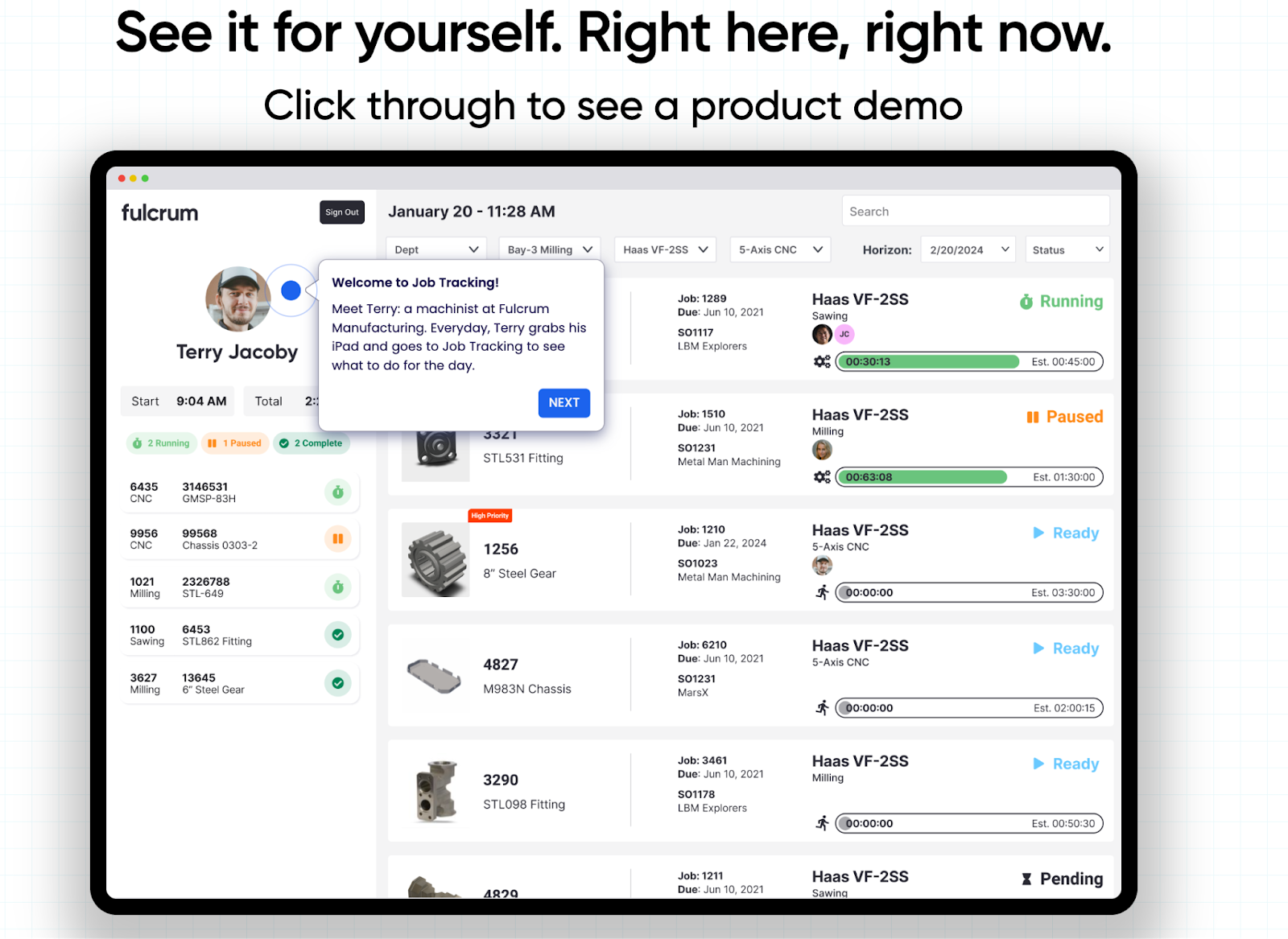
What we love
- Use of sample data gives the demo environment a real-world feel.
- Persona-driven storytelling makes for a highly engaging customer experience.
5. Pulley

What we love
- Use of a fictional example to demonstrate the use cases.
- A combination of demo overlays and tooltips lets the view follow without stress.
How to create the best click-through demos?
As we've explored the top tools in the market, it's clear that each offers unique strengths to suit different needs and budgets.
But, regardless of the tool you choose, here are some best practices to keep in mind for creating awesome click-through demos:
- Focus on key features that solve specific pain points
- Personalize the experience for different industries or use cases
- Provide clear navigation and interactive elements like hotspots and tooltips
- Optimize for various devices (desktop, tablet, mobile)
- Include clear calls-to-action to guide users to the next step
- Regularly analyze user interactions to improve your demos
Why speed matters in demo automation:
The faster you can capture and share a demo, the faster you can test what resonates with prospects. Storylane's browser extension records your product clicks in real-time, and automatically stitches screens together.
Easiest product tour software for quick setup:
- Storylane : It gets you up and running in 2-5 minutes. Install the Chrome extension, click through your product, and it captures everything automatically. The HTML editor lets you edit text, swap images, and blur sensitive data instantly. Best for sales and marketing teams who want speed without sacrificing quality.
"Storylane is easy to use and pretty intuitive. We had something live on the first day of subscribing." - Stephanie Clish, Head of Product (11-50 employees) | G2
- Walnut : Initial setup takes time but it offers great personalization features. Focused at sales use case, you get advanced customizations to help you scale demos.
Bottom line: Storylane let you build your first demo in under 10 minutes with zero coding. Walnut takes longer but offers more complex customization.
Best tools to embed click-through product tours on your homepage
Marketing teams typically embed demos on homepage hero sections to replace static videos. They are great on pricing pages to show value before the sales call, and resource centers as self-serve walkthroughs.
- Storylane uses iframe or script tag embeds that load fast because they're HTML-based, not video files. You get analytics that track engagement and deanonymize accounts visiting your site. Best for homepage hero sections and pricing pages where you want to capture high-intent leads.
- Navattic also uses iframes with customizable styling so the demo matches your brand. Their embed-specific analytics show you exactly how visitors interact with demos on different pages. Marketing teams use this for landing pages and product tours.
- Walnut provides iframe embeds with basic tracking. It works well for sales-focused pages but doesn't offer as much embed customization as the other two.
What to look for when looking for platform that enables demo embeds:
- No-code setup: Copy-paste an iframe, no developer needed
- Mobile responsive: Your demo should work on phones, not just desktops
- Lead capture: Can you gate the demo with a form? Storylane and Navattic both support this
- Page speed impact: HTML-based demos load faster than full sandbox clones
Interactive product walkthroughs vs. video demos: When to use each
Bottom line: Use interactive walkthroughs when you want prospects to click and explore. Use videos when you need to tell a story without requiring user action.
When interactive walkthroughs win
Interactive demos let prospects control the experience. They click through your actual product interface, choose their own path, and spend more time exploring. The data backs this up: interactive demos generate 3x higher engagement than videos and keep prospects exploring for 40 minutes longer.
Use interactive walkthroughs when:
- You need to qualify prospects, analytics show who's actually interested
- Your product has multiple use cases, branching logic lets users pick their path
- You want to embed on your website, they load faster than videos and track engagement
- Your sales team needs personalized leave-behinds, edit data in seconds without re-recording
When videos tours still make sense
Videos work when you're telling a narrative or explaining complex workflows. They're passive, which means lower engagement but easier consumption for busy buyers.
Use video demos when:
- You're running top-of-funnel ads on social media or YouTube
- You need to explain "why" before "how", positioning and problem-framing
- Your audience is on mobile and can't interact easily
- You're demoing workflows that require narration or voiceover
The hybrid approach
Smart teams use both. Create an interactive walkthrough for your homepage and sales calls, then record a 60-second video version for LinkedIn or email outreach. Tools like Storylane let you export the same demo as both an interactive tour and a video, no need to build twice.
To wrap up
The most effective demos are those that not only highlight your product's features but also clearly demonstrate how it solves your prospects' pain points while allowing them the freedom to explore at their own pace.
With the insights and tools discussed in this article, you're now well-equipped to create compelling click-through demo that help you close deals faster.
Frequently asked questions - Click-through demo software
Q. What is click-through demo software?
Click-through demo software lets you create clickable product walkthroughs. Your prospects click through the demo needing to log in or schedule a live call. Tools like Storylane helps you create click-through demos in minutes.
Q. What is HTML capture and why does it matter for demos?
HTML capture clones your product's actual interface so demos look and behave like the real thing, not static screenshots. You can edit text, swap data, and update content instantly without recapturing every screen when your product changes, it's why top demos feel authentic instead of janky.
Q. What features should I look for in click-through demo software?
Prioritize tools that offer both HTML and Screenshot capture. HTML capture for a realistic product feel and Branching logic so prospects can choose their own path. Screenshot capture for quick product/ feature overviews. Also look for:
- Analytics that show you exactly who's engaged and where they drop off,
- Easy CRM integration (HubSpot, Salesforce),
- Personalization tokens to swap in prospect data, and
- The ability to blur sensitive info without recapturing screens.
Storylane delivers on all of these.
Q. Which demo software is best for product demos?
Best demo software lets you run website embeds, live sales calls, and personalized follow-ups in stable environments. Storylane ($6K) delivers this.The exception is when technical buyers need actual product access to test workflows and integrations in your live software, which is where Testbox ($38K+) comes in.
Q. What is demo automation and why does it matter?
Demo automation replaces the 2-3 hours sales engineers spend building custom demos with a 2-3 minute templating process. Storylane's AI-powered creation lets reps clone and personalize demos instead of rebuilding from scratch. At 40+ demos monthly, presales teams reclaim bandwidth for high-value work like POCs.
Q. Do I need developer support to implement demo software?
No for HTML capture tools like Storylane, Walnut, and Navattic, your marketing and sales teams can build demos independently with no-code editors. Yes for full sandbox environments (Testbox, Demostack) since they clone your entire product infrastructure, and partially for tools like Reprise that need dev setup but self-serve management afterward.
Q. What's the difference between click-through demos and sandbox environments?
Click-through demos are pre-scripted (and guided) tours you control. Prospects follow your narrative, you update content instantly, and creation takes minutes. Sandbox environments give prospects full product access to explore freely. The tradeoff? Someone needs to maintain that clone every time your product ships. Use click-through for marketing and early sales, sandbox when technical buyers need hands-on validation.