
.svg)

Not sure how to hit your B2B SaaS sales quotas in 2026?
It's time to shift your focus from just making the sale to building a relationship with your customers.
With the right strategies and techniques, you can create a solid foundation for your SaaS business and watch it flourish.

Our guide will show you how to use data analysis, craft a compelling strategy, and build a sales team to hook even the most elusive customers.
You'll learn how to turn prospects into loyal customers who keep coming back for more.
Let’s start with the basics.
B2B SaaS Selling: The Basics
SaaS sales is all about selling subscription access to cloud-hosted software products to both B2B and B2C clients.
It’s different from traditional software because it's hosted, secured, and managed by a single provider.
This means:
- Lower entry costs
- Easier upgrades
- Better integrations
For businesses, these products are designed to tackle various pain points and make your customer's business more successful. That could mean saving them time, money, or human resources.
Service and attention are crucial to getting a prospect to close, especially since, as a SaaS rep, you are usually selling at a higher price.
To sell B2B SaaS successfully, a well-thought-out sales process based on your Ideal Customer Profile is critical. Understanding your total addressable market will give you an advantage in selling software to them.
Let’s look at what this sales process looks like.
The B2B SaaS Sales Cycle
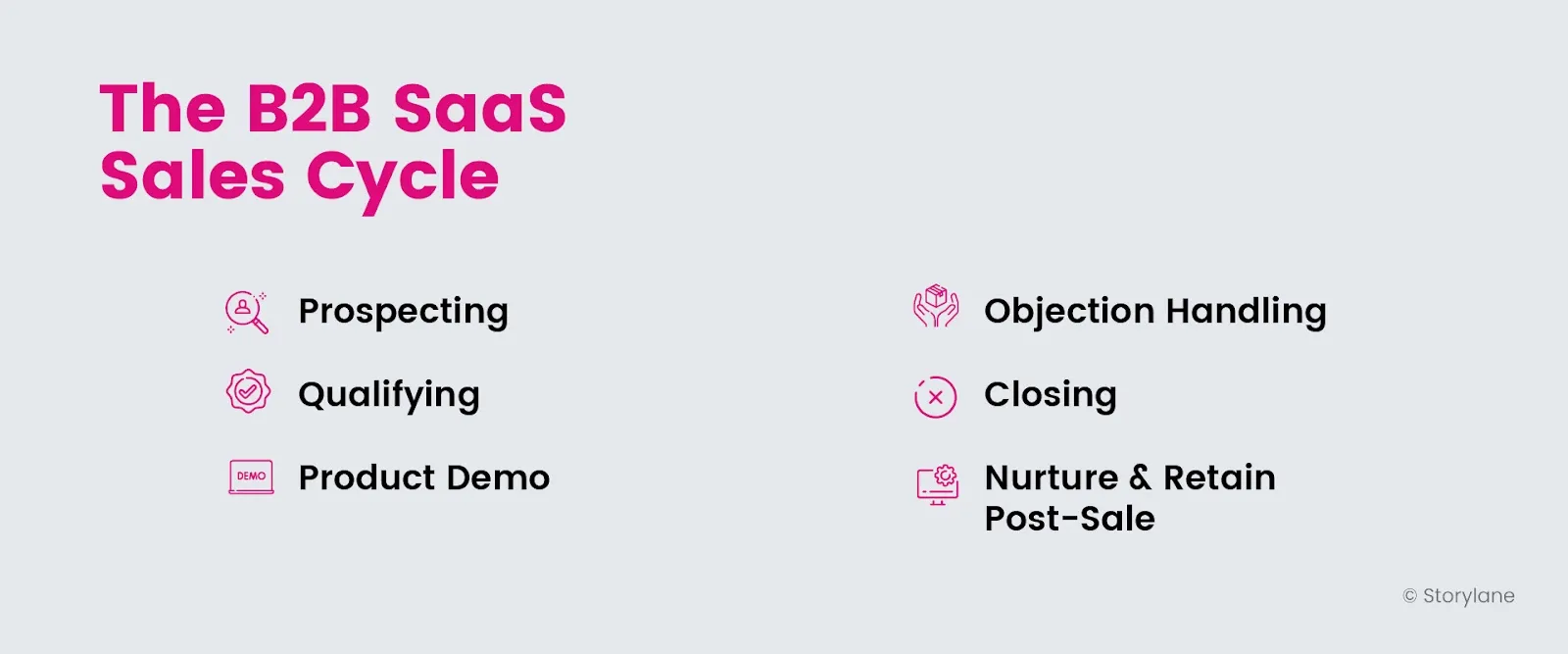
Understanding the SaaS sales cycle and its stages is essential for creating accurate revenue forecasts and developing a successful sales strategy that can help your company grow.
Let’s have a look at the six primary stages of the B2B SaaS sales cycle:
1. Prospecting
It's essential to hone in on your ideal customer profile (ICP) by collecting qualitative and quantitative data about your prospects and customers to shape your user persona.
To effectively pursue leads, you must develop sturdy buyer personas based on demographic and psychographic information.
2. Qualifying
Who seems the most likely to buy your product?
You’ll be able to identify your most high-potential leads by wading through user behavior from website visitors and trial subscribers.
Ensure your sales team is readily available to speak with qualified leads right away and consider sending materials early to help educate your prospect.
3. Product Demo
Show, don’t tell: Once you’ve landed a demo with a potential customer, it’s time to dazzle them with your product.
If you want to delve deeper into this, check out our guides on building great product demos and winning demo scripts.
You can use Storylane to drive the sale home with a stellar interactive demo!
Storylane is a no-code product demo software that allows you to create interactive and engaging demos by just dragging and dropping visual elements.
Depending on your prospect’s industry and their main business challenges, you can change the data in your product demo to ensure it’s relevant to your prospects.
4. Objection Handling
The fourth stage is handling objections – where you anticipate and address any concerns the prospect may have.
It's important to listen to the prospect's concerns and respond accordingly.
To prepare better for this stage, make sure that you discuss your prospect’s goals and pain points during the discovery call.
5. Closing
Here’s where you get the prospect to officially commit to purchasing your product.
When closing, it’s key to make sure all stakeholders are on board and the price and terms are clearly defined.

6. Post-Sale: Nurture & Retain
The final stage is post-sale, where you need to ensure the customer is satisfied and continue to engage with them.
You can do this through:
- stellar customer support
- comprehensive training
- a range of useful upsells
B2B SaaS Sales v/s Other Types of Sales: The Difference
Selling Software as a Service (SaaS) is fundamentally different from other types of sales, as it involves more complexity and a longer sales cycle.
Unlike physical products or services that are delivered shortly after purchase, SaaS products require a lot more support, maintenance, and engineering – leading to a longer sales cycle and more touch points from Sales and Marketing before your customer is ready to buy.
As a SaaS sales rep, you also need to provide substantial education to simplify the product’s complexity.
This is critical – without fully understanding the product's capabilities, your prospective customer won't feel confident enough to invest.
You also need to tailor each presentation to meet the unique needs of each of your prospect.
The attention you give to each potential customer has to be highly personalized, since each company’s problems, needs, and tech stacks are different.
The complexity of the SaaS model makes it common to bring multiple stakeholders like engineers, executives, or product marketers into some meetings to make a difficult sale.
These differences also bring some unique challenges to the table.
Unique Challenges in B2B Saas Sales
One of the main challenges is the typical SaaS subscription-based pricing model.
Although it provides your company with regular and predictable revenue, it can be a significant investment for your customer – which means they will take more time to evaluate whether it is a sound investment.
Plus, the variety in features and subscription plans in SaaS products means your customers must spend time deciding which ones are relevant to their business.
To close a B2B SaaS sale, you need to multi-thread. You’ve got to identify, build relationships with, and convince multiple decision-makers in your target company.
Apart from this, you need to create personalized sales pitches to emphasize the value of specific features for each prospect.
It takes a focused and determined sales team to overcome these unique challenges. But with the right approach, B2B SaaS sales can be highly lucrative.
So how do you define your B2B SaaS sales strategy?
Defining Your B2B SaaS Sales Strategy
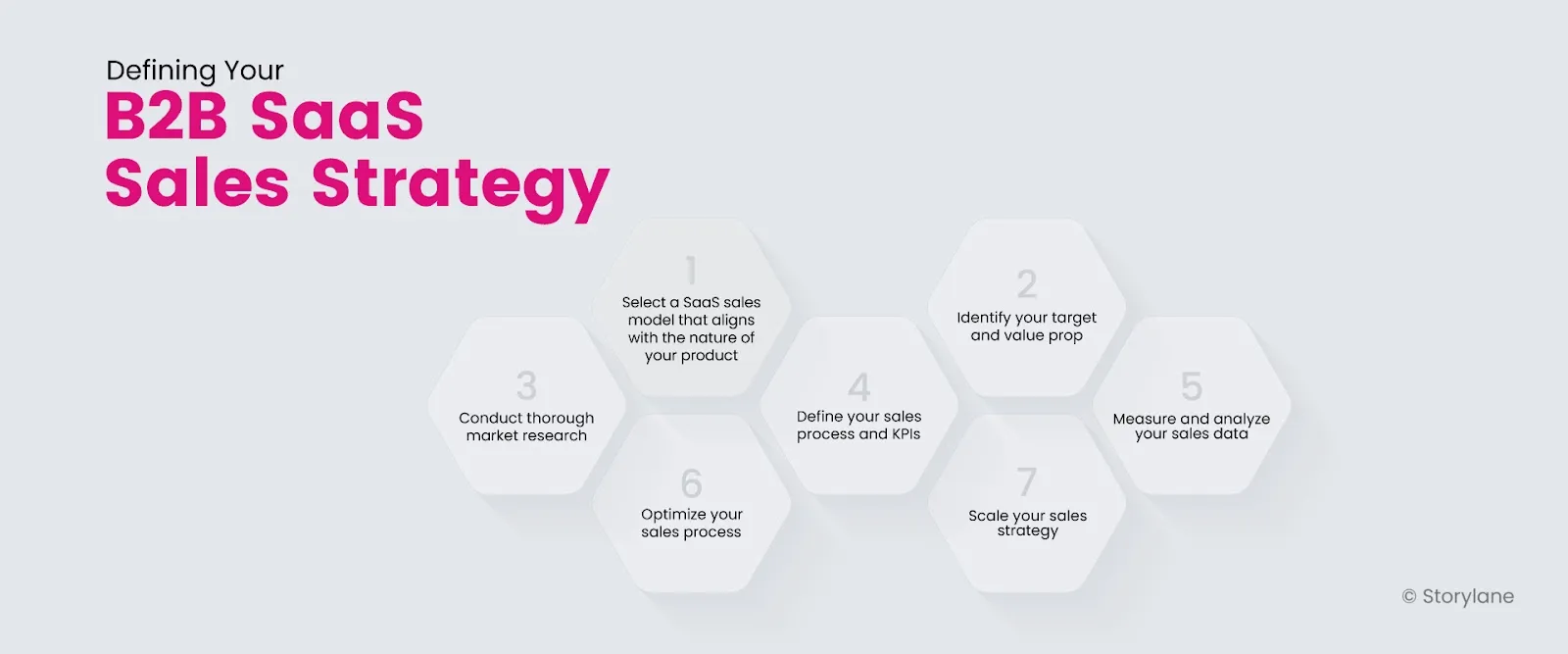
Crafting a successful SaaS sales strategy requires a deliberate and organized approach.
Let’s break it down into easy steps that you can follow:
1. Select a SaaS Sales Model that Aligns With the Nature of your Product
Your sales model is going to help you figure out how to operate. There are widely three different models for you to choose from:
- Self-Service Model
Ideal for: Products or subscription plans with a lower price point
The self-service model relies on marketing efforts to drive traffic to your sales pipeline, which makes it suitable for SaaS products with a lower price point and simpler onboarding process.
- Transactional Model
Ideal for: SaaS products or subscription plans that are expensive
The transactional model combines sales reps and content marketing to nurture leads throughout the sales cycle.
- Enterprise Model
Ideal for: High-ticket, specialized software for custom plans
The enterprise model needs sales techniques that often focus on outbound marketing rather than inbound marketing and are tailored for a longer sales cycle and a highly personalized approach for each prospect.
2. Identify Your Target and Value Prop
Once you choose the right model for your business, you need to identify your target audience and create a value proposition for your software.
You can follow the "Target Audience, Problem, Solution, Value" framework to create an easy-to-scan summary of your software's value proposition. It’ll help you outline:
- your target audience
- the problem they are facing
- how your software can help solve it
- the value your software offers
3. Conduct Thorough Market Research
Make sure you’re covering all the bases when you conduct market research.
Don’t miss any of these:
- Competitor and gap analysis
- Industry trends
- Target market behavior
- User behavior of your ICP
4. Define Your Sales Process and KPIs
This includes:
- Defining your goals and identifying which key performance indicators (KPIs) you want to track
- Outlining your lead generation process
- Setting up your CRM
- Creating your sales pipeline
- Building and training a sales team of sales reps, managers, and customer success reps
5. Measure and Analyze Your Sales Data
You’ve got to track your KPIs, identify areas for improvement, and create reports to share with your team. We’ll have a look at what metrics you should ideally be tracking in the next section of this article.
6. Optimize Your Sales Process
Once you have tracked and analyzed your data long enough to see some patterns, need to work on optimizing the process.
This involves:
- Implementing changes to your sales process
- Testing new strategies, and
- Refining your approach over time
7. Scale Your Sales Strategy
After optimizing your sales process, you can scale your team, and expand your target audience.
At this point, you need to optimize your sales strategy for scalability:
- Automate repetitive tasks
- Leverage technology to improve your timelines
- Create a sustainable and efficient sales process
Now it’s time to dive into the specifics of tracking your B2B sales performance.
Tracking Your B2B SaaS Sales Performance

Tracking your B2B sales performance is essential for evaluating the success of your sales process.
Examining and leveraging key sales metrics can tell you whether or not your all your effort has paid off!
There’s a ton of sales metrics out there, so let’s look at the ones that are typically the most critical for your company's revenue operations and bottom line:
1. Sales Performance Metrics
These are essential for measuring how effective your company’s sales strategy is – and identifying areas for improvement.
- Customer acquisition cost (CAC)
Measures how much your company spends on acquiring a new buyer – you can’t be spending more to acquire a customer than you are making from them.
- Customer lifetime value (CLV)
The average revenue a buyer generates for you over the course of their relationship with you. How much revenue can you expect from a single buyer? CLV helps you keep track of that.
- Monthly recurring revenue (MRR)
This is the total predictable revenue generated each month by your business.
It’s a critical metric for subscription-based models – it helps you measure your financial growth and forecast sales.
- Lead-to-opportunity conversion rate
The lead-to-opportunity conversion rate measures how effectively you, as a sales rep, can turn leads into qualified prospects that are likely to become buyers.
- Sales cycle length
The average time it takes you to close a deal is crucial. Shorter sales cycles are ideal since they typically mean faster growth for the company.
- Average deal size
Average deal size is the average amount of revenue generated per closed deal.
This can help you estimate how many such deals you need to reach your quotas. If this metric is on the decline when you measure it, it can help you identify a drop in the quality of your leads.
2. Sales Activity Metrics
Sales activity metrics are great at helping you track your performance as a sales rep and is a great way to identify areas for improvement in your sales process.
- Number of emails sent
Here, tracking email metrics like:
- Bounce rates
- Response rates
- Open rates
…can help you determine the effectiveness of your cold email outreach.
- Number of calls made
The more calls you make, the more opportunities you can generate.
You can break down this metric further by tracking:
- Number of answered calls
- Average time spent on calls
- Conversion rates
- Number of meetings booked
Tracking the number of meetings booked can help you calculate sales productivity and measure the effectiveness of new sales pitches and talk tracks. Measuring the discovery call-to-meeting rate can help you determine whether you’re effectively conveying the value of your product to prospects.
- Win rate
The win rate provides insights into sales strategy and indicates whether you’re targeting the right buyers.
These metrics provide valuable insights for you to optimize your sales process, maximize revenue, and hit your quotas for 2026!
Role of Tech in Hitting Your B2B SaaS Sales Quota
In 2026, tech plays a central role in achieving B2B sales quotas.

Sales engineering and tech helps to create a comprehensive sales process from product development to after-sales support:
- CRM software and sales intelligence tools: Help B2B sales teams connect with the right leads at the right time
- Sales analytics software: To track critical sales metrics like sales activity, open opportunities, win rates, identifying deals at the risk of slipping
- Sales manager software: Helps sales teams monitor the sales funnel and track sales metrics through dashboards displaying leads moving through the sales pipeline in real time
- Sales enablement software: To empower teams with the right assets to supercharge their sales, you need a wide variety of tools (a tech stack, if we may) that work well with each other. These range from training tools and engagement platforms to digital asset management systems and sales content creation tools - such as an interactive demo software like Storylane! You can also use your product demos as leave-behinds after your sales call.
Sales technology can streamline your sales process, maximize productivity, create a seamless customer experience, and so much more!
With the right tools, your sales team can improve productivity, connect with the right leads, and achieve your sales quotas effectively.
12 Strategies to Meet Your 2026 B2B Saas Sales Quota
B2B SaaS is always evolving, so it can be challenging to keep up.
We’ve compiled a few strategies you can use to meet your sales quota for 2026!

Product-Focused Strategies
- Offer trials strategically
A free trial can be an effective way to showcase the value of your offering, but trial length is an important consideration. Here’s what to keep in mind when you’re considering offering a trial:
- 7-day trial: Ideal for simple products or lower-cost sales
- 14-day trial: Works well for products with added complexity
- 30-day trial: Best for more complex offerings or when multiple stakeholders are involved
Regardless of the length, a well-planned trial period can help you drive conversions and lead to long-term customer retention.
- Make sure your demo highlights your product’s value
Providing valuable demos can be a real game-changer to your sales strategy.
Don’t overwhelm your prospects with information – demonstrate the value of your product instead.
Knowing your audience and their specific needs can help you create customized demos that clearly show how your software can solve their problems.
Here’s an added suggestion from Nebojsa Savicic, co-founder of Plainly:
“We took a different approach and decided to cut down the length of our demo to just 15 minutes, which resulted in a 27% boost in close rates. Because people know we value their time and it's just 15 minutes we're talking about here, they are more likely to commit to booking a demo. And it truly is a demo, meaning it's a demonstration of what the tool can do for them. That's the biggest value we provide: we're not trying to sell them anything, we're trying to help them solve their problems through video automation.”
- Offer discounted annual plans
Annual plans are a great way to increase upfront revenue and improve customer retention. Offering discounts for annual subscriptions can convince buyers to commit to your product – and improve your retention rates.
- Capitalize on cross-selling and upselling
Upselling and cross-selling to existing customers can boost annual recurring revenue. Remember to tailor your pitch to each customer, highlighting the additional features and services that can provide more value to their business.
Client-Focused Strategies
- Build confidence in your buyer
Your prospect has likely done some research about your product – but if they’re seriously considering investing in your product, it’s likely that they will have questions they haven’t found answers to.
It’s then your job to provide answers and contextualize the information that your buyer has consumed – so that you can build confidence and show them that your product can offer the best possible solution to their problems.
Matthew Ramirez, serial entrepreneur & investor, and founder of Rephrasely, backs this up:
“The biggest challenge I face with B2B SaaS sales is having a clear understanding of the customer journey. It’s not always clear which stage our prospects are in, especially if they are not actively looking to purchase. B2B companies typically have long sales cycles, so it’s important to nurture our leads until they are ready to purchase. We do this by regularly sending them educational content and following up with them to answer any questions they may have. This allows us to build trust with our leads and eventually convert them into customers.”
- Master selling to the C-suite
With executives becoming more involved in the buying process, you need to understand your role in the buying process. It’s crucial to capture their attention in the first few minutes of a call – by providing insights that will impact their business, for instance.
- Approach pricing conversations with confidence
Confidence is everything – and this applies especially when you’re discussing pricing. Avoid over-explaining, this can sound like you’re not sure of yourself.
Instead, use concise and to-the-point language to signal confidence.

- Check-in and follow-up regularly during trials
If your prospect is using a free trial period – make sure you’re maintaining regular communication with them during this time. Staying in contact with and gathering feedback from them means that you’re keeping your prospect interested in your product.
It's also critical at this stage to create a safe playground for the prospect to explore the product. This is possible with Storylane.
Process-Optimizing Strategies
- Remove avoidable friction points
To increase your sales velocity, conversion, and close deals in a shorter period of time – remove unnecessary buyer friction.
Research from Gong shows that timely follow-up and discussing next steps during sales calls have been shown to significantly boost win rates and cut deal duration.
- Gather feedback regularly
Quick check-ins with current customers can help you:
- Cement your relationship with them
- Improve your product
- Increase product adoption
- Provide opportunities for upselling
- Leverage data analytics
Invest in sales technology – like sales engagement platforms and digital sales tools.
You can then leverage data analytics to optimize sales performance by identifying patterns and opportunities in sales data.
- Use a CRM
Using a CRM to keep track of all customer details will ensure nothing slips through the cracks – and can lead to better relationships and increase the likelihood of you closing a deal.
Wrapping Up

Selling B2B SaaS products can be challenging – but with the right strategies, hitting your quotas can go a lot smoother!
It's important to focus on:
- Building strong relationships with prospects and customers
- Leveraging a range of marketing tactics
- Prioritizing collaboration with other departments
Plus, analyzing sales data and metrics is crucial for making data-driven decisions and staying ahead of the competition.
By implementing these strategies and continuously refining your approach, you’ll be able to see significant success with your sales quotas for 2026.