
.svg)

Your conversion rate is growing but in the opposite direction! Prospects who have shown interest in your solution are no longer interested in receiving your emails!
The actual problem exists with your discovery call script. Discovery call scripts are often cast aside, as most sales reps don’t prefer reading sales scripts while engaging with their prospect.
However, writing down a discovery call script will prevent you from swimming blindfolded in a call to discover “what to ask next?”
A lack of a discovery script can often lead to a lack of trust that leads to a ‘no.’
If you are clueless about creating a sales script, this guide is for you! You will get all the essential elements to craft a successful sales script by the end of this guide.
Let’s create!
What is a discovery call?
A discovery call is the first point where you and your potential client get to know each other in the areas of business, goals, problems, and what you can do together to solve a particular problem.
Here, the goal is not to sell but to get a complete overview of the client's needs, how your services might help them, and at what price point it makes sense for both parties.
A discovery call will help you qualify the leads and move them down the pipeline based on the information you gathered through your discovery call while explaining how your product helps them to solve their problem.
Then what about the length of a discovery call?
According to Mindtickle, ideal discovery calls range between 30-40 minutes. And this 40 minutes determines whether the prospect is going to move ahead with you or not.
A discovery call script is a tool that helps you lead the conversation with prospects, but it doesn’t have to be complicated.
It’s a one-time investment of your time and efforts. If you can craft a discovery call sales script and templatize it, you can customize it for future discovery calls. Once you have a template handy, the whole customization part takes about an hour to complete.
Start with in-depth research, frame qualifying questions, and end with objection handling strategies.
Voila…your sales discovery call script is ready!
Looks simple, isn’t it?
Let’s start the process.
1. Create a buyer persona
Every sales process starts with an ideal buyer persona, and the discovery call script is no different.
A buyer persona is a semi-fictional character created based on your target audience's real-life needs, behaviors, and goals.

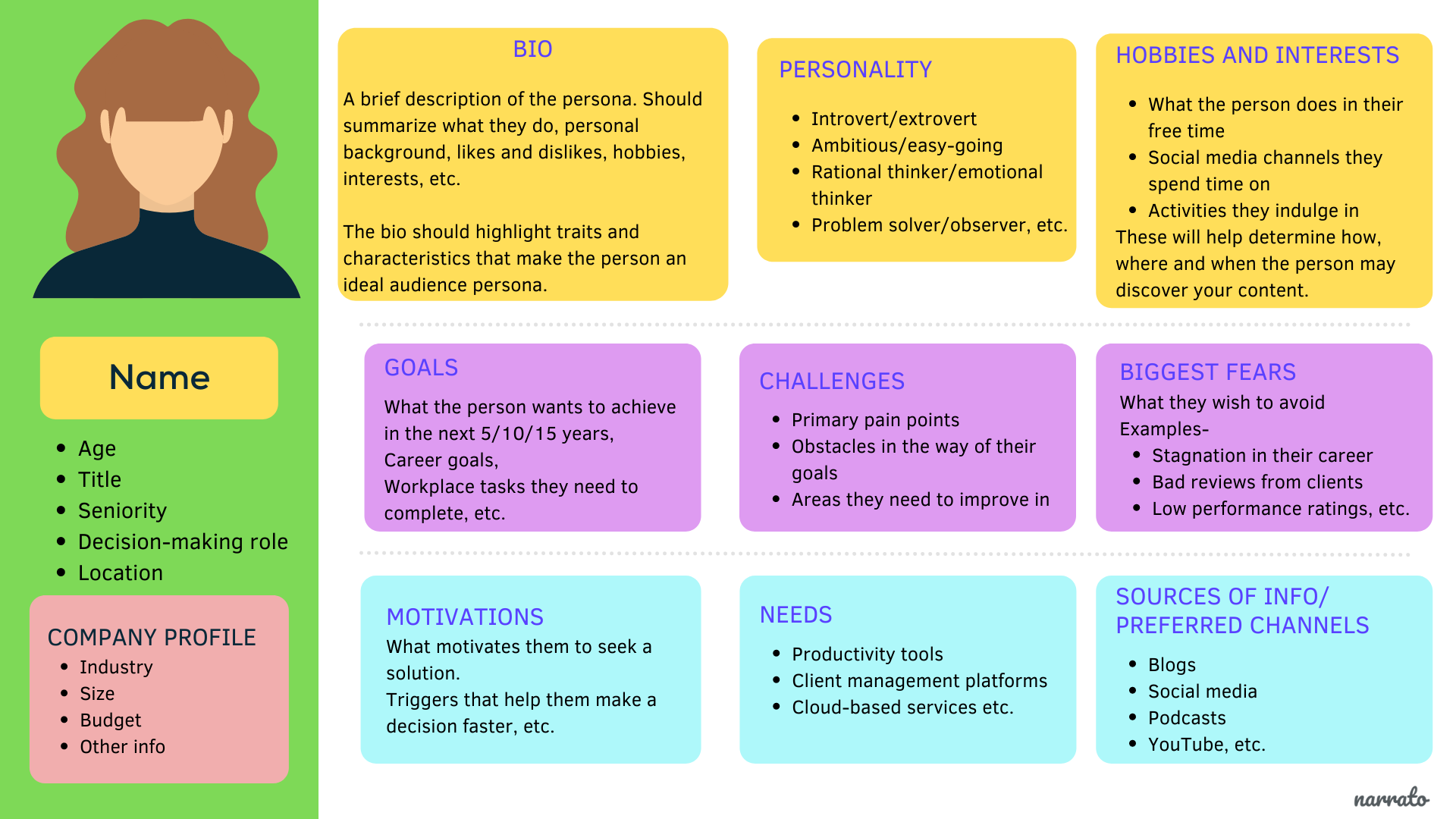
When you have a buyer persona in your hand, you can better tailor your discovery call script that resonates with them. A well-crafted persona will help you improve your sales process by giving you an idea of what questions they will ask during the discovery phase. This is an integral part so that you can cleary see the big picture.
2. Select your lead qualification framework
Here comes the vital component to include in your discovery call checklist. Your prospect and their business may perfectly match the ideal buyer persona that you have. But without evaluating other critical factors like budget, the timeline for implementation, and other elements, you can’t move your prospect down the sales funnel.

With a lead qualification framework, you can check whether your prospect is likely interested in your product or service.
Here are some essential criteria that you have to consider while creating your lead qualification framework.
- BANT: This framework stands for budget, authority, need, and timeline. It helps you asses a prospect based on those elements. A lead that doesn't meet all of the BANT qualifications might initially be placed into a closed-lost queue, but that doesn't mean you should give up on them completely. There's a chance that they might be ready to buy eventually, so sending over educational resources and offering to help until they're ready to buy is a good idea.
- MEDDIC: This framework stands for metrics, economic buyer, decision criteria, decision process, identity pain, and champion. MEDDIC was designed to help increase forecasting accuracy for enterprise companies, who can lose millions of dollars from just one lost deal. MEDDIC can be a helpful tool for companies that sell products that require behavior transformation or have a high average sales price. This is because MEDDIC can clearly understand how a prospect buys, why they would buy your product, and who would be your champion internally. This framework can then help you to maintain an accurate pipeline.
- CHAMP: This framework stands for challenges, authority, money, and prioritization. CHAMP is an excellent way for companies to show their dedication and commitment to their leads. It helps establish trust and rapport while also providing clear expectations of what the seller is willing and able to do to help the lead succeed.
- GPCTBA/C&I: To meet the needs of the modern buyer, HubSpot designed the GPCTBA/C&I qualification framework (Goals, Plans, Challenges, Timeline, Budget, Authority/Negative Consequences, and Positive Implications) in response. With buyers being more informed when they come into the sales process, sales teams need to be able to provide value beyond basic product knowledge. This framework is perfect for sales teams selling complex solutions, like enterprise software, and who want to have a comprehensive checklist.
When you select and stick with one qualification framework based on your product and business goals, you will better understand what questions to ask during the next step—the qualification. Remember that a poor framework will yield too many false positives (people who do not qualify may be considered qualified), so it’s essential to keep everything organized to accelerate your marketing efforts in the perfect direction.
Also Read: Lead Qualification Checklist
3. Craft your qualification questions
Now that you know what qualifies someone, create at least two questions to include in your discovery call script. Suppose you’re selling B2B products or services and have created buyer personas based on business value. In that case, these should be the first ones under consideration—you can ask about company size and role to assess their match with your customer profile. Our own research into 637 B2B deals found that decision-making process is usually messier than reps assume — buying committees are bigger and less visible than most discovery scripts account for.
To filter out your prospects, create a minimum of 8–10 questions that cover each criterion in your chosen lead qualification framework. For example, if you have selected BANT, you can create questions like,
- Budget: What’s your allocated budget for solving the specific problem with X that you have mentioned?
- Authority: How will you make a purchasing decision? Who else will be involved in this decision-making process?
- Need: What would happen if the problem is not solved?
- Timeline: How quickly do you want to solve this problem?
Now you have the questions handy. If you need further clarification, refer to these 51 sales discovery call questions to complete your sales script with questions that can find out pain points and establish the next steps.
4. Split up parts of your sales call
You've got your sales questions ready, but how do you know when to ask them? You should have a plan when you make a discovery call.
This makes it essential for you to split up parts of your entire sales call. Let's go further into the different parts of the sales call.
These are the actual scenes that you have to include in your discovery call script.
- An opening talk: Greet your prospects with a small note and initiate the chat by asking a few questions that set the stage. These questions are too basic, like, “tell me more about what you do.”
- Lead with small talk: This stage aims to warm up and create a comfortable environment. You can include this in your discovery call script but can’t make an actual conversation out of the entire sales process.
- About your service/product: Provide a bird's eye view of your achievements in a customer-centric manner in no more than five minutes. Discuss how your solution solves their pain points, your business' credentials, and the benefits your customers receive.
- Discovery questions: Now, lead your call by asking more about your prospects and their business. Let them narrate their pains and struggles. You can take questions that stir the pain points of your prospect.
- Qualifying questions: You have this segment prepared, as we have already addressed this before. So carefully tailor the questions that help you narrow your list of potential leads to only those who fit your criteria and are ready to buy.
- Establishing further steps: You have to create two discovery call scripts– one for a qualified lead and another for disqualified lead. Script questions that lead to the next steps and take the association forward(for qualified leads).
A good discovery call script should be detailed enough to guide a seller but also flexible enough not to smother their creativity. As you’re writing, keep in mind your buyer persona so that the language you use addresses their wants and needs. If you make them feel excited about working with you, they’ll be more likely, to tell the truth, and commit to the next steps if qualified.
5. Plan for common sales objections
Handling objections can make or break the deal. When you discover and prepare for the typical sales objections during your call, you will likely convert the lead without allowing them to slip through the cracks.
These are the usual sales objections and how you can tackle them,
- This is not the right time: Asking if anyone on the team would be willing to handle a sale is an excellent way to get past decision-makers who are too busy. If a prospect is enthusiastic, it might indicate that now is the right time to close the sale. However, suppose they seem reluctant or are unqualified for any reason (they don't have sufficient financing or aren't prepared to spend enough on your product). In that case, you should consider backing off and trying again later when prospects appear more receptive.
- It’s too expensive for me: The prospect may not value your product, or there could be a real cash crunch. You have to judge that from the conversation. Present some hard facts on pricing, then put it into context by explaining how other companies have succeeded with similar products.
- Just send me the information: If you hear a problem from the later part of the call, your lead is likely feeling overwhelmed or simply didn't understand enough about your product to be interested in purchasing. If this is true—take another look at your presentation and make sure it demonstrates why they should purchase from you instead of someone else. In this place, you can use interactive product demo tools like Storylane to create an interactive demo that sells without sounding salesy.
- Product X is cheaper: Nowadays, prospects examine other options available on the market well. If you have to handle this, try to showcase the unique feature that you are offering with your product. Again, you can use a product demo to showcase its work without making it too dull. You can also provide a discount for your prospect if they have the potential to subscribe for the long term.
Also Read: Tips to Overcome Objections in Sales
Five critical questions you should ask your prospect during the discovery call
Even though the objective of the sales call is to analyze more about your prospect, you can’t bombard them with a series of questions.
As a rule of thumb, you must listen more than you talk. As a backup to this fact, Saleshacker found that the highest conversion achieved is centered over the 43:57 talk-to-listen ratio.
So listen more by asking tightly stitched questions. Here are the five common questions that are used by most sales representatives work regardless of the end product,
- How do you operate regularly with respect to X? Can you walk me through the process?
- What’s your number one goal, and what is stopping you from achieving it?
- How does the problem affect your business, and how quickly do you want to solve it?
- What are the solutions applied before, and how did it go?
- What’s the budget to solve the problem that you have with X?
When you ask these questions, you can better understand your prospect's pains and buying stage from the ground level. You can also use this to qualify your potential and move them into your sales loop.
Obviously, these are just some slices of cake. You must figure out more questions to lead a successful sales discovery call.
4 Mistakes you should avoid
Even after preparing a killer discovery call script, you can make mistakes that smash the entire effort even after preparing a killer discovery call script. So beware of these common mistakes that you can avoid while leading a successful sales call.
1. Highlighting only the features but not the benefits
Would you listen if someone kept leading the conversation only with the rich features available on their product? A straight no!
And this is the most prevalent mistake that happens in a sales call. That’s why it’s essential to listen to their pain points. You can use that information to position your product to solve its pain points with its features.
The best way to overcome this situation is to focus on the post-sales experience they will earn if they are committed to your product.
2. Not personalizing the solution
You can paint a beautiful picture of your product, but not every prospect can hang it on their wall. You have to pinpoint the exact struggle and show them how your product works to solve the same.
If they can’t feel the worth of your product, they may try to derail or skip your product and land in the hands of your competitor! To avoid these, use a personalized demo that gives hands-on experience on how your product works to solve their problems in real time.
Here's how SentinelOne uses Storylane to show how they solve different problems for different use case:
3. Derailing from the actual sales call structure
If you don’t create and follow a perfect discovery call script, your sales discovery call won’t yield the desired outcome. That’s why having a clear agenda with a detailed sales script is essential.
To improve your sales hit rate, you should invest time to create a compelling sales discovery call structure: before getting on a call with a prospect, research about him and learn about his industry. While on the call with a customer, it makes sense to listen more than you talk—and by doing so, you can engage that person in a conversation without sounding like a sleazy salesperson.
4. Pitching straight without making a rapport
Of course, the purpose of the sales discovery call is to pitch your offer and onboard qualified leads. But it doesn’t mean you pitch them straight after asking a few questions to the prospect.
Even if you pitch asking multiple questions, chances are there that it will fall on deaf ears. You can even notice that your prospect actively listens to your pitch, but remember that they won’t appear for the next call.
So it’s better to build a rapport with them before you start mentioning the benefits of your product. On top of that, it’s okay to take conversations lengthy than usual to build a comfortable environment that makes a sales call a problem-solving discussion.
You can hit better conversion rates if you guide them to solve their problem by actively listening to their struggles.
Lead your call like a pro
Remember the fact that a discovery call script is a powerful tool to lead the discovery call professionally. But make sure to customize your discovery call script per your prospect's background. Otherwise, you will sound like a robotic salesman who tries to push the product into the prospect’s pocket.
Once your sales call ends, follow up with a qualified prospect. It gives a chance for the prospect to think about the conversation and allows you to stay top-of-mind for him. You can even include a product demo embedded in your mail and let them feel how your product works in action to solve the problem.
When they feel their problems are getting resolved while discovering the features of your product with a demo, they won’t resist themselves to invest in a problem-solving product. With Storylane, you can create a compelling product demo that narrates the benefits of your product rather than leading it as a sales pitch!
You can even analyze how your prospects react to your demo through analytics and tweak it better to hit maximum conversions—wondering about how it works with your product? Book a free demo, and we will show you exactly how it syncs with your goals.
Discovery calls - Frequently asked questions
Q. Which lead qualification framework should I use: BANT, MEDDIC, CHAMP, or GPCTBA/C&I?
BANT works for transactional sales. MEDDIC fits complex enterprise deals. CHAMP suits consultative SaaS sales. GPCTBA/C&I is buyer-centric for modern sales. Blend frameworks based on your deal size and complexity.
Q. How long should a discovery call be?
35 minutes is ideal for most B2B sales. SMB deals need 15-20 minutes. Enterprise deals can extend to 60 minutes. Build in buffer time to avoid rushing critical questions.
Q. What's the ideal talk-to-listen ratio on discovery calls?
Talk 43% of the time, listen 57%. This ratio drives highest conversion rates. Most reps talk too much at 65-75%, which hurts deal progression.
Q. What are the 5 most important questions to ask on every discovery call?
How do you currently handle this process? What's your #1 goal and what blocks it? How does this problem affect your business? What solutions have you tried? What's your budget and timeline?
Q. How do I handle common objections during discovery calls?
"Not the right time" → Ask about team readiness, reschedule if needed. "Too expensive" → Present ROI data. "Just send info" → Offer an interactive demo instead. "Competitor is cheaper" → Differentiate on value, not price.
Q. What's the difference between a discovery call and a demo call?
Discovery qualifies prospects and gathers information. Demo shows your solution to qualified leads. Discovery always comes first and informs how you customize the demo.
Q. How do I personalize my discovery call script for different prospects?
Spend 15-20 minutes researching their company and industry beforehand. Customize questions based on buyer persona. Reference specific pain points from your research. Adjust framework questions to their business context.
Q. What should I do if a prospect is disqualified during the discovery call?
Be honest about why it's not a fit. Offer alternative solutions or referrals if possible. Ask for referrals to better-fit prospects. Document disqualification reasons for future learning.
Q. How many discovery call questions should I prepare?
Prepare 8-10 core questions covering your framework criteria. Have 15-20 total including follow-ups ready. Don't ask all of them—let conversation flow naturally. Fewer deep questions beat many surface ones.